
Most small business owners I talk to hit the same wall. They start with a spreadsheet, add a shared inbox, throw in some sticky notes, and suddenly managing 300 clients feels like defusing a bomb while blindfolded. The truth is, client management software is not a luxury for growing businesses. It is the foundation that keeps your follow-ups consistent, your data clean, and your team on the same page.
According to a study by Gartner in 2023, customer data and analytics ranked as the top priority for achieving business goals among customer service and support leaders. When your contact data is organized and accessible, every customer interaction improves. I have seen this pattern across industries, from freelancers to consulting firms to construction companies.
In this guide, I break down 12 of the best client management software tools for small businesses, based on real features, honest pricing, and what actually works for teams of 1 to 25 people. BIGContacts by ProProfs sits at the top of this list because it is what I recommend most often for small teams who need something powerful without the enterprise price tag. Let’s get into it.
What Is Client Management Software?
Client management software is a centralized platform that helps businesses store client information, track every interaction, send emails, manage follow-up tasks, and monitor sales opportunities, all from one place. It replaces disconnected tools like Excel sheets, Outlook contacts, and manual reminders with a structured system that keeps nothing from falling through the cracks.
Unlike a basic contact book, a proper client management system logs every email sent, call made, and meeting scheduled, and ties those interactions to the specific client record. Teams access the same data in real time, which eliminates the “I thought you followed up with them” problem that kills deals in small businesses.
Why Do Small Businesses Need Client Management Software?
Small businesses lose revenue not from lack of effort but from lack of system. According to a study by Nucleus Research in 2024, CRM tools deliver an average ROI of $3.10 for every dollar spent, with customer retention rates improving by up to 27%. When you rely on spreadsheets or email alone, you are leaving that ROI on the table.
Here is what consistently breaks without a proper client management system:
- Follow-Ups Get Missed – There is no reminder to call a lead who showed interest two weeks ago.
- Data Is Scattered – One team member has notes in Gmail, another in a spreadsheet, and the owner keeps everything in their head.
- Mass Emails Become Impossible – Sending a newsletter or campaign update to 200 clients through Outlook is a manual nightmare.
- New Team Members Struggle – There is no shared history, so every new hire starts from zero on every client relationship.
- Pipeline Visibility Is Zero – No one knows which deals are hot, which are stalled, and which have gone cold.
The right client tracking software fixes all five of these problems without adding complexity. If you want a deeper look at how small business managers actually use CRM software day-to-day, the patterns are consistent across industries.
12 Best Client Management Software for This Year
The tools below are the ones I have evaluated most closely for small business use. Each one serves a different need, and I have structured this list so you can match the right tool to your actual situation.
| Tool | Best For | Pricing |
| BIGContacts | Easiest All in One CRM for Contact Management, Email Marketing & Deal Tracking | Forever free for small teams. Paid starts at $9.99/month |
| Nutshell | Sales Automation | From $13/user/month |
| Keap | Marketing Automation | From $299/month |
| Zendesk Sell | Sales Pipeline Management | From $19/user/month |
| ClickUp | Task and Project Management | From $7/user/month |
| HubSpot CRM | Centralizing Sales, Marketing, and Support | From $15/user/month |
| Salesforce | Large and Complex Sales Organizations | From $25/user/month |
| Freshworks CRM | Deal Management | From $10.60/user/month |
| Pipedrive | Sales-Focused Teams | From $14/user/month |
| Zoho CRM | Omnichannel Client Engagement | From $15.30/user/month |
| Monday CRM | Customizable Workflows | From $9/user/month |
| Capsule CRM | SMB Relationship Management | From $18/user/month |
1. BIGContacts – Easiest All in One CRM for Contact Management, Email Marketing & Deal Tracking
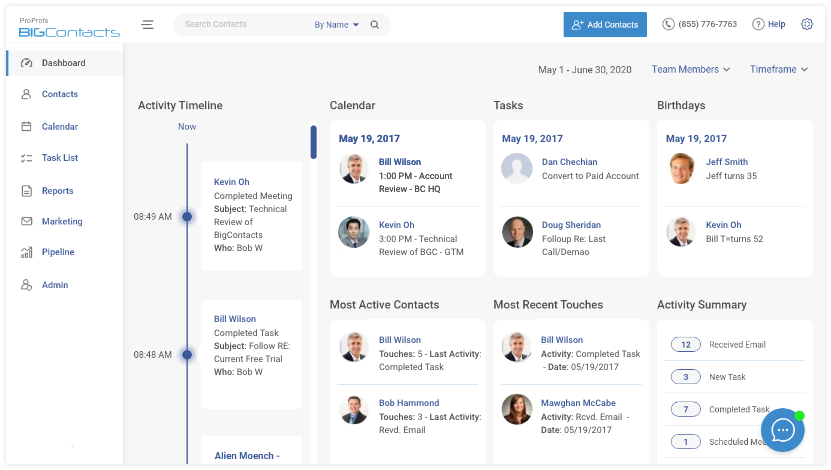
BIGContacts by ProProfs is a simple, affordable CRM built for growing businesses, with contact management, email marketing, task automation, sales pipeline tracking, and AI-powered tools in one place. Right now, BIGContacts is what I use to keep every client relationship organized without any of the overhead that comes with other tools in the market. The moment I open a contact record, I see the full interaction history, upcoming tasks, email threads, and associated deals, all in one view.
What makes BIGContacts genuinely practical for growing teams is that it combines contact management with email campaigns out of the box. I can segment a list of 500 contacts, launch a drip campaign, set up automated follow-up reminders, and track the pipeline without ever leaving the platform.
The AI Campaign Designer builds full campaigns from a simple goal description, the Email Assistant sharpens drafts before anything goes out, the AI Pipeline Tracker flags stalled deals before they go cold, and the AI Dashboard scores leads and surfaces missed opportunities so the team always knows where to focus.
Pros:
- Stores unlimited contacts with custom fields, tags, filters, and detailed interaction history per record
- Sends email campaigns and drip sequences directly from the CRM without needing Mailchimp or Zapier
- Automated follow-up reminders and task scheduling prevent missed opportunities
- Visual sales pipeline with drag-and-drop stages for tracking deals from prospect to close
- Shared and individual calendar views let multiple users manage schedules from one dashboard
- Workflow automation handles repetitive tasks across the full sales process
Cons:
- No downloadable or on-premise version; cloud-only deployment
- Dedicated account manager is not available on the free plan
Pricing:
Forever free for small teams. Paid starts at $9.99/month.
2. Nutshell – Best for Sales Automation
Nutshell stood out to me when I was evaluating tools that handle both contact management and sales automation without splitting those into two separate products. When I tested it, the automated lead assignment and email follow-up sequences worked cleanly, and the multi-email drip feature kept prospects engaged without manual scheduling.
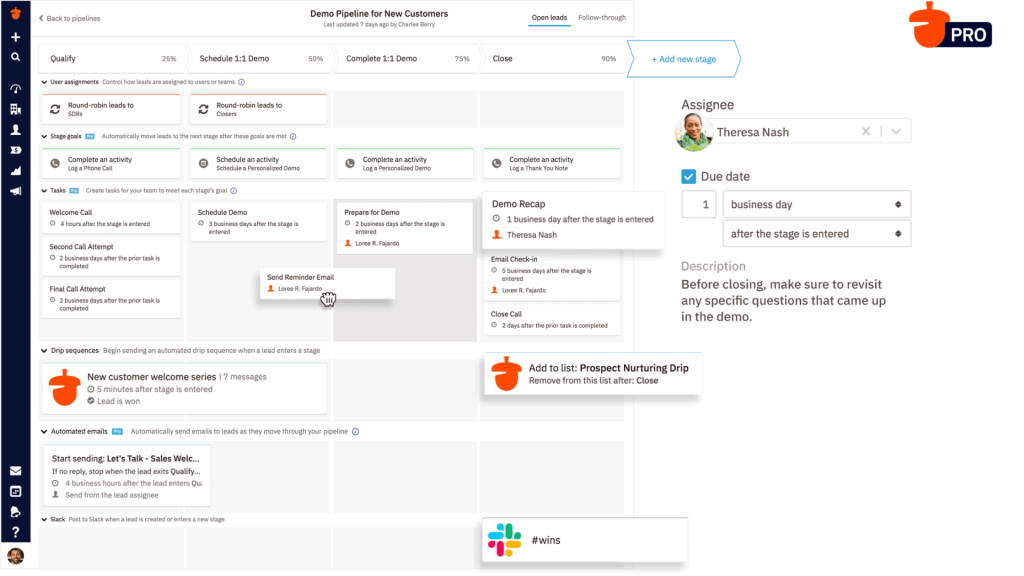
The pipeline views in Nutshell are genuinely flexible. I could switch between list, map, chart, and board views depending on what I needed to see. The reporting module gave me clear breakdowns of team activity and deal velocity, which made weekly reviews a lot faster.
The one friction point I noticed was that some integrations required workarounds that a more technical user would handle fine, but a non-technical owner might find frustrating.
Pros:
- Automated lead assignment routes new contacts to the right team member without manual input
- Multi-email drip sequences keep leads engaged across several touchpoints automatically
- Multiple pipeline views, including list, map, chart, and board, for flexible management
- Custom web forms capture leads directly from the business website into the CRM
Cons:
- Interface requires a learning curve before it becomes fully intuitive for new users
- Integration options are narrower compared to some larger CRM platforms
Pricing:
Starts at $13/user/month.
3. Keap – Best for Marketing Automation
Keap was the most feature-complete marketing automation platform I evaluated, but it came with a price and complexity level that made it better suited to established businesses than early-stage teams. When I worked with it, the automated email campaign builder was powerful. I could set up conditional sequences that triggered based on client behavior, which reduced the manual decision-making in follow-up processes.
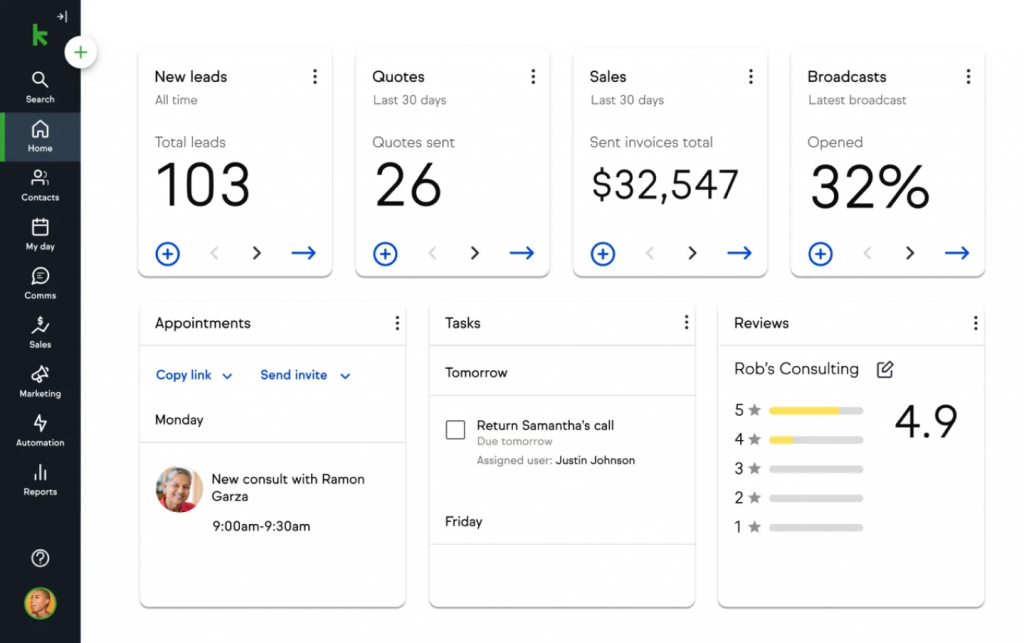
The built-in appointment scheduling and invoicing features are genuinely useful for service businesses. Instead of using three separate tools for booking, billing, and CRM, Keap wraps all three into one platform.
The trade-off is the starting price, which sits at $299 per month, and a learning curve that takes a few weeks to get through fully. If Keap feels like more than you need, there are leaner Keap alternatives worth considering.
Pros:
- Conditional email automation triggers sequences based on client actions and behaviors
- Built-in appointment scheduling lets clients book directly through the system
- End-to-end sales pipeline management tracks leads, proposals, and revenue forecasts visually
- Invoicing and payment processing built directly into the platform for service businesses
Cons:
- Occasional email deliverability issues with some messages landing in spam folders
- Extensive features require significant onboarding time before the full platform feels natural
Pricing:
Starts at $299/month.
4. Zendesk Sell – Best for Sales Pipeline Management
Zendesk Sell was the most intuitive pure-pipeline tool I used during my evaluation period. I tracked leads, deals, and contacts from a single dashboard, and the real-time reporting gave me a clear picture of where revenue was coming from and where deals were stalling.
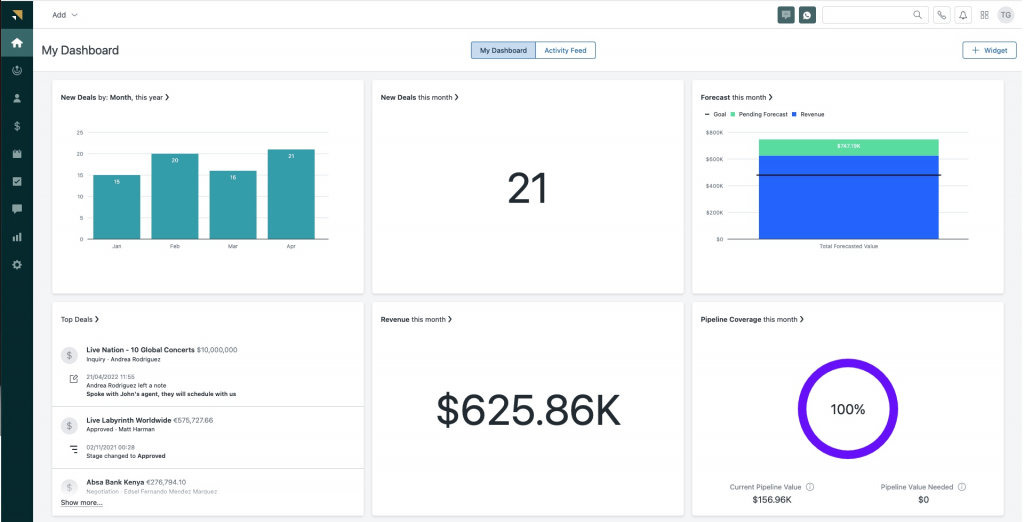
The email sync worked cleanly, meaning every client email was automatically logged against the right contact without manual entry.
The mobile app was a strong point. I could update deal stages, add notes, and respond to client activity while away from my desk, and the data synced immediately. Where Zendesk Sell showed its limits was in deeper customization. Teams with non-standard sales processes sometimes bumped into layout restrictions that required workarounds.
Pros:
- Visual sales pipeline with customizable stages matches the exact sales process of the business
- Real-time reporting shows sales performance, deal velocity, and activity breakdowns
- Built-in dialer allows calls to be made directly from the CRM with automatic call logging
- Lead scoring prioritizes the most promising opportunities without manual ranking
Cons:
- Customization of fields and layouts is more restricted compared to some competitors
- Better suited to sales-driven teams than businesses needing full client lifecycle management
Pricing:
Starts at $19/user/month.
5. ClickUp – Best for Client Task Management
ClickUp impressed me with how well it handled the overlap between project management and client management. When I set it up, I could build tasks for each client, assign them to team members, set deadlines, and track progress through multiple views, including list, board, calendar, and Gantt. The custom status fields let me define my own stages rather than using a generic pipeline.
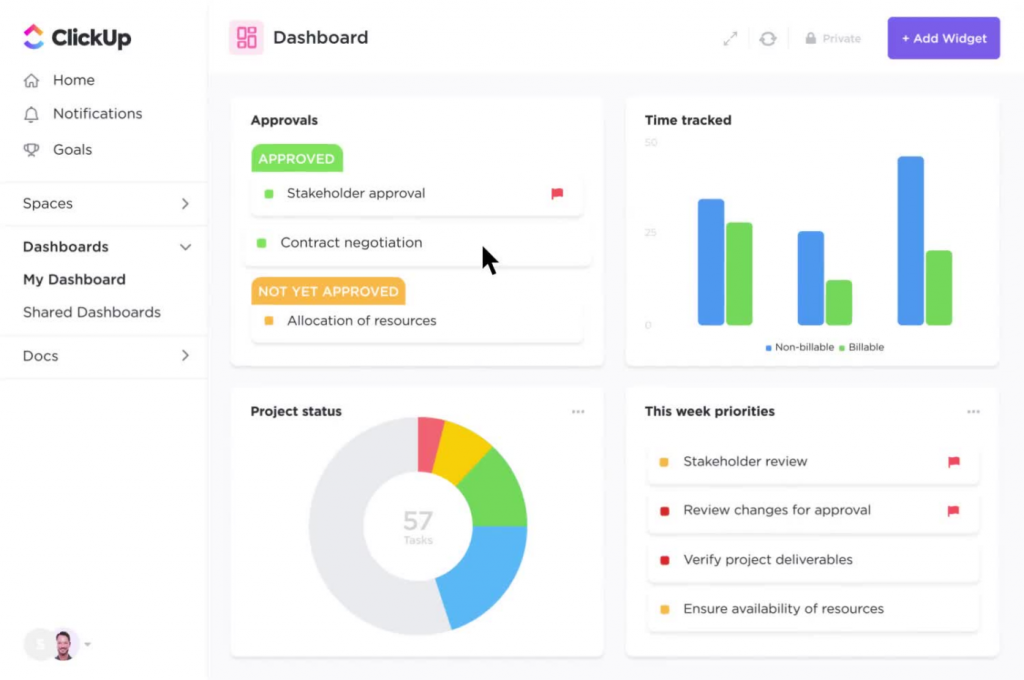
The AI-powered task prioritization helped my team focus on the most urgent items first rather than working through a flat to-do list. However, ClickUp is not a traditional CRM, so teams that need dedicated email campaign tools or a native contact database will need to pair it with another platform.
For teams where the primary need is task and workflow management around client work, ClickUp covers that thoroughly.
Pros:
- Multiple view options, including list, board, calendar, and Gantt, adapt to different project styles
- Custom fields and statuses allow teams to define exactly how client data is organized
- Workflow automation handles repetitive tasks like status updates and assignment routing
- Integrated email function centralizes client communication alongside task records
Cons:
- Default notification settings generate high alert volume and require manual adjustment
- New users often find the range of features overwhelming without structured onboarding
Pricing:
Starts at $7/user/month.
6. HubSpot CRM – Best for Centralizing Sales, Marketing, and Support
HubSpot CRM was the most polished all-in-one platform I tested, and for businesses that need marketing, sales, and support under one roof, it delivers on that promise. The unified inbox consolidated client messages from email, chat, and other channels so I never missed a communication. The marketing automation tools were mature and covered everything from lead nurturing to re-engagement campaigns.
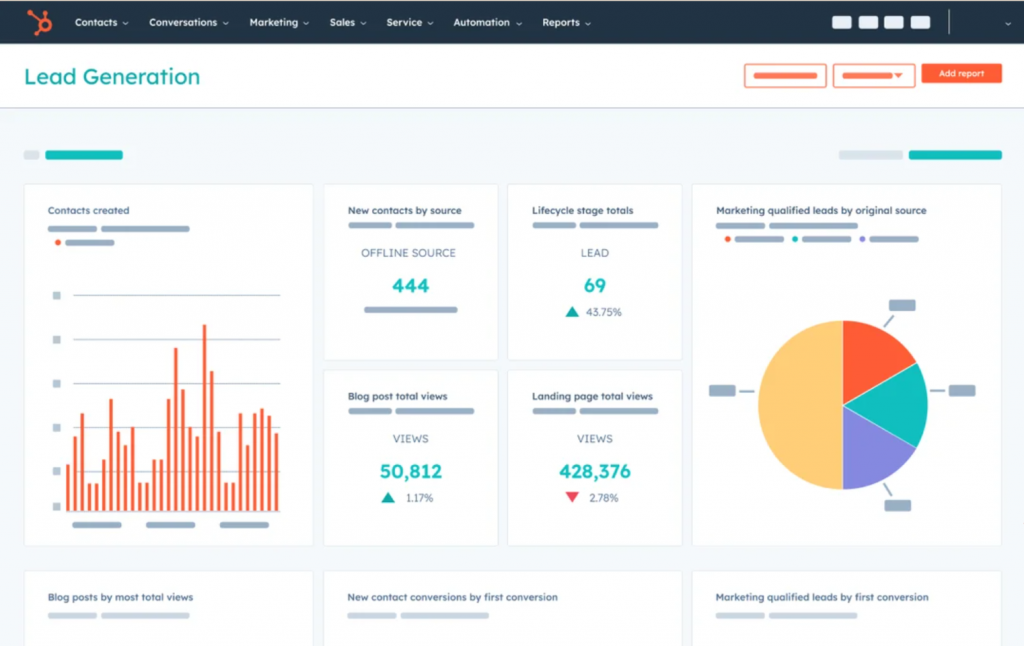
Where HubSpot starts to show friction is pricing. The free plan is genuinely useful for getting started, but the moment a team needs automation, reporting depth, or advanced contact management, the cost jumps significantly.
I have seen small businesses outgrow the free tier quickly and feel the sting of HubSpot’s paid tiers, which is exactly why many end up looking at HubSpot alternatives built specifically for smaller teams.
Pros:
- Unified inbox consolidates emails, chat, and other channels into one shared view
- Marketing automation supports personalized email campaigns and lead nurturing at scale
- Detailed contact profiles include full interaction history and engagement metrics
- Sales pipeline tracking offers clear visibility into every deal’s stage and movement
Cons:
- Advanced features require a paid subscription, and pricing escalates steeply at higher tiers
- Some tools have a complex setup process that benefits from technical expertise
Pricing:
Starts at $15/user/month.
7. Salesforce – Best for Large and Complex Sales Organizations
Salesforce was the most powerful platform I worked with, and also the most demanding. When deployed correctly across a sales team, the contact management system delivered a complete view of every client, including interaction history, purchase records, and support tickets in one place. The AI-powered analytics were genuinely useful for identifying high-value accounts and predicting deal outcomes.
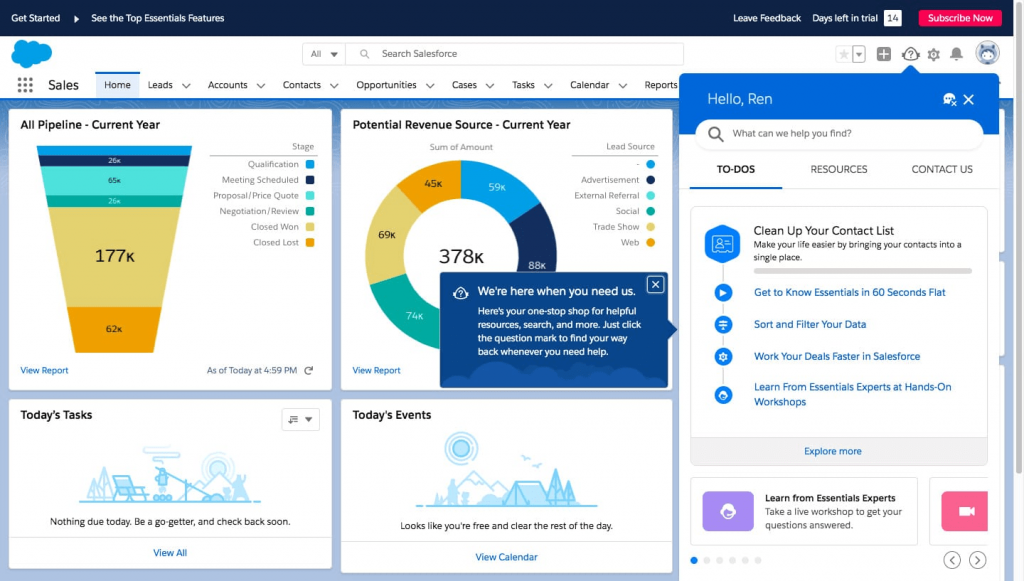
The challenge with Salesforce for small businesses is that it is built for enterprise scale. Implementation typically takes months, requires dedicated administrators, and costs significantly more than what most teams of 1 to 25 people need.
It earns its place on this list for teams that have outgrown simpler tools, but small business owners should explore Salesforce alternatives before committing to that level of investment.
Pros:
- Customer 360 platform provides a unified view of every client across sales, service, and marketing
- AI-powered analytics identify high-value leads and predict sales trends with precision
- Omnichannel engagement integrates email, chat, and social media interactions in one place
- Customizable dashboards adapt to the specific reporting needs of each team or department
Cons:
- Steep learning curve requires significant training investment and often a dedicated admin
- Implementation timeline for enterprise setups typically runs two to six months
Pricing:
Starts at $25/user/month.
8. Freshworks CRM – Best for Deal Management
Freshworks CRM delivered the clearest deal management experience of any tool I tested. The AI-powered lead scoring ranked prospects automatically based on their engagement behavior, so my team focused on the accounts most likely to convert rather than working through a flat pipeline. The 360-degree client view pulled together email history, call logs, deal status, and support interactions into one record.
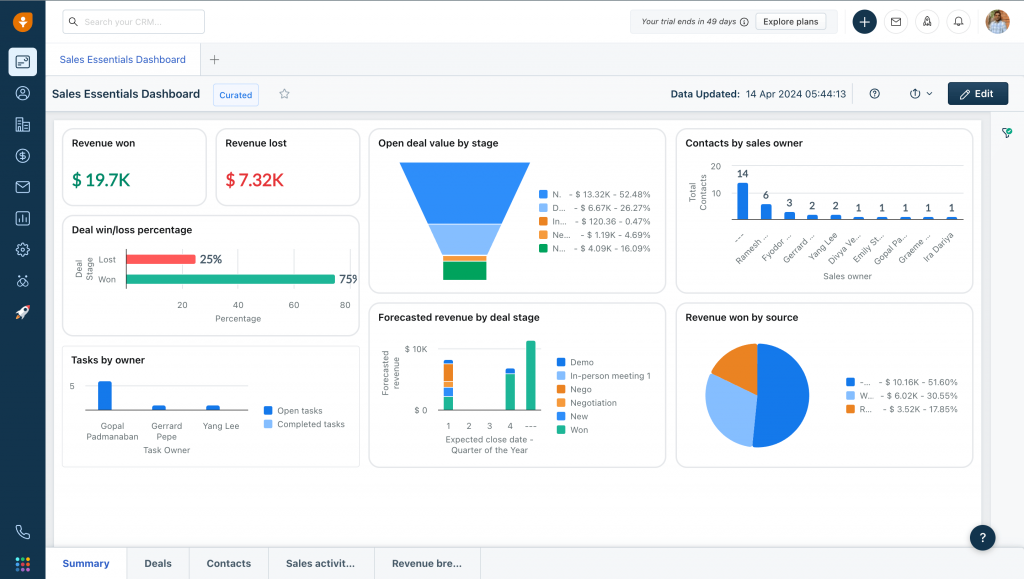
The one-click email and call logging was a notable time-saver. Every interaction was captured without manual entry, which meant the CRM stayed accurate as long as the team used it.
Where I found limitations was in custom reporting. The built-in reports covered standard use cases well, but adapting them to more specific business metrics required technical configuration that smaller teams might not have resources for.
Pros:
- AI-powered lead scoring prioritizes prospects based on engagement and behavioral signals
- One-click email and call logging eliminates manual data entry for every interaction
- 360-degree client view aggregates interaction history, deal status, and support records
- Automated deal assignment routes opportunities to the right team member by workload or geography
Cons:
- Custom reporting requires technical expertise and configuration beyond standard templates
- Integration with certain third-party applications is more complex than expected
Pricing:
Starts at $10.60/user/month.
9. Pipedrive – Best for Sales-Focused Teams
Pipedrive was the most visually clear pipeline tool I tested. The drag-and-drop deal board gave my team an immediate read on where every opportunity stood, and the activity reminder system meant no follow-up ever slipped past its scheduled date. Email tracking showed exactly when a client opened a message, which helped the team time their next outreach.
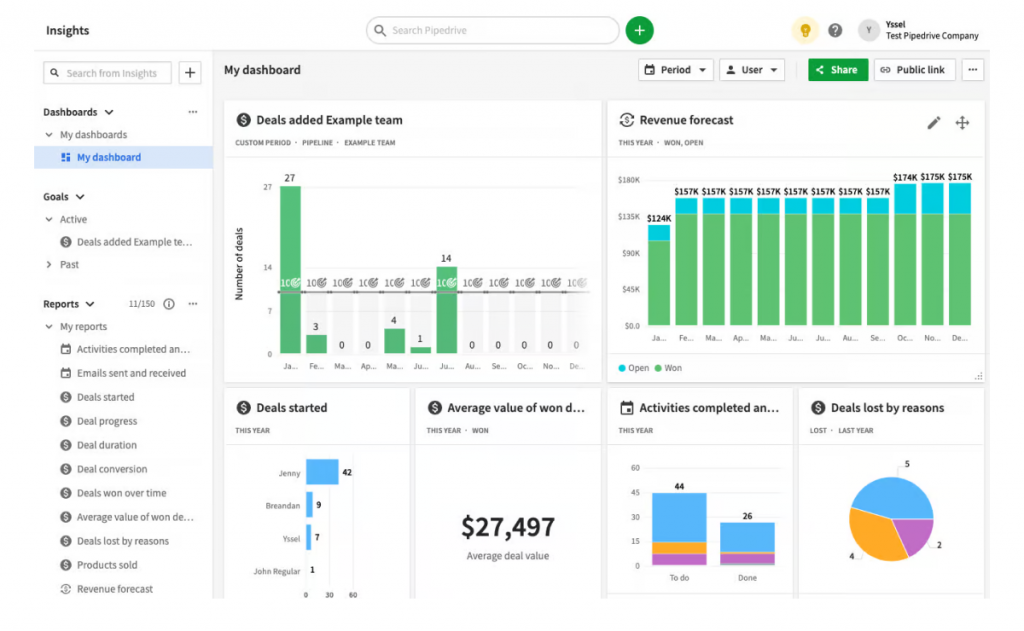
The customizable fields let me adapt Pipedrive to different types of sales processes without forcing the platform’s default structure onto the team’s workflow. What Pipedrive lacks is depth on the post-sale side.
It excels at moving deals through a pipeline, but teams that need to manage ongoing client relationships, run email campaigns, or track support interactions will find the feature set thinner than a full client management system. Teams evaluating similar tools may also want to look at Pipedrive alternatives that include stronger contact management.
Pros:
- Visual sales pipeline gives an immediate, drag-and-drop view of every deal’s current stage
- Activity reminders ensure follow-ups happen on schedule without manual calendar management
- Email integration tracks open rates and logs all client correspondence against the contact record
- Customizable fields adapt the CRM to unique sales processes without technical configuration
Cons:
- AI-driven predictive insights and advanced analytics are limited in the standard plan
- Post-sale client relationship management is not a core strength of the platform
Pricing:
Starts at $14/user/month.
10. Zoho CRM – Best for Omnichannel Client Engagement
Zoho CRM handled the widest range of communication channels of any tool on this list. When I used it, I could connect with clients across email, social media, live chat, and phone from within the same interface, and no interaction was missed regardless of how the client chose to reach out.
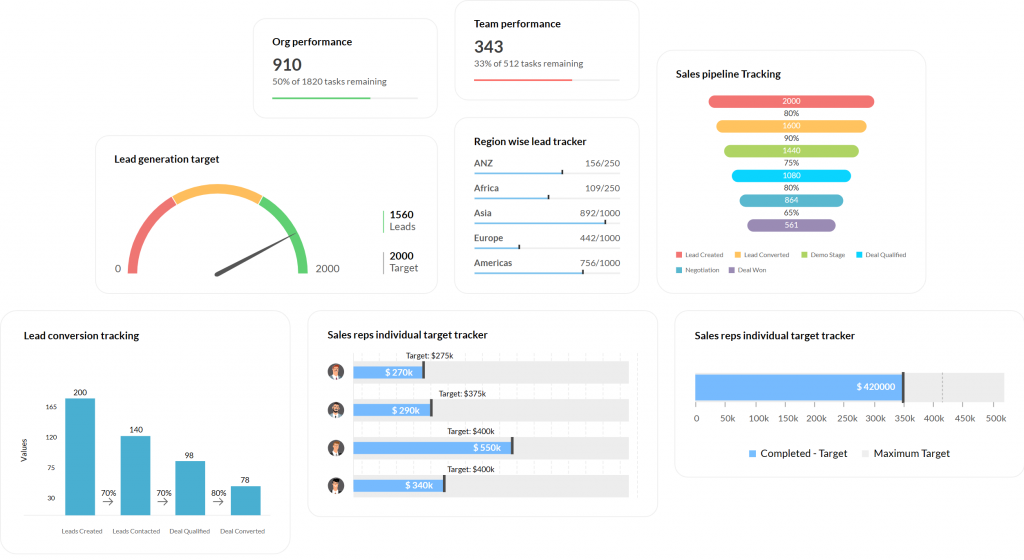
The AI assistant, Zia, analyzed client data and surfaced recommendations about when to follow up and which accounts needed attention.
The 360-degree customer view gave a comprehensive snapshot of every client’s history, preferences, and purchase patterns, which made personalized outreach straightforward. The platform’s customization depth is high, but that same depth means advanced configuration takes time and technical knowledge. Teams that want an out-of-the-box experience will find the setup process more involved than simpler alternatives. If Zoho feels like too much for your team, there are focused Zoho CRM alternatives worth exploring.
Pros:
- Omnichannel communication integrates email, social media, chat, and phone in a single interface
- AI assistant Zia analyzes data and recommends optimal times and approaches for client outreach
- Comprehensive contact management stores detailed client histories, preferences, and engagement data
- Sales funnel visualization provides clear insights into every stage of the client journey
Cons:
- Advanced customization is time-consuming and benefits from technical expertise to configure correctly
- Handling extensive datasets can occasionally lead to slower system performance
Pricing:
Starts at $15.30/user/month.
11. Monday CRM – Best for Customizable Workflow Management
Monday CRM gave me the most flexibility of any platform when it came to building exactly the workflow I wanted. I could map client interactions, project stages, and sales tasks in a visual format, and the drag-and-drop interface made updating deal statuses faster than any other tool I tested. The automated lead routing and task assignment reduced manual handoffs between team members.
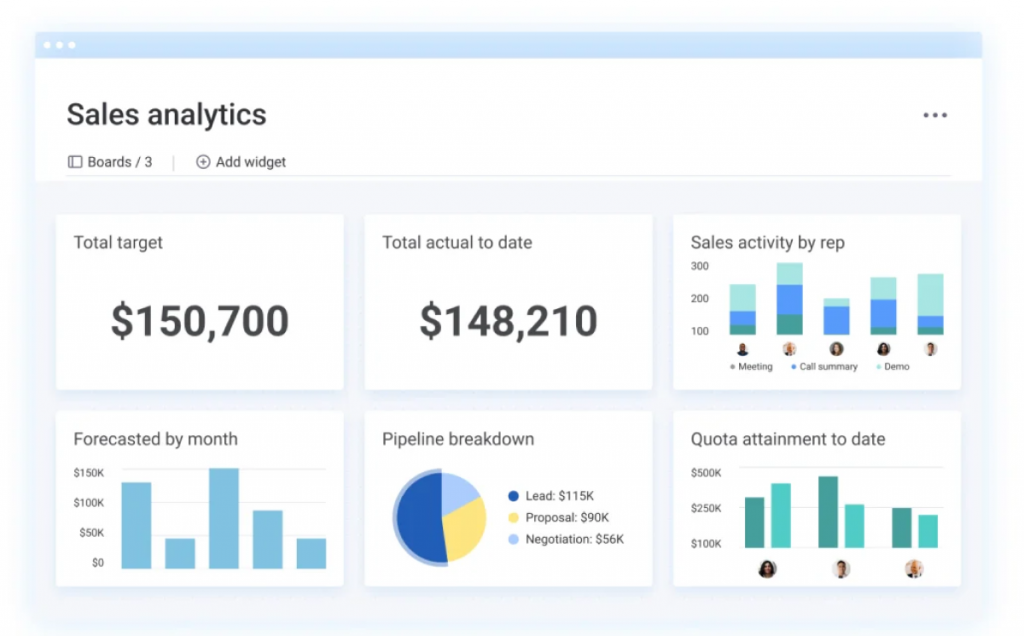
The shared dashboards made real-time collaboration easy across a distributed team. Every member could see the same pipeline, leave updates on specific deals, and manage tasks without emailing back and forth.
The reporting tools provided solid insights into sales performance, though teams with very complex workflows sometimes find the platform’s structure constrains how far they can push customization. If Monday CRM does not fit your workflow, there are strong Monday.com alternatives that are worth evaluating.
Pros:
- Visual workflow mapping displays client interactions, project stages, and tasks in one unified view
- Customizable dashboards surface the most relevant information for each team or role
- Drag-and-drop deal management updates statuses without manual data entry
- Automated lead routing ensures fast response and reduces manual workload for the team
Cons:
- Complex workflows with many dependencies can become difficult to manage within the platform
- Higher-tier pricing may not align with the feature value for smaller teams
Pricing:
Starts at $9/user/month.
12. Capsule CRM – Best for SMB Relationship Management
Capsule CRM was the most relationship-focused tool on this list, and the one I found most natural for service businesses managing a defined book of clients rather than a high-volume sales pipeline.
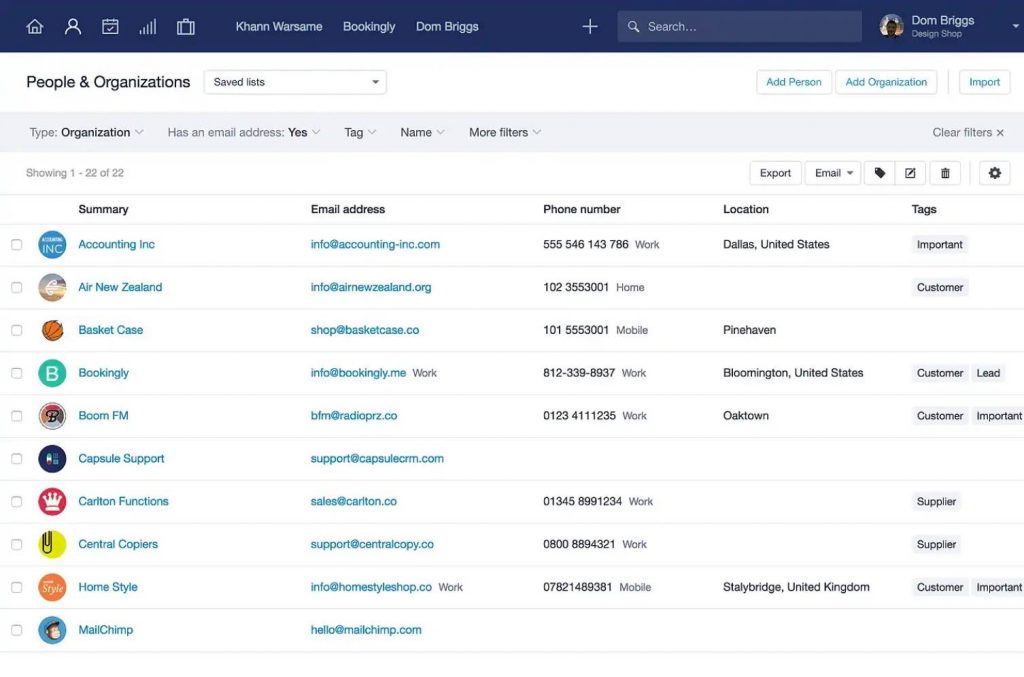
The contact-to-company linking structure made it easy to track multiple contacts under one organization, and the native project management module meant I could move seamlessly from closing a deal to managing the delivery work.
The pipeline view in Capsule is clean and functional without being overwhelming. The tool does not try to do everything, which is precisely why small teams in consulting, real estate, and professional services find it so easy to adopt. For teams needing heavy email marketing or advanced automation, Capsule would need to pair with a dedicated email tool. You can also compare Capsule CRM alternatives if you need a broader feature set.
Pros:
- Native project management allows seamless transition from deal management to service delivery
- Clean pipeline view tracks deal stages without unnecessary complexity
- Contact-to-company linking organizes multiple contacts under a single client account record
- Solid mobile app keeps the team connected to client data from any location
Cons:
- Email marketing capabilities are limited compared to CRMs with built-in campaign tools
- Advanced automation requires integration with external tools rather than native functionality
Pricing:
Starts at $18/user/month.
How I Evaluated These Tools?
I did not put this list together by scanning marketing pages. I evaluated each tool by actually working with it, cross-referencing real user feedback, and assessing how well it fits the specific context of small business client management. Here is the methodology I used across all 12 tools.
- User Reviews and Ratings: I reviewed verified feedback from platforms like G2, Capterra, and TrustRadius to understand how real users experience each tool in day-to-day use. Ratings alone are not enough. I paid close attention to recurring complaints, edge cases that reviewers flagged, and whether the issues mentioned were deal-breakers or minor inconveniences for a small business team. This gave me a ground-level picture that product demos never show.
- Core Features and Functionality: I assessed each tool’s core feature set against what small business owners actually need: contact management, email campaigns, follow-up reminders, pipeline tracking, and multi-user access. I specifically looked at whether these features were native or required bolt-on integrations, and whether the feature depth justified the pricing tier. Understanding the full range of CRM features that matter for small teams was central to this evaluation.
- Ease of Use: A tool that requires a two-week onboarding is a liability for a team of five. I evaluated each platform’s interface, navigation structure, and the time it realistically takes for a non-technical user to become productive. Tools that were powerful but inaccessible scored lower here, regardless of feature depth.
- Customer Support Quality: I looked at whether each tool offers live support, what the response time expectations are, and whether support is available without paying for a premium tier. For small businesses that cannot afford downtime, 24/7 support availability is a meaningful differentiator. This factor directly influenced how I positioned tools that charge extra for access to a human being.
- Value for Money: I compared what each tool delivers against what it costs, and specifically evaluated whether the entry-level plan is genuinely usable or artificially limited to push upgrades. Most small business teams pay between $10 and $30 per month per seat, so I weighted this tier heavily. I also factored in whether a free CRM option was available and whether it provided real functionality. You can also explore CRM pricing benchmarks across the market to set realistic expectations.
- Personal Experience and Expert Observations: Every tool on this list is one I have either used directly or evaluated in depth through structured testing. Where I had gaps in direct experience, I drew on published comparisons, analyst assessments, and insights from practitioners who manage client relationships across different industries. This layer of personal observation is what separates a genuine recommendation from a rephrased feature list.
My Top 3 Picks for the Best Client Management Software
With 12 tools on this list, the choice can still feel overwhelming. These are the three I recommend most often when someone asks me where to actually start.
1. BIGContacts
BIGContacts by ProProfs is a simple, affordable CRM built for growing businesses, with contact management, email marketing, task automation, and sales pipeline tracking in one place. It is the tool I point small business owners toward first because it eliminates the two biggest obstacles: cost and complexity. The forever-free plan is not a marketing trick. It gives real access to contact management and basic email functionality with no time limit. For teams that want to run mass email campaigns from their CRM without paying for a separate email platform, BIGContacts handles both in one place.
2. Nutshell
Nutshell is my second recommendation for teams that have a dedicated sales process and need automation to run it consistently. Where BIGContacts excels at contact-first management, Nutshell leans into the pipeline and makes sure leads move through stages with minimal manual effort. The drip sequencing, automated assignment, and reporting make it a strong fit for sales managers who want visibility across a small team.
3. HubSpot
HubSpot earns its place in the top three for teams that need marketing, sales, and support coordinated in one platform from the start. The free tier is more capable than most paid tools at a similar stage, and the learning curve is manageable if your team is willing to invest a few days in setup. The trade-off is that scaling beyond the free plan gets expensive quickly.
How Does Client Management Software Work?
A client management system works by connecting four core actions: store, track, communicate, and automate. Here is how it functions in practice:
- Store Client Data Centrally – Every contact record holds the client’s name, company, email, phone, custom fields, and notes from past interactions.
- Track All Communication – Emails sent, calls logged, and meetings recorded are all tied to the contact record. Any team member can pick up a conversation with full context.
- Set Tasks And Reminders – Automated follow-up reminders alert your team when it is time to reach out, so no deal goes cold by accident.
- Run Email Campaigns – Segment your contact list and send targeted emails or drip sequences without switching to a separate tool.
- Monitor Your Pipeline – A visual sales pipeline shows where every deal stands, from prospect to proposal to closed.
- Generate Reports – Built-in analytics show which campaigns perform, which reps follow up fastest, and which clients need attention.
What Are the Key Features of Client Management Software?
The best client management tools go well beyond storing a list of names and phone numbers. Here is a breakdown of the features that actually drive value for small business teams.
1. Centralized Contact Database
A centralized contact database is the foundation of any client management system. It stores each client’s contact details, company information, custom fields, tags, and notes in one accessible record. Every team member works from the same data, which eliminates version conflicts and the “who has the latest spreadsheet” problem.
You can learn more about building and organizing a contact database that scales with your business.
2. Email Campaign Builder
A built-in email campaign builder lets you design, schedule, and send mass emails to segmented contact lists without switching to a separate tool like Mailchimp. The best tools include templates, open rate tracking, and drip sequence automation.
Understanding how CRM and email marketing work together in a single platform is one of the biggest efficiency gains for small teams.
3. Automated Follow-Up Reminders and Task Scheduling
Well-structured client follow-up emails combined with automated reminders significantly improve conversion rates. The system automatically alerts a team member when it is time to call, email, or check in with a specific client. Tasks attach directly to contact records so nothing gets missed. Well-structured client follow-up emails combined with automated reminders significantly improve conversion rates.
4. Sales Pipeline with Drag-and-Drop Stages
A visual sales pipeline gives your team an immediate view of where every deal stands, from first contact to closed. Drag-and-drop stage management means updating deal status takes seconds, not minutes of data entry. If you are building a pipeline from scratch, it helps to understand how to build a sales pipeline that maps to your actual sales process before configuring the CRM.
5. Multi-User Access with Role-Based Permissions
Multi-user access allows every team member to work from the same contact database simultaneously, with role-based permissions controlling who can view, edit, or export records. This is non-negotiable for teams of two or more people managing shared clients.
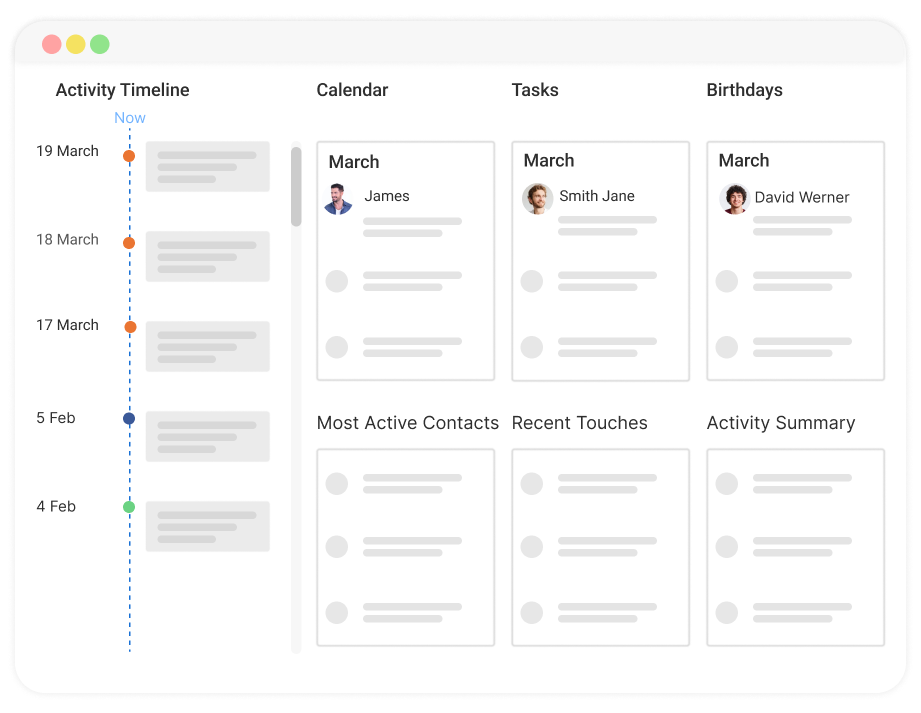
6. Communication History Log
Every email, call, note, and meeting is logged chronologically against each contact record. Any team member can open a client’s profile and see the full history of every interaction, which removes the need to dig through email threads or ask colleagues “did we ever talk to them about X?”
7. Contact Segmentation and List Management
Segmentation lets you filter your contact list by any combination of fields, tags, location, deal stage, or custom attributes, and then target those segments with specific campaigns or outreach. This is what turns a contact database into a marketing and sales engine. Effective customer segmentation directly improves campaign relevance and response rates.
8. Integration with Existing Tools
The best client management software connects to tools your team already uses, including Gmail, Outlook, Mailchimp, QuickBooks, and Zapier. Native integrations are preferable to Zapier workarounds because they are more reliable and require no extra configuration. A proper CRM integration strategy determines how smoothly client data flows across your entire tech stack.
9. Mobile App
A mobile app lets team members access client records, log calls, update deal stages, and complete tasks from any location. This matters most for service-based businesses where field work is common and desktop access is not always available.
10. Reporting and Analytics Dashboard
Built-in reporting surfaces the metrics that matter: deal win rates, follow-up completion rates, campaign open rates, and pipeline value by stage. Good CRM reporting eliminates manual data pulling and gives managers a real-time view of team performance without building spreadsheet formulas.
What Problems Does Client Management Software Solve?
Here is a direct problem-to-solution mapping based on the most common pain points from small business owners:
| Problem | Solution |
| Contacts scattered across Excel, Gmail, and Outlook | Centralized contact database with import from CSV or Google |
| No visibility into who followed up with which client | Communication history tied to every contact record |
| Sending mass emails from Outlook one-by-one | Built-in email campaigns with list segmentation |
| Team members working from different contact lists | Shared database with real-time access for all users |
| No reminder system for follow-ups | Automated task reminders and activity scheduling |
| No idea where deals stand in the sales process | Visual pipeline with drag-and-drop deal stages |
| Switching from an expensive CRM | Affordable, simpler alternative with core features intact |
How Does Client Management Software Compare to a Spreadsheet?
Many businesses start with Excel or Google Sheets for managing clients. Here is why that approach breaks down as the contact list grows:
| Feature | Spreadsheet | Client Management Software |
| Contact storage | Manual rows, no structure | Structured records with custom fields |
| Communication history | Not tracked | Full log per contact |
| Follow-up reminders | Calendar or sticky notes | Automated task reminders |
| Email campaigns | Not possible | Built-in segmentation and send |
| Multi-user access | File sharing with version conflicts | Real-time shared access |
| Sales pipeline | Color coding or manual tags | Visual drag-and-drop pipeline |
| Reporting | Manual formulas | Automated dashboards |
According to a study by Capterra, 74% of CRM users report improved access to customer data after switching from manual systems. The transition from spreadsheet to client management system is one of the highest-leverage moves a small business can make.
Who Needs Client Management Software?
Any business that manages ongoing client relationships benefits from a proper client management system. Here is how it applies by role and industry:
- Small business owners track every client across email, calls, and in-person meetings without losing context between interactions. If you are exploring whether a CRM is the right fit for your stage, this overview of reasons every small business needs CRM software is worth reading.
- Freelancers and consultants manage project timelines, follow-up deadlines, and invoice tracking for multiple clients simultaneously. There are CRM tools built specifically for consultants that balance lightweight contact management with the flexibility independent professionals need.
- Sales managers monitor pipeline health, assign leads, and review team activity from one central dashboard. Effective sales management relies on having accurate, real-time data on every deal and rep.
- Account managers maintain client history, log every touchpoint, and set reminders to check in at the right intervals. Following client relationship management best practices becomes far easier when the CRM handles the tracking automatically.
- Service-based businesses including real estate agents, construction companies, dental practices, and travel agencies use client tracking software to organize referrals, bookings, and recurring client communication. There are purpose-built tools like the best CRM for service businesses that address the specific workflows these teams run.
- Agency owners manage client campaigns, project deliverables, and billing conversations from a single shared platform accessible to the full team. Platforms designed as the best CRM for agencies typically include team collaboration and campaign tracking as native features.
Take Control of Your Client Relationships With the Right Software
The difference between a business that retains clients and one that constantly chases new ones is almost always the presence of a consistent system. When follow-ups happen automatically, when every team member sees the same client history, and when email campaigns go out on time without manual effort, the relationship with each client improves without working harder.
The tools on this list cover every type of small business, from solo consultants to teams of 25 managing hundreds of accounts. The right choice depends on your volume, budget, and whether your bigger need is contact management, email marketing, or pipeline visibility. Understanding the benefits of CRM for small business before making a selection helps you evaluate tools against real outcomes rather than feature checklists.
For teams starting out or switching from Excel and Outlook, a tool like BIGContacts removes the barrier entirely. The free plan is real, the interface is clean, and the contact-plus-email combination means you do not need two tools to handle what should be one job.
Frequently Asked Questions
What is the difference between client management software and CRM?
Client management software and CRM are often used interchangeably, but CRM traditionally refers to tools focused on sales pipelines and deal tracking. Client management software is broader, covering the full client lifecycle including onboarding, ongoing communication, and long-term relationship management beyond the initial sale.
Is client management software worth it for very small businesses?
Yes. Even a solo operator managing 50 clients benefits from a centralized contact record, automated follow-up reminders, and the ability to send email updates without building a manual list. The time saved on administrative work alone typically pays for the tool within the first month.
Can client management software replace email for client communication?
It complements email rather than replacing it. Most client management systems integrate with Gmail or Outlook and log every email automatically against the client record. The platform becomes the single source of truth while the team continues sending emails through the tools they already use.
What is the best free client management software for small business?
BIGContacts offers a forever-free plan that includes contact management, email templates, and basic task tracking for small teams. HubSpot CRM also has a free tier, though its advanced features require a paid upgrade quickly as the business grows.
How many contacts can client management software handle?
Most mid-tier plans handle between 5,000 and 25,000 contacts. For small businesses managing under 5,000 contacts, the free or entry-level paid plan of most tools is more than sufficient. Verify the contact limit on the specific plan before committing if your database is large.
Does client management software work for service-based businesses?
Service businesses are among the primary users of client management software. Real estate agents, consultants, agencies, contractors, and healthcare providers all use it to track client interactions, schedule follow-ups, and manage service delivery alongside contact records.
How long does it take to set up a client management system?
Most small business tools take one to three days to set up, including importing existing contacts from a spreadsheet, customizing fields, and running a test campaign. More complex platforms like Salesforce can take weeks or months for full implementation.
What is client tracking software used for?
Client tracking software logs every interaction a business has with a client, including emails, calls, meetings, and notes, and ties those records to a central contact profile. It helps teams avoid duplicate outreach, maintain relationship context, and identify clients who have gone quiet.
Can multiple team members use the same client management system?
Yes. Multi-user access is a standard feature on most paid plans and some free plans. Team members share the same contact database, see each other's notes and tasks, and work from a unified view of every client relationship without version conflicts.
What should I look for in apps for client management?
The most important factors are: ease of contact import, email campaign capability, automated reminders, mobile access, and pricing that fits the team size. Avoid tools that charge per user in a way that makes the monthly cost prohibitive as the team grows beyond two or three people.
How is client management software different from project management tools?
Project management tools organize tasks and timelines but do not store contact records, track email history, or run campaigns. Client management software treats the client as the central record, not the task. Some overlap exists for service businesses, but the two serve different primary needs.
When should a small business switch from excel to client management software?
Switch when any of these are true: your contact list exceeds 200 entries, more than one person needs access to the same data, you are missing follow-ups regularly, or you want to send email campaigns to a segmented list. Excel was never designed for client relationship management, and the cost of staying in it compounds as the business grows.
FREE. All Features. FOREVER!
Try our Forever FREE account with all premium features!