

Most creators do not lose brand deals because of bad content. They lose them because they have no system. I started looking into CRM for creators after watching YouTubers, podcasters, and newsletter writers miss five-figure sponsorships simply because they forgot to follow up. Not because they were unqualified. Because their contacts were buried in DMs, their follow-ups lived in their heads, and their pipeline was a sticky note.
A report by Goldman Sachs in 2023 shows the creator economy was valued at $250 billion and is on track to nearly double to $480 billion by 2027, and it is growing fast. But most of that growth is being captured by creators who treat their work like a business, not just a content operation. The ones who are scaling are the ones who know exactly which brand contact is waiting on a reply, which sponsorship deal is in the negotiation stage, and which collab partner needs a check-in this week.
That is exactly what a creator CRM solves. I have reviewed dozens of tools to put this list together, and every pick here has been evaluated for what creators actually need: simplicity, affordability, contact management, email marketing, and pipeline tracking. BIGContacts by ProProfs, a simple and affordable CRM built for small teams and solo operators, sits at the top of this list and for good reason. Let me walk you through the full breakdown.
What Is a CRM for Creators?
A CRM for creators is a contact management and relationship tracking tool built to help content creators, influencers, bloggers, and media professionals organize their brand contacts, manage sponsorship pipelines, automate follow-ups, and track communications, all from one centralized dashboard. Instead of hunting through email threads and Instagram DMs, a creator CRM gives you a single source of truth for every business relationship you manage.
Unlike traditional sales CRMs designed for enterprise teams, a creator CRM is optimized for solo operators and small creator teams who need to move fast, stay organized, and close brand deals without getting buried in admin work. If you want a broader overview of what CRM software covers, the guide on what is CRM is a useful starting point.
What Are the Top CRM Tools for Creators?
Here is a look at the best CRM tools available for creators right now, evaluated for contact management, pipeline tracking, email marketing, ease of use, and value for money.
| Tool | Best For | Starting Price |
| BIGContacts | Easiest All in One CRM for Contact Management, Email Marketing & Deal Tracking | Forever free for small teams. Paid starts at at $9.99/month |
| HubSpot CRM | Creators who want deep marketing automation | Free plan; paid from $15/user/month |
| Pipedrive | Visual pipeline management for deal-heavy creators | Starts at $14/user/month |
| Zoho CRM | Creators needing extensive customization | Starts at $14/user/month |
| Notion CRM | Creators who prefer flexible, DIY setups | Free plan; paid from $10/user/month |
| Airtable | Data-heavy creators managing large contact bases | Free plan; paid from $20/user/month |
| Close CRM | Creators running high-volume outreach campaigns | Starts at $49/user/month |
1. BIGContacts – Easiest All in One CRM for Contact Management, Email Marketing & Deal Tracking
BIGContacts by ProProfs is a simple, affordable CRM built for growing businesses, with contact management, email marketing, task automation, and sales pipeline tracking in one place. It is the tool I currently use and recommend first to creators who are stepping out of the spreadsheet-and-DM chaos for the first time.
The AI-powered dashboard goes a step further. It scores leads, flags inactive contacts, and identifies which deal types convert fastest, so I always know where to focus my energy across brand outreach, affiliate deals, and collab conversations. When I open a report, the AI Report Summary reads it for me and delivers the key insight up front. That one feature alone saves meaningful time every week.
The built-in email marketing lets me segment brand contacts by niche fit, deal stage, or engagement level and send targeted campaigns without a separate tool. The AI Marketing Campaign Designer takes this further: I describe my goal and audience, and it builds the full campaign, written and formatted, ready to send. The forever-free plan covers up to 100 contacts, which is more than enough for creators just starting out.
Pros:
- Stores emails, notes, tasks, files, and calls under each contact record
- AI Pipeline Tracker flags stalled deals and surfaces priority opportunities automatically
- AI-powered dashboard scores leads and identifies the fastest-converting deal types
- Built-in email marketing with AI campaign designer and segmentation
Cons:
- No downloadable or on-premise version available.
- No dedicated account manager on the free plan.
Pricing:
Forever free for growing teams. Paid starts at $9.99/month.
2. HubSpot CRM – Best for Marketing Automation
HubSpot CRM was the first tool I tried when I realized my Google Sheets contact tracker was no longer cutting it. The free plan is genuinely generous, contact management, deal tracking, and basic email tools are all included at no cost, which made the initial switch feel low-risk.
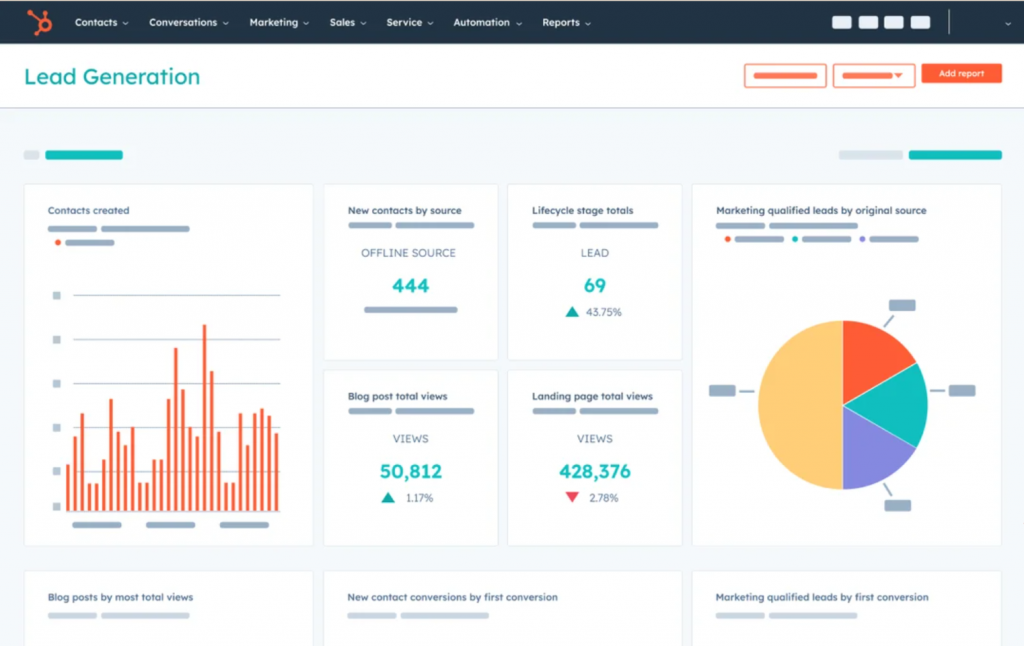
Where HubSpot shined for creator use cases was its email marketing integration. Building automated sequences for brand outreach campaigns, an initial pitch, a follow-up three days later, and a final nudge, was straightforward once I understood the workflow builder. The reporting dashboard also gave me a clear view of which email subject lines were getting opened and which were getting ignored, which helped me sharpen my sponsorship pitches over time.
The limitation I ran into was cost. The free plan caps out quickly once you start needing things like advanced segmentation, A/B testing, or more than basic automation. Creators looking to move away from HubSpot can find a detailed comparison in this list of HubSpot alternatives.
Pros:
- Contact management, deal tracking, and email tools available on free plan
- Email sequence builder for automated brand outreach follow-ups
- Detailed email reporting including open rates, clicks, and reply tracking
- Large library of integrations with tools creators already use
Cons:
- Features most useful to creators sit behind expensive paid plans
- Can feel overpowered and complex for solo or small creator operations
Pricing:
Free plan available; paid plans start at $15/user/month.
3. Pipedrive – Best for Visual Pipeline Management
Pipedrive was the CRM I recommended to a podcaster friend who was juggling 15 active sponsorship conversations at once and losing track of where each one stood. The visual pipeline was immediately intuitive, each deal moved across columns in a Kanban board that was clean and satisfying to work with.
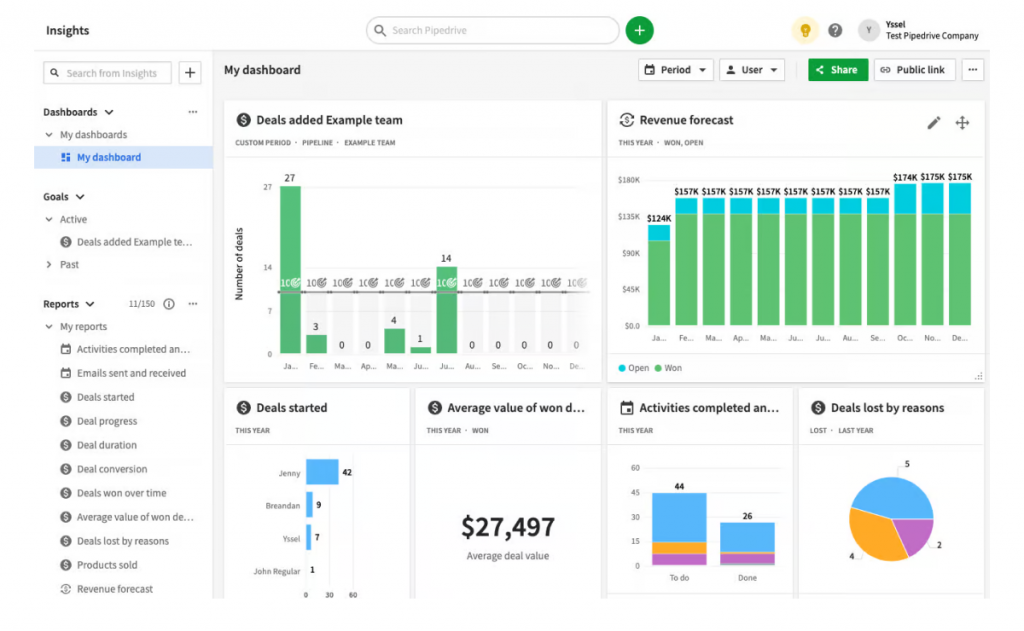
The core strength of Pipedrive for creators is its pipeline focus. Everything is built around moving deals through stages. I could customize the stages to match a creator’s actual workflow,pitch sent, intro call booked, proposal delivered, negotiating, contract signed, and Pipedrive tracked which deals had activity and which had gone quiet. The activity reminders were solid, and the email integration pulled communication history into each deal card automatically.
The downside for creators is that Pipedrive is primarily built around sales pipelines, not general contact and relationship management. For a creator who also wants to manage fan contacts, newsletter subscribers, or media relationships alongside brand deals, Pipedrive starts to feel narrow. It also lacks native email marketing, so you are looking at additional tool costs to run outreach campaigns.
Pros:
- Visual drag-and-drop pipeline is one of the cleanest in the CRM market
- Customizable deal stages that map to any creator’s brand deal workflow
- Activity reminders and deal-rotation alerts keep follow-ups on track
- Email integration logs communication history directly inside deal cards
Cons:
- Less suited for broader relationship management outside of deal tracking
- Starting price is higher than simpler creator-friendly options
Pricing:
Starts at $14/user/month (billed annually).
4. Zoho CRM – Best for Deep Customization
Zoho CRM was the tool I explored when I needed more flexibility than most lightweight CRMs offered. The level of customization available, custom modules, fields, views, automation rules, and workflows, was genuinely impressive for the price point.
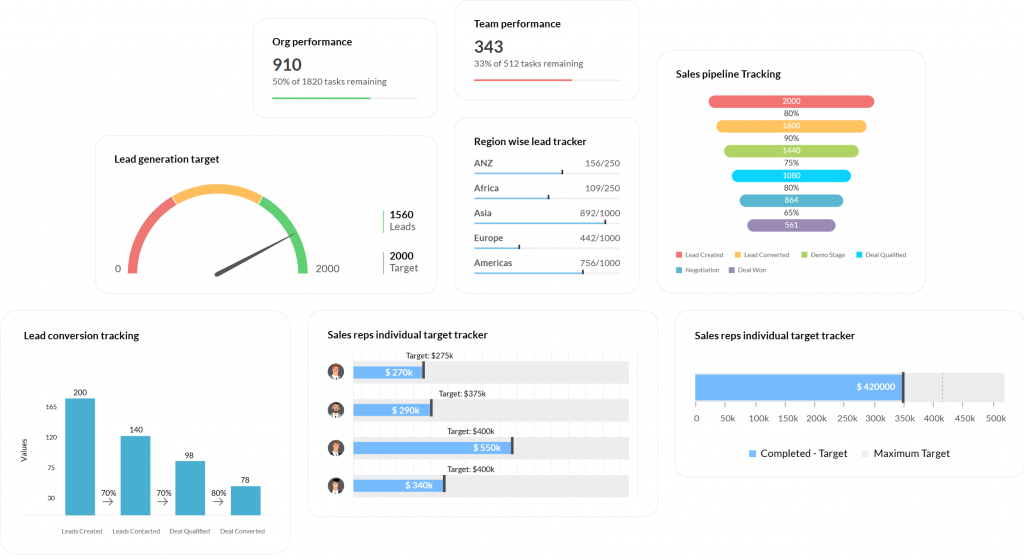
For a creator managing multiple income streams, brand deals, affiliate partnerships, merchandise, a course business, and a newsletter, Zoho CRM can be configured to track each of these separately within a single platform. The automation builder lets you create multi-step workflows triggered by contact activity, deal stage changes, or time-based conditions. I could build a workflow that automatically sent a thank-you email when a deal moved to “Closed Won,” then triggered a task to add the brand to a future outreach list.
The challenge with Zoho CRM is that it requires setup investment. Out of the box, it does not feel immediately creator-friendly, the interface is dense, and the configuration options can be overwhelming. Creators who are just starting out with CRM tools often find the onboarding steep.
Pros:
- Extensive customization for modules, fields, workflows, and views
- Built-in email marketing and automation at competitive price points
- AI-powered sales assistant (Zia) for deal insights and predictions
- Strong integration ecosystem with 800+ third-party apps
Cons:
- Initial setup and configuration require significant time investment
- Interface feels complex and cluttered compared to simpler creator tools
Pricing:
Free plan for up to 3 users; paid plans start at $14/user/month.
5. Notion CRM – Best for a Fully Custom, DIY System
Notion as a creator CRM was something I stumbled into after seeing several newsletter writers rave about their custom Notion dashboards on Twitter. It is not a purpose-built CRM, it is a flexible workspace where you build your own. But for creators who are highly organized and enjoy building their own systems, it works remarkably well.
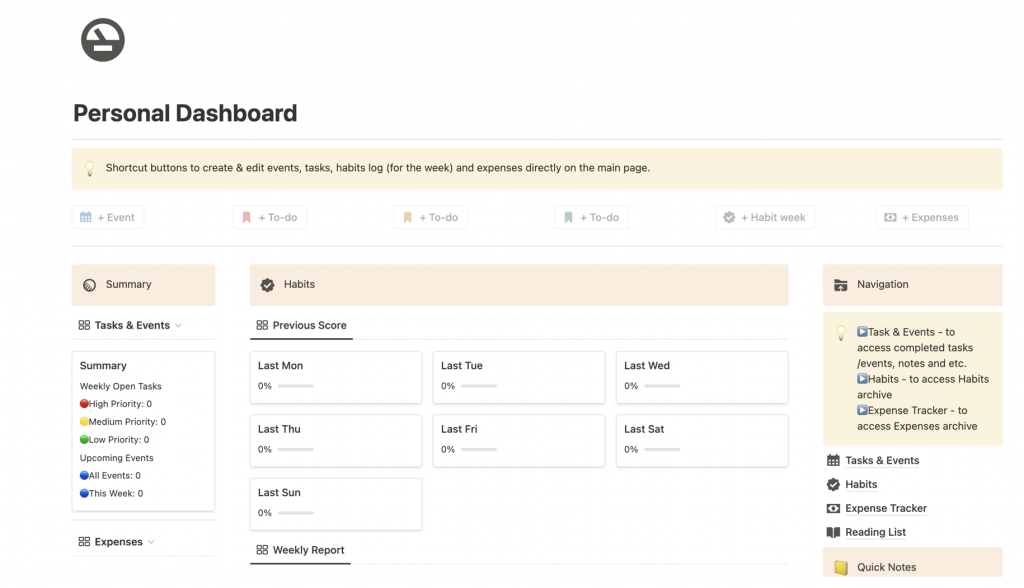
The approach is simple: you build a contacts database in Notion, add properties for things like brand name, deal value, contact stage, last interaction date, and follow-up due date, and then create linked views, a Kanban board for pipeline view, a table for contact management, a calendar for follow-up scheduling. With the right template, the setup takes a couple of hours and costs almost nothing.
The ceiling, though, is real. Notion has no native email marketing, no automated reminders triggered by CRM logic, no activity logging from your email inbox, and no built-in reporting. Everything is manual. For a creator with a handful of brand relationships, that is fine. For someone managing 30 or more active brand relationships, Notion starts showing its limits fast.
Pros:
- Extremely flexible, build the exact system your workflow needs
- Free plan is generous and covers most solo creator use cases
- Integrates with Zapier for basic automation to extend functionality
- Large community of shared CRM templates to start from
Cons:
- No native email marketing or automated follow-up sequences
- Activity logging from email requires manual entry or third-party workarounds
Pricing:
Free plan available; paid plans start at $10/user/month.
6. Airtable – Best for Managing Large Contact Bases
Airtable sat somewhere between a spreadsheet and a CRM when I first tested it, and that is exactly what made it appealing for a certain type of creator. If you have 500 brand contacts, a detailed media kit, and a system where you track engagement metrics per contact, Airtable handles that kind of data complexity better than most lightweight CRMs.
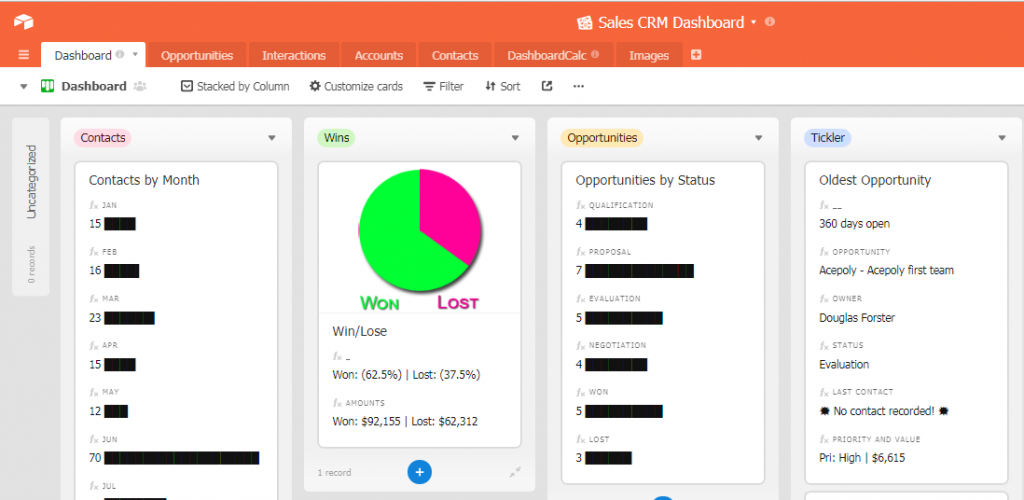
The grid view feels like an enhanced spreadsheet, filterable, sortable, and customizable with fields that go beyond plain text. I could track brand contacts with fields for platform, niche fit, engagement rate, deal history, last contacted date, and campaign performance. Switching to gallery or Kanban view gave me different ways to visualize the same data without rebuilding anything.
The limitation is the same one Notion faces: Airtable is not a CRM by design. Email marketing is not built in, automated follow-up reminders require Zapier, and the interface can feel overwhelming for creators who just want simplicity.
Pros:
- Handles large contact databases with advanced filtering and field customization
- Multiple view types, grid, gallery, Kanban, calendar, for the same data
- Strong API and Zapier integration for connecting to email tools
- Great for media companies or creator agencies managing many contacts
Cons:
- No native email marketing or CRM-style follow-up automation
- Automation and advanced features require higher-tier paid plans
Pricing:
Free plan available; paid plans start at $20/user/month.
7. Close CRM – Best for High-Volume Outreach Campaigns
Close CRM was a tool I came across while researching CRM options for media companies and creator agencies managing hundreds of brand relationships at scale. It is built for sales teams that move fast, which makes it more relevant to larger creator operations than to solo creators.
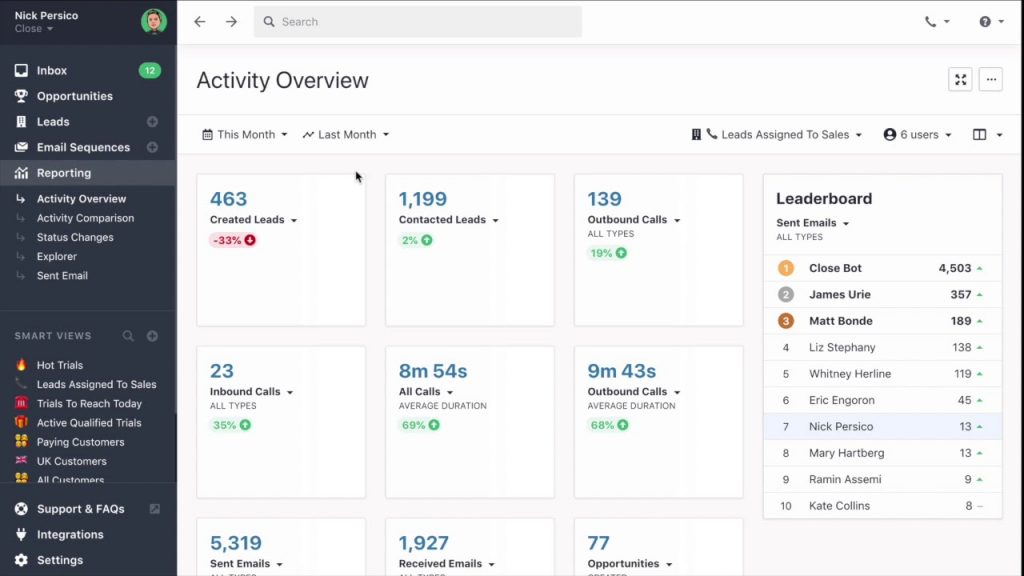
The standout feature of Close is its communication stack. Built-in email, calling, and SMS are all native to the platform, no integrations needed. For a creator agency sending 50 brand outreach emails a day and following up by phone, this saves real time. Email sequences are easy to build, open rate reporting is detailed, and the pipeline view is solid for tracking deals across multiple team members.
The challenge for most creators is the price. Close starts at $49/user/month, which is a significant jump from every other tool on this list. For a solo creator or a two-person team, that cost is hard to justify when simpler options deliver the core functionality at a fraction of the price.
Pros:
- Built-in email, calling, and SMS in one platform, no integrations needed
- Email sequences with detailed open, click, and reply tracking
- Strong pipeline management with multi-team visibility
- Custom activity reporting for tracking outreach volume and deal velocity
Cons:
- Starting price is the highest on this list, not suitable for solo creators
- Overkill for creators managing fewer than 20 active brand relationships
Pricing:
Starts at $49/user/month.
Evaluation Criteria
The evaluation of products or tools chosen for this article follows an unbiased, systematic approach that ensures a fair, insightful, and well-rounded review. I used six key factors to assess each CRM for creators:
- User Reviews and Ratings: I looked at direct experiences from creators and small business users on platforms like G2, Capterra, and Trustpilot. Ratings and written reviews gave me a ground-level view of what each tool actually feels like to use week to week, not just on a free trial.
- Essential Features and Functionality: I evaluated each tool on the core features that matter most to creators: contact management, pipeline tracking, email marketing, task automation, and follow-up reminders. Tools that required five extra integrations to cover the basics scored lower than those that delivered out of the box.
- Ease of Use: Creator businesses run lean. A CRM that takes four weeks to configure is a non-starter. I specifically assessed how quickly a solo creator with no CRM experience could get up and running, and how intuitive the interface felt during daily use.
- Customer Support: I examined how each platform handles support, response time, availability, help documentation quality, and onboarding resources. For creators with no IT team, good support is not a nice-to-have; it is essential.
- Value for Money: I compared what each plan delivers relative to its price. The best creator CRMs offer meaningful functionality on free or low-cost tiers, not just enough to frustrate you into upgrading. Tools that locked essential features behind expensive plans were scored accordingly.
- Personal Experience and Expert Opinions: This list draws on hands-on testing and community research across creator forums, Reddit threads, and practitioner conversations. Tools that creators are actively recommending to each other in communities, not just ranking well on review sites, earned stronger consideration.
My Top 3 Picks for the Best CRM for Creators
After evaluating all seven tools, here are the three I would recommend most confidently to different types of creators.
1. BIGContacts
BIGContacts is my first pick for the majority of solo creators and small creator teams. BIGContacts by ProProfs is a simple, affordable CRM built for growing small businesses, with contact management, email marketing, AI-powered pipeline tracking, and task automation in one place. The forever-free plan covers up to 100 contacts, the AI dashboard flags stalled deals automatically, and the built-in email marketing with AI campaign designer eliminates the need for a separate tool.
2. HubSpot
HubSpot CRM is my second pick for creators who are also building a newsletter, lead generation funnel, or content marketing operation alongside their brand deal business. The free plan is genuinely functional, and the email automation depth is hard to match at the entry-level price point. Creators who need to manage both audience relationships and brand relationships in one place will find HubSpot’s breadth worth the setup time.
3. Pipedrive
Pipedrive is my third pick specifically for deal-heavy creators, podcasters and YouTubers juggling ten or more active sponsorship conversations at once. The pipeline visualization is the cleanest on this list, and the deal-stage tracking is purpose-built for exactly the kind of workflow a creator running multiple concurrent brand negotiations needs. If your primary pain point is losing track of where deals stand rather than general contact management, Pipedrive is the right tool.
Ready to Boost Conversions With AI-Powered CRM?
Why Do Creators Need a CRM?
Most creators managing brand deals, sponsorships, and collab outreach hit an operational wall at some point. The problem is not the volume of work. It is the chaos of managing that work without a system. A CRM for creators solves the following pain points directly:
Problem: Brand Contacts Are Scattered Everywhere
Emails, Instagram DMs, Twitter messages, LinkedIn replies, WhatsApp threads, brand contacts live in too many places. A contact database inside a CRM pulls every contact into one organized record so you never lose track of who you spoke to or when.
Problem: Follow-Ups Fall Through The Cracks
A study by Influencer Marketing Hub in 2025 shows that 59.4% of marketers with an influencer or creator marketing budget plan to increase that budget, reflecting how much creator relationships now drive business outcomes.
For individual creators chasing brand deals, a missed follow-up often means a lost deal to another creator who stayed top of mind. A CRM automates reminders and client follow-up emails so nothing slips.
Problem: No Visibility Into The Deal Pipeline
When you are juggling ten brand conversations at once, it is nearly impossible to know at a glance which are warm, which are stalled, and which need immediate action. A CRM sales pipeline view gives you that clarity in seconds.
Problem: Mass Outreach Takes Forever
Reaching out to 50 brands for a campaign pitch, one email at a time, is a productivity killer. A CRM with email marketing built in lets you send segmented bulk emails and track open rates so you know which pitch is landing and which is not.
Problem: Collaboration Contact History Gets Lost
When a brand asks what you agreed on last quarter, you need a record. A CRM logs every note, call, email, and task against each contact so the full relationship history is always available.
Which Types of Creators Benefit Most From a CRM?
A creator CRM is particularly valuable across a wide range of creator types. The common thread is a business that runs on relationships, and relationships that need to be tracked, nurtured, and acted on consistently.
Youtubers And Tiktok Creators
They often manage five to twenty brand sponsorships simultaneously. Each deal has its own timeline, deliverable requirements, rate card, and follow-up history. Without a CRM, deal details live across email chains, DMs, and notes, and things slip.
A CRM gives these creators a single dashboard where every sponsorship is tracked by stage, every deadline is visible, and every brand contact has a complete communication log. The AI pipeline tracker in tools like BIGContacts flags which deals have stalled so nothing gets dropped between upload days.
Podcasters
Podcasters run two parallel contact workflows at once: guest outreach and sponsor management. Guest pipelines can involve hundreds of potential guests at different stages of outreach, scheduling, and confirmation.
Sponsor pipelines involve rate negotiations, contract timelines, ad-read approvals, and payment tracking. Managing both in a spreadsheet quickly becomes a second job. A simple CRM handles both pipelines in one place and automates the follow-up sequences that keep both moving.
Newsletter Writers And Bloggers
They depend heavily on sponsor relationships for revenue, but they also manage media partnerships, affiliate contacts, and cross-promotion relationships with other creators.
A CRM centralizes all of these contacts, tracks which partnership conversations are active, and lets them run segmented outreach campaigns to sponsor lists, particularly useful during open sponsorship windows before a new issue launches.
UGC Creators
They work with a high volume of brand clients simultaneously, each with their own brief, revision cycle, approval timeline, and payment schedule. Keeping track of all of this manually is exhausting and error-prone.
A CRM with workflow automation handles the status tracking, reminder triggers, and communication logging so UGC creators can focus on production rather than project management.
Instagram Influencers And Talent Managers
Instagram influencers and talent managers who manage multiple creator clients or brand relationships at once benefit from the organizational structure a CRM provides. Every brand contact is tagged, every deal is staged, and every conversation has a logged history.
This is especially useful for talent managers overseeing ten or more creator relationships simultaneously, a best personal CRM approach scales naturally to small talent management operations.
Course Creators
They depend on affiliate partner relationships and joint venture contacts to drive launch revenue. Managing affiliate outreach, tracking which partners have agreed to promote, monitoring their activity, and following up on performance all benefit from the kind of lead nurturing workflows a CRM provides.
Start Managing Your Creator Business Like a Business Today
The gap between creators who scale and creators who stall is rarely about content quality. More often, it is about systems. The creators closing five-figure brand deals consistently are not necessarily more talented, they are better organized.
They know which brand contact is waiting on a follow-up, which deal is about to go cold, and which partnership is worth doubling down on.
A CRM for creators gives you that clarity. It replaces the DM chaos, the forgotten follow-ups, and the spreadsheet that stopped scaling three months ago with a single system that keeps your entire creator business visible and actionable.
If you are starting out or scaling up and want something that covers contact management, email marketing, pipeline tracking, and AI-powered follow-up automation without overwhelming your workflow, a tool like BIGContacts makes it easy to get organized without a steep learning curve or a big monthly bill, and the forever-free plan means there is no reason to wait.
Frequently Asked Questions
What is the best CRM for content creators?
The best CRM for content creators depends on the size of your operation and what you need to manage. For solo creators and small teams, BIGContacts is a strong starting point — it covers contact management, pipeline tracking, email marketing, and AI-powered follow-up automation at an affordable price with a forever-free plan.
Do content creators really need a CRM?
Yes. Any creator managing more than a handful of brand deals, collaborations, or audience relationships benefits from a CRM. It replaces scattered DMs and spreadsheets with a centralized system that tracks contacts, automates follow-ups, and gives you clear visibility into every business relationship.
What is a CRM for influencers?
A CRM for influencers is a contact relationship management tool built to help influencers and creators track brand contacts, manage sponsorship pipelines, log communications, and automate follow-up outreach, all from one dashboard instead of juggling email, DMs, and spreadsheets separately.
Can I use a free CRM for my creator business?
Yes. Several tools on this list offer free plans that are genuinely functional for creators just getting started. BIGContacts offers a forever-free plan for up to 100 contacts. HubSpot, Zoho CRM, Airtable, and Notion also offer free tiers with meaningful functionality.
How does a CRM help with brand deal management?
A CRM helps with brand deal management by giving you a visual pipeline where every deal is tracked by stage, from first outreach to signed contract. Automated reminders fire when a deal has been inactive too long, communication history is logged automatically, and email marketing tools let you run bulk outreach campaigns to your brand contact lists.
What should I look for in a CRM for bloggers?
The best CRM for bloggers should include contact management for brand and media relationships, email marketing for outreach campaigns, task reminders for follow-ups, and a pipeline view for tracking sponsorship or advertising deals. Simplicity and affordability matter more than enterprise-grade complexity for most individual bloggers.
Is BIGContacts good for solo creators?
Yes. BIGContacts is specifically built for small teams and solo operators. Its contact management, AI pipeline tracking, email marketing, and task automation features are all available at a price point and simplicity level that works well for individual creators, and the forever-free plan for up to 100 contacts makes it easy to get started without a financial commitment.
What is a creator CRM and how is it different from a regular CRM?
A creator CRM is optimized for the specific workflows of content creators, influencers, and media professionals, brand deal pipelines, sponsorship outreach, collab tracking, and audience relationship management. A regular CRM is typically built around B2B sales cycles. The best creator CRMs are simpler, more affordable, and designed for solo operators rather than large sales teams.
How does a CRM for creators work?
A creator CRM works in five steps. First, you import brand contacts, collab partners, and sponsors from email, spreadsheets, or web forms. Second, you organize and tag contacts by type using custom fields and lists. Third, you track all communications, emails, notes, calls, against each contact record. Fourth, you manage brand deals through a visual pipeline by moving them across stages like Prospecting, In Negotiation, and Contract Signed.
How do you choose the right CRM for your creator business?
Choosing the right CRM for creators or for media companies comes down to three questions. First, how many contacts are you managing right now, and how fast is that growing? Under 100 contacts, a free plan is more than enough. Growing quickly, choose a tool that scales without a steep price jump. Second, what features do you actually need? If you only need contact management and pipeline tracking, do not pay for a platform built around advanced marketing automation. Third, how much setup time can you invest? Some tools are ready in 20 minutes; others take weeks to configure.
What is the best CRM for media companies?
The best CRM for media companies depends on team size and workflow complexity. Smaller media teams benefit from tools like BIGContacts, which offer affordable contact management and email marketing without the overhead of enterprise platforms. Larger media companies running high-volume outreach campaigns may find Close CRM better suited to their scale and reporting needs.
How much does a crm for creators cost?
CRM pricing for creators ranges from free to $50 per user per month depending on the platform and features needed. BIGContacts starts at $9.99/user/month with a forever-free plan for up to 100 contacts. Zoho CRM has a free plan with paid tiers starting around $14 per user per month. Close CRM starts at $49/user/month and is better suited to larger creator teams or agencies.
FREE. All Features. FOREVER!
Try our Forever FREE account with all premium features!