

Most businesses don’t have a data problem. They have a scattered data problem.
I’ve worked with small business owners who had hundreds of contacts spread across Outlook, a Gmail inbox, three different Excel files, and a stack of business cards from the last trade show. Everyone on the team knew a little about each customer, but nobody had the full picture. Customer conversations slipped through the cracks. Follow-ups happened twice, or not at all. And when someone left the team, they took all their knowledge with them. Understanding what is a customer database, and actually building one, is the fix for exactly this.
A customer database isn’t just a place to store names and phone numbers. It’s a living record of every relationship your business has, one that your sales team, marketing team, and support team can all read from and write to. When it’s working well, your whole organization operates from the same facts, and customers feel it every time they interact with you.
What Is a Customer Database?
A customer database is a centralized, structured repository that stores all customer-related data a business needs to manage relationships, run marketing campaigns, and close sales. It consolidates information from multiple sources into one accessible system so every team member works from the same data.
Unlike a simple contact list, a customer database captures the full context of every customer relationship. It records what a customer bought, when they last heard from you, what they asked about, and what they are most likely to need next. Businesses use customer databases to move from reactive to proactive relationship management.
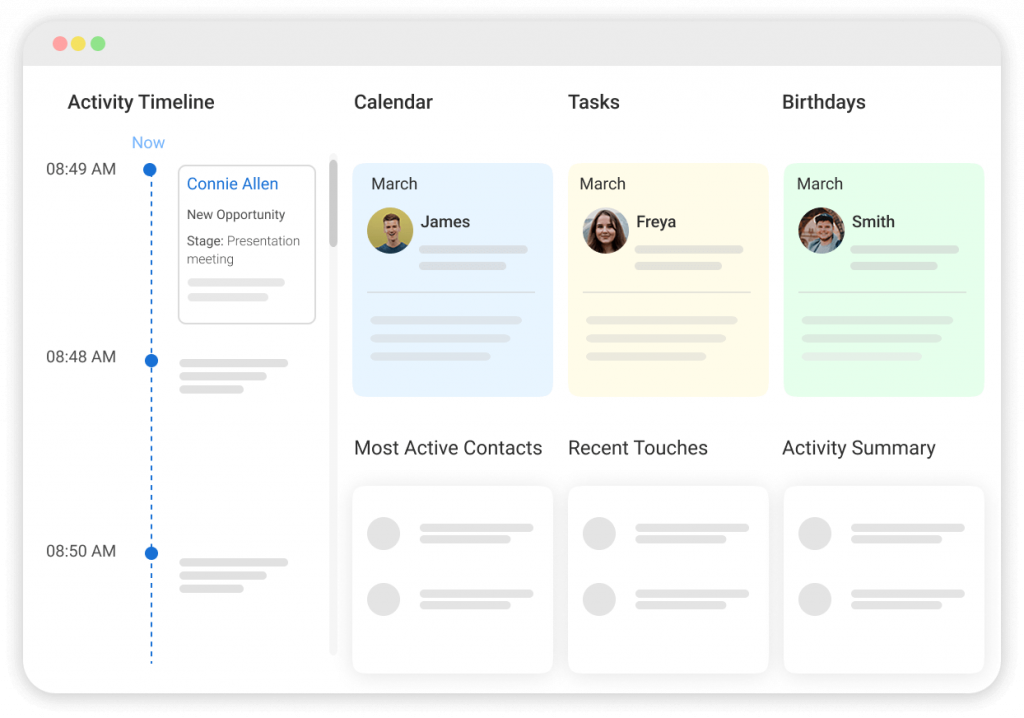
A study by Nucleus Research in 2023 shows that CRM systems, which are built on customer databases, return an average of $3.10 for every $1 invested, making structured customer data one of the highest-ROI assets a business can maintain.
If you want to understand how a CRM wraps around a customer database, our guide on what is CRM covers the full picture.
Why Does a Customer Database Matter for Small Businesses?
Small businesses cannot afford to let customer data live in silos. When contacts are scattered across spreadsheets, email threads, and individual team members’ notes, opportunities get missed and customer experience suffers.
Here is what a well-maintained customer database enables:
- Targeted Marketing: Segment contacts by industry, location, purchase history, or deal stage. Send the right message to the right group without sending it to everyone.
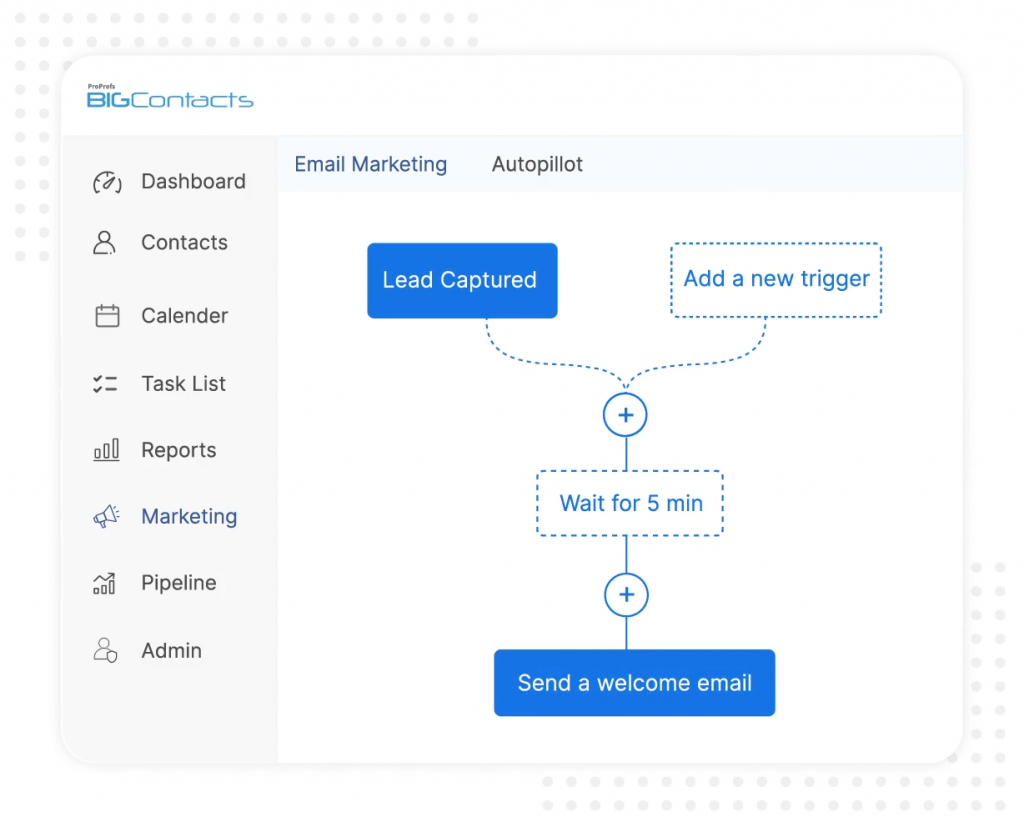
- Consistent Follow-Up: Set reminders, assign tasks, and log every touchpoint so no lead falls through the cracks.
- Team Alignment: Every team member sees the same contact history, eliminating duplicate outreach and contradictory information.
- Sales Pipeline Visibility: Track where each contact sits in the buying journey and prioritize accordingly.
- Customer Retention: Use interaction history to personalize communication and address issues before they become reasons to leave.
- Data-Driven Decisions: Analyze patterns in customer behavior to inform product, pricing, and outreach strategy.
A study by Forrester in 2024 shows that US brands’ customer experience quality has fallen for three consecutive years, with only 3% of companies truly putting customer needs at the center of operations. A customer database is the foundational fix: when every team member has complete, accurate customer context, the experiences customers receive actually improve.
What Information Is Stored in a Customer Database?
The core function of a customer database is storage, but what it stores goes far beyond names and email addresses. Here is a breakdown of the data types a complete customer database contains:
Contact Information
- Full name, job title, company
- Email address, phone number, mailing address
- Social media profiles and website
Interaction History
- Notes from calls, meetings, and emails
- Support tickets and service requests
- Sales conversations and objections raised
Purchase and Transaction Data
- Products or services purchased
- Order dates, amounts, and frequency
- Subscriptions, renewals, and cancellations
Demographic and Firmographic Data
- Industry, company size, annual revenue
- Location, time zone, language preference
- Decision-maker status and role within an organization
Behavioral Data
- Email open rates and click activity
- Website pages visited
- Event attendance and form submissions
Custom Fields and Tags
- User-defined fields relevant to your business (e.g., “Referral Source,” “Contract Type”)
- Tags for segmentation (e.g., “VIP Client,” “Seasonal Buyer,” “Warm Lead”)
Task and Follow-up Data
- Scheduled calls and meetings
- Assigned follow-up reminders
- Team member ownership of each contact
BIGContacts by ProProfs is a simple, affordable CRM built for growing small businesses, with contact management, email marketing, task automation, and sales pipeline tracking in one place. It lets you store all of the above across every contact with no technical setup required.
How Does a Customer Database Work?
A customer database works by collecting, organizing, and making customer data accessible across your team in a structured format. Here is how the process flows:
- Data Entry: Customer information enters the database through web forms, manual input, email sync, imported CSV files, or integrations with other tools.
- Organization: Records are structured using fields, tags, and categories so data is consistent and searchable.
- Access Control: Team members are assigned roles and permissions, so the right people see the right data.
- Interaction Logging: Every call, email, meeting, and note is recorded against the relevant contact record.
- Segmentation: Contacts are grouped by shared attributes for targeted outreach or reporting.
- Task Management: Follow-up reminders, calls, and meetings are tied to contact records so nothing is missed.
- Reporting: Activity data and contact attributes are used to generate insights on pipeline health, engagement rates, and customer behavior.
Most modern customer databases live inside a CRM platform and update in real time as team members log activity and contacts engage with your business.
What Are the Key Features of a Customer Database?
A strong customer database goes beyond basic storage. These are the features that separate a functional database from one that actually drives growth. For a closer look at what contact management specifically involves, our guide on what is contact management is a useful companion read.
Does It Store Complete Contact Profiles?
A customer database should store far more than a name and email address. Each contact record holds a job title, company, phone, mailing address, social profiles, and any custom fields your business needs, for example, “Contract Value,” “Referral Source,” or “Industry Vertical.”
Custom fields are what make a generic database feel purpose-built for your specific workflow. Without them, you end up working around the tool instead of with it.
Does it log the full communication history?
Every email sent, call made, meeting held, and note written should attach automatically to the relevant contact record. This interaction log is what transforms a contact list into a relationship record.
When a new team member takes over an account, they can read the full history of that relationship without asking anyone. When a customer calls in, the person picking up can see exactly what was discussed last time. This feature alone justifies switching from a spreadsheet.
Does It Support Contact Tagging and Segmentation?
Tags let you group contacts by any attribute that matters to your business, deal stage, industry, product interest, geographic region, or customer tier.
Segmentation then lets you filter those groups instantly and act on them, whether that means sending a targeted email campaign, pulling a report, or assigning a batch of follow-ups. Without tagging and segmentation, every outreach effort is either too broad or too manual.
Does It Automate Follow-Up Reminders and Tasks?
The biggest reason leads go cold is not disinterest, it is that nobody remembered to follow up. A customer database with task automation lets you set follow-up reminders tied directly to each contact, assign tasks to specific team members, and trigger workflow actions based on contact behavior or deal stage.
Nothing falls through the cracks when the system reminds you before the opportunity closes.
Does It Integrate with Your Existing Tools?
A customer database that sits in isolation creates more work, not less. The right platform connects to your email provider for automatic email logging, your calendar for meeting sync, your marketing tools for campaign data, and your web forms for lead capture.
Every integration removes one more manual transfer step and keeps the database current without extra effort from the team.
Does It Support Bulk Email Sending?
Sending individual emails to hundreds of contacts is not scalable. A customer database with built-in bulk email lets you send targeted campaigns to segmented lists directly from the same platform where your contact data lives.
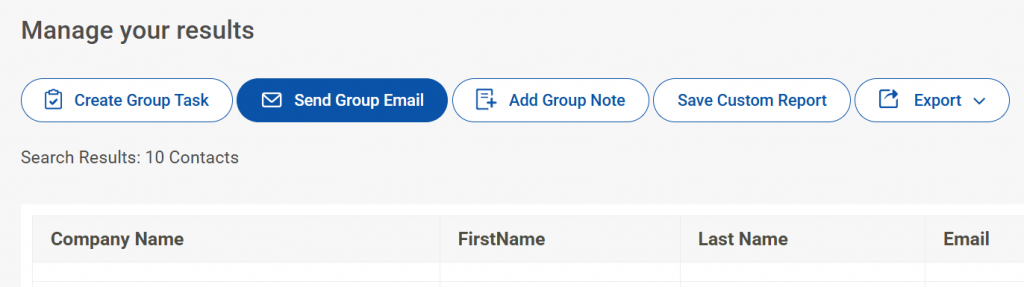
You get open rates, click rates, and unsubscribe data attached to each contact record, so your next outreach is always informed by what the last one revealed.
Does It Provide Activity Tracking and Reporting?
Knowing that a contact exists is not enough. You need to know when they were last contacted, which team member owns the relationship, how many touchpoints have happened, and where they sit in the buying journey.
Activity tracking gives managers visibility into team performance and gives individual contributors a clear picture of their own pipeline. Reporting turns that activity data into decisions.
Does It Support Multi-User Access with Permissions?
A customer database used by more than one person needs role-based access control. Not every team member should see every contact or every deal. Sales reps should see their assigned contacts.
Managers should see the full team. Administrators should control data settings. Without permission levels, sensitive data becomes accessible to everyone and accountability breaks down.
Does It Include Data Import and Export?
Any business migrating from a spreadsheet, a legacy CRM, or another tool needs to bring its existing contacts across cleanly. A good customer database accepts CSV imports with field mapping so data lands in the right place from day one.
Export capability matters equally, you should always be able to get your data out in a portable format, not be locked into a platform because leaving is too painful.
Does It Offer Pipeline Views?
A customer database that connects to a sales pipeline gives your team a visual map of where every contact sits in the buying journey. Pipeline views, whether Kanban-style boards or list-based stage trackers, make it easy to identify stuck deals, prioritize active opportunities, and spot gaps in the funnel before they cost revenue.
For teams where closing deals is the primary goal, this feature is what makes the database actionable rather than just informational.
What Problems Does a Customer Database Solve?
Most businesses that start looking for a customer database are being pushed there by a specific frustration. Here is a map of the most common pain points and how a customer database addresses each one.
Problem: Data Scattered Across Multiple Tools
Team members store contacts in personal Outlook accounts, Gmail, individual spreadsheets, and sticky notes. Nobody has the full picture.
Solution: A customer database centralizes all contact data into one system accessible to the whole team.
Problem: No Record Of Who Said What Or When
Without interaction history, teams repeat conversations, miss commitments, and lose context when a team member leaves.
Solution: Every call, email, and note is logged against the contact record and visible to everyone.
Problem: Cannot Send Targeted Emails At Scale
Sending mass emails from Outlook or Gmail is limited, clunky, and offers no tracking. Segmenting by contact type is impossible.
Solution: A customer database enables contact segmentation and bulk email sending to specific groups with open and click tracking.
Problem: No Follow-Up System
Leads go cold because nobody remembered to call back. Existing customers feel ignored between transactions.
Solution: Task reminders and follow-up workflows tied to each contact ensure consistent outreach.
Problem: Multiple People Cannot Work From The Same Data.
Sharing an Excel file by email creates version conflicts and data gaps. Only one person can update it at a time.
Solution: A cloud-based customer database gives every team member real-time access to the same records.
Problem: Outgrowing A Legacy System
Tools like Microsoft Access, ACT, Highrise, or manual spreadsheets hit a wall as contact volumes grow or team size increases.
Solution: Modern customer database platforms scale with the business and require no database administration skills. If you are in the middle of switching systems, our CRM migration guide covers the steps to make the move without losing data.
How Does a Customer Database Compare to a Spreadsheet?
Many businesses start with Excel or Google Sheets to manage contacts. It works at first, and then it doesn’t. Here is a direct comparison:
| Feature | Spreadsheet | Customer Database |
| Contact storage | Rows and columns only | Structured profiles with multiple data types |
| Interaction history | Manual notes in cells | Automatic log tied to each contact |
| Shared team access | File-sharing required, version conflicts | Real-time shared access, no conflicts |
| Email sending | Not supported | Built-in bulk email with tracking |
| Segmentation | Manual filtering | Tag-based, field-based instant segments |
| Follow-up reminders | Not available | Automated task reminders per contact |
| Scalability | Breaks above a few hundred rows | Scales to tens of thousands of contacts |
| Data security | Local file, easy to lose | Cloud-hosted with access control |
| Reporting | Manual calculations | Built-in activity and engagement reports |
A study by Searchlab in 2026 shows that 22% of businesses still use spreadsheets as their primary customer management system. Most of them are one data loss event or team departure away from a serious setback.
What Are the Types of Customer Databases?
Not all customer databases serve the same purpose. Understanding the main types helps you identify what your business actually needs.
- Contact Database: Stores basic contact information: names, emails, phone numbers, and company details. Best for small businesses starting with organized contact management.
- Transactional Database: Records purchase history, invoices, order frequency, and lifetime value. Useful for retail, e-commerce, and distribution businesses that need to understand buying behavior.
- Behavioral Database: Tracks how contacts engage with your business: which emails they open, which pages they visit, which events they attend. Used primarily in marketing and lead scoring.
- Relational Customer Database: Links multiple data points together: contacts linked to companies, deals linked to contacts, tasks linked to deals. This is the model used by modern CRM systems and is the most useful for small business teams managing complex relationships.
- Operational Customer Database: Powers day-to-day business operations such as customer service, order management, and support ticket routing. Typically integrated into a larger business operations platform.
For most small businesses, a relational customer database inside a CRM platform covers all the bases.
Who Uses a Customer Database? (Use Cases by Industry)
Customer databases are used across virtually every industry. Here is how different business types put them to work:
1. Small Businesses and Startups
A startup founder managing 200 leads across sales conversations uses a customer database to track where each prospect stands, when to follow up, and which channels drive the best results. Our CRM for startups guide covers the specific features early-stage teams should prioritize.
2. Real Estate Agencies
A small real estate firm managing 300 leads across three agents uses a customer database to log property preferences, track viewing history, and trigger follow-ups at key moments in the buying cycle. Explore our guide on the best real estate CRM for options built for this use case.
3. Manufacturing and Distribution
A manufacturer with 50 distributor relationships uses a customer database to segment contacts by territory, send product launch emails to the right group, and track monthly check-ins with each distributor. Our roundup of the best CRM for manufacturing covers tools designed for this type of multi-tier contact structure.
4. Non-Profit Organizations
A nonprofit uses a customer database to track donor history, segment by giving level, and automate thank-you communications after each donation. See the best CRM for nonprofits for tools designed for this.
5. Professional Services and Consulting
A consulting firm with 6 project managers uses a shared customer database to avoid duplicate outreach to the same client, track project status, and maintain relationship history across the team. If your business is agency or consultancy-shaped, our best CRM for agencies guide covers the right tools for that context.
6. Healthcare Providers
A healthcare practice uses a patient database to track appointment history, follow up after visits, and send relevant health communication to segmented patient groups. Check out the best healthcare CRM software for options in this space.
7. PR and Media Agencies
A PR firm managing 1,500 journalist contacts uses a customer database to build targeted distribution lists, track which contacts received which press releases, and avoid contacting the wrong journalist with the wrong story.
8. Travel Agencies
A travel agency managing hundreds of partner contacts across multiple regions uses a customer database to track communication history, segment contacts by destination specialty, and send targeted offers. Our best CRM for travel agencies guide covers the specific tools built for this industry.
9. Financial Services
An investment advisory firm uses a customer database to log every client interaction, track portfolio discussions, and ensure compliance documentation is attached to each contact record. The best CRM for financial advisors covers this category well.
What Is a Customer Database Used for in Marketing?
In marketing, a customer database is the engine behind every campaign. It determines who gets which message, when, and through which channel.
1. Audience Segmentation
Marketers segment the database by attributes like industry, location, purchase history, or engagement level to send relevant messages to the right group instead of blasting the entire list. A deeper look at how this works in practice is covered in our customer segmentation guide.
2. Email Campaign Management
A customer database tracks which contacts are opted in, which belong to which list, and which emails they have received. This prevents duplicate sends and enables open and click tracking. See how CRM and email marketing work together to get more out of both systems.
3. Lead Nurturing
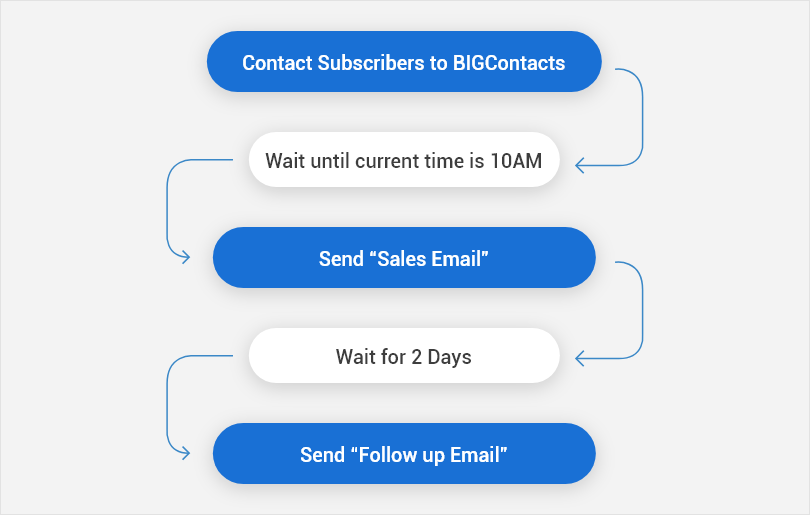
Contacts who are not ready to buy are moved into nurture sequences based on their database record. Automated emails go out at defined intervals based on where each contact sits in the sales funnel. Our email drip campaign guide walks through how to set these sequences up effectively.
4. Personalization
When you know a contact’s name, company, recent interaction, and purchase history, every email, call, and message can be tailored to that person specifically rather than sent as a generic blast.
5. Campaign Attribution
A customer database tied to a CRM tracks which marketing activities led to which contacts, and which contacts converted to customers. This gives marketing teams concrete data to justify budget decisions.
How to Choose the Right Customer Database for Your Business?
Choosing a customer database is not about picking the one with the longest feature list. It is about matching the tool to how your team actually works. Here is what to evaluate:
1. What Data Do You Need To Store?
If you only need contact information and follow-up reminders, a simple CRM works fine. If you need custom fields, firmographic data, and behavioral tracking, look for a platform with flexible data structures.
2. How Large Is Your Team?
A solo operator and a 20-person team have different access control and collaboration needs. Check per-user pricing and whether the tool allows you to set role-based permissions.
3. Do You Need Email Marketing Built In?
Some tools combine contact management with email campaigns. Others require a separate email platform. If you send regular newsletters or drip sequences, choosing a tool with built-in email marketing saves integration work and cost.
4. What Tools Do You Already Use?
Look for a customer database that integrates with your existing calendar, email provider, and any other tools your team depends on daily. The fewer manual transfers between systems, the better. Our CRM integration guide explains what to check before committing to a platform.
5. What Is Your Budget?
Start with what you need today, not what you might need in five years. Most platforms offer free or low-cost starting plans. BIGContacts, for example, offers a forever-free plan that gives small businesses a functional starting point with no time limit.
6. How Easy Is Migration?
If you are moving from Excel, Outlook, or a legacy tool, look for platforms that support CSV import and offer migration assistance. Moving data is always the hardest part of switching systems.
What Are the Best Practices for Maintaining a Customer Database?
Building a customer database is the first step. Keeping it clean and useful over time is the ongoing work. For a more detailed breakdown of how to structure and organize the data itself, our guide on how to organize customer information is worth reading alongside this. Here are the practices that matter most:
- Deduplicate Regularly: Run deduplication checks quarterly to merge or delete duplicate contact records before they accumulate.
- Standardize Data Entry: Define consistent formats for phone numbers, company names, and address fields to make searching and filtering reliable.
- Set Required Fields: Make key fields mandatory at the point of entry so incomplete records never enter the system.
- Archive Instead Of Delete: When a contact goes inactive, archive the record rather than deleting it. Historical data has value for trend analysis.
- Review Data Regularly: Schedule quarterly reviews to update contact details, remove bounced emails, and refresh inactive records.
- Train Everyone Consistently: Database quality degrades when team members use the system differently. Invest in consistent onboarding for anyone with data entry access.
- Audit Access Permissions: Review who has access to which data periodically, especially after team changes.
I’ve put together a free checklist so you can apply everything above without missing a step.
What Are the Challenges of Building a Customer Database?
Understanding the challenges upfront prevents the most common mistakes:
- Data Entry Errors: Manual data entry introduces inconsistencies and typos. Tools with import templates, form-to-CRM connections, and field validation reduce this significantly.
- Data Decay: Contact information changes constantly. Emails go stale, people change jobs, and companies rebrand. A database that is not actively maintained becomes unreliable within 12 to 18 months.
- Siloed Adoption: A customer database only works if the whole team uses it consistently. Partial adoption creates a two-tier information system where some contacts are in the database and some are not.
- Integration Friction: Connecting a customer database to other tools like email providers, calendars, and marketing platforms requires planning. Tools with native integrations reduce the technical lift considerably.
- Data Security And Compliance: A customer database that stores personal data is subject to data protection regulations including GDPR and CCPA. Choose platforms with encryption, access controls, and clear data processing policies. Our CRM data security guide outlines what to look for when evaluating a platform’s security posture.
Build Stronger Customer Relationships with the Right Database
Customer data is one of the most valuable assets a small business has, and it is only valuable when it is organized, accessible, and acted on. Scattered spreadsheets, crowded inboxes, and memory-based contact management are not systems. They are workarounds that cost time, relationships, and revenue.
The shift to a proper customer database is not a big-company project. It is a practical decision that pays off quickly once your team has a single place to find, update, and act on customer information. The hardest part is usually just deciding to start.
For businesses looking for something that works without months of setup, BIGContacts by ProProfs is a simple, affordable CRM built for growing businesses, with contact management, email marketing, task automation, and pipeline tracking built in. The forever-free plan is a genuine starting point, not a limited demo. Explore our contact database guide and our roundup of the best customer database software to keep evaluating your options.
Frequently Asked Questions
What Is the Difference Between a Customer Database and a CRM?
A customer database stores structured customer information including contact details, interaction history, and purchase records. A CRM (Customer Relationship Management) system is a broader platform built on top of that database. It adds workflow tools, pipeline management, email marketing, and reporting. Most CRM platforms include a customer database at their core, but a standalone customer database does not always include the full workflow capabilities of a CRM.
What Is a Customer Database Definition in Simple Terms?
A customer database is an organized collection of information about your customers and prospects, stored in one central system that your team can access, search, and update. It replaces scattered spreadsheets, email threads, and individual notes with a single shared record of every customer relationship your business has.
How Do You Build a Customer Database from Scratch?
Start by identifying the data points most relevant to your business, then choose a CRM or database tool that fits your team size and budget. Import existing contacts from spreadsheets or email tools, set up custom fields for any data specific to your business, and establish a consistent data entry process for the team. From there, the database grows as your team logs interactions and new contacts come in through forms, sales calls, and marketing activities.
What Is a Good Customer Database for a Small Business?
A good customer database for a small business stores contact profiles, logs interaction history, supports segmentation and email marketing, and is easy for non-technical users to set up and maintain. Tools like BIGContacts CRM are built specifically for this purpose and offer a forever-free plan so small businesses can start without upfront cost.
How Is a Client Database Different from a Customer Database?
The terms "client database" and "customer database" are used interchangeably in most business contexts. Both refer to a centralized system for storing and managing information about the people and organizations a business serves. Some industries, particularly professional services, use "client" to distinguish long-term service relationships from one-off "customers," but the underlying data management system functions the same way.
What Data Should Be Stored in a Customer Database?
A complete customer database stores contact details (name, email, phone, company), interaction history (calls, emails, meetings, notes), purchase or transaction records, demographic and firmographic data (industry, company size, role), behavioral data (email opens, website activity), and custom fields relevant to your business. It also stores follow-up tasks, assigned team members, and segmentation tags.
How Do You Keep a Customer Database Accurate?
Keep a customer database accurate by running regular deduplication checks, setting mandatory fields at data entry, using email validation tools to remove bounced addresses, and scheduling quarterly data audits to update stale records. Making database hygiene a team habit rather than an occasional project is what keeps data quality high over time. Read ourCRM data cleaning guide for a full process.
Is Excel a Customer Database?
Excel can store customer information, but it is not a customer database in the functional sense. It lacks interaction history logging, follow-up reminders, built-in email sending, real-time team collaboration, and scalable segmentation. Astudy by Searchlab in 2026 shows that 22% of businesses still use spreadsheets as their primary customer management system, and most of them hit significant limitations as their contact list grows.
What Is a Relational Customer Database?
A relational customer database links related data points together across multiple tables. Contacts are linked to companies, deals are linked to contacts, tasks are linked to deals, and emails are linked to all three. This structure allows businesses to query complex relationships, for example, "which contacts at companies with more than 50 employees have not been contacted in 90 days." Most CRM platforms use a relational database structure underneath their interface.
How Does a Customer Database Help with Email Marketing?
A customer database enables effective email marketing by providing clean, segmented contact lists, tracking opt-in status and communication preferences, and logging which emails each contact has received. Marketers use the database to build targeted segments (by industry, deal stage, purchase history, or geography) and send relevant campaigns rather than undifferentiated blasts. Open rates, click rates, and unsubscribes are tracked back to the contact record for future reference.
What Is the Best Way to Migrate Contacts into a Customer Database?
The most reliable migration method is to export existing contacts from your current system (usually as a CSV file), clean the data in a spreadsheet to remove duplicates and standardize formatting, then import into your new customer database using the platform's import tool. Most CRM platforms provide import templates that match their required field structure. Plan the migration carefully, validate a sample batch first, and avoid importing duplicate or outdated records.
What Is the Role of a Customer Database in Sales?
In sales, a customer database functions as the operational backbone. Sales teams use it to track where every prospect sits in the pipeline, log conversation notes after each call, set follow-up reminders, and identify which contacts need attention. It replaces informal tracking methods with a structured system that gives managers visibility into team activity and gives individual reps a complete history of every relationship they manage. For pipeline-specific needs, see oursales pipeline guide.
FREE. All Features. FOREVER!
Try our Forever FREE account with all premium features!