

Somewhere between your 40th follow-up call and your third missed insurance renewal this quarter, it hits you: you’re running your book of business on memory, sticky notes, and a spreadsheet that’s about to break. I’ve been in that exact spot, and that’s what pushed me to go deep on CRM tools designed specifically for insurance professionals.
The right CRM for insurance agents doesn’t just store contacts. It tells you who needs a call today, which policy is expiring in 30 days, and which client is ready for a cross-sell conversation, all without you having to dig through emails or Excel. According to a study by Salesforce in 2023, sales reps using CRM software close 29% more deals than those who don’t. In insurance, where retention and renewals drive most of your revenue, that gap is even more significant.
I’ve evaluated dozens of CRMs, from enterprise-grade systems that require an IT team to set up, to simple tools designed for solo agents. In this guide, I’m sharing the six best CRM tools for insurance agents in 2026, with honest takes on what each does well, what it doesn’t, and who it’s actually built for.
What Is an Insurance CRM and Why Do Agents Need One?
An insurance CRM (Customer Relationship Management) system is software that helps agents and brokers manage client data, track leads, automate policy renewal reminders, and log every communication, all from a single dashboard.
Unlike a generic CRM, an insurance CRM maps to the actual workflow of an agent: a prospect becomes a lead, a lead gets quoted, a quote becomes a bound policy, and that policy needs renewal attention every 6–12 months. That cycle repeats across hundreds of clients simultaneously, and managing it manually is where most agents start losing money.
Here’s what a CRM for insurance agents actually handles:
- Stores policyholder contact details, coverage types, carrier information, and renewal dates in one place
- Sends automated reminders for policy renewals, follow-ups, and key client milestones
- Tracks every call, email, and note so the full communication history is always accessible
- Manages leads through a visual sales pipeline from first inquiry to bound policy
- Enables segmented email campaigns for cross-selling, renewals, and check-ins
- Links household members or business groups under a single account record
Top 7 CRMs for Insurance Agents to Boost Productivity in This Year
The tools below were evaluated specifically for insurance agents and brokers, not generic businesses. The criteria: ease of setup, insurance-relevant features, automation capabilities, pricing, and how well each supports the daily workflow of a working agent.
| CRM | Best For | Pricing |
| BIGContacts | Contact management & email marketing for growing businesses | Free for growing teams. Paid plan starts at $9.99/month |
| Zendesk | Customer Support Integration | From $19/user/month |
| Monday CRM | Customizable Workflows | From $9/user/month |
| Salesmate | Lead Management & Built-In Calling | From $29/user/month |
| Kylas CRM | Scaling Insurance Agencies | From $250/month (unlimited users) |
| noCRM.io | Sales Pipeline Simplicity | From $18/user/month |
| Creatio | AI Agents in Insurance Workflows | From $40/user/month |
1. BIGContacts – Best for Contact Management & Email Marketing for Growing Businesses
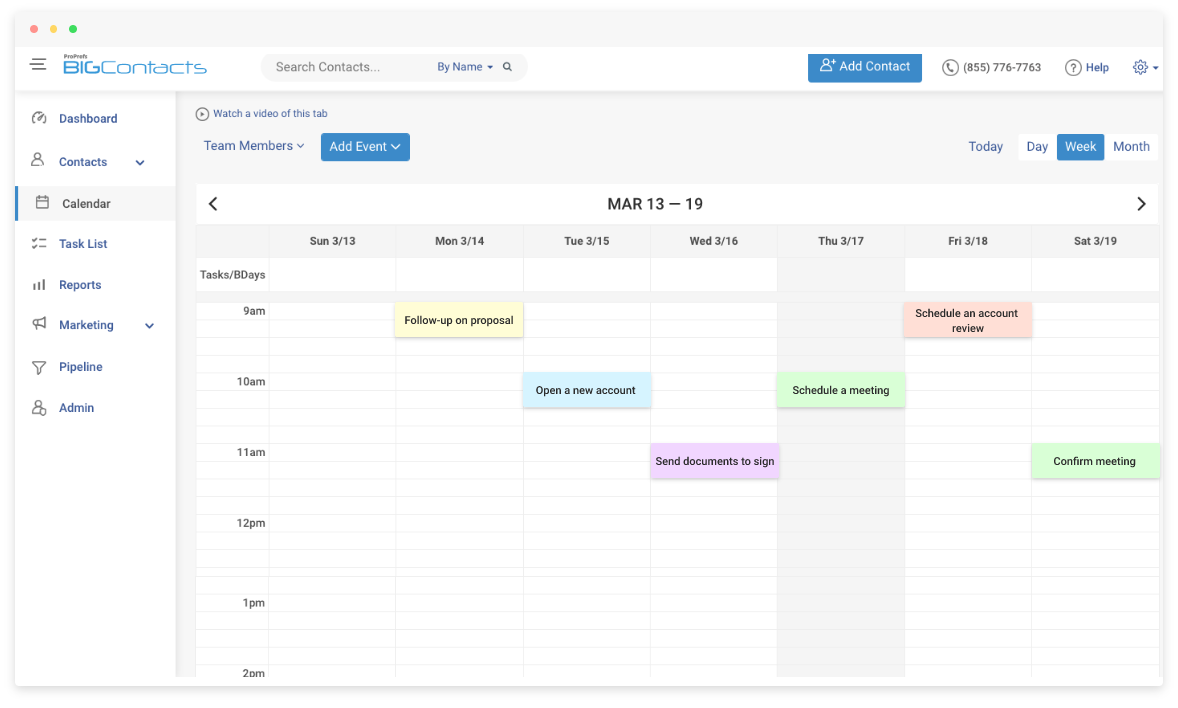
BIGContacts by ProProfs is a simple, affordable CRM built for growing small businesses, with contact management, email marketing, task automation, and sales pipeline tracking all in one place.
When I started using BIGContacts, the first thing I noticed is how fast it is to set up and actually use. There’s no six-week onboarding, no IT department required, and no features I’ll never touch buried three menus deep. For an independent insurance agent managing a book of 200–500 clients, that simplicity is the point.
What currently works especially well is the contact timeline; every email sent, call logged, and note added shows up in a clear chronological view per client. When a policyholder calls, and I need their full history in 10 seconds, it’s right there. The drip email campaigns also let me set up renewal outreach sequences that run automatically. I build the sequence once, and the CRM handles the timing for every client segment.
Pros:
- Centralized contact management with full communication history per policyholder
- Built-in email marketing with drip campaigns for renewal outreach and cross-selling
- Customizable sales pipeline to track leads from first inquiry to bound policy
- Task and activity tracking with automated follow-up reminders
- 24/7 human support via phone, chat, and knowledge base, including on the free plan
Cons:
- Some users found the mobile version less robust compared to the desktop version
- Navigating through saved email templates could be simplified
Pricing:
Free for growing teams. Paid plan starts at $9.99/month.
2. Zendesk – Best for Customer Support Integration
Zendesk is a CRM and customer support platform that consolidates all client communication, email, chat, phone, and social media into one unified workspace.
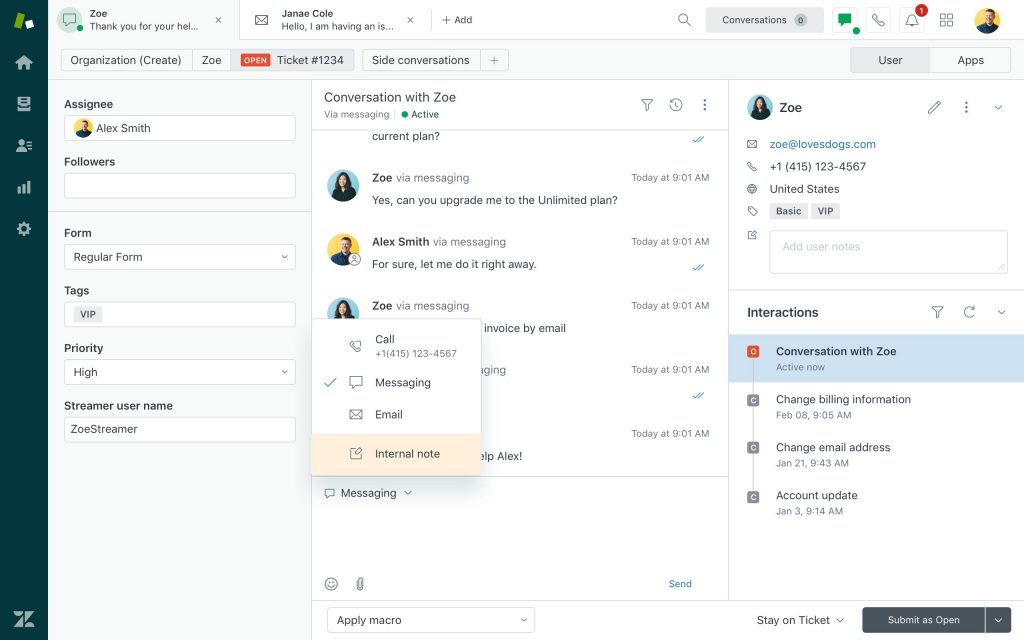
I used Zendesk in a previous role managing a mid-sized insurance agency, and it genuinely changed how the team handled inbound client inquiries. The biggest win was the omnichannel inbox, a client could start a conversation on email and pick it up on chat, and every agent could see the full thread without having to ask the client to repeat themselves. For agencies where client service and sales run side by side, that continuity matters a lot.
The automation capabilities were also strong, with follow-up sequences triggered on specific conditions, escalation rules when tickets aged past a threshold, and template replies for the most common questions. The tradeoff is that Zendesk is a bigger lift to set up and maintain than most tools on this list, and for a solo agent or two-person shop, it can feel like more than you need.
Pros:
- Omnichannel communication hub for email, chat, phone, and social in one place
- Customizable sales pipeline configurable to match insurance agency workflows
- Powerful automation for follow-ups, escalations, and routine task sequences
- Extensive app marketplace with 1,000+ integrations
Cons:
- Steep learning curve for smaller agencies without dedicated IT or admin support
- Advanced features significantly increase cost — pricing can escalate fast
Pricing:
Starts at $19/user/month.
3. Monday CRM – Best for Customizable Workflows
Monday CRM is a visual, drag-and-drop CRM platform that lets agents and agency owners build workflows that match exactly how their business operates, not the other way around.
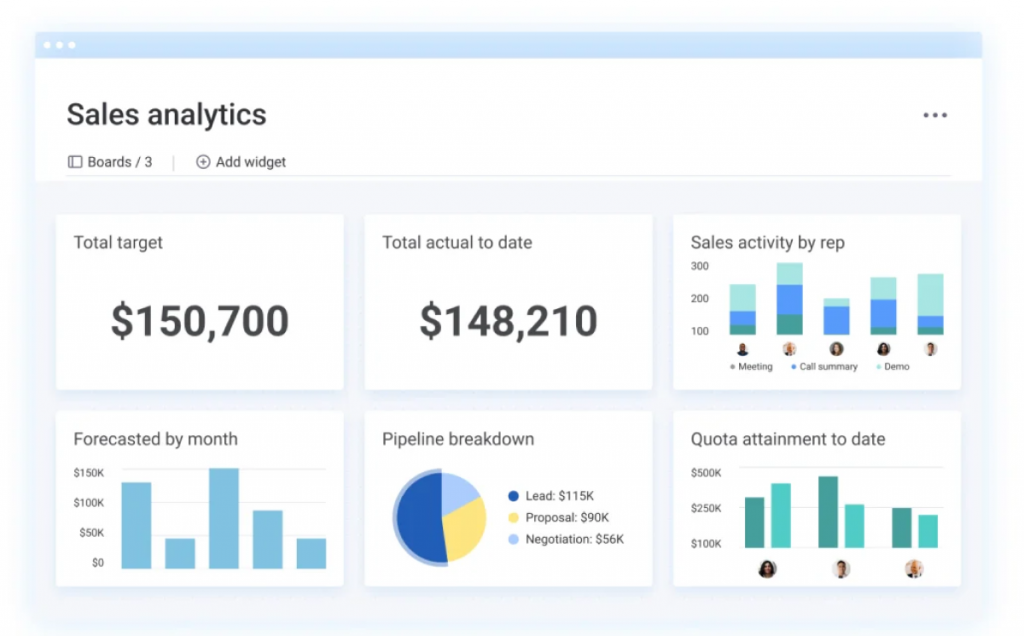
What drew me to Monday CRM was how fast I could see everything at once. The board view, where each column represents a pipeline stage and each card is a lead or client, made it immediately obvious which deals needed attention and which were stalled. In insurance, where you’re managing dozens of active quotes, pending applications, and upcoming renewals simultaneously, visual clarity like this is genuinely useful.
The flexibility is Monday CRM’s strongest card. I was able to create separate boards for new business leads, active policies, and renewal tracking, each with its own columns, automation rules, and views. The integration library is also extensive, so it connected easily with the email and calendar tools the team was already using.
Pros:
- Highly visual board and pipeline views that work well for multi-client tracking
- Drag-and-drop customization for workflows, stages, and fields
- Real-time team collaboration with shared boards and activity feeds
- Automation for routine tasks like moving deals between stages and sending follow-ups
Cons:
- Customization flexibility comes with a learning curve for new users
- Reporting and analytics are limited compared to more specialized CRMs
Pricing:
Starts at $9/user/month.
4. Salesmate – Best for Insurance Lead Management & Built-In Calling
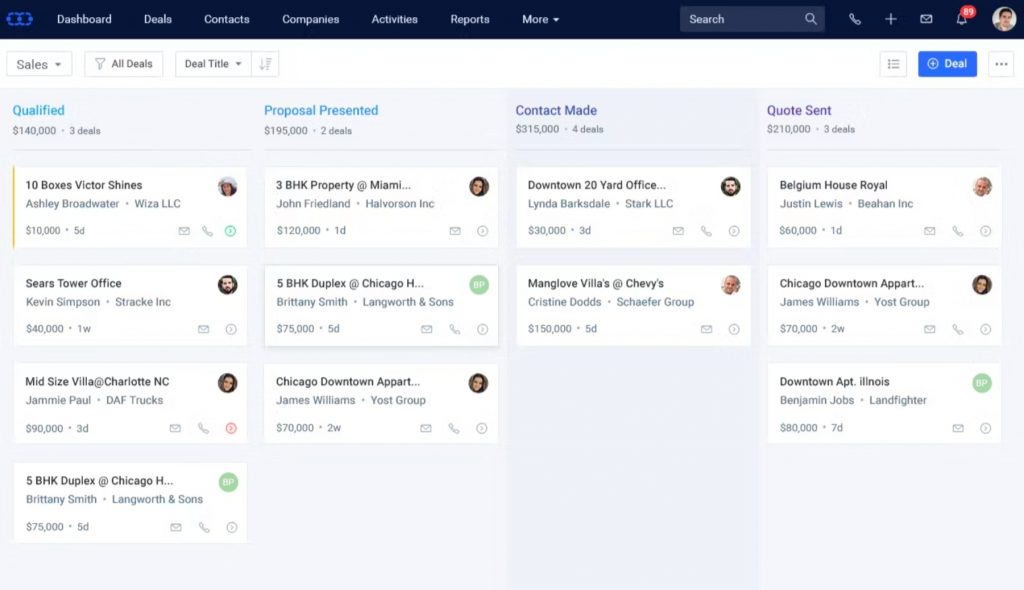
Salesmate is a sales-focused CRM with advanced lead management, visual pipeline tracking, and a built-in calling solution, all designed to help agents capture, nurture, and close more business.
I evaluated Salesmate specifically for its calling features, which turned out to be one of its most underrated advantages for insurance agents. The built-in VoIP dialer lets you call clients directly from the CRM record, records the call automatically, and logs a timestamped note, all in one step. For an agent doing 30–50 outreach calls a day during open enrollment or renewal season, that workflow saves a significant amount of time.
The lead management tools are also strong. I could score leads by engagement level, see which ones hadn’t been contacted in over a week, and set automated follow-up sequences triggered by how the lead behaved. The pipeline itself is visual and clean, and moving a lead between stages takes about two seconds.
Pros:
- Built-in calling with automatic call recording and notes logged per contact
- Advanced lead scoring to prioritize high-value prospects
- Visual pipeline management with drag-and-drop deal movement
- Automated email sequences with behavioral triggers
Cons:
- Less customizable than some other tools in this list
- Can have a learning curve for agents new to CRM software
Pricing:
Starts at $29/user/month.
5. Kylas CRM – Best for Scaling Insurance Agencies
Kylas CRM is built specifically for growing businesses that need an affordable, scalable CRM without paying per-seat fees as the team expands.
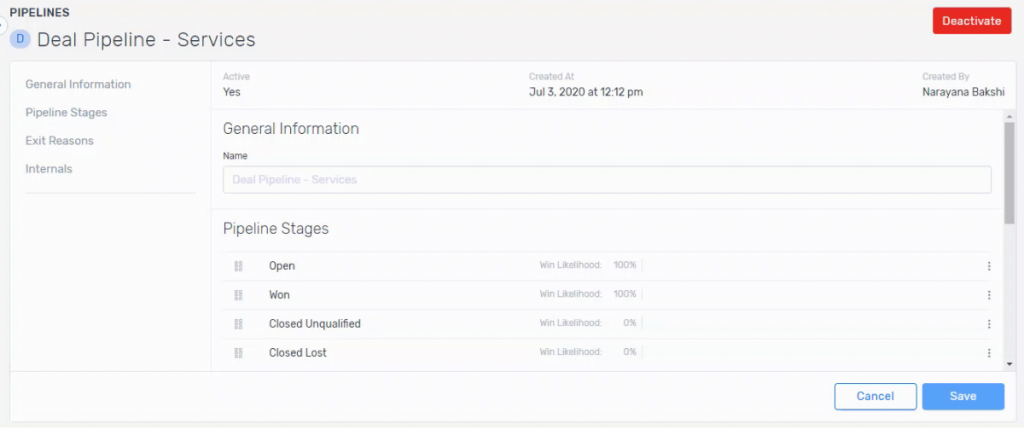
I came across Kylas when evaluating options for a mid-sized agency that was adding three agents in a quarter. Most CRM platforms at that growth rate become expensive fast, each new user seat adds to the monthly bill. Kylas’s flat-rate pricing model (unlimited users from a single plan) changed the math entirely. For agency owners thinking about team growth, that’s a meaningful structural advantage.
The CRM itself covers the core bases well, including pipeline management, contact organization, activity tracking, and automation. Dashboards are customizable, and the team collaboration features kept everyone aligned on which leads were being worked on without duplicating outreach. It’s not the most feature-rich tool on this list, but for agencies that prioritize scale without proportional cost increases, it does exactly what it needs to do.
Pros:
- Flat-rate pricing model supports unlimited users, ideal for growing teams
- Comprehensive sales automation for reducing manual administrative work
- Customizable dashboards showing the metrics that matter most to your agency
- Team collaboration tools that keep agents aligned on shared leads and clients
Cons:
- Fewer third-party integrations compared to larger CRM platforms
- Reporting features may feel limited for complex, multi-line insurance agencies
Pricing:
Starts at $250/month for unlimited users.
6. noCRM.io – Best for Sales Pipeline Simplicity
noCRM.io is a lightweight, sales-first CRM that strips away complexity and focuses on one thing: helping agents track their leads and close more deals with as little friction as possible.
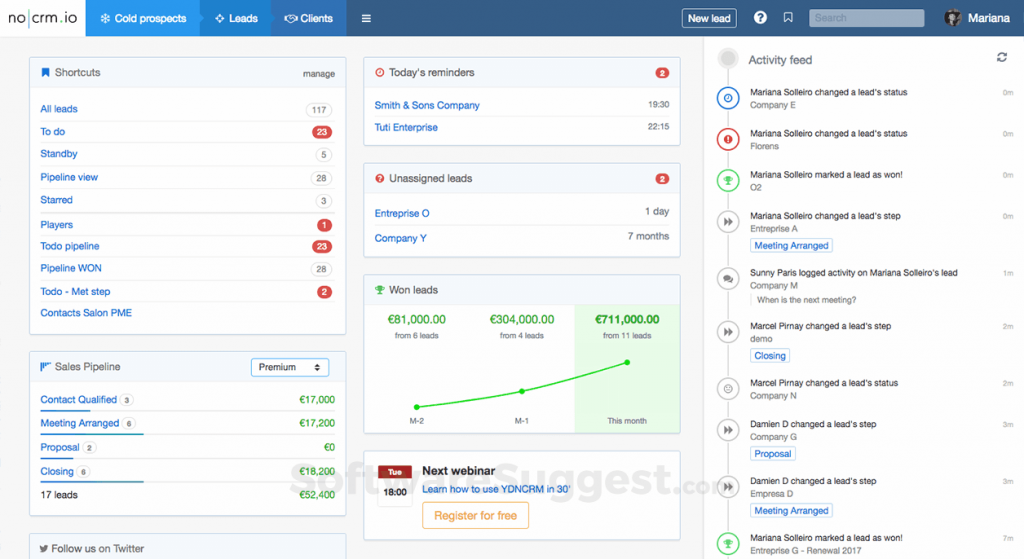
I tested noCRM.io when looking for an option a first-time CRM user could pick up in under 30 minutes — and it delivered exactly that. The setup took about 20 minutes, the pipeline was live in another 10, and there was no moment where I had to stop and figure out where something was. For an independent agent who’s been managing their book in a spreadsheet and knows they need to do better, this is the most approachable step up.
The lead-centric design means every action is oriented around moving a prospect forward — not logging activities for their own sake. The pipeline stages are fully customizable, the mobile app is clean, and the quick follow-up prompts make it easy to stay on top of a list of 50–100 active leads without feeling overwhelmed.
Pros:
- Extremely simple interface, no training required, live in under an hour
- Lead-centric design keeps focus on moving prospects through the pipeline
- Customizable pipeline stages that map to the insurance sales cycle
- Clean mobile app for managing leads from the field
Cons:
- Lacks advanced features needed by larger or multi-agent agencies
- Limited integration options compared to full-featured CRM platforms
Pricing:
Starts at $18/user/month.
7. Creatio – Best for AI Agents in Insurance Workflows
Creatio is an AI-native CRM and workflow platform, and it’s the one tool on this list where I found AI agents doing real work inside insurance processes instead of just drafting emails or summarizing notes. I watched agents triage and route incoming claims, check submitted data against policy records, flag inconsistent or high-risk cases, and summarize case history for whoever picks the file up next.
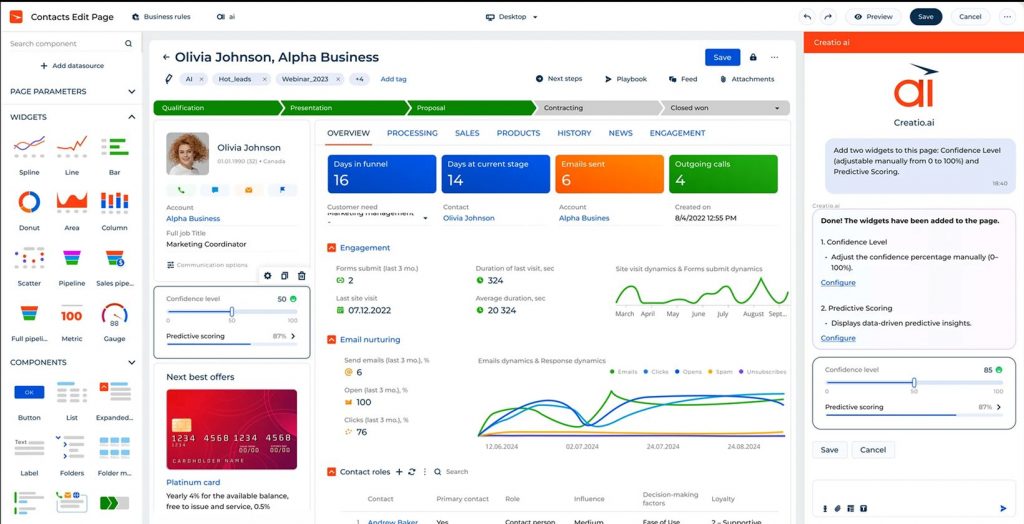
On the sales side, they surface cross-sell and renewal openings out of a client’s existing coverage. What reassured me most is that approvals and final calls still sit with a person at every step.
What sold me beyond the AI, though, is how insurance-specific the underlying workflows are. Alongside the lead, quote, and renewal management you’d expect, I could follow a policy through its full lifecycle and a claim from first notice of loss all the way to settlement, on one customer record. And when I wanted to change a process, I did it in a drag-and-drop designer rather than filing a ticket. Insurance users include MetLife, WTW, Ringler Associates, Saskatchewan Blue Cross, and Heritage Life Insurance.
Pros:
- AI agents embedded directly in claims, underwriting, and renewal workflows, with human-in-the-loop control over approvals
- Native insurance processes for policy administration and claims handling, not a general CRM bent into shape
- No-code builders that let agency teams adjust workflows, forms, and rules without developer help
- Self-service portals for policyholders and agents, a mobile app for field adjusters, and role-based access, encryption, and audit trails for compliance work
Cons:
- Built for mid-sized and larger agencies, brokerages, and carriers — more platform than a solo agent needs
- Pricing stacks, since the platform license and each CRM product are separate line items, so budgeting takes a scoping conversation
Pricing:
Starts at $40/user/month.
How Did I Evaluate the Best CRMs for Insurance Agents?
Picking the right CRM for insurance agents isn’t something I took lightly. With so many tools claiming to be “the best,” I needed a framework that cut through the marketing and focused on what actually matters for an agent managing a real book of business. Here’s the six-factor approach I used to evaluate every tool on this list:
- User Reviews and Ratings: I looked at what actual insurance agents and agency owners had to say on platforms like G2, Capterra, and industry forums, not just star ratings, but the specific complaints and praise that reveal how a tool performs in day-to-day use.
- Essential Features and Functionality: I assessed whether each CRM covers the core jobs an insurance agent needs: contact management, policy renewal reminders, pipeline tracking, email marketing, and activity logging. Tools that required extensive third-party workarounds to handle basic insurance workflows were marked down.
- Ease of Use: A CRM that takes weeks to learn is a CRM most agents won’t fully adopt. I paid close attention to how quickly a solo agent or small team could get set up and start using the tool productively, without needing an IT background.
- Customer Support: Insurance agents can’t afford to be stuck waiting on a support ticket during renewal season. I evaluated how each platform handles onboarding, troubleshooting, and ongoing support, including whether live chat or phone support is available when you actually need it.
- Value for Money: I compared what each tool delivers against what it charges, especially for the independent agent and small agency audience who can’t justify bloated enterprise pricing. The goal was to find tools where the cost is proportional to the real-world productivity gain.
- Personal Experience and Expert Opinions: Where I’ve personally tested or used a tool, I’ve drawn on that experience directly. I also factored in perspectives from insurance professionals and CRM experts who’ve evaluated these platforms in the context of agent workflows specifically.
My Top 3 Picks for the Best CRM for Insurance Agents
After testing all six tools against real insurance agent workflows, these three stood out the most. Each earns its spot for a different reason, so the right pick depends on where you are right now.
1. BIGContacts
BIGContacts is my top pick for independent agents and small agencies. What sets it apart isn’t any single feature, it’s how well everything works together out of the box. Contact management, drip email campaigns, pipeline tracking, task reminders, and 24/7 support are all included without needing add-ons or complicated setup. For an agent who wants to get organized fast and stay that way without a steep learning curve, BIGContacts is the most practical starting point on this list.
2. Salesmate
Salesmate earns the second spot for agents who prioritize lead management and outbound outreach. The built-in calling feature alone separates it from most tools on this list. Being able to dial a client, record the call, and log a timestamped note all from within the same contact record removes a real daily friction point for agents working through a long follow-up queue.
3. Monday CRM
Monday CRM is the strongest choice for agency owners who need visibility across a team. The visual board layout makes it easy to see exactly where every lead and active client sits in the pipeline at any given moment, which matters when you’re managing multiple agents and need to spot bottlenecks fast. Its flexibility also means you can build separate boards for new business, renewals, and service requests without the system feeling cluttered.
What Are the Biggest Challenges Insurance Agents Face Without a CRM?
Without a CRM, insurance agents rely on fragmented tools, email inboxes, spreadsheets, and calendars that don’t talk to each other. The result is missed renewals, slow follow-ups, and a client experience that feels disorganized.
Here’s the problem breakdown agents face most:
- Missed Policy Renewals: Manual renewal tracking across dozens of clients means deadlines slip. A missed renewal isn’t just a dissatisfied client; it’s a policy that lapses and revenue that walks out the door.
- Follow-Up Failure: According to a study by Harvard Business Review in 2021, agents who follow up within five minutes of a new lead inquiry are 21 times more likely to qualify that lead than those who wait 30 minutes. Most agents without a CRM fall into the 30-minute (or 30-day) bucket.
- Scattered Client Data: Client information lives in email, sticky notes, personal calendars, and shared spreadsheets. When a client calls with a question, the agent can’t pull up a full picture immediately, and that erodes trust fast.
- No Pipeline Visibility: Agents managing 100+ clients and prospects have no easy way to see what stage each relationship is in. Without a sales pipeline view, high-value opportunities get treated the same as cold leads.
- Cross-Sell Blindness: Insurance agents leave significant revenue on the table by not proactively identifying clients who need additional coverage. A CRM’s tagging and segmentation features surface these opportunities automatically.
- Administrative Overload: A study by Businessnext in 2024 found that insurance agents save 10–15 hours per week on administrative tasks after implementing a CRM. That’s nearly two full workdays reclaimed every week.
How Does a CRM for Insurance Agents Actually Work?
An insurance CRM follows a five-step workflow that maps directly to the agent sales cycle — from capturing a lead to tracking long-term policy renewals.
Here’s how the process works in practice:
- Lead Capture: Leads from website forms, referrals, or third-party platforms automatically enter the CRM and are assigned to a pipeline stage.
- Contact Enrichment: The agent logs policy interest, coverage needs, carrier preferences, and personal notes into the contact record.
- Pipeline Management: The lead moves through defined stages: Prospect → Quote Sent → Application In Progress → Policy Bound → Active Client.
- Automated Follow-Ups: The CRM triggers reminder emails, texts, or task alerts at pre-set intervals so no lead goes cold.
- Renewal Automation: When a policy’s renewal date approaches (typically 60–90 days out), the CRM sends the agent a task and the client a personalized renewal reminder.
- Reporting: Dashboards show retention rates, pipeline value, open tasks, and campaign performance, so the agent always knows what’s working.
What Are the Must-Have Features in Insurance CRM Software?
The best insurance CRM software includes these core features: contact management, policy renewal automation, sales pipeline tracking, email marketing, mobile access, and integration with your existing tools.
Most CRM buyers make the mistake of evaluating tools on feature count. What actually matters is whether the specific features an insurance agent relies on every day are built-in, easy to use, and don’t require third-party workarounds to function. Here’s a detailed breakdown of what to look for and why each feature matters for your workflow:
1. Contact Management
This is the foundation of any insurance CRM. It goes beyond storing a name and phone number. A proper contact management system for insurance stores the policyholder’s full profile, including policy type (auto, life, health, home, commercial), carrier name, coverage amount, premium, beneficiary details, household members, and the complete history of every interaction you’ve had with them.
When a client calls mid-conversation, you should be able to pull up their entire record in under 10 seconds. If you can’t, your CRM is just an expensive phonebook.
Look for CRMs that let you create custom fields so you can add insurance-specific data points that generic tools don’t include by default. Also, check whether it supports contact linking, meaning you can group a spouse, business partner, or dependent under the same parent account.
2. Policy Renewal Reminders
Renewals are the single highest-value activity in an insurance agent’s calendar, and they’re also the easiest to miss at scale. A good insurance CRM tracks the expiration date of every policy in your book and automatically triggers reminders at 90 days, 60 days, and 30 days before renewal.
The agent gets a task in their queue. The client gets a personalized email. Neither has to rely on memory or a manual calendar check.
Without this feature running automatically, agents managing 300+ policies are always playing catch-up. With it, renewal conversations happen proactively and feel like relationship touchpoints rather than last-minute scrambles.
3. Sales Pipeline Tracking
An insurance agent’s sales process has multiple distinct stages: a prospect expressing initial interest is not the same as a client who has received a quote, and neither is the same as someone whose application is in underwriting.
A CRM pipeline gives you a visual board where each contact sits in the right stage, making it immediately obvious where the bottlenecks are and which opportunities need attention today.
This also helps agency owners see team-level performance at a glance: how many quotes went out this week, how many applications are pending, and what the projected close rate looks like for the month.
3. Email Marketing and Drip Campaigns
The agents who grow their book fastest aren’t the ones who make the most cold calls. They’re the ones who stay in front of their existing clients consistently, without it feeling like a sales pitch every time.
A CRM with built-in email marketing lets you build drip sequences for renewal outreach, cross-sell campaigns by policy type, birthday and anniversary messages, and check-in campaigns for clients you haven’t spoken to in 90+ days.
Segmentation is the key feature here. You should be able to filter your contact list by policy type, renewal date range, geographic location, or any custom tag you’ve created, and send targeted messages to that segment in a few clicks. Mass emails sent to your whole book with no personalization get ignored. Segmented, timely emails get responses.
4. Task and Activity Logging
Every call, email, meeting, and note should be automatically or manually logged against the contact record and time-stamped. This serves two purposes. First, it means any agent on your team can pick up a conversation exactly where it left off without asking the client to repeat themselves.
Second, it creates a full audit trail that supports Errors and Omissions (E&O) compliance, which matters significantly in regulated insurance markets.
Look for CRMs that offer activity tracking with due-date reminders, so tasks don’t fall off your radar even during a busy renewal season.
5. Custom Fields
Generic CRMs are built for generic sales teams. An insurance agent’s contact record needs fields that don’t exist in an out-of-the-box setup: policy number, carrier name, coverage type, premium amount, deductible, expiration date, and agent license number, among others.
The ability to add custom fields without developer help is non-negotiable. If a CRM forces you to cram policy details into the “notes” field, it’s going to create confusion at exactly the moments when you need clarity.
6. Mobile Access
Insurance agents frequently meet clients at their office, home, or a coffee shop. A CRM that only works well on a desktop is a CRM you’ll stop using the moment you’re in the field.
The mobile app needs to let you pull up a client record mid-conversation, log a call note before you get back in the car, and send a quick follow-up email without opening a laptop. If the mobile experience is a stripped-down version of the real thing, treat that as a significant limitation.
7. Integrations
The best CRM integration strategy for insurance agents is one that doesn’t require juggling five tabs. Your CRM should connect directly to your email client (Gmail or Outlook) so emails are automatically logged against contact records.
Calendar integration means scheduled appointments show up in the CRM timeline. If you use a marketing tool like Mailchimp for newsletter campaigns, a native or Zapier-based integration keeps both systems in sync without manual data entry.
How Does a CRM for Insurance Agents Compare to a Spreadsheet?
A spreadsheet is a static list. A CRM for insurance agents is a live system that tracks, reminds, automates, and reports, eliminating the manual work that causes agents to lose leads and miss renewals.
| Feature | Spreadsheet | Insurance CRM |
| Policy renewal reminders | Manual: you have to check | Automated, system alerts you |
| Follow-up tracking | Easy to forget | Task queue with due dates |
| Client communication history | Not stored | Full timeline per contact |
| Email campaigns | Requires a separate tool | Built-in with segmentation |
| Pipeline visibility | No structure | Visual stages with deal value |
| Team access | Version control issues | Real-time shared access |
| Lead scoring | Manual ranking | Automated by activity |
| Mobile access | Limited and clunky | Full app with offline notes |
The agents who stay on spreadsheets aren’t doing so because spreadsheets are better. They do it because switching feels like a project. The reality is that most modern CRMs, including BIGContacts by ProProfs, offer a contact import from Excel or CSV in under 10 minutes.
How to Choose the Right CRM for Insurance Agents?
Choosing the right insurance CRM comes down to matching the tool’s strengths to your specific workflow, solo agent vs. agency team, simple contact management vs. full pipeline automation, and budget-conscious vs. feature-rich.
Follow this decision framework:
- Define Your Biggest Pain Point First: Is it missed renewals? Disorganized contacts? No visibility into your pipeline? The answer narrows your options immediately.
- Set A Realistic Budget: Most independent agents and small agencies operate best on tools in the $10–$50/user/month range. Enterprise tools often go unused because they require too much setup.
- Check For Insurance-Relevant Fields: Can you add policy type, carrier name, renewal date, and coverage amount as contact fields? If not, the tool will create workarounds, not solutions.
- Test The Automation: Run a free trial and set up a simple renewal reminder workflow. If it takes more than 20 minutes to configure, it’s probably too complex for daily use.
- Verify Mobile Usability: If you meet clients in the field, you need a mobile app that works in real time, not just a stripped-down view of your desktop.
- Ask About Data Import: If you have an existing spreadsheet or are migrating from another CRM, confirm how easy the import process is before signing up.
- Check Support Options: For agents who aren’t technical, live chat or phone support is not optional, especially during the first 30 days.
Choose the Right CRM for Insurance Agents and Never Miss a Renewal Again
Every renewal you miss, and every follow-up that falls through the cracks is revenue that walks to a competitor. The insurance agents who consistently outperform their peers aren’t necessarily better at selling; they’re better at staying organized, staying proactive, and showing up for clients at the right moment.
A CRM for insurance agents makes that consistency automatic. It does the remembering so you can focus on the relationships. And the barrier to getting started is lower than most agents think. Most of these tools offer a free trial, and some don’t require a credit card at all.
For independent agents and small agencies looking for the simplest, most affordable place to start, a tool like BIGContacts makes it easy to centralize your client data, automate your follow-ups, and run email campaigns, all without hours of onboarding or a big software budget. The forever-free plan means there’s no reason to wait.
Frequently Asked Questions
What is the best CRM for independent insurance agents?
BIGContacts is one of the best options for independent insurance agents because it combines contact management, email marketing, and pipeline tracking in one affordable tool — with a forever-free plan for small teams and paid plans starting at $9.99/month.
What features should an insurance CRM have?
An insurance CRM should include policy renewal reminders, lead pipeline tracking, contact management with custom fields, email marketing with drip campaigns, mobile access, activity logging, and integration with your email client. These features cover the core workflow of any insurance agent.
Can I use a general CRM for insurance, or do I need an industry-specific one?
You can use a general CRM for insurance if it allows custom fields for policy data, configurable pipelines, and automation for renewal reminders. Tools like BIGContacts, Salesmate, and Monday CRM work well for insurance agents with some initial configuration.
How much does an insurance CRM cost?
Insurance CRM pricing ranges from free (BIGContacts' forever-free plan) to $29–$100/user/month for full-featured platforms. Most independent agents and small agencies find tools in the $10–$30/user/month range sufficient for their needs.
How does a CRM help insurance agents with policy renewals?
A CRM automates policy renewal reminders by tracking each policy's expiration date and sending alerts to the agent and the client at pre-set intervals, typically 90, 60, and 30 days before renewal. This eliminates manual calendar tracking and ensures no renewal goes unattended.
What is the best free CRM for insurance agents?
BIGContacts offers a forever-free plan for small teams that includes contact management, basic email marketing, and task tracking, making it the most complete free option specifically suited for insurance agents.
How do I switch from a spreadsheet to a CRM for insurance?
Most CRMs allow you to import contacts from a CSV or Excel file. Clean your spreadsheet first, ensure contact names, email addresses, policy types, and renewal dates are in separate columns, then use the CRM's import wizard. The process typically takes 15–30 minutes.
Is a CRM useful for life insurance agents specifically?
A CRM is especially valuable for life insurance agents who manage long-term policyholder relationships, track beneficiary information, and handle complex household coverage needs. Key features for life agents include household linking, policy history tracking, and automated anniversary or milestone reminders.
Can a CRM help with cross-selling insurance policies?
A CRM helps with cross-selling by letting agents tag clients by current coverage type and run targeted email campaigns to specific segments, for example, reaching out to all auto insurance clients about home or umbrella coverage. Segmentation and drip campaigns are the two features that make cross-selling systematic rather than ad hoc.
How long does it take to set up an insurance CRM?
Simple CRMs like noCRM.io and BIGContacts can be set up and live in under an hour. More complex platforms like Zendesk or Salesforce may require days to weeks of configuration. For most independent agents, a tool you can use today is more valuable than a sophisticated system you'll configure for a month.
Does CRM software help with insurance compliance?
Some CRMs offer activity logging and audit trails that support E&O (Errors & Omissions) compliance by documenting every client interaction. For agents in regulated markets, look specifically for CRMs that time-stamp all emails, calls, and notes and allow you to export that data for audits.
What is the difference between an insurance crm and an agency management system (ams)?
An AMS (Agency Management System) is built for full back-office operations, policy issuance, commission tracking, and carrier integration. A CRM for insurance agents focuses on the sales and relationship side: leads, pipeline, communication history, and renewals. Many agencies use both, or choose a CRM first and add an AMS as they scale.
FREE. All Features. FOREVER!
Try our Forever FREE account with all premium features!