

If you run a business, there are good chances you’ve faced this.
Monday morning, someone calls in to reschedule. You check your notebook. Your colleague already moved that slot in Outlook. Now you’ve double-booked a client and spent twenty minutes untangling it before 9 AM. If online scheduling software had been in place, none of that would have happened.
I’ve spent years watching teams operate on spreadsheets, sticky notes, and shared inboxes that weren’t built for coordination. The pattern is always the same: things work until they don’t, and then they really don’t. A study by G2 in 2024 shows that businesses using automated scheduling tools report a significant reduction in no-shows and a measurable increase in booked appointments simply because clients can self-book around the clock.
In this guide, I’ll walk you through the six best tools for online appointment scheduling, what to look for when choosing one, and how to match the right software to your business size and workflow. Whether you’re a solo consultant, a healthcare admin managing a busy clinic, or a team leader coordinating across locations, there’s a tool here that fits.
What Is Online Scheduling Software and How Does It Work?
Online scheduling software is a platform that automates the entire appointment booking process, from showing your real-time availability to sending confirmation emails and reminders. It replaces manual calendar management with a centralized, self-service system that works 24/7.
Here is how a typical online appointment scheduling workflow runs:
- Set your availability. Define your working hours, block off breaks, and mark days you are unavailable.
- Share your booking link. Send it via email, embed it on your website, or add it to your social profiles.
- Clients self-book. They see your real-time calendar and pick a slot that works for them with no calls and no back-and-forth.
- Automatic confirmations go out. Both you and the client receive an instant confirmation with all the details.
- Reminders fire automatically. The system sends email or SMS reminders before the appointment, cutting no-shows.
- Your calendar updates in real time. Cancellations and reschedules reflect instantly, so you always have an accurate view.
The result: fewer scheduling conflicts, less admin time, and a more professional experience for your clients.
Why Does Your Business Need an Appointment Scheduler?
Most small teams still rely on a patchwork of tools: a shared Outlook calendar, a spreadsheet of contacts, and a group chat to coordinate. It works until the team grows, a key tool gets discontinued, or a client slips through the gap between three systems. If you’ve been looking at ways to organize your customer information more efficiently, scheduling is one of the fastest places to start.
Here are the core problems solved by a scheduling app for business:
- Double bookings caused by multiple people editing the same calendar
- No-shows that happen because reminders were never sent
- Lost leads when clients can only book during business hours, and no one picks up the phone
- Admin overload from manual confirmation emails, reschedule requests, and follow-ups
- Team coordination gaps where one person’s availability is unknown to everyone else
- Fragmented client data spread across sticky notes, email threads, and notebooks
The best scheduling app for small businesses brings all of this into one place. According to a study by Statista in 2023, over 67% of consumers prefer to book appointments online rather than by phone, meaning if your business doesn’t offer self-booking, you are likely losing clients to competitors that do.
6 Best Online Scheduling Software Tools
To build this list, I evaluated each tool across ease of use, scheduling features, calendar integrations, team support, pricing, and scalability. I focused on tools that serve small businesses and growing teams, not enterprise platforms that require IT teams to set up. The first position goes to the tool that fits the broadest range of small business needs.
| Tool | Best For | Pricing |
| BIGContacts | Contact Management & Email Marketing for Growing Businesses | Forever free for small teams. Paid starts at $9.99/month. |
| SimplyBook.me | Client Management + Multi-Channel Booking | Starts at $10.4/month |
| Zendesk | AI-Based Automation + Customer Service | Starts at $19/month |
| EngageBay | Marketing Automation + Appointment Booking | Starts at $14.9/user/month |
| YouCanBookMe | Team Booking + Multi-User Scheduling | Starts at $9/user/month |
| HubSpot | Centralized Sales, Marketing, and Support | Starts at $15/user/month |
1. BIGContacts – Best for Contact Management & Email Marketing for Growing Businesses
BIGContacts is a simple, affordable CRM built for growing small businesses, with contact management, email marketing, task automation, appointment scheduling, and sales pipeline tracking in one place. It is the only tool on this list that gives you a forever-free plan with real scheduling capability baked in.
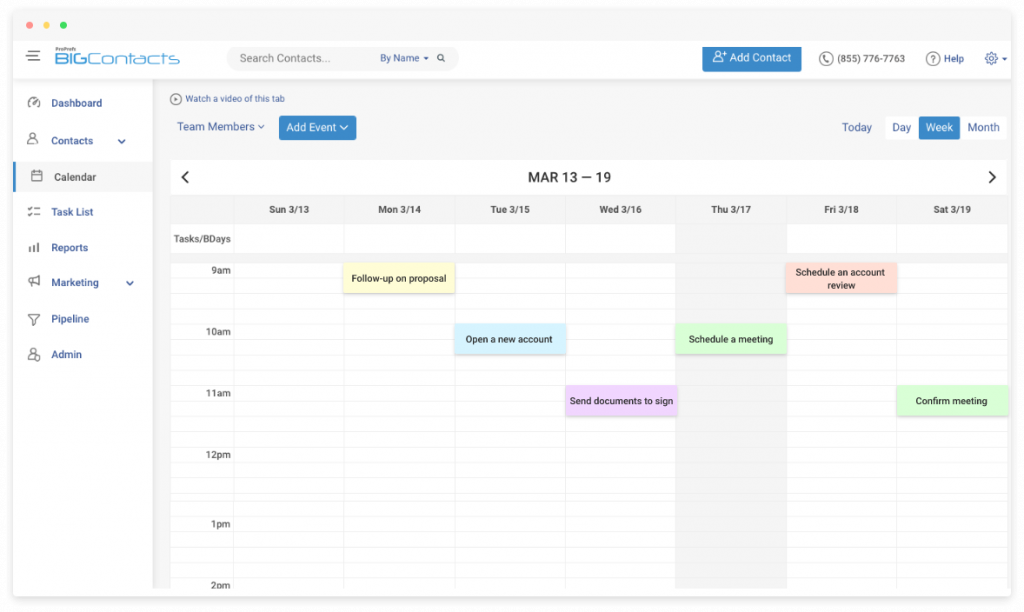
I use BIGContacts daily to manage client appointments alongside contact records and follow-up tasks, and it has replaced what used to be a three-tool stack for me. The calendar syncs with both Google and Office 365, which means I never have to check two places before confirming a slot. What makes it stand out from pure scheduling apps is the context it gives you: when an appointment is on the calendar, the full client history, including emails, notes, and previous meetings, is right there next to it. You can also track meetings and calendar events alongside all your other contact activity, which matters when you’re walking into a call.
The shared calendar view is especially useful for teams. Every member can see who’s booked when, assign meetings to the right person, and set reminders without any manual coordination. I’ve used it for teams of two and teams of twenty, and the experience holds up at both ends.
Pros:
- Syncs with Google Calendar and Office 365 in real time, eliminating double bookings across the team
- Shared and individual calendar views let multiple users manage schedules from one dashboard
- Automated meeting reminders sent via email reduce no-show rates without manual follow-up
- Custom fields let you capture specific appointment details relevant to your service or industry
- 24/7 human support via phone, chat, and knowledge base
Cons:
- No downloadable or on-premise version
- Dark user interface option not available
Pricing:
A free plan is available for growing teams. Paid starts at $9.99/month.
2. SimplyBook.me – Best for Client Management and Multi-Channel Booking
SimplyBook.me was one of the first appointment scheduling tools I set up for a service-based client, and it handled multi-channel bookings better than anything else I tested at the time. Clients could book directly through the website, Facebook page, and Instagram, and everything landed in one calendar without any manual syncing required.
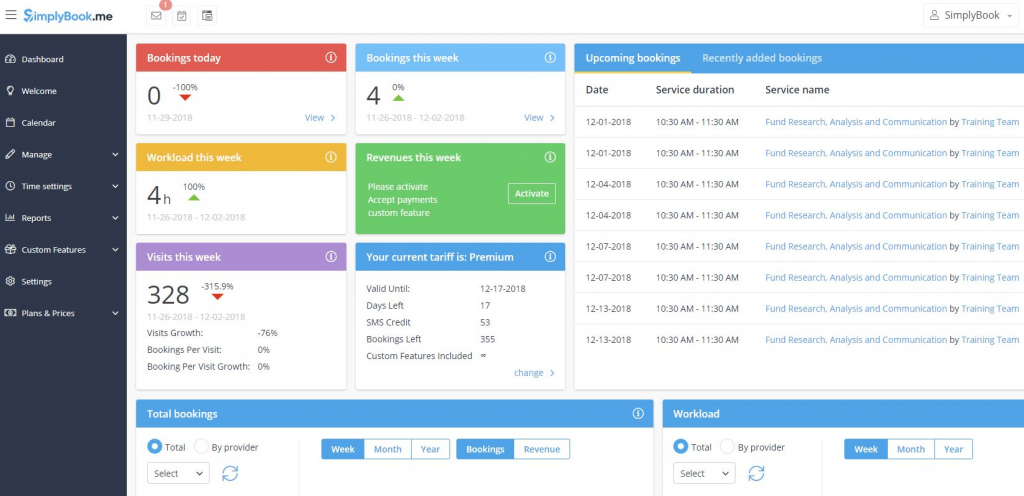
Image source: G2
The automated SMS and email confirmations went out without any prompting, which my client’s customers clearly appreciated. The integration with Google Calendar kept everything accurate, and the built-in PayPal and Stripe support meant payments were collected at the time of booking.
For businesses running recurring sessions or group classes, the membership and class scheduling features saved hours of admin work each week.
Pros:
- Multi-channel booking accepts appointments from the website, Facebook, and Instagram in one place
- Extensive payment gateway support including PayPal and Stripe for seamless transactions at booking
- Automated SMS and email reminders significantly reduce no-show rates
- The class and membership scheduling system handles recurring and group appointments efficiently
Cons:
- Mobile app performance has received mixed reviews from users, particularly for on-the-go schedule management
- The feature library is large and can feel overwhelming for very small teams with simple needs
Pricing:
Starts at $10.4/month.
3. Zendesk – Best for AI-Based Automation and Customer Service Integration
A colleague pointed me toward Zendesk when I was helping a growing support team manage both client inquiries and appointment bookings from the same inbox. What I didn’t expect was how naturally the scheduling piece fit into the support workflow and how it removed the handoff between booking a time and confirming it.
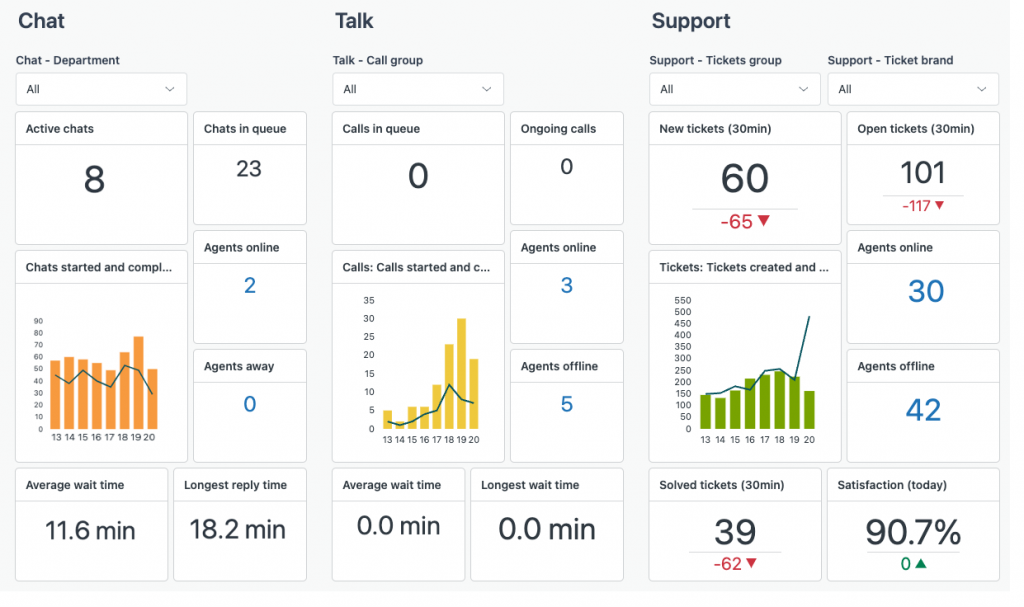
I set up a booking page connected to the team’s Zendesk instance, and customers could pick a time without ever calling or emailing. Confirmation and follow-up notifications went out automatically, and the AI-powered ticket routing handled inquiry prioritization in the background.
For teams where scheduling and customer service overlap, such as clinics, legal offices, and consulting firms, this combination removes a lot of friction. If you’re interested in how CRM tools can further support this kind of setup, the guide on CRM for customer service is worth a read.
Pros:
- AI-powered chatbots automate routine inquiries and reduce response time for booking-related questions
- Custom ticket forms gather client information upfront, reducing back-and-forth before appointments
- Collaboration tools, including internal notes and shared ownership, keep teams aligned
- Customizable dashboards and reporting give insight into booking volume, team performance, and satisfaction scores
Cons:
- Entry pricing is higher than standalone scheduling apps, making it less cost-effective for very small teams
- Scheduling is a secondary feature; businesses with high appointment volume may need a dedicated tool alongside it
Pricing:
Starts at $19/month.
4. EngageBay – Best for Marketing Automation and Appointment Booking
EngageBay came onto my radar when I was helping a solo consultant who needed a tool that could run email campaigns and handle appointment bookings without requiring two separate subscriptions. It delivered on both fronts without being complicated about it.
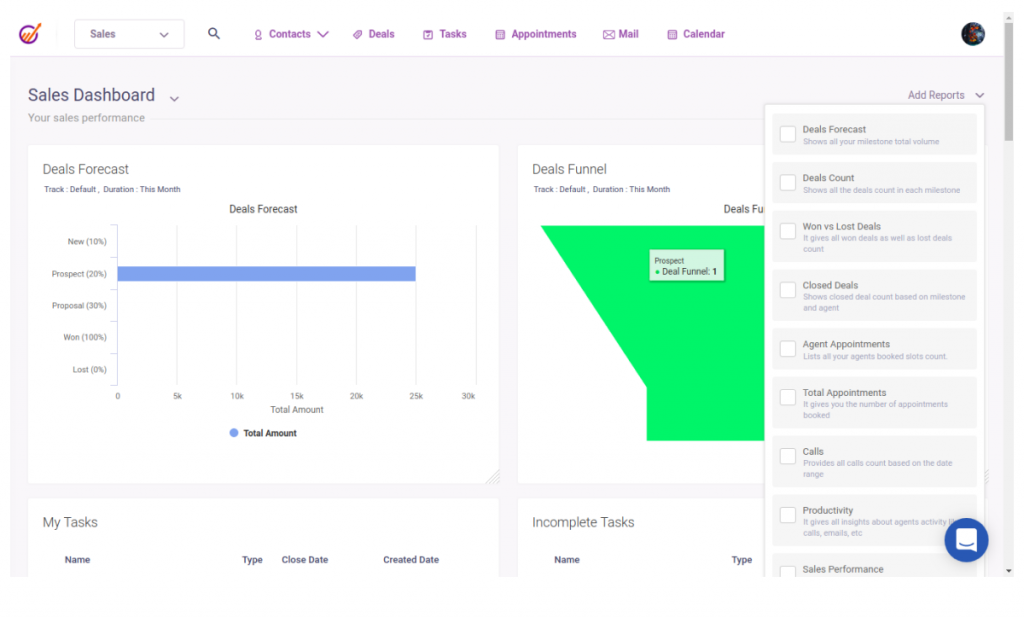
The drag-and-drop workflow builder let me set up a lead nurturing sequence in about an hour, and the booking widget embedded directly on the website gave prospects a way to schedule a consultation without any back-and-forth. The Google Calendar sync prevented double bookings, which had been a persistent problem.
For a one-person business or a small marketing team juggling outreach and scheduling simultaneously, EngageBay is one of the most practical all-in-one options available.
Pros:
- Drag-and-drop workflow builder creates automated marketing sequences without coding knowledge
- Booking widget embeds directly on the website or is shareable via a direct link in emails and messages
- Google Calendar sync prevents double bookings in real time
- Milestone tracking feature monitors marketing campaign progress and sales goals
Cons:
- Reporting and analytics features are less advanced compared to dedicated marketing platforms
- Some integrations require a higher-tier plan to unlock
Pricing:
Starts at $14.9/user/month.
5. YouCanBookMe – Best for Team Booking and Multi-User Scheduling
Before I found YouCanBook.me, coordinating meetings across a five-person team meant a group chat thread, two calendar checks, and at least one mistake per week. That changed the moment we gave each team member a personalized booking page.
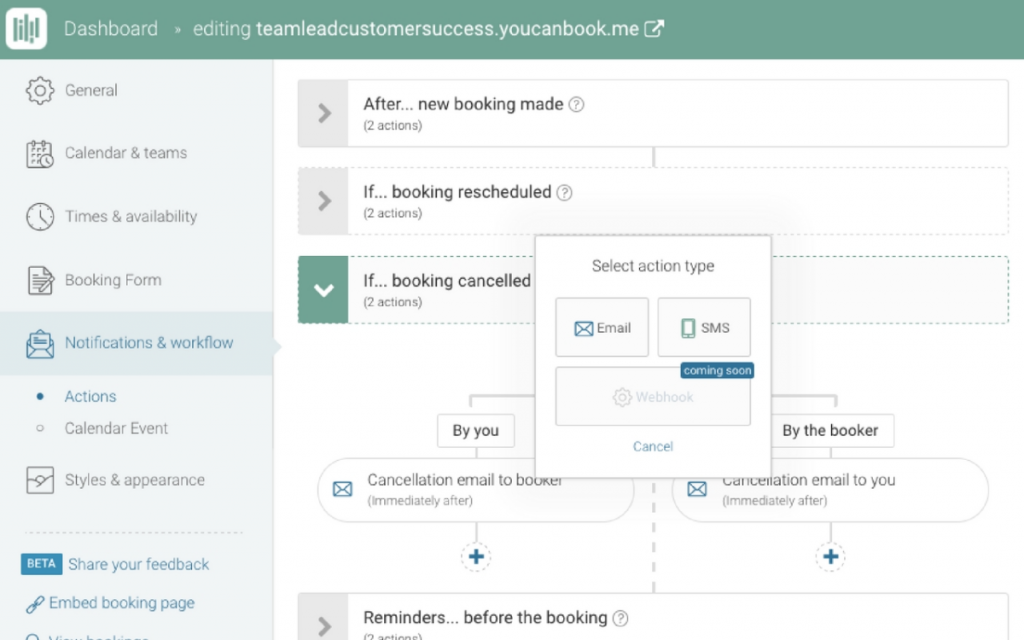
Image source: YouCanBookMe
Clients could see exactly who was available and when, without needing to copy everyone on an email chain. The round-robin booking feature distributed appointments fairly across the team, and buffer times between meetings meant no one was jumping from call to call without a break. The Zoom and Microsoft Teams integrations handled virtual meeting setup automatically, which saved another five minutes per booking.
Pros:
- Personalized booking pages for each team member show real-time individual availability
- Multiple calendar integrations, including Google Calendar, prevent scheduling conflicts automatically
- Payment processing built into the platform simplifies invoicing and reduces cancellation risk
- Group booking feature supports workshops and sessions where multiple clients book the same slot
Cons:
- Customization options for the booking page design are more limited compared to some competitors
- Users have reported occasional sync delays with third-party calendar integrations
Pricing:
Starts at $9/user/month.
6. HubSpot – Best for Centralized Sales, Marketing, and Support Operations
HubSpot was already part of a client’s stack when I started helping them streamline their inbound process. The appointment scheduling feature was one of the last things we turned on, and it turned out to be one of the highest-impact changes we made.
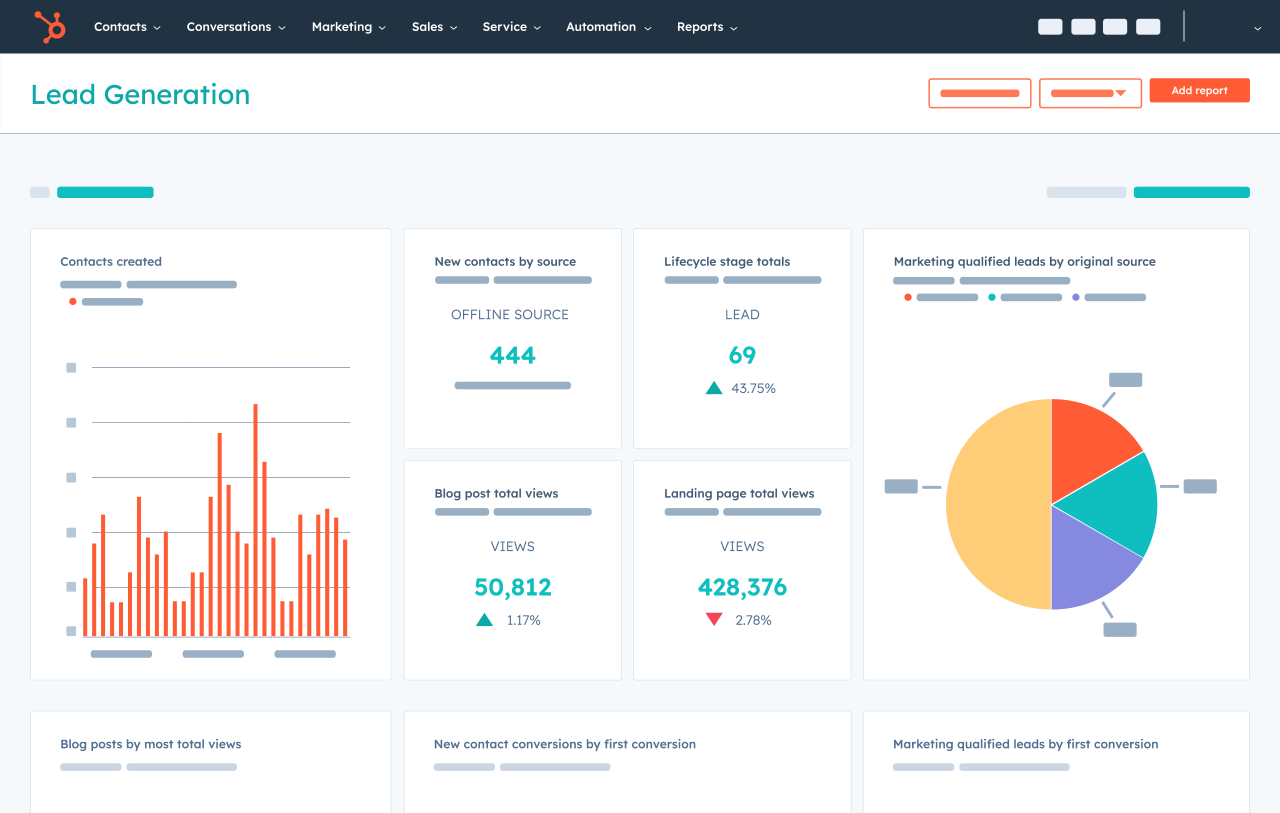
Adding a scheduling link to every follow-up email removed the “let me know when you’re free” exchange entirely. Prospects booked consultations directly from the email, those bookings synced to Google Calendar, and the full contact history in HubSpot meant no rep was walking into a call without context.
For teams where sales, marketing, and support all touch the same client journey, HubSpot’s scheduling feature is most powerful as the booking layer on top of an existing CRM workflow, not as a standalone scheduler.
Pros:
- Visual workflow builder automates lead nurturing sequences, notifications, and data updates
- Lead capture tools, including forms, pop-up CTAs, and live chat, connect bookings to the pipeline
- Sales pipeline management tracks every deal from first contact to close in one view
- Social media management allows teams to schedule and publish content across platforms from HubSpot
Cons:
- Full scheduling and CRM functionality require paid plans, which can get expensive quickly for small teams
- Platform complexity is high; many users report a long onboarding curve before getting full value
Pricing:
Starts at $15/user/month.
How Did I Evaluate These Online Scheduling Software Tools?
The evaluation of tools chosen for this article follows an unbiased, systematic approach that ensures a fair, insightful, and well-rounded review. I applied six criteria consistently across every tool to make sure this list reflects real-world scheduling needs, not just feature counts.
- User Reviews and Ratings: I looked at direct experiences from users, including verified ratings and feedback from reputable platforms like G2 and Capterra. Real user sentiment helps surface recurring friction points and consistent strengths that marketing copy tends to skip over.
- Essential Features and Functionality: I assessed each tool’s core scheduling capabilities, including calendar sync, automated reminders, multi-user support, and booking page customization. The focus was on whether a feature works reliably in daily use, not just whether it exists.
- Ease of Use: I evaluated how quickly a non-technical user could get the tool set up and running. For scheduling software specifically, a tool that your team or clients find confusing will go unused regardless of how powerful it is under the hood.
- Customer Support: The quality and responsiveness of support matter most during onboarding and when things go wrong. I considered what support channels each tool offers, whether live support is available, and how well they help users at different stages of adoption.
- Value for Money: I compared what each tool delivers against its pricing tier. For small businesses with tight budgets, a tool that charges extra for basic features like reminders or team calendars loses points here, even if the base price looks competitive. The guide on CRM pricing is a useful reference for understanding what fair pricing looks like across tiers.
- Personal Experience and Expert Opinion: This list draws on my own hands-on use of these tools across different business types, as well as insights from industry peers who manage scheduling workflows daily. Where I haven’t used a tool personally, I’ve validated observations through structured expert feedback.
What Are My Top 3 Picks for the Best Online Scheduling Software?
If you’re short on time and just want a quick recommendation, here are the three tools I’d point most small businesses toward first. Each one stands out in a different way depending on what your team actually needs.
1. BIGContacts
BIGContacts by ProProfs is my top pick for growing businesses that want scheduling built into a broader client management system. I currently use it to manage appointments, track contact history, and send follow-up emails from one dashboard. The forever-free plan makes it a low-risk starting point, and the Google and Office 365 calendar sync means there’s no manual updating between tools. For teams of two to twenty who are tired of juggling a scheduler, a CRM, and an email tool separately, BIGContacts handles all three without the bloat of enterprise software.
2. SimplyBook.me
SimplyBook.me is the tool I recommend most for service businesses that need clients to book across multiple channels. When I set it up for a client running a wellness studio, bookings started coming in through Instagram and Facebook within the first week without any extra configuration. The automated reminders and built-in payment support make it especially strong for businesses where no-shows and last-minute cancellations have a direct revenue impact.
3. YouCanBookMe
YouCanBookMe earns its spot for teams where multiple people manage their own schedules but need a shared, organized view. The round-robin booking and individual booking pages made a noticeable difference for a five-person consulting team I worked with, cutting the weekly scheduling coordination time from hours to minutes. If your biggest scheduling headache is internal team coordination rather than client-facing booking, this is the tool to look at first.
What Features Should You Look for in the Best Scheduling App for Growing Business?
The right appointment scheduling software does more than block calendar slots. Before you commit to a tool, check for these ten features that separate functional tools from ones that actually improve your workflow.
1. Customizable Booking Options
Your scheduling tool should let you set specific time slots, limit daily bookings, create recurring appointments, and adjust availability by service or team member. One-size-fits-all booking pages create friction for clients and confusion for your team.
2. Automated Reminders
Automated email and SMS reminders are the single fastest way to reduce no-shows. Look for tools that let you control the timing, channel, and recipient of every reminder rather than just sending a generic confirmation. This pairs well with a broader email drip campaign strategy that keeps clients engaged between appointments.
3. Calendar Integration
Seamless two-way sync with Google Calendar, Outlook, or Apple Calendar is non-negotiable. If changes in your scheduling tool don’t instantly reflect in your main calendar and vice versa, double bookings are inevitable.
4. Multi-User Support
If more than one person manages appointments, the tool needs to support individual availability settings, shared team calendars, and role-based access. This is the feature that separates personal scheduling apps from scheduling apps for business. It also connects directly to how well your team handles task tracking across the board.
5. Payment Integration
For service businesses that charge at booking, built-in payment support via Stripe or PayPal removes the friction of a separate invoicing step and reduces last-minute cancellations when a deposit is already collected.
6. AI-Powered Scheduling
Some tools now suggest optimal booking times based on past patterns and workload. AI scheduling features are especially useful for high-volume businesses where back-to-back meetings without strategic gaps reduce productivity.
7. Mobile Accessibility
Both your team and your clients book from phones. A mobile-responsive booking page and a functional mobile app are now baseline requirements, not optional extras. For teams that manage client relationships on the go, a mobile CRM that includes scheduling is worth prioritizing.
8. Client Management Features
The best scheduling software doubles as a lightweight client database. Storing contact details, appointment history, and preferences inside the tool means you always have context when a client books again. This is closely tied to solid contact management best practices that keep your data accurate and actionable.
9. Reporting and Analytics
Track booking volume, no-show rates, peak booking times, and cancellation patterns. This data helps you optimize your availability, plan staffing, and identify where bookings drop off in your funnel. Good CRM reporting practices apply directly here.
10. Centralized Scheduling and Communication
The strongest tools keep appointments, contact notes, email history, and reminders in one place. Context switching between a scheduler and a separate CRM wastes time and creates gaps in client communication.
How Does Online Scheduling Software Compare to Manual Booking?
Manual scheduling through phone calls, emails, or shared spreadsheets works at a very small scale. But it creates compounding problems as your team or client base grows.
| Factor | Manual Booking | Online Scheduling Software |
| Availability | Business hours only | 24/7 self-booking |
| Double bookings | Common with shared calendars | Eliminated by real-time sync |
| No-show rate | High without manual follow-up | Reduced by automated reminders |
| Team coordination | Email threads and calls | Centralized shared calendar |
| Client experience | Slow, requires back-and-forth | Instant confirmation, no friction |
| Admin time | High, multiple steps per booking | Low, fully automated workflow |
| Scalability | Breaks down as volume grows | Scales with your business |
| Data visibility | Scattered across tools | Centralized dashboard |
The clearest signal that a team needs scheduling software is when someone on the team spends more than 30 minutes per day managing bookings, reminders, or reschedule requests. That time compounds, and it is time that could go toward revenue-generating work.
How Do Different Industries Use Online Appointment Scheduling?
From healthcare clinics to fitness studios, appointment scheduling software is helping businesses across industries simplify bookings, reduce admin work, and deliver a more seamless experience to their clients. Here is how different sectors are putting it to work.
Healthcare: Managing Patient Flow Without Phone Overload
Clinics and medical practices use online appointment scheduling to let patients book, reschedule, and receive reminders without calling the front desk. Multiple provider calendars stay in sync, walk-in conflicts are reduced, and staff spend less time on administrative coordination.
Healthcare administrators who manage a high volume of daily appointments find that automated reminders alone reduce no-show rates significantly. The broader benefits of CRM-driven coordination in this space are covered in detail in the guide on CRM benefits in healthcare.
Real Estate: Simplifying Property Showings and Client Meetings
Real estate agents use scheduling apps to let buyers pick showing slots directly from a booking link with no phone tag and no missed callbacks. Agents share a single link in every listing, sync it to their Google Calendar, and show up to every meeting with the client details already loaded.
Consulting and Legal: Keeping Client Time Organized Across Time Zones
Consultants and legal professionals handle dozens of intake calls, case reviews, and follow-up meetings. Scheduling apps with personalized booking links, time-zone detection, and intake forms reduce the admin load before each call and ensure clients arrive prepared.
Salon and Spa: Filling Chairs and Managing Walk-Ins
Salons, barbershops, and wellness studios use online appointment scheduling to manage individual stylist availability, recurring client bookings, and waitlists. Clients book their preferred provider for a specific service, pay a deposit at booking to reduce no-shows, and receive reminders before their appointment.
For owners managing a team of providers, multi-user scheduling with individual calendars is the most-used feature.
HR and Recruitment: Coordinating Interviews Without the Back-and-Forth
HR professionals use scheduling apps to coordinate interview slots across candidates, hiring managers, and panel members. Round-robin and collective scheduling features eliminate the multi-email coordination loop and give candidates a professional, friction-free experience.
For teams hiring at volume, automated scheduling is one of the fastest ways to reduce time-to-interview. The guide on best recruitment CRM software covers how scheduling fits into the broader hiring workflow.
How Should You Choose the Right Online Scheduling Software for Your Business?
Choosing the best scheduling software comes down to matching the tool to how your business actually operates, not just picking the one with the most features.
Step 1: Define Your Scheduling Volume And Team Size
A solopreneur needs a simple booking page and reminders. A team of fifteen needs shared calendars, multi-user access, and role-based permissions. Start with team size and weekly booking volume before comparing features.
Step 2: List The Tools You Already Use
If your team lives in Google Workspace, you need Google Calendar integration. If your CRM is the hub of your client relationships, your scheduling tool should sync with it. Standalone tools that don’t connect to your existing stack create more manual work, not less. A good starting point is understanding CRM integration, so you know what to look for before you commit.
Step 3: Decide Whether You Need Client Management Alongside Scheduling
Pure scheduling apps handle bookings well. But if you need client history, notes, email follow-ups, and pipeline tracking alongside your appointments, a CRM with built-in scheduling like BIGContacts by ProProfs saves you from managing two separate tools.
Step 4: Check Pricing Against Your Actual Usage
Per-user pricing adds up quickly for larger teams. Flat-rate plans work better when your team is small but growing. Always check what features are gated behind paid plans; reminders, team calendars, and integrations are commonly restricted on free tiers.
Step 5: Test Before You Commit
Every tool on this list offers a free trial or free plan. Use it. Run a real booking through the system, check how reminders look to the recipient, and test the calendar sync before you ask your team or clients to use it. If you’re still narrowing down options, the guide on how to choose a CRM for small business walks through the same decision-making framework applied to scheduling and beyond.
What Are the Top Benefits of Using an Appointment Scheduling Software?
Appointment scheduling software does more than just help you book time. It helps you run your business more efficiently. Whether you’re working solo or managing a team, these tools bring structure, speed, and professionalism to how you handle appointments.
1. Saves Time Across the Entire Booking Lifecycle
Every automated confirmation, reminder, and calendar update is one less manual task. Teams that switch from manual booking to scheduling software consistently recover hours per week that had been spent on coordination, time that goes back into serving clients and growing the business.
2. Reduces No-Shows With Automatic Reminders
Clients forget appointments. Automated reminders sent via email or SMS at a set interval before the booking reduce no-show rates without requiring anyone to manually follow up. This single feature often justifies the cost of the tool on its own.
3. Improves the Client Experience
Letting clients book at 11 PM on a Tuesday, without waiting for a business-hours response, signals professionalism and respect for their time. Self-booking with instant confirmation is now what clients expect from service businesses. A strong scheduling setup feeds directly into improving the customer experience at every touchpoint.
4. Prevents Double Bookings at Scale
Real-time calendar sync means a slot that is taken is taken everywhere: on your scheduling page, in your calendar app, and in your team’s shared view. No more checking three places before confirming a time.
5. Improves Team Coordination Without Constant Check-ins
Individual availability, team-wide calendar visibility, and booking notifications keep everyone on the same page without requiring a group chat update for every booking. This matters most for teams of five or more managing overlapping client schedules. The connection between scheduling and broader team management is something growing teams quickly feel once they centralize their calendar.
6. Provides Data to Optimize Your Schedule and Staffing
Reporting features show you which time slots fill fastest, when no-shows are most common, and which team members have capacity. That data drives better decisions about availability, promotions, and team planning.
Start Booking Smarter With the Right Online Scheduling Software
The difference between a team that is constantly reacting to scheduling chaos and one that runs a predictable, organized calendar is almost always one tool. Not a bigger team, not a more complex process, just the right scheduling app in place.
If you are still managing appointments through a shared inbox, a spreadsheet, or a calendar app that was not built for client bookings, the ROI of switching to purpose-built online scheduling software is immediate. Fewer no-shows, less admin time, and a booking experience your clients will actually appreciate.
For small teams looking for a starting point that does not require a long setup or a large budget, a tool like BIGContacts by ProProfs makes it easy to combine scheduling, contact management, and follow-up communications in one place, with a forever-free plan that gives you a real starting point without a credit card.
Frequently Asked Questions
What is online scheduling software used for?
Online scheduling software is used to automate appointment bookings, send reminders, sync calendars, and manage client availability without manual coordination. It replaces phone calls and email chains with a self-service booking system that works around the clock.
What is the difference between scheduling software and a calendar app?
A calendar app stores events and appointments you enter manually. Scheduling software lets clients or team members book time with you directly, updates your calendar in real time, sends automated reminders, and manages availability rules, which is a fundamentally different workflow.
How much does online appointment scheduling software cost?
Most appointment scheduling tools start between $9 and $20 per user per month for paid plans. Free plans are widely available with limited features. BIGContacts offers a forever-free plan that includes scheduling alongside contact management, making it one of the most cost-effective options for small teams.
Can scheduling apps reduce no-shows?
Yes. Automated email and SMS reminders sent before appointments are the most effective tool for reducing no-shows. Studies from scheduling platforms consistently show that clients who receive a reminder before their appointment are significantly less likely to miss it.
What is the best scheduling app for small business teams?
The best scheduling app for small business teams depends on team size and use case. For teams that need scheduling alongside CRM and email follow-up, BIGContacts is a strong fit. For pure scheduling with multi-channel booking, SimplyBook.me works well. For teams already using HubSpot, its built-in scheduling feature adds convenience without a new tool.
Does online scheduling software integrate with google calendar?
Most modern scheduling apps integrate directly with Google Calendar and Outlook. This two-way sync means that bookings made through the scheduling tool update your main calendar instantly, and existing calendar events block off availability on your booking page.
Is online scheduling software suitable for solo professionals?
Scheduling software is highly effective for solo professionals including consultants, freelancers, coaches, and healthcare providers who manage their own calendars. A personal booking link with automated reminders removes the back-and-forth completely and projects a more professional image to clients.
Can appointment scheduling software accept payments?
Many scheduling apps support payment collection at the time of booking through integrations with Stripe and PayPal. Collecting a deposit or full payment during booking reduces last-minute cancellations and eliminates a separate invoicing step.
What is the best free scheduling software for small businesses?
BIGContacts offers a robust forever-free plan that includes appointment scheduling, contact management, and email marketing, making it a strong free option for small businesses. Calendly and HubSpot also offer free scheduling tiers with more limited features.
How does online scheduling software help healthcare businesses?
Healthcare providers use scheduling software to let patients book appointments online, receive reminders, and reschedule without calling the front desk. Multi-provider calendar support, automated reminders, and real-time availability management reduce no-shows and administrative overhead significantly.
What is round-robin scheduling?
Round-robin scheduling is a feature that distributes incoming appointment requests evenly across available team members. When a client books, the system automatically assigns them to the next available person in rotation, ensuring no single team member gets overloaded with bookings.
How long does it take to set up an online scheduling tool?
Most scheduling apps are set up in under an hour. You connect your calendar, set your availability, configure reminder settings, and share your booking link. Tools like BIGContacts and YouCanBookMe are designed for non-technical users and require no developer help to go live.
FREE. All Features. FOREVER!
Try our Forever FREE account with all premium features!