
Here’s what most CRM vendors won’t tell you: adding AI to a broken workflow does not fix the workflow. It just automates the mess.
But when AI in CRM is done right, it genuinely changes how a sales team operates. Contacts get updated automatically. Follow-ups fire without anyone remembering to send them. Deals at risk of going cold get flagged before they’re lost. The CRM stops feeling like a second job and starts doing the job itself.
I’ve spent time testing and researching AI CRM tools across small business and mid-market use cases, and the gap between tools that use AI as a marketing badge and tools that actually put it to work is significant. In this guide, I’ll cover the use cases that genuinely move the needle, call out where vendors hide AI features behind expensive tiers, and compare the 11 best AI CRM tools for 2026 so you can make a decision based on what actually works.
Here’s what we are going to cover:
- The highest-ROI AI CRM use cases for small teams are follow-up consistency, email segmentation, and automatic activity capture, not complex enterprise forecasting.
- Many vendors lock real AI features behind higher pricing tiers or add-ons, always check what’s included before you commit.
- AI works best as an assistant, not autopilot – human oversight still matters for customer-facing messages and decisions.
- If you’re moving off spreadsheets or switching from an overcomplicated tool, start simple: one workflow, one team, one measurable win.
What Is AI in CRM? (And What Does It Actually Do?)
Instead of manually logging every call, email, or meeting, an AI-powered CRM can capture that activity automatically. Instead of guessing which leads to calling first, it scores them based on engagement. Instead of writing the same follow-up email from scratch five times a week, it suggests a draft or sends it for you.
For growing businesses, the most practical AI CRM capabilities include:
- Automatic Activity Capture: emails, meetings, and calls logged without manual entry
- Follow-up Reminders: reminders and smart alerts so no lead goes cold by accident
- Contact Segmentation: grouping contacts by behavior, stage, or tags for targeted outreach
- Email Automation: drip sequences that send at the right time to the right segment
- Lead Scoring: ranking prospects by their likelihood to convert
- Sentiment Analysis: reading how customers feel based on email or chat language
- Predictive Analytics: forecasting deal outcomes and identifying churn risks early
The key word is practical. AI in CRM isn’t about replacing your sales team or reading minds. It’s about removing the invisible admin tax that eats your team’s week before any real selling even begins.
If you want a broader breakdown of core CRM capabilities before evaluating AI features, this guide to CRM features is a helpful place to start.
How Does AI Work in a CRM System? (Step-by-Step)
Here’s how AI in CRM systems actually functions, in plain language without the tech jargon.
Step 1: Data Collection
The AI pulls data from your emails, meetings, call logs, website behavior, and social interactions. Instead of you manually entering each touchpoint, the system captures it automatically. Some teams also enrich CRM records with external public-web signals, news mentions, and at scale, that pipeline relies on a web scraping proxy to pull data.
Step 2: Contact Segmentation
AI groups your contacts by shared traits such as purchase behavior, engagement level, industry, or deal stage. This makes it possible to send the right message to the right group without building lists by hand.
Step 3: Lead Scoring and Prioritization
AI assigns scores to leads based on how likely they are to convert. Your sales team sees a ranked list so they call the hottest prospects first, not whoever happens to be at the top of the spreadsheet.
Step 4: Personalization
Based on a contact’s history, the AI suggests what to say next, whether that’s a product recommendation, a follow-up email, or a re-engagement offer.
Step 5: Automated Follow-Ups
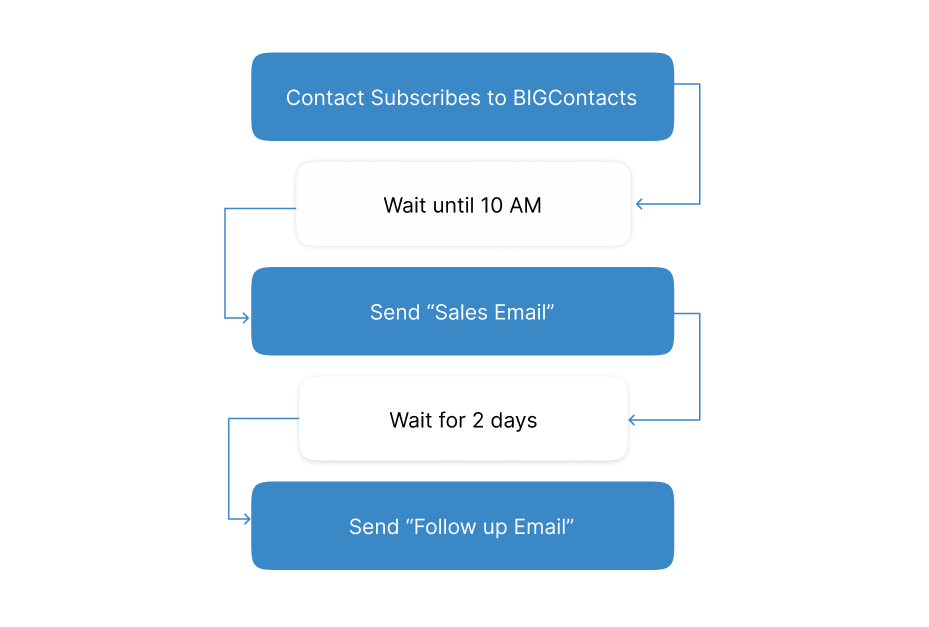
AI-powered drip sequences send emails or reminders automatically based on time, behavior, or deal stage. No more “I forgot to follow up” costing you a closed deal.
Step 6: Predictive Analytics
The system analyzes patterns in your data to forecast which deals are likely to close, which customers might churn, and where your pipeline is at risk.
Step 7: Sentiment Analysis
AI scans emails and messages to detect how a customer is feeling, whether frustrated, interested, or disengaged, so your team can respond before a relationship sours.
Step 8: Performance Insights
AI tracks campaign results, response rates, deal velocity, and team activity, then surfaces what’s working and what isn’t so you can improve without guessing.
11 Best AI CRM Tools for This Year
I’ve tested and researched dozens of AI CRM tools so you don’t have to. Below are the 11 best options for growing teams in 2026, ranked by real-world usefulness, not just feature count. Each one has been evaluated on simplicity, AI value, pricing transparency, and fit for SMB workflows.
| Tool | Best For | Pricing |
|---|---|---|
| BIGContacts | Contact management & email marketing for growing businesses | Free for growing teams. Paid plan starts at $9.99/month. |
| ClickUp | CRM-style pipelines inside a project management platform | Starts at $7/user/month |
| Lightfield | Automatic interaction capture & AI-native CRM | Starts at $36/user/month |
| Creatio | Scaling sales, marketing & service with prebuilt AI agents | Starts at $40/user/month |
| HubSpot | Unified sales, marketing & support operations | Starts at $15/user/month |
| Freshsales | AI-powered lead scoring & deal insights | Starts at $8.6/user/month |
| Salesforce | Large & complex sales organizations | Starts at $25/user/month |
| Pipedrive | Visual pipeline management & follow-up automation | Starts at $19/user/month |
| Freshworks | Marketing automation & multi-channel campaigns | Starts at $11.5/user/month |
| Zendesk | Sales pipeline management & automated support | Starts at $19/user/month |
| Zoho CRM | Omnichannel engagement & customizable workflows | Starts at $15/user/month |
1. BIGContacts – Best for Contact Management & Email Marketing for Growing Businesses
If you’re moving off spreadsheets or need a CRM that’s simple enough to actually use every day, BIGContacts is where I’d start. The biggest reason I use BIGContacts is that it keeps the fundamentals right. Contact records stay clean and readable, the entire history of a relationship (calls, emails, notes, tasks) is visible in one place, and segmenting contacts for a targeted email campaign takes minutes, not hours.
For a team moving off Outlook or Excel, the onboarding is genuinely painless. I’ve watched teams go from “we have no CRM” to “we have a working pipeline and our first automated follow-up running” in the same week. The pricing model is also based on contact volume rather than per seat, which removes the mental tax of figuring out who gets access.
The reporting and analytics give a clear picture of which campaigns are actually working, which leads to smarter decisions without having to dig through reports manually.
Pros:
- Comprehensive contact management with tags, notes, custom fields, and full interaction history
- Built-in email automation and segmentation for targeted campaigns without complex setup
- Sales pipeline management with drag-and-drop deal tracking
- Advanced reporting and analytics for campaign and sales performance
- 24/7 human support via phone, chat, and knowledge base
Cons:
- No downloadable or on-premise version
- No dedicated account manager for the free plan, unlike the paid
Pricing:
A free plan is available for growing teams. Paid plan starts at $9.99/month.
2. ClickUp – Best for Managing Sales & Delivery
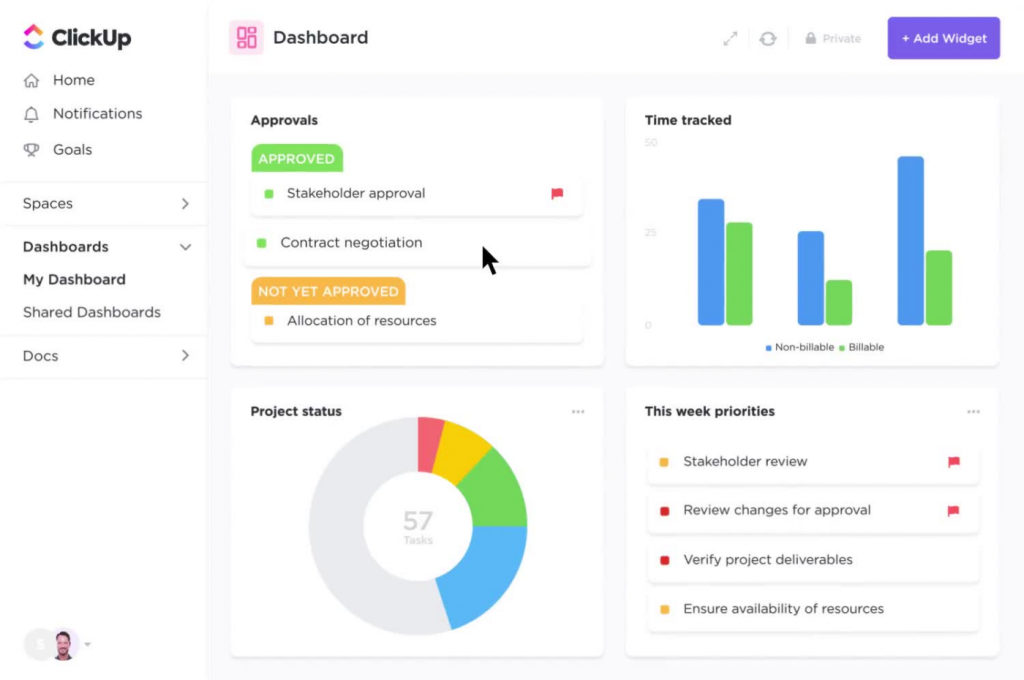
For teams where the sales process and client delivery are tightly connected, ClickUp offers a flexible way to manage both inside one platform. When I used ClickUp in a CRM-style setup, it worked best for teams that sell and deliver, where managing a deal and managing the resulting project needed to happen in the same workspace.
The AI features such as summaries, task generation, and status updates reduced the coordination overhead that usually falls on a project manager or sales ops person. The customizable dashboards were a genuine strength. I could track client conversations and project milestones side by side without toggling between systems.
That said, ClickUp isn’t a dedicated CRM. If your primary need is contact management, pipeline tracking, or email marketing automation, a purpose-built CRM tool will serve you better. ClickUp shines when you want one platform where deals and delivery coexist.
Pros:
- Highly flexible pipeline-style workflows inside a full work management platform
- AI-powered task assignments and workflow automation reduce coordination effort
- Extensive integration options with 1,000+ third-party tools
- Strong fit for cross-functional teams managing sales-to-delivery workflows
Cons:
- Not a dedicated CRM; requires intentional setup to maintain contact data quality
- Some users report lag when managing large datasets or complex projects
Pricing:
Starts at $7/user/month.
3. Lightfield – Best for Automatic Context Capture
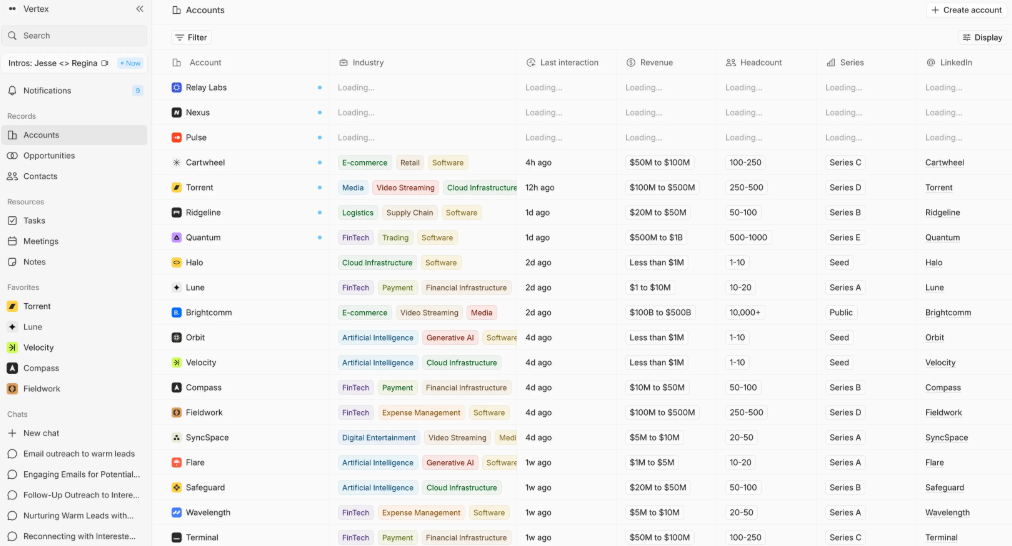
Image source: The Homebase
Lightfield is designed for teams who want the CRM to update itself rather than reminding reps to log activity manually. What stood out to me about Lightfield was the “set it and forget it” philosophy around data capture. When I tested it, every email, meeting, and conversation was automatically logged and attached to the right contact record without anyone on the team having to remember to update anything.
The AI meeting summaries were genuinely useful for handoffs. Instead of a new team member spending 20 minutes reading through a contact’s history before a call, Lightfield surfaces a brief, structured summary. The personalized outreach capabilities were impressive too. The system uses both structured data (fields) and unstructured data (email content, notes) to generate relevant messaging at scale.
The schema-less design means setup is faster than most CRM tools. You’re not configuring a rigid structure before you can use it. The trade-off is that teams wanting rigid pipeline control or deep marketing automation may need to supplement it.
Pros:
- Automatically captures all customer interactions and updates contact records in real time
- AI-powered meeting prep, summaries, and follow-up suggestions save hours per week
- Personalized outreach at scale using both structured and unstructured contact data
- No upfront configuration required; adapts as the business grows
Cons:
- AI-driven features may have a learning curve for users new to autonomous CRM systems
- Some advanced multi-step workflows require initial configuration to work reliably
Pricing:
Starts at $36/user/month.
4. HubSpot – Best for Teams That Need Sales, Marketing, and Support in One Place
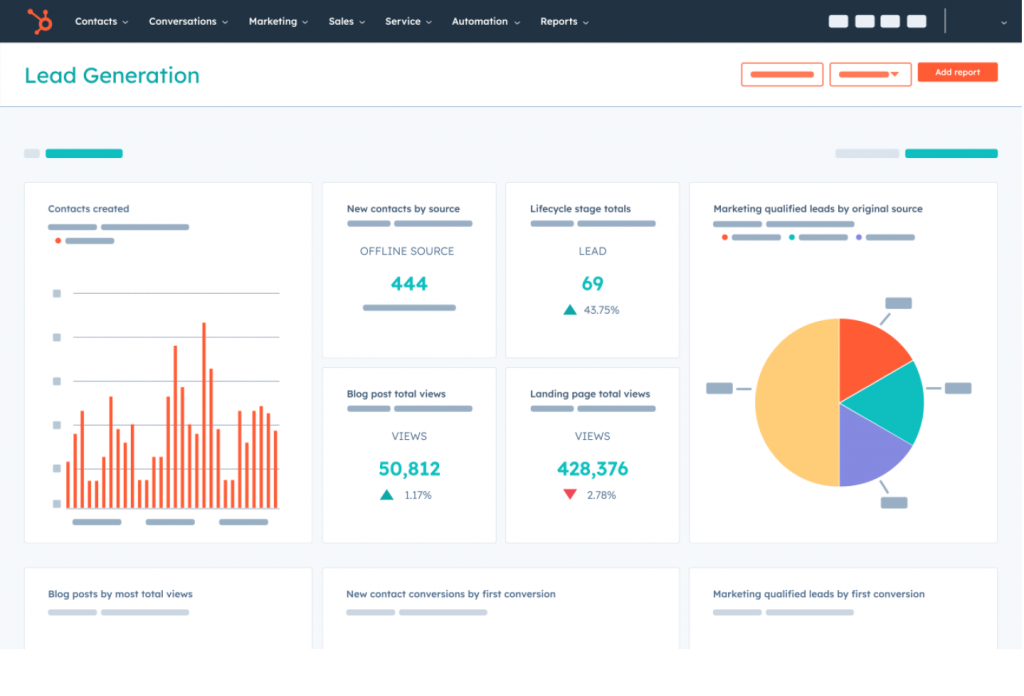
HubSpot makes the most sense when you need alignment across multiple teams and you’re ready to use the platform as a true system of record, not just a contact list. HubSpot was at its best for me when I needed sales and marketing to operate from the same contact data.
The AI-powered content assistant helped speed up email draft creation, and the predictive lead scoring was useful for prioritizing who to call each morning. But I’ll be honest: if you’re only buying HubSpot for the AI writing features, you probably won’t feel the ROI. The real value comes from connected workflows where leads captured from marketing are handed to sales, then supported by service, all in the same platform.
The main watch-out for cost-sensitive buyers: HubSpot scales quickly with seats and tier upgrades. The entry plan is accessible, but by the time you unlock the AI features that make the real difference, the monthly bill can surprise a small team.
Pros:
- Unified platform for sales, marketing, and service with shared contact data
- Visual workflow builder for automated lead nurturing and internal notifications
- AI-powered predictive lead scoring to prioritize high-value prospects
- Scales from free tools up to enterprise tiers with a strong integration ecosystem
Cons:
- Costs rise quickly with seat additions and tier upgrades; budget carefully
- Customization and data export can be complex and time-consuming
Pricing:
Starts at $15/user/month.
5. Creatio – Best for Scaling Sales, Marketing & Service with AI Agents
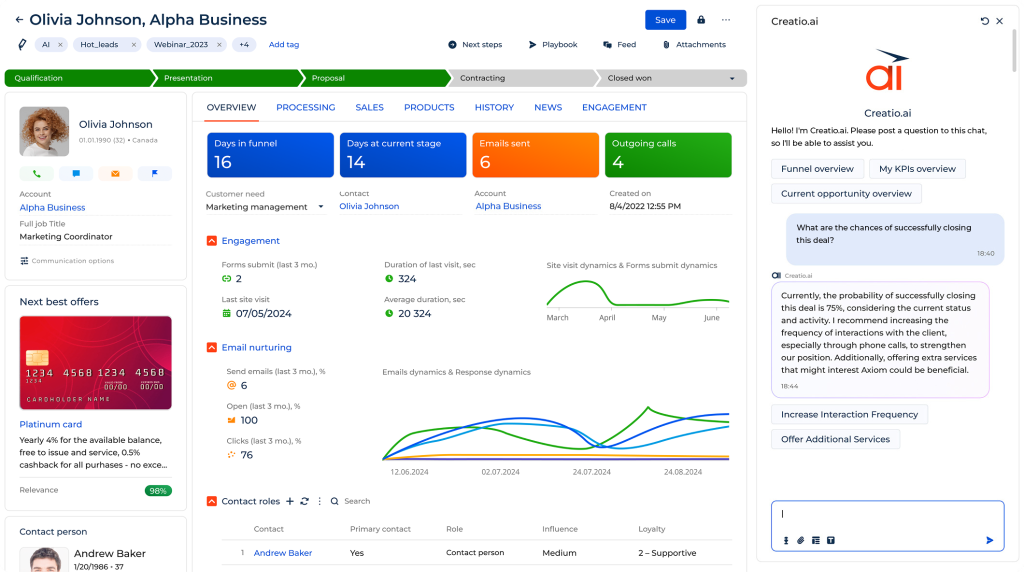
Creatio is an AI CRM that unifies sales, marketing, and service on a single no-code platform, so that contact data, pipelines, campaigns, and cases all live in one place rather than across separate tools. Moreover, its CRM foundation is built around AI that acts on your data rather than just surfacing suggestions.
It ships with prebuilt AI agents for sales, marketing, and service, handling tasks like account research, lead scoring and routing, campaign generation, and case resolution out of the box, and lets users build their own agents on top of them. These agents can run multi-step workflows autonomously, moving deals or cases forward with a human kept in the loop for approvals. Because they live inside the same no-code platform used to build the CRM itself, they understand the underlying data and processes rather than bolting on as a separate layer.
It’s more of a full enterprise platform than a lightweight contact manager, which makes it a stronger fit for mid-market and larger teams ready to design their own workflows than for a small team that just needs the basics on day one.
Pros:
- Unifies sales, marketing, and service CRM on one no-code platform
- Prebuilt AI agents for sales, marketing, and service work out of the box
- AI agents execute full, multi-step workflows autonomously
- No-code builder lets non-developers create and adjust custom agents and automations
Cons:
- Learning curve for teams new to no-code development
- More capability than a small team coming off spreadsheets will use
Pricing:
Starts at $40/user/month.
6. Freshsales – Best for AI-Assisted Scoring and Deal Insights
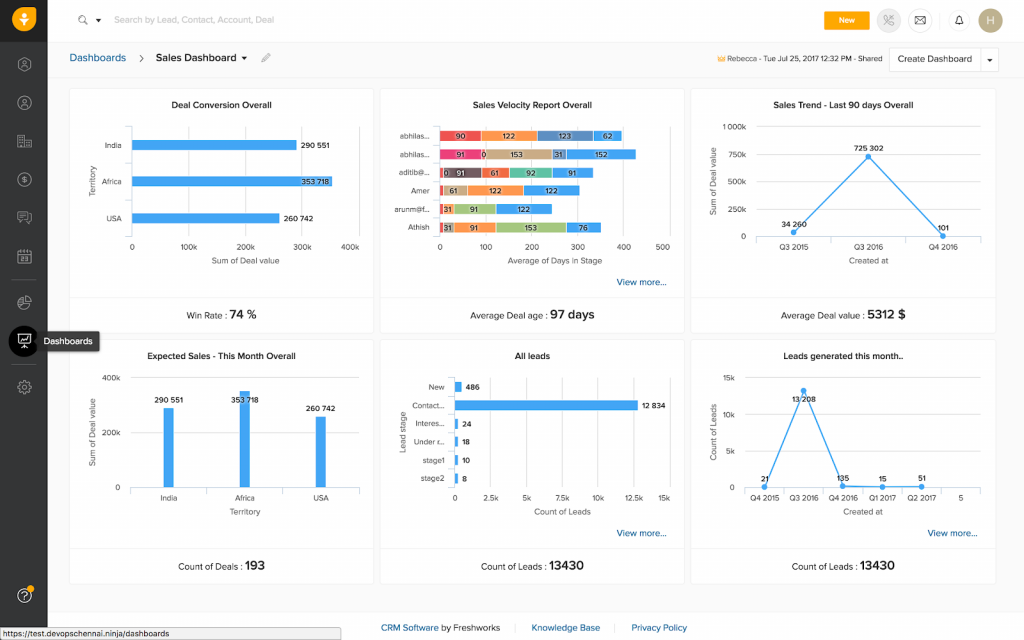
Freshsales is built for teams that want AI to help them prioritize pipeline activity without a complicated setup. Freshsales clicked for me almost immediately because the interface was built around what a sales rep actually needs to do each day: move deals forward.
The platform’s Freddy AI engine was most useful as a prioritization tool. I’d come in on a Monday, check the AI-scored contact list, and have a clear sense of where to direct energy without running a manual report. The deal insights and forecasting features available in higher tiers gave a more honest view of pipeline health than I’d expected from a mid-market tool.
The main caveat: the most meaningful AI features are in the Pro plan and above. If you’re evaluating Freshsales on the entry plan alone, you may not see what the AI layer can really do.
Pros:
- Freddy AI for contact scoring and deal insights in higher tiers
- Automated lead scoring to prioritize top prospects and reduce wasted outreach
- Multi-channel engagement across email, chat, and phone from one platform
- Customizable dashboards and reports for sales performance tracking
Cons:
- Reporting features can feel less intuitive than competitors at entry level
- Limited third-party integrations compared to larger platforms
Pricing:
Starts at $8.6/user/month.
7. Salesforce – Best for Larger Sales Organizations With Complex Needs
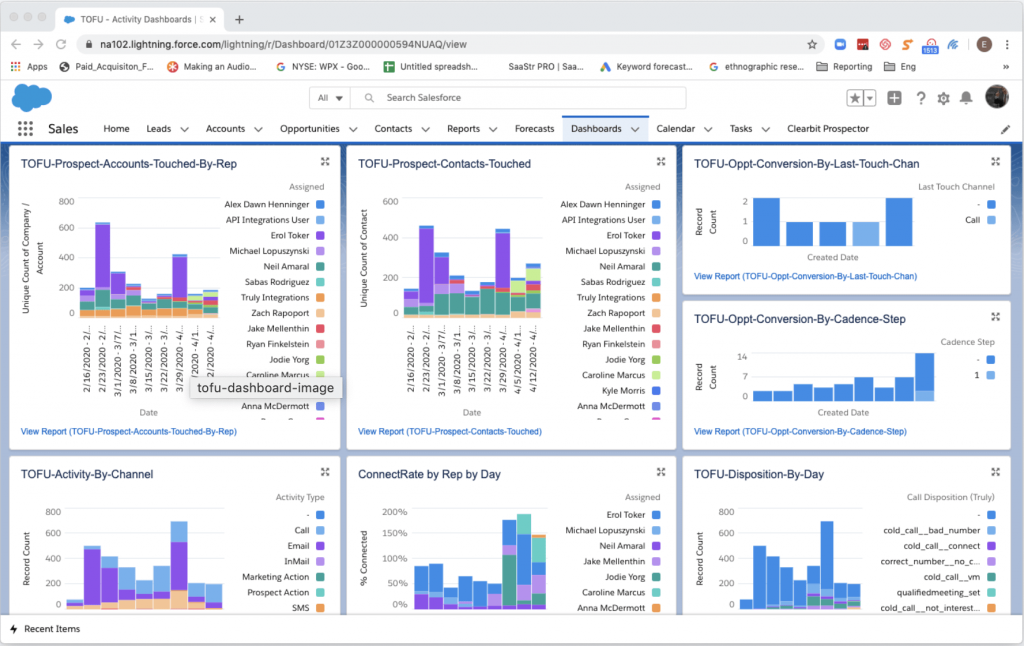
Salesforce is the most powerful CRM on this list and also the most complex. It’s best for teams that have outgrown simpler tools and have the resources to configure and manage an enterprise-grade system. When I used it, having a complete, unified view of every customer interaction across channels made it clear why so many large organizations rely on it.
Salesforce Einstein, their AI engine, helped me identify high-potential leads, build personalized customer journeys, and reduce manual data entry through intelligent automation. The reporting and dashboards were the most customizable I’ve used on any platform.
That said, Salesforce is not the right fit if your team is small or your CRM process is still maturing. The setup complexity is real, and without dedicated admin support, you’ll spend more time configuring than selling. If you’re a team of 1 to 5 people coming from spreadsheets, start somewhere simpler.
Pros:
- Highly customizable dashboards and reports tailored to complex business needs
- Salesforce Einstein AI for lead scoring, predictive analytics, and workflow automation
- Opportunity management tracks deals from initial contact to close
- Mobile app for accessing insights and pipeline data on the go
Cons:
- Customer support response times can be inconsistent for lower-tier plans
- Setup and ongoing configuration require dedicated admin resources
Pricing:
Starts at $25/user/month.
8. Pipedrive – Best for Visual Pipeline Management
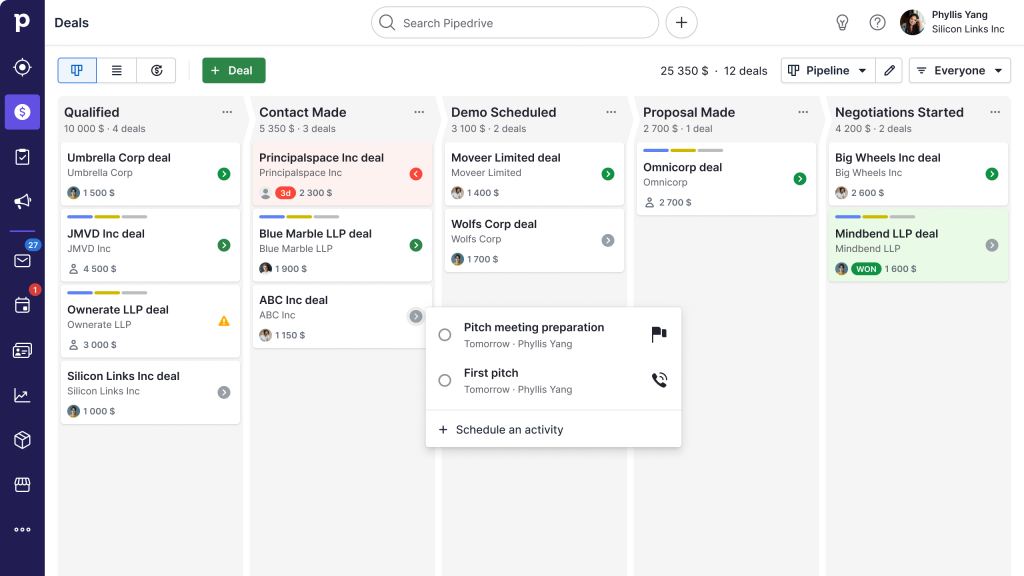
Pipedrive was the first CRM I ever used that made pipeline management feel natural instead of obligatory. The visual drag-and-drop interface answered “where is each deal right now?” in seconds, which is exactly what a sales manager needs during a Monday morning stand-up.
The AI-driven sales assistant was a practical addition: it surfaced high-priority deals, suggested optimal next steps, and flagged activity that was stalling. The smart contact data and customizable workflows reduced how much time I spent on deal admin versus actual selling.
The thing to watch: Pipedrive’s ecosystem includes add-ons that can push the monthly cost higher than the headline price suggests. Map out which features your team actually needs before choosing a tier and be specific about whether AI reporting is included in your selected plan.
Pros:
- Intuitive drag-and-drop visual pipeline for clear deal stage visibility
- Automated follow-up reminders to prevent deals from going cold
- Built-in sales forecasting for planning and resource allocation
- AI-powered report creation for faster performance analysis
Cons:
- Advanced AI and enrichment features are in higher tiers
- Some basic features missing from entry-level plans
Pricing:
Starts at $19/user/month.
9. Freshworks – Best for Marketing Automation and Multi-Channel Campaigns
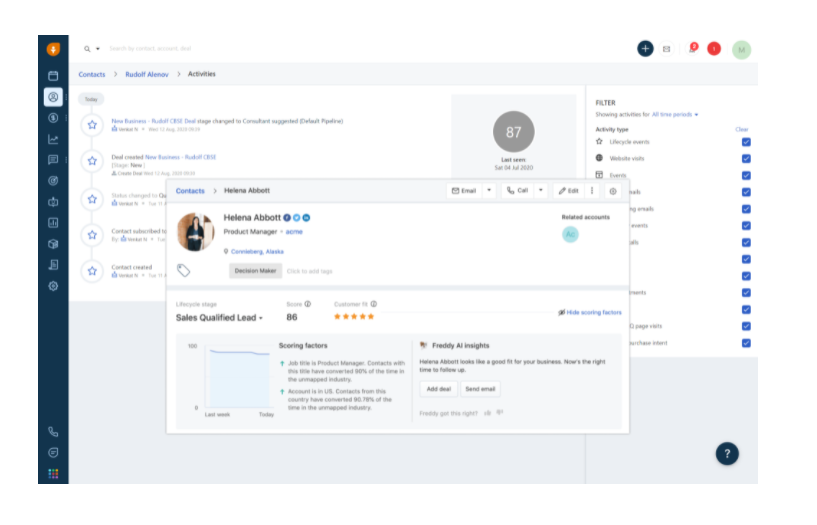
Freshworks felt different from most CRMs I’ve used because it didn’t treat marketing as an afterthought. The visual journey builder let me map out complete customer journeys, from first touch to post-purchase, and automate the steps in between. That’s the kind of workflow that usually requires a dedicated marketing tool on top of a CRM; Freshworks handles both.
Freddy AI, the same engine that powers Freshsales, was most useful for audience segmentation and predicting which leads were ready to engage. It surfaced insights that shaped campaign targeting rather than just reporting on what already happened.
The main friction point was integration reliability. Occasional glitches disrupted what should have been seamless connections between tools. For a team running high-volume campaigns, that’s worth factoring into your evaluation.
Pros:
- Visual journey builder for automated, personalized customer campaign workflows
- Freddy AI for audience segmentation, lead prediction, and actionable marketing insights
- Drag-and-drop interface simplifies navigation and reduces onboarding time
- In-depth analytics and reporting for campaign performance tracking
Cons:
- Mobile app functionality is less robust than the desktop experience
- Advanced AI marketing features are more prominent at higher tiers
Pricing:
Starts at $11.5/user/month.
10. Zendesk – Best for Sales Pipeline Management & Automated Support
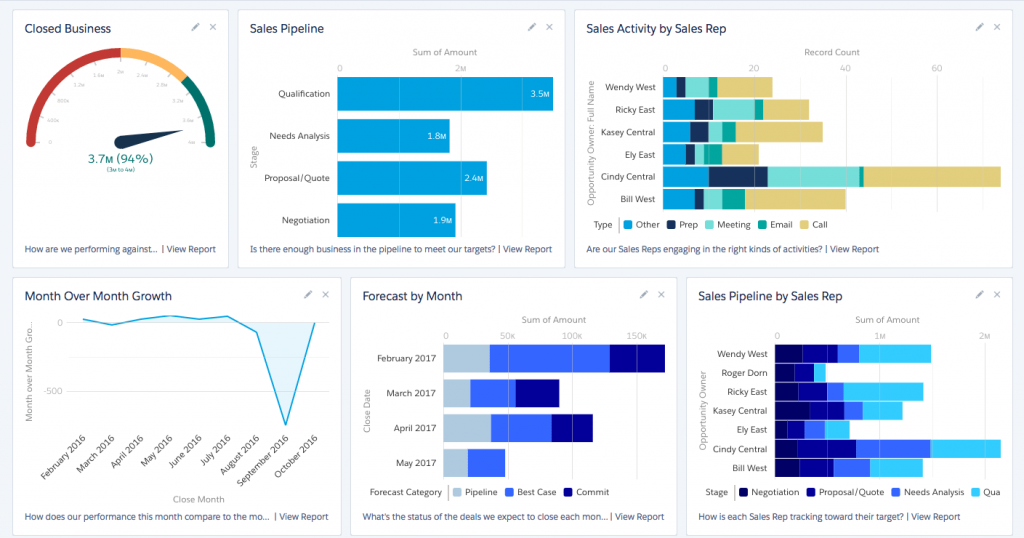
Zendesk surprised me with how straightforward it was for a tool that covers both sales and support. Managing customer tickets alongside a sales pipeline in the same platform removed a lot of the “which team owns this contact?” confusion that typically slows down smaller organizations.
The AI-powered chatbots were genuinely useful for handling routine inquiries 24/7, freeing up the human team for conversations that actually required judgment. The scheduling integration with Google Calendar and Outlook also worked without any fuss, which sounds minor until you’ve spent time debugging calendar sync in other CRMs.
The setup complexity can become a real issue as team size grows. For a five-person team, it’s manageable. For larger rollouts, expect to invest time in configuration and training.
Pros:
- AI-powered chatbots for automating routine customer inquiries and support tasks
- Customizable dashboards and reports for team performance and customer satisfaction tracking
- Custom ticket forms to streamline appointment booking and reduce back-and-forth
- Collaboration tools such as internal notes and shared ownership for consistent team communication
Cons:
- Setup complexity increases significantly for larger teams and organizations
- Customer support response times can be slow, leading to delays in issue resolution
Pricing:
Starts at $19/user/month.
11. Zoho CRM – Best for Omnichannel Engagement
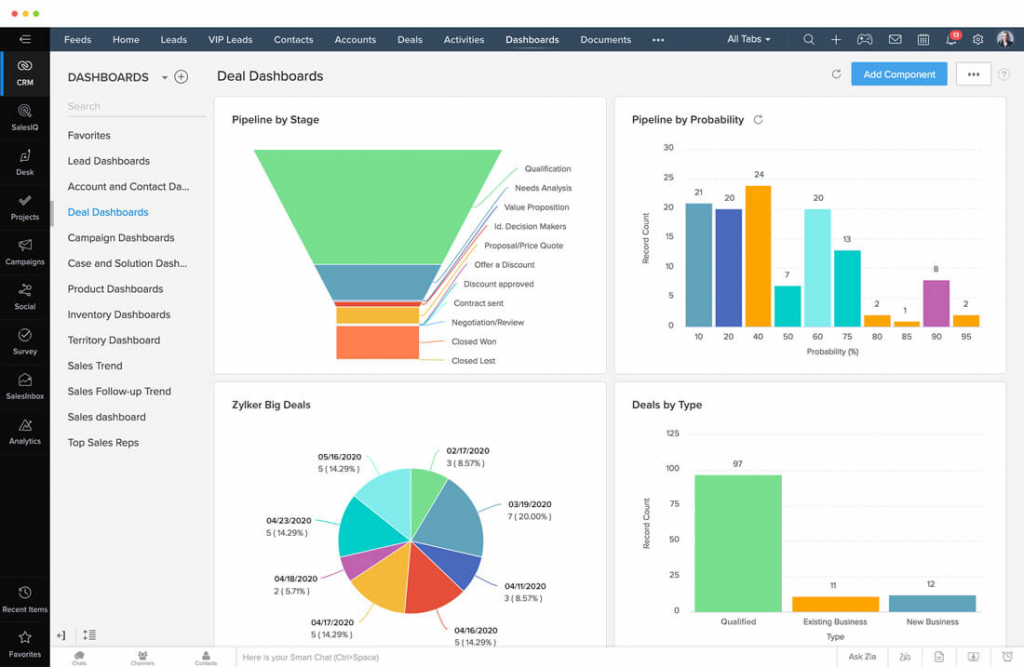
Zoho CRM felt like a platform you could grow with, not just use for six months and outgrow. When I used it, the omnichannel communication features like email, social, live chat, telephony all in one place were genuinely impressive. Knowing that every customer touchpoint was being tracked regardless of channel gave the team a much more complete view of each relationship.
Zia, Zoho’s AI assistant, was most useful for analyzing sales patterns and suggesting workflow optimizations. The key watch-out: Zia’s best capabilities are in the Enterprise tier. If you’re evaluating Zoho CRM on a standard plan expecting full AI functionality, you may end up disappointed.
For cost-sensitive buyers, the recommended approach is phased: start with pipeline and required fields, add automation in month two, and unlock AI features once your data is clean enough for the AI to be useful.
Pros:
- AI assistant Zia available in Enterprise tier for sales pattern analysis and predictions
- Real-time notifications keep teams updated on customer activities as they happen
- Comprehensive omnichannel contact management across email, chat, social, and telephony
- Workflow automation for routine tasks to increase team productivity
Cons:
- Zia’s most valuable AI capabilities are locked behind the Enterprise tier
- Advanced customization can be time-consuming and may require technical expertise
Pricing:
Starts at $15/user/month.
How Did I Evaluate These AI CRM Tools?
Picking the right AI CRM is not just about ticking feature boxes. I used a consistent, six-point framework to evaluate every tool on this list, so you can trust that each recommendation is based on real-world usefulness, not marketing claims.
- User Reviews and Ratings: I looked at verified ratings and feedback from platforms like G2, Capterra, and Trustpilot to understand how real users, especially small business owners, sales managers, and CRM admins, experience each tool day to day. Patterns in praise and complaints tell you far more than a feature list ever will.
- AI Features and Core CRM Functionality: Not all “AI-powered” CRMs deliver the same value. I assessed each tool specifically on whether its AI features reduce real admin work: automatic activity capture, follow-up automation, contact segmentation, and lead scoring. Tools that gate meaningful AI behind expensive tiers were flagged clearly.
- Ease of Use and Adoption: A CRM your team does not use is worthless. Each tool was evaluated on how quickly a non-technical user, someone coming from spreadsheets or a basic email setup, could get up and running. The short learning curve and intuitive navigation were weighted heavily.
- Customer Support Quality: For SMBs without a dedicated IT team, responsive support is not optional. I examined each vendor’s support channels, response times, and availability, including whether onboarding assistance is included or charged separately.
- Value for Money: I compared pricing tiers against the actual AI and CRM capabilities available at each level. Tools that offered strong functionality at SMB-friendly price points scored higher. Hidden costs, add-ons, and tier-gated AI features were factored into the final assessment.
- Personal Experience and Expert Input: Each tool in this list was either personally tested or thoroughly researched using hands-on demos, expert walkthroughs, and verified community feedback from r/CRM and other practitioner forums. Where direct experience informed an opinion, it is stated clearly in the review.
My Top 3 Picks for the Best AI CRM
Based on my hands-on experience and research, here are the three tools I’d confidently recommend to most small and mid-sized teams in 2026.
1. BIGContacts
If I had to pick just one tool for a small team moving off spreadsheets or switching from an overcomplicated CRM, BIGContacts would be it. It gets the fundamentals right — clean contact management, reliable follow-up reminders, and email segmentation that actually works without a technical setup. The pricing is based on contact volume rather than per seat, which makes it genuinely affordable as your team grows.
2. HubSpot
HubSpot is my pick for teams that need more than just a contact database and are ready to align sales, marketing, and support under one roof. The AI-powered lead scoring, workflow automation, and shared contact timeline make cross-team collaboration much smoother. It’s not the cheapest option, and the feature depth can feel like a lot at first, but if you’ll genuinely use the connected workflows, the value is there.
3. Freshsales
For sales-focused teams that want AI-assisted lead scoring and deal insights without jumping to an enterprise price point, Freshsales hits a strong middle ground. The Freddy AI engine surfaces the right prospects at the right time, and the interface is clean enough that reps actually enjoy using it. Just go in knowing the best AI features live in the Pro plan and above.
What Are the Real Benefits of AI-Powered CRM Systems?
Most CRM systems store data. AI-powered CRM systems act on it. The difference is not a minor upgrade; it is the gap between a system your team maintains and one that actively helps them sell, follow up, and prioritize without the manual overhead.
Here is what that looks like in practice:
1. Eliminates the Admin Workload That Kills Productivity
Sales reps spend a significant portion of their week on non-selling tasks including manual data entry, updating records, and logging activity. AI in CRM attacks that directly by automating data capture, syncing emails to contact records, and updating deal stages without anyone lifting a finger.
2. Makes Follow-Up Consistent (Not Optional)
Missed follow-ups are the number one reason deals die silently. AI-powered CRM tools automate reminders, trigger sequences, and alert reps when a contact hasn’t been touched in too long. One small consulting firm using AI-powered reminders in their CRM reduced missed follow-ups by over 40% in the first quarter — not because their team suddenly became more disciplined, but because the system did the remembering for them.
3. Improves Email Segmentation and Response Rates
AI identifies which contacts share similar traits or behaviors and segments them automatically. This means your marketing emails are no longer “Dear Partner” blasts — they’re targeted messages that actually resonate. AI-driven follow-up emails have shown conversion lift of 20 to 30% compared to generic outreach in several SMB case studies.
4. Surfaces the Leads Worth Calling First
Instead of working through a flat list, your sales team gets AI-scored leads ranked by conversion likelihood. That’s hours saved per week, redirected into conversations that actually move revenue.
5. Keeps Customer Data Accurate and Current
Manual data entry is where errors live. When AI auto-captures emails, call notes, and meeting outcomes, your CRM stays clean without relying on reps to remember to update it. Clean data also makes every other AI feature more reliable.
6. Reduces Churn Before It Happens
AI monitors engagement patterns and flags when a customer is going quiet before they cancel or leave. Early warning signals give your team time to re-engage with a targeted offer or a personal check-in.
7. Scales Personalization Without Scaling Headcount
An AI CRM can personalize outreach for 5,000 contacts the same way a human might personalize for 50, using behavior data, history, and preferences to tailor every interaction. For SMBs, this is a genuine competitive advantage.
What Are the Key Challenges of AI in CRM (And How Do You Solve Them)?
Most teams that struggle with AI adoption are not dealing with a technology problem. They are dealing with a data problem, a people problem, or a mismatch between what the AI was built to do and how the team actually works.
Here are the most common challenges and how to get ahead of them:
1. Data Quality Issues
AI outputs are only as reliable as your input data. Duplicate contacts, empty fields, and outdated records produce poor AI recommendations.
Fix: Deduplicate on import. Enforce 5 to 7 required fields. Set up AI-driven automation to flag stale records.
2. Team Resistance to Adoption
Many employees worry AI will replace them or they simply find new tools difficult.
Fix: Show the team how AI removes their most hated tasks such as manual logging and reminder management. Pilot with one person first, let them become the internal champion.
3. AI Bias and Misinterpretation
AI trained on historical data can reinforce past biases, over-prioritizing certain lead types or under-flagging others.
Fix: Audit AI recommendations quarterly. Keep humans in the loop for any customer-facing decision.
4. Integration Complexity
AI CRM tools need to sync with your email, calendar, and other platforms. Integration gaps create data silos.
Fix: Prioritize CRM tools with native Outlook and Gmail integrations. Use Zapier for anything else.
5. Hidden AI Costs
“AI-powered” often means: pay more. Many platforms reserve real AI features for top tiers or charge per AI session.
Fix: Before signing up, list the specific AI features you need and confirm they’re included in the plan you’re evaluating, not just the tier above.
6. Over-Relying on AI for Customer Communication
AI-generated messages that go out unchecked can feel generic or even inappropriate for the relationship.
Fix: Build a human approval step for any customer-facing AI output, especially outbound emails and proposals.
Is AI in CRM Secure? What to Check Before You Share Customer Data
Before you hand your customer database to an AI-powered CRM system, run through this checklist:
If security and governance are a priority, it also helps to review broader CRM data security considerations before turning on AI features.
- Permissions: Who can see which contact fields and records?
- Data retention: Are your prompts and AI outputs stored? For how long?
- Audit trail: Can you review what the AI changed and why?
- Human-in-the-loop: Can you require approval before AI sends emails or updates records?
- Tier clarity: Are the AI features you need included in your plan or paywalled?
- Compliance: Does the platform comply with GDPR, CCPA, or other regulations relevant to your customers?
Start Saving Hours Every Week With the Right AI CRM
The whole point of AI in CRM is not to impress anyone. It is to give you and your team more time back — time that was quietly disappearing into spreadsheets, forgotten follow-ups, and manual data entry. Once the right system is in place, that time goes back where it belongs: into actual conversations with customers.
You do not need a big budget or a technical team to make this work. The businesses seeing the most benefit from AI in CRM are not the ones with the fanciest setups. They are the ones who picked one painful problem, fixed it with the right tool, and built from there. That is a realistic starting point for any team, regardless of size or experience.
If you are still figuring out where to begin, it helps to start with something simple and proven. A lot of teams in the same situation — coming from spreadsheets, tired of overcomplicated tools — have found that BIGContacts gives them exactly what they need without the overwhelm. There is a free plan to try it out, so there is no real risk in taking a look.
Frequently Asked Questions
Is AI in CRM only for large enterprises, or can small businesses use it too?
Small businesses are actually among the biggest beneficiaries. AI in CRM removes the admin burden that hits hardest when a team has no dedicated sales ops person. Several AI CRM tools, including BIGContacts, are specifically priced and built for teams of 1 to 10 people.
How much does an AI CRM system typically cost?
Entry-level AI CRM tools start as low as $7 to $15 per user per month. However, the AI features you actually want are often in mid or upper tiers. Always check which specific AI capabilities are included in the plan you're evaluating, not just the plan above it.
Do I need technical knowledge to set up an AI CRM?
Most modern AI CRM solutions are designed for non-technical users. Tools like BIGContacts, Freshsales, and Pipedrive can be configured without developer support. Salesforce and Zoho CRM at more advanced tiers may require admin expertise or onboarding assistance.
What is the difference between AI CRM and CRM automation?
CRM automation follows fixed rules you set up. AI CRM uses machine learning to adapt — it can score leads, predict the best send time, detect sentiment, or suggest actions based on patterns it identifies in your data. AI is more dynamic; automation is more rule-based.
Can AI in CRM replace my sales team?
No. Community discussions and research consistently show AI performs best on repetitive, structured tasks. Nuanced customer relationships, negotiation, and judgment still require humans. AI in CRM is designed to reduce what takes up your team's time, not to replace the people doing the selling.
How do I know if an AI CRM is actually using AI or just marketing it?
Ask specifically: Does it auto-capture activity without manual input? Does it score leads based on behavior? Does it flag churn risk automatically? Vague answers about "intelligent insights" and "smart dashboards" are red flags. Real AI CRM features are specific, measurable, and reduce manual work.
What's the best AI CRM for a team moving from spreadsheets?
Look for a tool that makes contact import easy, segmentation simple, and follow-up reminders automatic. BIGContacts is a strong starting point for this use case. It's designed for exactly this transition, with a free plan that lets you test it before committing.
How does AI in CRM improve email marketing results?
AI segments your contacts based on behavior, purchase history, and engagement level, then triggers personalized email sequences automatically. Instead of one generic newsletter to your full list, AI helps you send the right message to the right group at the right time, which directly improves open rates and conversions.
What data does an AI CRM use to make predictions?
AI CRM systems typically use email open rates, link clicks, website behavior, past purchase data, response times, call logs, and deal stage history. The more complete and current your CRM data is, the more accurate the AI predictions will be.
How long does it take to see results from AI in CRM?
Most teams see measurable improvement within 4 to 6 weeks, particularly in follow-up consistency and time saved on manual data entry. Advanced outcomes like improved forecasting accuracy and reduced churn take 2 to 3 months of clean data collection before AI predictions become reliably useful.
Are AI CRM features included in standard plans or do I have to pay extra?
This varies significantly by vendor. Some platforms like BIGContacts include core AI-driven automation in their base plans. Others like Zoho and Freshsales reserve the most powerful AI features for Enterprise or Pro tiers. Always read the feature comparison table before selecting a plan.
FREE. All Features. FOREVER!
Try our Forever FREE account with all premium features!