
Most people search for how to format an email at least once, usually right before a job application, a client pitch, or a message to someone whose opinion matters. It is not that you cannot write. It is that a badly formatted email gets skimmed, misread, or ignored, no matter how good the message inside it is.
The stakes are higher than most people realize. A study by Statista in 2024 shows email has grown into a core digital communication channel for businesses everywhere, with the number of people using it climbing every year. Your message is competing against a full inbox before anyone even opens it, so the format has to do some of the work the content cannot do alone.
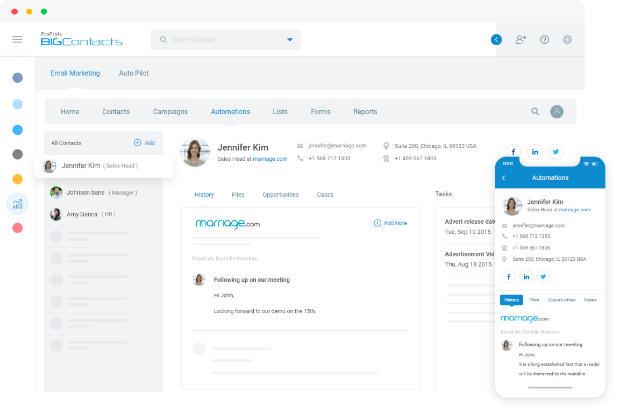
This guide walks through the exact structure of a well-formatted email, then shows how that structure shifts for business, sales, and marketing messages. If you send a lot of business emails, a tool like BIGContacts by ProProfs also stores email templates directly against each contact, so you are not formatting the same message from scratch every time.
What Is Email Formatting?
Email formatting is the arrangement of an email’s parts, the subject line, greeting, body, closing, and signature, into a structure that is easy to scan and quick to understand. Good formatting has nothing to do with fonts or colors. It is about order, spacing, and length.
When people talk about correct email formatting, they usually mean three things: the message follows a predictable order, each section is short, and there is enough white space that the reader is not staring at one dense block of text. Skip any one of the five parts and the reader has to work harder to figure out what you want.
Why Does Knowing How to Format an Email Matter?
Knowing how to format an email matters because format decides whether your message gets read in the first few seconds or gets skimmed and set aside. Recipients judge professionalism and urgency from structure before they read a single full sentence.
Here is what poor formatting actually costs you:
- A vague subject line means the email may never get opened at all
- A wall of text signals that reading it will take effort, so it gets pushed to later
- Inconsistent formatting between paragraphs makes you look careless, even if the content is solid
- A buried ask forces the reader to hunt for what you actually want
Relevance and formatting are connected to how people treat their inbox overall. A study by Capterra in 2024 shows 23 percent of recipients unsubscribe from digital communications every week, often because a message did not look worth their time on first glance. The same logic applies to one-to-one email.
If it looks like effort, people give it more attention (it’s worth understanding the most common reasons people unsubscribe if you send recurring emails to the same list).
What Does Correct Email Formatting Include?
Correct email formatting includes five parts in a fixed order: a specific subject line, a greeting matched to the relationship, an opening line that states your purpose, a body with only the necessary details, and a closing with a sign-off and signature.
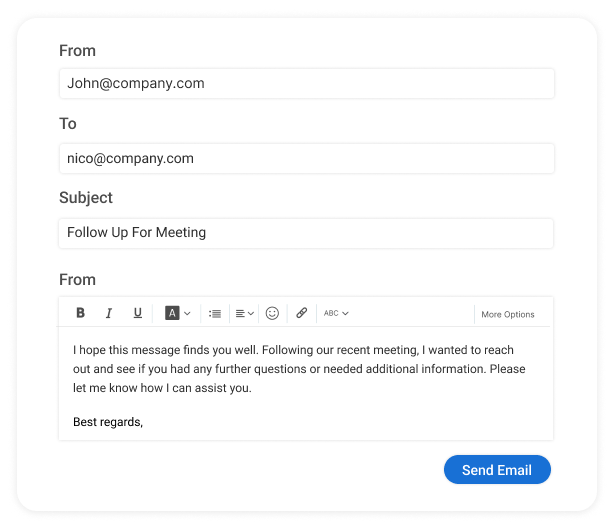
- Subject Line: 4 to 8 words naming the topic or the action needed
- Greeting: matched to formality, for example “Dear Mr. Lee” or “Hi Sarah”
- Opening Line: one sentence stating why you are writing, placed first
- Body: short paragraphs, 2 to 3 sentences each, one idea per paragraph
- Closing: a named next step, plus a sign-off phrase like “Best” or “Thanks”
- Signature: full name, role, and one way to reach you
How Do You Format an Email Step by Step?
Formatting an email step by step comes down to building the five parts above in order, then checking the whole message against a single test: would someone understand the ask within the first few lines on their phone?
Step 1: Write a Clear Subject Line
Name the topic or the action, not a vague phrase like “Quick question” or “Checking in.” “Confirm Q3 budget by Friday” gets opened. “Quick question” gets archived unread. Keep it under 50 characters so it displays fully on mobile. Transactional messages, like confirmation emails, follow this same rule even more strictly, since the subject line is often the only thing the recipient reads.
Step 2: Choose the Right Greeting
Match the greeting to the relationship. Use “Dear [Last Name]” for a first message to someone senior or external, and “Hi [First Name]” for day-to-day work email. If you do not know the recipient’s name, “Hi there” or no greeting at all works better than a generic “To Whom It May Concern.”
Step 3: State Your Purpose in the Opening Line
Put the reason you are writing in the very first sentence of the body, not buried three paragraphs down. “I am reaching out to confirm next week’s onboarding call” tells the reader exactly what to expect from the rest of the message.
Step 4: Keep the Body Short and Scannable
Break the body into paragraphs of 2 to 3 sentences, each covering one idea. Use a numbered or bulleted list for anything with more than two items, like dates, requirements, or options.
Step 5: Close With a Clear Next Step
Name exactly what you need the reader to do and by when. “Can you confirm by Thursday so we can move forward Monday?” removes any guesswork about what happens next.
Step 6: Add a Professional Signature
Keep it to four lines or fewer: name, title, company, and one contact method. Skip the inspirational quote and the row of five social icons.
Put together, a formatted email looks like this:
Subject: Confirm Q3 pricing by Friday
Hi Elena,
I am reaching out to confirm the updated Q3 pricing before we send the contract to legal.
The only change is Section 4: the seat price drops to $79 per user for 50-plus seats, matching what we discussed on the call. Everything else stays the same.
Can you confirm you are good with the new number by Friday so we can send the contract out Monday?
Best, Marc Dubois Head of Sales [email protected]
Ready to Make Clear, Consistent Emails Easier to Send Every Day?
How Do You Format a Business Email?
A business email format follows the same five parts as any professional email but leans more formal: a specific subject line, a greeting that matches the reader’s seniority, a purpose-first opening, a concise body, and a signature carrying your title and company.
Where a business email format differs from a casual one to a coworker:
- The greeting defaults to “Dear” or a full name instead of a first name only, for a first contact
- The signature always includes your title and company, not just your name
- The tone stays measured even when delivering bad news, with a future-oriented next step
- Attachments are named clearly in the body (“resume attached as a PDF”) so nothing gets missed
A job application email is a common example. State the role you are applying for in the subject line, keep the greeting formal (“Dear Hiring Manager” if you do not have a name), state your interest in one line, summarize your fit in one short paragraph, and close by thanking them for their time.
How Does Formatting Change for Sales and Marketing Emails?
Sales and marketing emails use the same five-part structure as any professional email, with one addition: a single, clear call to action that the entire message is built around.
For a sales email, the opening line references something specific about the recipient’s business, the body stays under five sentences, and the closing asks for one small commitment, like a 15-minute call. For a marketing email, add a preheader (the preview text after the subject line), lead with the main offer instead of burying it, and use one primary button instead of several competing links.
This is one of the reasons email marketing and CRM software tend to sit close together. BIGContacts by ProProfs is a simple, affordable CRM built for growing small businesses, combining contact management, email templates, task automation, and sales pipeline tracking in one place.
Instead of formatting a follow-up email from a blank page every time, you start from a saved template tied to the contact’s record, and it includes a forever free plan for individuals or small teams who just need the basics to start.
Spend Less Time Rebuilding Emails and More Time Moving Conversations Forward
What Mistakes Ruin Good Email Formatting?
Most formatting mistakes cost you a reply before the reader ever considers the content of the message. This shows up most often in follow-up emails to clients, where the same formatting slip gets repeated across every message in the sequence. Here is what to look for when you are formatting an email, and what to do instead.
- Burying the ask in the last paragraph. Fix: put the ask in the first line of the body.
- Writing a vague subject line like “Hey” or “FYI.” Fix: name the topic or the action directly.
- Writing one dense paragraph with no breaks. Fix: split it into 2 to 3 sentence chunks.
- Skipping the signature. Fix: always include name, role, and one contact method.
- Mixing three fonts and four colors. Fix: stick to one font and one consistent signature style.
- Guessing a name variant without checking. Fix: use the name you can confirm from a public source.
How Does a CRM Help You Format and Send Emails Faster?
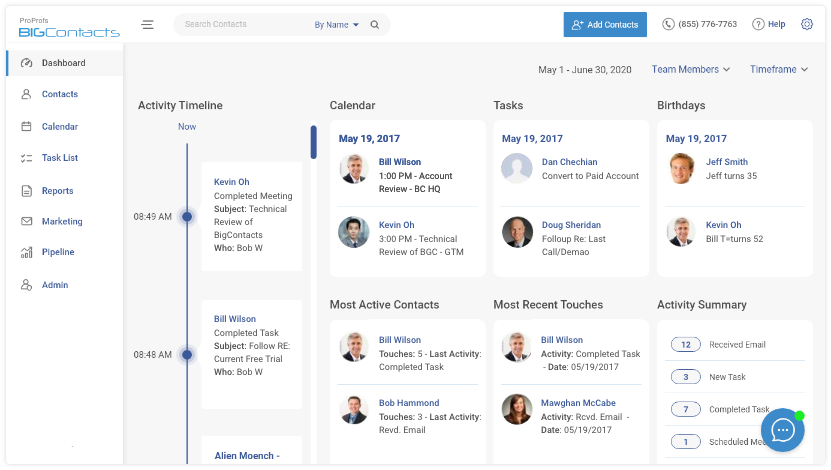
A CRM helps you format and send emails faster by storing pre-built templates against each contact, so the subject line, greeting, and structure are already correct before you type a single word of the message.
This matters more than it sounds like on paper. A study by Nucleus Research in 2023 shows the return on CRM investments has settled at $3.10 for every dollar spent, with time saved on repetitive tasks, like drafting the same email again and again, making up a large share of that return.
BIGContacts by ProProfs bakes this directly into the contact record instead of a separate email tool:
- Stores pre-formatted email and letter templates for follow-ups, check-ins, and invoices
- Logs and tracks every sent email automatically against the right contact
- Sends from your own business domain instead of a generic address
- Includes a forever free plan, so a solo user or a two-person team can start without a budget conversation
If you already track leads and customers in BIGContacts, the formatting work happens once, when you build the template, not every time you hit send.
How Is a Formatted Email Different From an Unformatted One?
The difference rarely comes down to what you are asking for. Two emails can carry the exact same request and get completely different responses, just because one is easy to scan and the other is not. Here is what typically changes between the two side by side.
| Unformatted Email | Formatted Email | |
| Subject line | Vague (“Hey” or blank) | Specific, names the topic |
| Opening line | Buried context, no clear ask | States the purpose in sentence one |
| Paragraphs | One dense block of text | 2 to 3 sentences per idea |
| Closing | No next step named | Clear ask with a deadline |
| Signature | Missing or inconsistent | Name, role, one contact method |
| Typical outcome | Skimmed, ignored, or misread | Read and answered same day |
Start Writing Emails That Get Read, Not Ignored
Formatting is not decoration you add at the end. It is the structure that decides whether your message gets opened, read all the way through, and answered. Five parts, in order, done consistently, will get you further than clever wording ever will.
The next email you write, run it through the five parts before you hit send: subject line, greeting, opening line, short body, and a closing with a signature. That habit alone fixes most of the reasons emails get ignored.
If you send business, sales, or follow-up emails often enough that formatting each one from scratch has become a drag, a tool like BIGContacts makes it easy to save your best templates once and reuse them against every contact, without hours of setup or a big budget to get started.
Most professional emails work best between 50 and 125 words. Longer emails are fine for detailed updates, but the ask itself should always appear within the first two or three sentences, not buried at the end. Open with the recipient's name alone, followed by a comma, or skip the greeting line entirely and start with your purpose. This works well for internal messages or quick follow-ups where a formal greeting feels unnecessary. Stick to one readable font at 10 or 12 point size, such as Arial or Calibri. Avoid decorative fonts, multiple colors, or all caps, since these read as unprofessional and can trigger spam filters in bulk sends. Use a formal sign-off like "Sincerely" or "Best regards," followed by your full name, title, and company on separate lines. Avoid casual closings like "Cheers" in a first message to someone senior or external. Yes, whenever you are listing more than two items, such as dates, requirements, or options. Bullet points break up dense information and make an email easier to scan than the same content written in paragraph form. Keep subject lines between 4 and 8 words, under roughly 50 characters, so the full line displays on mobile devices. Name the topic or action directly instead of a vague phrase like "Update." Limit a signature to four lines: full name, title, company, and one contact method. A CRM with saved contact profiles, like BIGContacts, can also auto-fill a consistent signature across every team member's outgoing email. Avoid emojis in formal or first-contact business emails. They can work in casual internal messages with colleagues you know well, but they read as unprofessional in client communication, job applications, or sales outreach. Use a single-column layout, short paragraphs, and a subject line under 40 characters so it is not cut off. Most professional emails are opened on a phone first, so mobile readability should come before desktop polish. A formal format uses "Dear [Name]" and "Sincerely," fits first contact and senior recipients, while a casual format uses "Hi [Name]" and "Thanks," fits colleagues you know well. The five core parts stay the same in both. Name every attachment in the body of the email, such as "resume attached as a PDF," so nothing gets missed. Keep attachment file names clear and professional instead of generic names like "Document1." Indirectly, yes. Poorly formatted emails get lower engagement, which signals to inbox providers that recipients do not want the message. Clean formatting supports better engagement, and understanding what pushes an email into spam helps you catch the other half of the problem.Frequently Asked Questions
What Is the Ideal Length of a Professional Email?
How Do You Start an Email Without Saying Hi?
What Font Should You Use in a Professional Email?
How Do You End an Email Formally?
Should You Use Bullet Points in a Business Email?
How Many Words Should a Subject Line Have?
What Is the Best Way to Format an Email Signature?
Can You Use Emojis in a Professional Email?
How Do You Format an Email on Mobile?
What Is the Difference Between a Formal and Casual Email Format?
How Do You Format an Email When Attaching Files?
Does Email Format Affect Deliverability?
FREE. All Features. FOREVER!
Try our Forever FREE account with all premium features!