
Someone hands you their email address, and then… nothing happens for three days. That gap is exactly what an email welcome series is built to close, and it’s the single biggest missed opportunity I see in email marketing today.
I’ve watched brands double their early engagement just by turning one lonely “thanks for signing up” email into a proper, well-timed sequence. A study by Statista in 2021 shows automated welcome emails sent by e-commerce businesses had an open rate of roughly 30%, noticeably higher than a standard promotional send, which tells you exactly how much attention a new subscriber is willing to give you if you show up with the right message at the right time.
By the end of this post, you will know what an email welcome series actually includes, how to automate it, what to send in each email, and how to pick a tool that does not require a developer or a huge budget.
What is an Email Welcome Series?
An email welcome series is a sequence of automated emails sent to new subscribers, leads, or customers right after they join your list. Each email has one job, whether that is saying thanks, sharing your story, offering a discount, or asking what the subscriber wants to hear about next.
Unlike a single “thank you for subscribing” email, a series unfolds over several days. It typically includes:
- A trigger event, such as a form submission, signup, or first purchase
- 3 to 5 individual emails, each sent on a set schedule
- One clear call to action per email
- Personalization based on how or why the person signed up
- A tracking mechanism for opens, clicks, and conversions
Marketers also call this a welcome email sequence, welcome flow, or onboarding email series. All of these terms describe the same core idea: a structured set of first-touch emails instead of one isolated message.
Why do you Need Welcome Series Emails?
Welcome series emails matter because the days right after signup are when a new contact is most curious about your brand and most likely to engage. Wait too long or send too little, and that curiosity fades fast.
A study by McKinsey in 2023 shows 71% of consumers now expect companies to deliver personalized interactions, and 76% get frustrated when brands fail to do that. A welcome series is one of the easiest places to start meeting that expectation, since you already know exactly how and why someone joined your list.
There is also a business case for investing in the tools that make this possible. A study by Grand View Research in 2024 shows the digital marketing software market, which includes CRM and email automation tools, was valued at $65.33 billion in 2022 and is projected to grow at a 19.4% compound annual rate through 2030. More businesses are automating this exact moment, which makes it harder to compete if you are still doing it by hand.
For any growing business, a welcome series does three things a single email cannot:
- It buys you multiple chances to earn a click, instead of just one.
- It lets you space out your brand story, your offer, and your ask for information, instead of cramming everything into one message.
- It gives you a natural, low-pressure way to collect preferences that make every future email more relevant.
How Does an Automated Welcome Email Work?
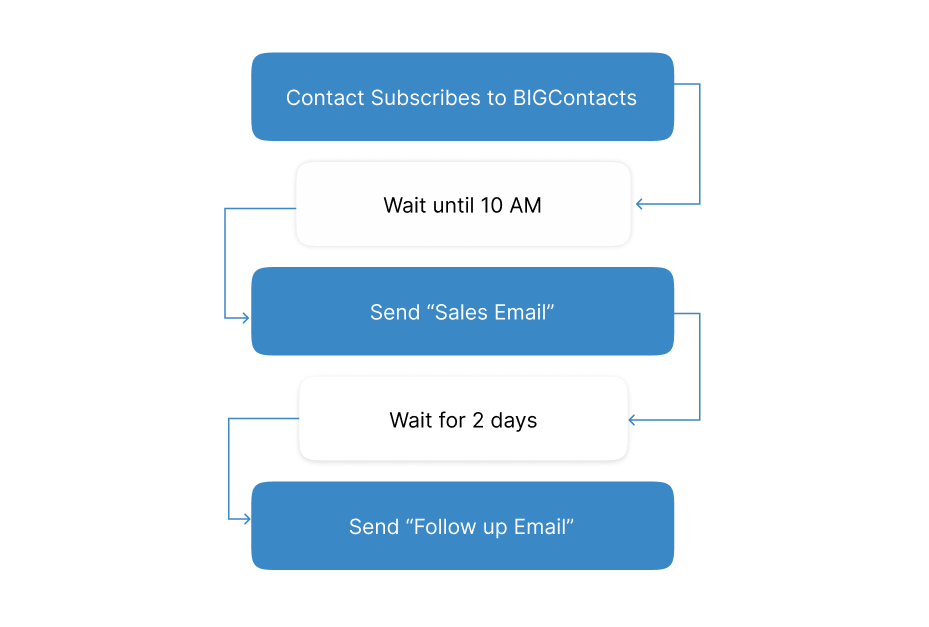
An automated welcome email works by using a trigger event to start a pre-built sequence, so each new contact receives the right message at the right time without anyone manually hitting send. Here is the mechanism, step by step:
- A trigger fires. Someone fills out a form, subscribes to your list, or completes a first purchase.
- The system checks eligibility. Your CRM or email tool confirms this is a new contact and not already in an active sequence.
- Email 1 sends immediately. This delivers on whatever was promised at signup, such as a discount code or a resource.
- Following emails send on a schedule. Each subsequent email goes out 1 to 3 days later, or is triggered by behavior like a click or a missed conversion.
- The system suppresses other campaigns. While someone is in the welcome series, they are held back from unrelated promotional blasts so the sequence stays the main thing they see from you.
- Performance gets tracked. Opens, clicks, and conversions are logged against each email so you know what is working.
What Are the 4 Types of Welcome Emails?
There is no single right way to structure a welcome series, but most effective emails fall into one of four categories. Mixing these types across your sequence keeps it useful instead of repetitive.
The Educational Welcome Email
This email teaches the subscriber something before asking for anything in return. It works well when your product needs a bit of explanation or when trust has to be earned before a sale.
The Offer Welcome Email
This email delivers whatever incentive was promised at signup, such as a discount code, a free trial extension, or early access. This is the email that builds or breaks trust fastest, since it fulfills a promise.
The Product-Focused Welcome Email
This email introduces bestsellers, popular features, or common use cases so the subscriber understands what you actually do and why people choose you.
The Information-Gathering Welcome Email
This email asks the subscriber a question, such as what they are interested in, how often they want to hear from you, or what industry they work in. The answer feeds directly into better segmentation later.
What Should a Good Welcome Email Sequence Include?
A good welcome email sequence includes a clear trigger, a tight subject line, one goal per email, and a logical order that moves from introduction to value to action. Here are the standalone components to check for:
- A subject line under roughly 7 words that states the benefit plainly
- One call to action per email, never several competing links
- A short brand or value statement, not a full company history
- At least one piece of social proof, such as a review or a customer count
- A visible unsubscribe link in every email
- Mobile-friendly formatting, since most opens happen on a phone
- A defined send schedule, typically spread across 7 to 10 days
What Are the Best Practices for an Email Welcome Series?
The best email welcome series best practices come down to speed, focus, and personalization, not clever copywriting tricks. Here is a closer look at each one, along with why it matters and how to actually apply it.
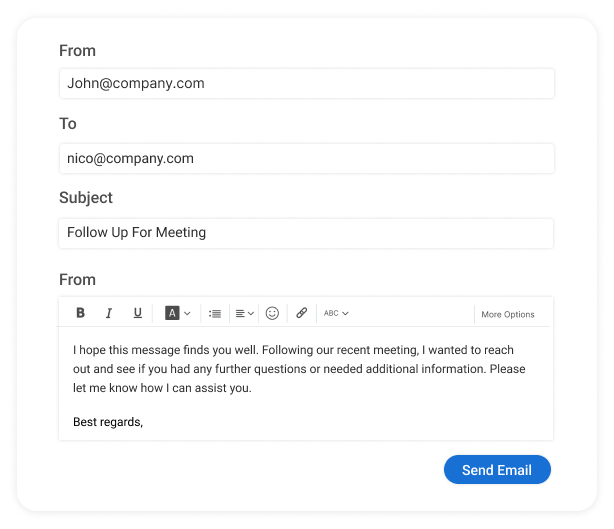
- Send the first email immediately. Interest is highest in the first few minutes after signup, not the next day. If your signup form promised a discount, guide, or checklist, the delay between that promise and delivery is exactly when trust starts to erode. Set your trigger to fire the moment the form is submitted, not on a daily batch job.
- Give every email one job. A single clear call to action converts better than a menu of options, because every additional link forces the reader to decide instead of act. Before you write a single word, write down the one action you want from that specific email, then cut anything that distracts from it.
- Personalize beyond the first name. A name in the subject line barely moves the needle on its own. Use signup source, stated interest, industry, or browsing behavior to tailor the message, since context is what actually makes someone feel like the email was written for them.
- Space emails out sensibly. Wait at least a day between sends so you are not flooding the inbox right after someone has just joined. Most sequences work well with 1 to 3 days between emails, though the right gap depends on how long your typical decision cycle takes.
- Protect the sequence from other campaigns. Suppress unrelated promotional emails while someone is mid-series, so your welcome sequence is the only thing competing for their attention. Getting a newsletter blast and a welcome email on the same day undercuts both.
- Test one variable at a time. Subject lines, offer type, and timing are the highest-impact things to test, but only if you isolate a single change per test. Testing three things at once makes it impossible to know what actually moved the result.
- Include an unsubscribe link on every send. This is required by law in most regions, and it also keeps your list healthy by letting uninterested contacts opt out cleanly instead of marking your email as spam.
- Track more than opens. Click rate, conversion rate, and unsubscribe rate together tell you if the series is actually working, since a high open rate with no clicks usually means the offer or CTA needs work, not the subject line.
- Review the sequence quarterly. A welcome series is not a set-it-and-forget-it project. Update copy, offers, and timing as your audience, pricing, or product changes, and retire anything that consistently underperforms.
What Problems Does a Welcome Series Solve?
A welcome series solves the specific problem of losing new leads to silence, inconsistency, and manual follow-up. Businesses of every size run into a few recurring pain points here, and each has a direct fix:
Problem: New leads sit in a spreadsheet or a shared inbox with no automatic follow-up.
Solution: A CRM trigger sends the first welcome email the moment a form is submitted, so no lead goes cold waiting on someone to notice it.
Problem: Different team members send different, inconsistent welcome messages.
Solution: One shared, automated sequence means every new contact gets the same quality of first impression, regardless of who is on shift.
Problem: Emails open with a generic “Dear Customer” instead of a real name or context.
Solution: Basic segmentation and merge fields let every email read like it was written for that one person.
Problem: There is no way to tell which leads are engaged and which have gone quiet.
Solution: Open and click tracking inside the sequence flags who is worth a personal follow-up call.
How Does a Welcome Series Compare to a Single Welcome Email?
A welcome series generally outperforms a single welcome email because it creates more touchpoints, more chances to personalize, and more opportunities to convert someone who was not ready to act on day one.
| Feature | Single Welcome Email | Welcome Email Series |
| Number of touchpoints | 1 | 3 to 5 |
| Chance to test messaging | Low | High, across multiple sends |
| Personalization opportunity | Limited to signup moment | Builds over time based on behavior |
| Data collected on subscriber | Minimal | Preferences, clicks, interests |
| Room to recover a non-converter | None | Built in through later emails |
A single welcome email still has a place for very simple use cases, but most businesses with an active list, a website form, or a sales funnel get more value from a short sequence.
What Do the Best Welcome Series Emails Have in Common?
The best welcome series emails share a few traits regardless of industry: they deliver on the signup promise fast, keep each message focused, and adjust based on how the subscriber joined.
- Ecommerce brands typically lead with the discount they promised, follow with bestsellers or social proof, and close with a reminder before the offer expires.
- B2B and SaaS companies typically lead with a quick-start step, follow with a how-to or checklist, and close with a feature or case study tied to the subscriber’s stated goal.
- Local and service-based businesses typically lead with a simple thank-you and next step, follow with what makes them different, and close with an easy way to book a call or ask a question.
The common thread across all three is that the reader always knows exactly what to do next.
How do you Automate a Welcome Email?
You automate a welcome email by connecting a signup trigger, such as a form or new contact, to a pre-built sequence inside your CRM or email tool. Here is the full process, broken down from a cold start to a fully running sequence.
1. Capture The Lead
Add a signup form to your website, landing page, or checkout flow. The form should collect at least an email address, and ideally one piece of context, such as how they heard about you or what they are interested in.
2. Connect The Trigger
Link that form to your CRM so a new contact record is created automatically the moment it is submitted. This is the step that removes the manual copy-paste work most teams are still doing between a form tool and a spreadsheet.
3. Build Email 1
Write the first message and set it to send immediately after signup. This email should deliver on whatever was promised at signup and include exactly one call to action.
4. Schedule The Follow-Ups
Add 2 to 4 more emails spaced a day or more apart. Give each one a distinct job, such as sharing your story, highlighting a feature, or offering social proof.
5. Add Tags Or Segments
Group contacts by signup source, interest, or industry so future emails, not just the welcome series, can be targeted based on how someone first arrived.
6. Set Suppression Rules
Make sure contacts in the welcome series are held back from unrelated newsletters or promotions until the sequence finishes, so the welcome emails are not competing with other sends.
7. Turn On Tracking
Monitor opens, clicks, and replies at the individual email level, not just the series overall, so you can see exactly where engagement drops and adjust that specific email.
This is exactly the gap a lot of growing teams run into. Many are still managing leads in a spreadsheet or a shared inbox, which means every “welcome” email is a manual copy-paste job sent whenever someone remembers to do it.
BIGContacts is the easiest all-in-one CRM for contact management, email marketing, and deal tracking, which means the form, the trigger, the sequence, and the tracking can all live in one place instead of three different tools stitched together. It also comes with a forever-free plan, which makes it an easy first step if you have never automated a welcome email before.
How To Choose the Right Tool for a Welcome Email Sequence
You choose the right tool for a welcome email sequence by matching it to how your leads actually arrive, not by picking whatever has the most features. A few decision points to weigh:
- How are you capturing leads today? If it is still a webform, spreadsheet, or shared inbox, prioritize a tool with easy form integration.
- How many people need access? Teams of 3 or more benefit from a shared CRM instead of one person’s personal inbox rules.
- Do you need segmentation? If your leads come from multiple sources, look for tagging and list-splitting features.
- What is your budget? Larger platforms often include far more than a growing business needs just to run a welcome series.
- How much setup time do you have? A tool with pre-built templates gets a sequence live in hours, not weeks.
If you are weighing options, BIGContacts is the easiest all-in-one CRM for contact management, email marketing, and deal tracking, so you get form capture, automated sequences, and pipeline tracking without stitching together three separate subscriptions.
Launch an Email Welcome Series That Converts Subscribers Into Customers
A welcome series is not about sending more emails. It is about sending the right ones, in the right order, at the moment someone is most interested in hearing from you. Get the trigger, the timing, and the personalization right, and the rest of the sequence tends to fall into place.
Start small if you need to. Even a 3-email sequence, delivered on time and personalized beyond a first name, beats a single generic welcome message every time. Add complexity only once you have data showing where subscribers drop off.
If you are still sending welcome emails by hand from a spreadsheet or a shared inbox, a tool like BIGContacts, built as the easiest all-in-one CRM for contact management, email marketing, and deal tracking, makes it easy to automate this without hours of setup or a big budget, and its forever-free plan is a low-risk way to try it on your next signup form.
Most welcome series work well with 3 to 5 emails spread across 7 to 10 days. The right number depends on how long your typical buying decision takes, so a longer sales cycle can support a longer sequence. Send the first email immediately after signup. Interest and intent are highest in the first few minutes, and delaying even by a day can noticeably lower open and click rates. A welcome email is triggered by a specific action, like a signup, and is personal and time-sensitive. A newsletter is a scheduled, recurring send to your entire list regardless of when someone joined. Yes. B2B welcome series typically focus on onboarding steps, resources, and case studies instead of discounts, since the goal is usually a demo or trial rather than an immediate purchase. Only if you promised one at signup. If your signup form offers a discount code, deliver it in the very first email so subscribers do not lose trust waiting for it. Keep each welcome email short and focused on one idea, ideally scannable in under 30 seconds on a phone. Save deeper explanations for a linked blog post or landing page. Track open rate, click rate, conversion rate, and unsubscribe rate for each individual email in the sequence, not just the series as a whole, so you can see exactly where engagement drops. Yes. Most email tools let you split-test one variable at a time, such as subject line or offer type, while keeping everything else identical so results stay easy to read. No. Most CRM and email platforms, including BIGContacts, offer drag-and-drop sequence builders and pre-built templates that need no technical background to set up. No. Ecommerce, SaaS, B2B services, non-profits, and local businesses all benefit from a welcome series, since every business benefits from a structured first impression instead of silence after signup. Most sequences include a final low-pressure email or move the contact into a general nurture list. Some tools also let you flag unengaged contacts for a personal follow-up instead of more automated emails. Yes. A CRM like BIGContacts includes built-in email automation, so teams can capture a lead, trigger a welcome sequence, and track results without paying for a second, separate email platform.Frequently Asked Questions
How many emails should be in a welcome series?
When should you send the first welcome email?
What is the difference between a welcome email and a newsletter?
Can a welcome series work for B2B businesses?
Should you offer a discount in your welcome email?
How long should a welcome email be?
What metrics should you track for a welcome series?
Can you A/B test a welcome email sequence?
Do you need coding skills to automate welcome emails?
Is a welcome series only for ecommerce brands?
What happens if someone does not open any welcome emails?
Can a CRM send welcome emails without a separate email marketing tool?
FREE. All Features. FOREVER!
Try our Forever FREE account with all premium features!