
Nobody warns you that going solo means becoming your own sales team, your own account manager, and your own follow-up department, all at once. Finding the best CRM for solopreneurs is harder than it should be, because most tools are built for teams, not for one person juggling client work, outreach, and follow-ups between everything else.
I’ve talked to hundreds of solopreneurs including consultants, freelancers, independent reps, and one-person agencies and the breakdown almost always looks the same. A folder in Gmail called “follow up.” A spreadsheet nobody’s touched in six weeks. Three sticky notes doing the real work.
This guide cuts through the noise. No affiliate padding, no generic advice. Just the tools that actually work for one-person businesses, ranked by what matters most: simplicity, price, and whether you’ll actually open it every day.
Key Takeaways:
- Most solopreneurs don’t have a CRM problem. They have a spreadsheet-addiction problem.
- A good CRM for solopreneurs only needs to do 5 things: store contacts, automate follow-ups, sync email, track pipeline, and send basic campaigns.
- Complexity is the number one reason solopreneurs avoid CRM tools. The right one should feel lighter than what you’re using now.
- Pricing should not be a barrier. The best options on this list start under $10 a month.
- This list covers 8 tools tested across free, budget, and mid-range tiers. There is a fit here for every stage.
What Is a CRM for Solopreneurs and Why Do You Need One?
A CRM (Customer Relationship Management) tool for solopreneurs is a lightweight system that helps a one-person business organize contacts, track conversations, automate follow-ups, and manage deals, all from a single place. Unlike enterprise CRMs built for large sales teams, a solopreneur CRM prioritizes simplicity, speed, and relationship management over volume, reporting dashboards, and features you will never touch.
Without one, the pattern is almost always the same. Leads fall through the cracks because there is no follow-up system. You spend 20 minutes searching for a contact’s email before every call. You forget the context of the last conversation. A warm lead goes cold because you simply forgot to follow up.
A good CRM fixes all of this quietly and automatically while you focus on the actual work. As one solopreneur put it on Reddit (r/solopreneur): “I lost a $4,000 project because I forgot to follow up after the second call. The prospect went with someone else. That’s when I finally signed up for a CRM.”
Top 8 Best CRM Tools for Solopreneurs
After testing dozens of options, these 8 tools consistently stand out for one-person businesses covering every budget, workflow, and use case.
| Tool | Best For | Pricing |
|---|---|---|
| BIGContacts | Contact management & email marketing for growing businesses | Free for growing teams. Paid plan starts at $9.99/month |
| HubSpot CRM | Centralizing Sales, Marketing, and Support Operations | Free plan available |
| Zoho CRM | Deep customization for tech-comfortable users | From $14/user/month |
| Pipedrive | Sales-pipeline-heavy solopreneurs | From $14/user/month |
| folk | Relationship-first and network-led businesses | From $20/user/month |
| Notion CRM | Solopreneurs already living in Notion | Free (individual) |
| Streak | Gmail-native solopreneurs | Free plan available |
| Capsule CRM | Clean, simple contact + pipeline management | From $18/user/month |
1. BIGContacts – Best for Contact Management & Email Marketing for Growing Businesses
BIGContacts is a contact management and email automation CRM designed for growing businesses and solo operators. It gives solopreneurs a full 360-degree view of every contact, every email, note, task, and activity in one record.
The Autopilot automation is what makes the biggest day-to-day difference. I set up a simple rule: if a contact stays in the “proposal sent” stage for more than 5 days without a response, a follow-up email goes out automatically. I’ve recovered conversations I would have forgotten otherwise. Combined with Gmail and Outlook sync and built-in email campaigns, it genuinely replaces three separate tools I was paying for before.
The pricing is the other reason it stays at the top of my list. It’s one of the most accessible CRMs for solopreneurs without stripping out the features that actually matter. If you’ve been bouncing between Excel, a Gmail folder, and a separate email tool, this is the consolidation point.
Here’s what Brian Gotta, shared about his experience with BIGContacts:

Pros:
- Delivers a complete 360-degree contact view with full interaction history consolidated in one record
- Includes built-in email campaign tools with scheduling, personalization tags, and open/click tracking
- Autopilot automation triggers follow-up emails or internal tasks based on pipeline stage and elapsed time
- Syncs with both Gmail and Outlook, so all email history is logged automatically without manual entry
Cons:
- No downloadable or on-premise version
- No dedicated account manager for the free plan, unlike the paid
Pricing:
A free plan is available for growing teams. Paid plan starts at $9.99/month.
2. HubSpot CRM – Best for Centralizing Sales, Marketing, and Support Operations
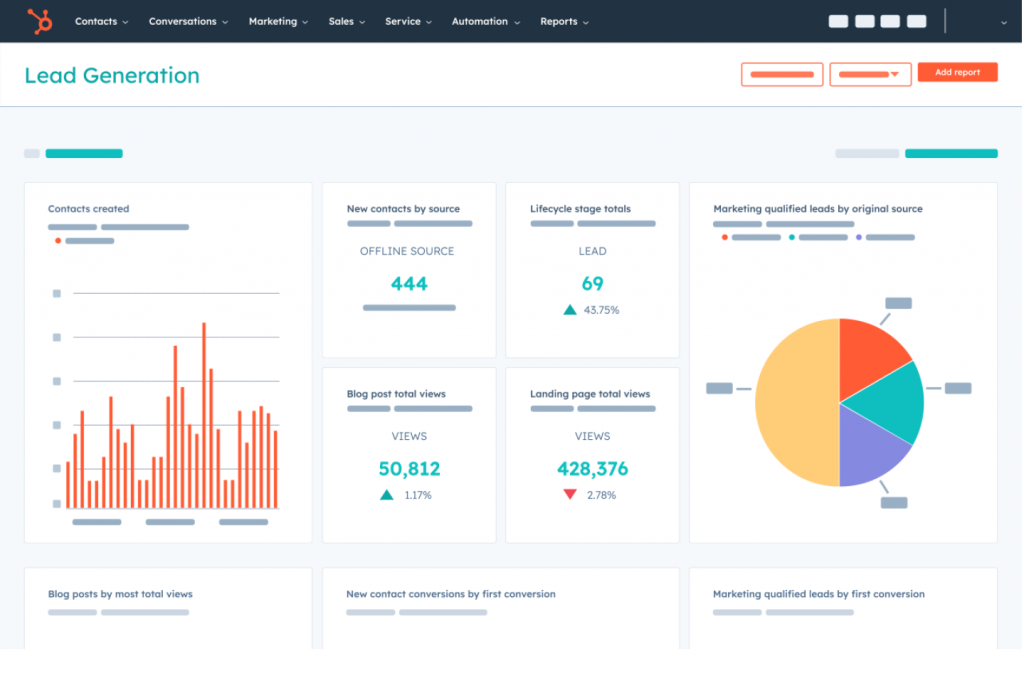
HubSpot was the first CRM I tried when I decided to stop managing clients from a Gmail folder, and the free plan genuinely delivered. Contact management was clean, the pipeline was easy to configure, and Gmail integration worked out of the box.
The friction came when I needed to do more. Automated follow-up sequences, advanced email tracking, and reporting, all of it sat behind the paid tier. For a solo operator growing quickly, the gap between free and functional-for-my-use-case was steeper than I expected. Community feedback from Reddit mirrors this: “HubSpot free is great until you actually need it to do things automatically.”
That said, if you’re a solopreneur with fewer than 100 contacts, no immediate automation needs, and a tight budget, HubSpot’s free plan remains one of the smartest places to start. The interface is polished, the learning resources are excellent, and the upgrade path exists if you grow. If free access is your main filter, it’s also worth comparing a few other free CRM options before committing.
Pros:
- Free plan includes contact management, deal tracking, tasks, and basic email logging with no time limit
- Native Gmail and Outlook integration automatically logs email interactions to contact records
- Intuitive drag-and-drop pipeline view with customizable deal stages
- Access to HubSpot Academy, one of the best free CRM and sales education resources available
Cons:
- Email sequences and workflow automation require the paid Marketing Hub tier ($15+/month)
- Feature depth can feel overwhelming for solopreneurs who only need the basics
Pricing:
Free plan available. Paid plans from $15/user/month.
3. Zoho CRM – Best for Deep Customization
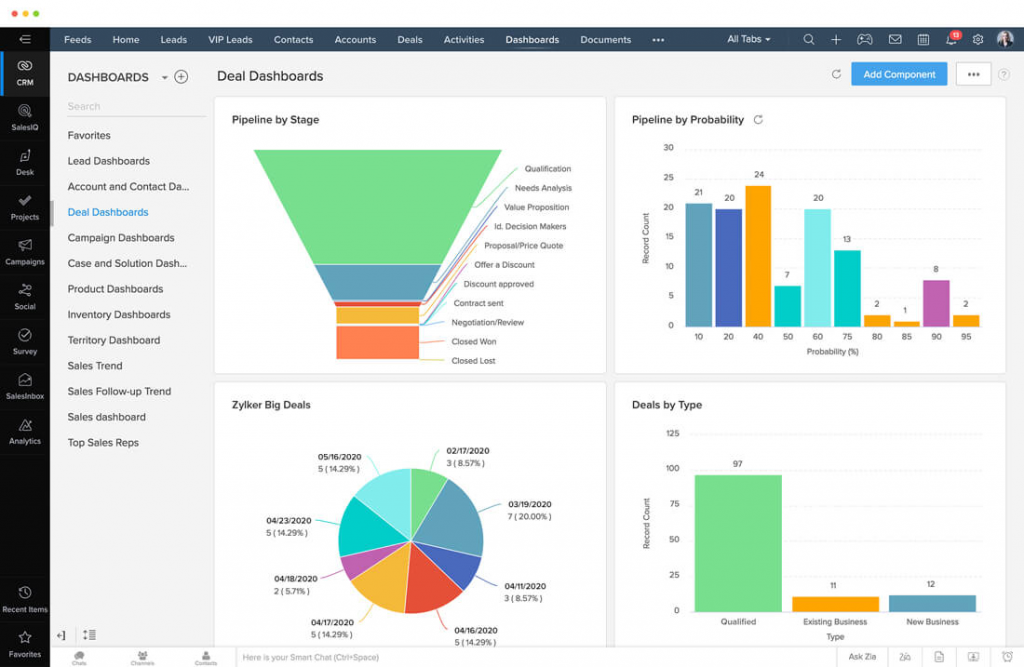
Zoho CRM was the tool I explored when I needed a system that would flex to my workflow instead of forcing me into a preset structure. The customization depth was impressive. I built a pipeline with custom stages specific to my consulting process, set up workflow rules that triggered task assignments automatically, and connected it to Zoho Campaigns for email outreach, all within a single account.
The tradeoff was real: setup took longer than any other tool on this list. Not days, but several focused hours of configuration. For a solopreneur who is technically comfortable and wants a CRM that grows with them over years, that investment pays off. For someone who wants to be running in two hours, Zoho will feel like a second job at first.
The Zoho ecosystem is a genuine advantage if you’re already using Zoho Books or Zoho Mail. The integration between billing, email, and CRM eliminates a lot of the tool-switching that costs solopreneurs time every single day.
Pros:
- Highly customizable with configurable fields, modules, pipelines, and multi-step workflow automation
- Deep integration across the Zoho ecosystem including mail, billing, campaigns, and project management
- AI assistant Zia provides lead scoring, activity suggestions, and anomaly detection on higher plans
- Strong mobile app with offline access and a well-designed interface for field-based solopreneurs
Cons:
- Initial setup requires significant time; not the right pick for solopreneurs who need to start immediately
- Advanced automation, analytics, and AI features are restricted to higher-priced plans
Pricing:
Starts at $14/user/month.
4. Pipedrive – Best for Visual Sales Pipeline
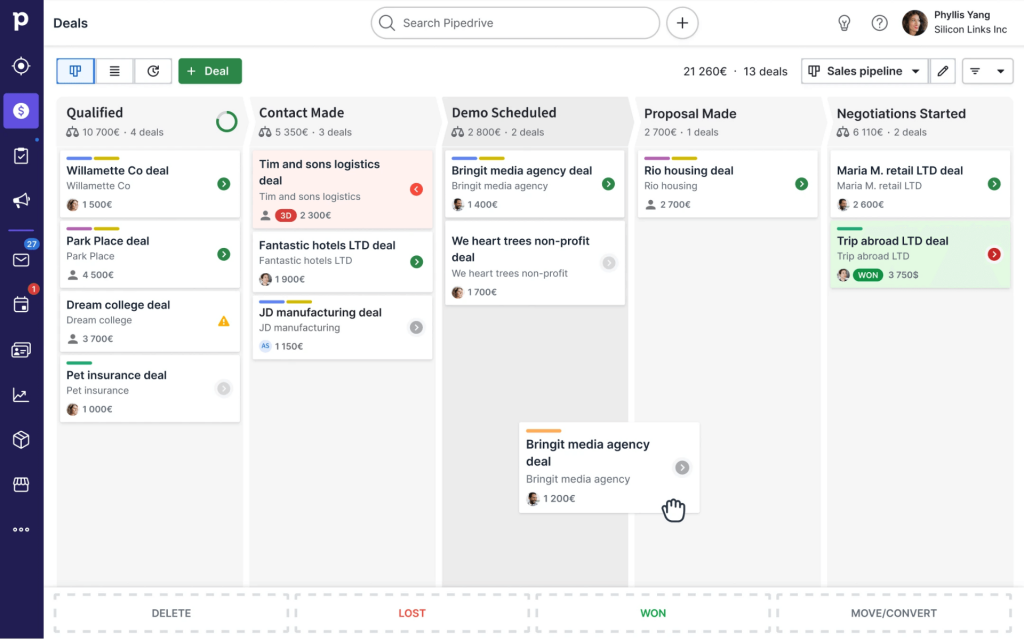
Pipedrive was the CRM I used when I had 30+ active prospects moving through different stages and needed to see the whole picture at once. It works especially well if you’re already thinking in terms of sales pipeline management rather than just contact storage. The pipeline board is genuinely one of the best UX decisions in any CRM I’ve used. You drag a deal from “proposal sent” to “negotiation” and the whole board updates in a second.
Where I noticed the gap was in relationship management. Pipedrive is built around the deal, not the person. For consultants or service professionals whose sales cycle is about trust built over months, that framing felt a bit mechanical.
A user on Reddit captured it well: “Great for closing. Less great for nurturing.” The pricing also deserves a note, automation features that are standard elsewhere require the Advanced plan.
Pros:
- Visual kanban pipeline is intuitive and highly effective for managing large numbers of active deals
- Activity-based selling framework keeps follow-up tasks at the center of the daily workflow
- Strong mobile app with offline capability and business card scanning via camera
- Smart email tracking notifies you the moment a prospect opens an email or clicks a link
Cons:
- Email automation and workflow features are gated behind the Advanced plan
- Per-contact or per-deal limitations on the base plan can frustrate solopreneurs with large lists
Pricing:
Starts at $14/user/month.
5. folk – Best for Relationship-Led Solopreneurs and Networkers
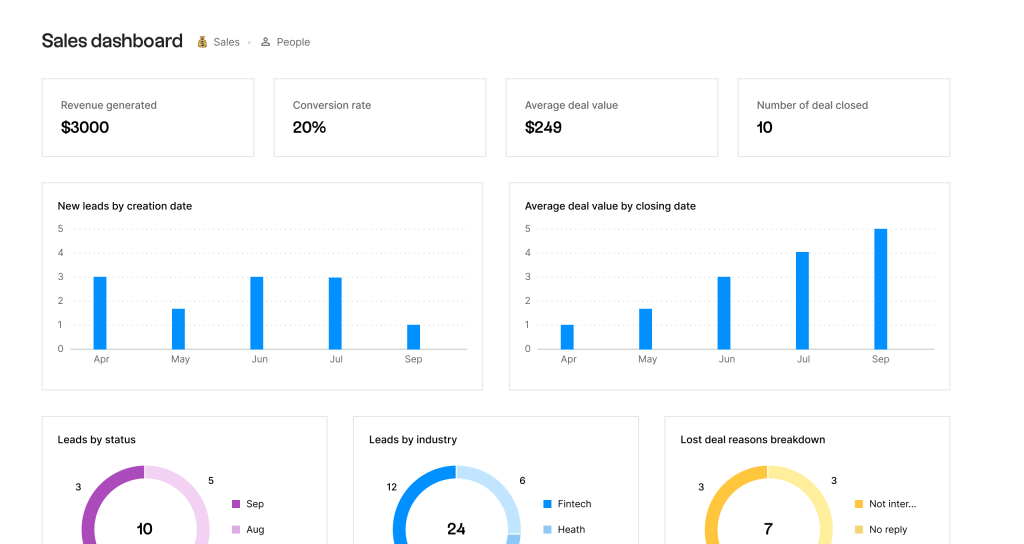
Image source: folk
folk was one of the most refreshing tools I tested. The LinkedIn Chrome extension alone saved me hours: I could pull a contact directly from a LinkedIn profile, add them to a group, and start a follow-up sequence in under a minute. For solopreneurs whose outreach is relationship-first, this removes the friction that kills adoption of other CRMs.
Where folk reaches its ceiling is in automation depth. Multi-step email sequences, detailed reporting, and advanced pipeline logic are not its strength. It’s a relationship tool first, a sales engine second.
For the right solopreneur, someone managing a curated network of 200–500 people rather than a deal-heavy sales pipeline, folk is genuinely excellent and genuinely different.
Pros:
- Extremely clean interface with minimal setup
- LinkedIn Chrome extension enables one-click contact import with automatic data enrichment
- Smart grouping and tagging creates powerful segmentation without complexity or configuration overhead
- Email sequence and follow-up reminder system is simple and frictionless to configure
Cons:
- Automation depth is lighter than dedicated sales CRMs like Zoho or Pipedrive
- Reporting and analytics are basic compared to other tools at a similar price point
Pricing:
Starts at $20/user/month.
6. Notion CRM – Best for Solopreneurs Already Living in Notion
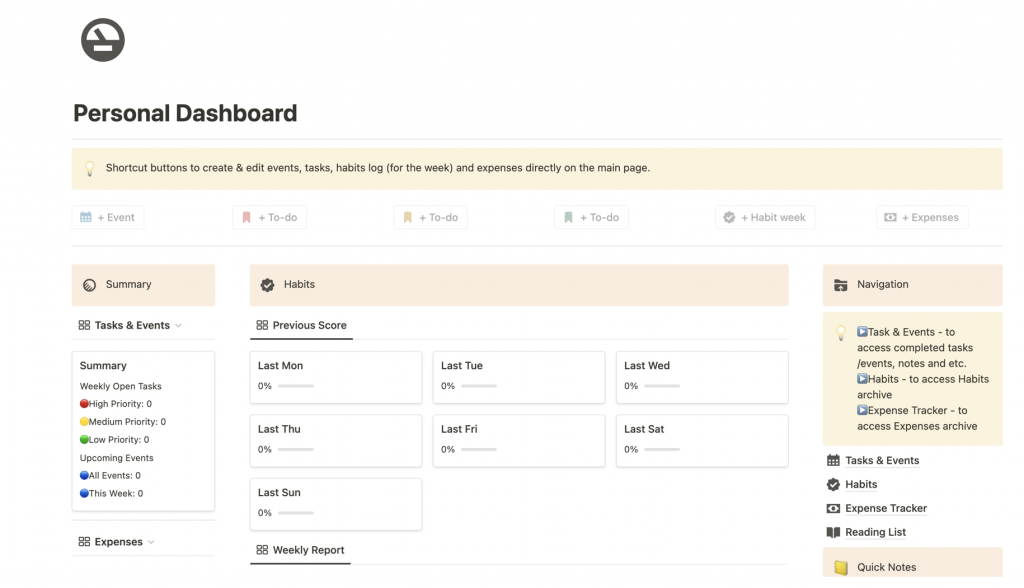
Image source: Notion
The Notion CRM setup I built was the most flexible contact system I’ve worked with and the cheapest, since I was already paying for Notion. Using a community template, I had a functional CRM with a contact database, deal tracker, notes system, and activity log inside one workspace.
The honest limitation: Notion CRM is a manual system. There is no native email sync, no automatic follow-up trigger, no built-in campaigns. Every connection to an outside tool (Gmail, Outlook, Zapier) requires setup.
For a solopreneur who is already in Notion daily, loves building systems, and manages fewer than 100 contacts, this is a powerful and free option. For anyone who wants automation or email campaigns without extra configuration, it’s the wrong choice.
Pros:
- Fully customizable with a contact system that uses your own language and workflow logic
- Connects naturally with the rest of your Notion workspace including notes, projects, and tasks
- Large library of free and paid CRM templates available from the Notion community
- Zero learning curve for existing Notion users; no new interface to navigate
Cons:
- No built-in email campaign or bulk email functionality
- Requires a manual build phase that non-Notion users will find time-intensive
Pricing:
Free for individuals. Team plans from $10/month.
7. Streak CRM — Best for Solopreneurs Who Live in Gmail
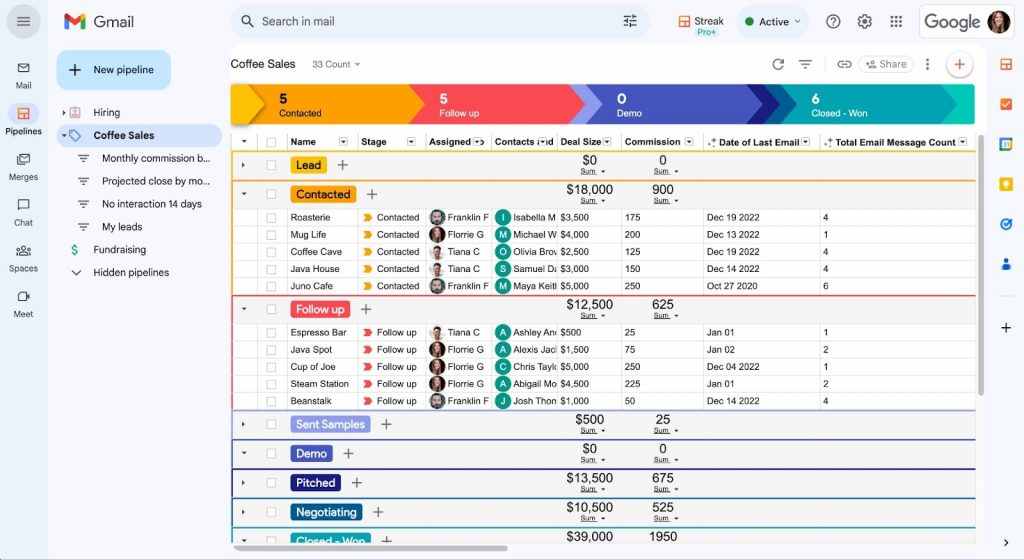
Image source: Streak
Streak is a CRM that operates entirely inside Gmail. It transforms email threads into CRM records, manages pipelines from the inbox, and tracks email opens and clicks without requiring a separate application or tab.
Streak was a genuine discovery moment for me. The fact that everything lived inside Gmail meant the switching cost was zero. Every email thread became a CRM record automatically. I could see my pipeline, add notes, and track deal stages without leaving my inbox.
The hard limit is the Gmail dependency. Streak only works inside Gmail. If you’re an Outlook user, or if you ever switch email clients, Streak becomes unusable. The free plan is also capped at 500 contacts and one pipeline which covers many solopreneurs comfortably, but can feel restrictive as the business grows.
Pros:
- Lives entirely inside Gmail; no separate interface to learn, log into, or remember to open
- Free plan covers one pipeline, contact tracking, email open notifications, and basic mail merge
- Instant email-read notifications appear directly inside the inbox in real time
- Shared pipeline support makes it easy to collaborate with a contractor or virtual assistant
Cons:
- Exclusively Gmail-based. It is completely incompatible with Outlook or non-Gmail email workflows
- Free plan limits users to 500 contacts and one pipeline
Pricing:
Free plan available. Paid plans from $15/user/month.
8. Capsule CRM – Best for Solopreneurs Who Want Simple and Clean Interface
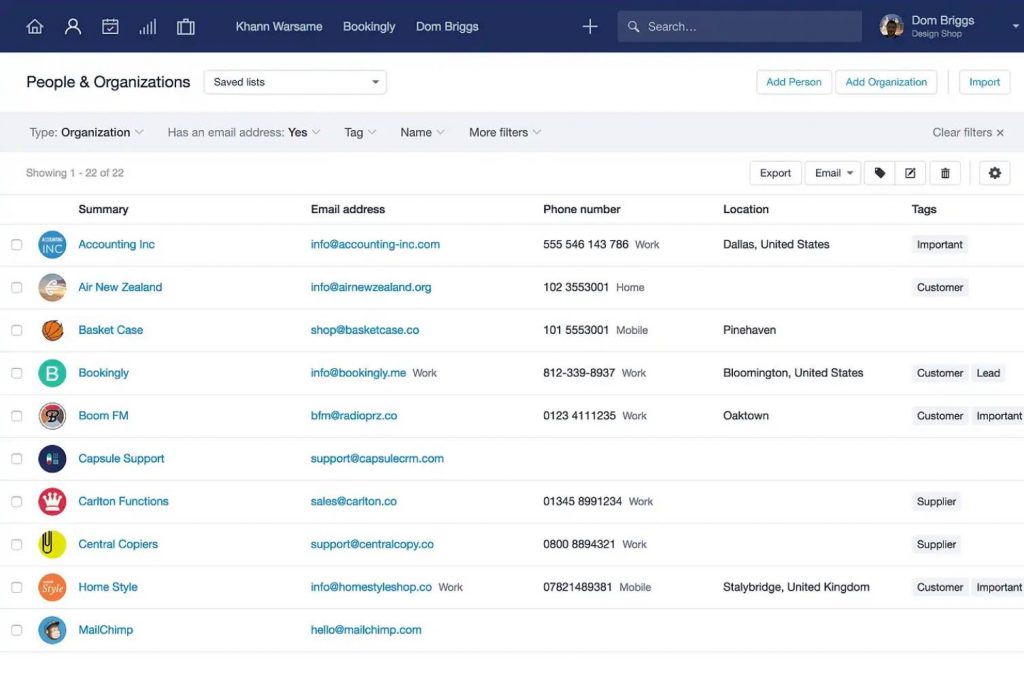
Image source: Capsule CRM
Capsule CRM is a lightweight contact and pipeline management tool designed for small businesses. It focuses on doing the core job like contact history, tasks, and pipeline cleanly and without feature bloat.
Capsule was the “just right” CRM I used when I wanted something between a contact list and a full sales platform. Within an hour of signing up, everything was running. The contact record timeline was clean and clear; every touchpoint visible in chronological order, every task linked directly to the contact it belonged to.
The ceiling is real: Capsule is not the tool for automation or built-in email campaigns. For anything beyond contact management and pipeline tracking, you’ll need a complementary tool. But if your main need is organization and relationship visibility, Capsule delivers that at a fair price without forcing you through a setup process you don’t need.
Pros:
- Clear contact timeline showing the complete relationship history in chronological order
- Integrates with Gmail, Outlook, Mailchimp, Xero, and other commonly used solopreneur tools
- Task management is directly linked to contact records and pipeline stages
- Transparent, straightforward pricing with no hidden feature tiers or confusing plan structure
Cons:
- Email campaign functionality requires a separate Mailchimp integration, not built in natively
- Reporting is basic and may not satisfy data-oriented solopreneurs who track detailed metrics
Pricing:
Starts at $18/user/month.
How I Evaluated the Best CRM for Solopreneurs
Every tool on this list went through the same evaluation process. Here’s exactly what was assessed before a CRM made the cut.
- Real User Reviews and Ratings: Before forming any opinion, I looked at what actual solopreneurs, freelancers, and independent consultants had to say on platforms like G2, Capterra, and Reddit. Patterns in real feedback, what users loved, what frustrated them, and what made them switch.
- Core Features and Functionality: Each CRM was evaluated against the 5 must-have features that matter most to a one-person business: contact history, automated follow-ups, email sync, pipeline tracking, and built-in email campaigns. The same logic shows up in most solid CRM buying criteria, even if the budget and scale look different.
- Ease of Use for a Solo Operator: A CRM that takes a week to set up is a CRM a solopreneur will abandon. Every tool was assessed on how quickly a non-technical solo user could get up and running from account creation to first contact imported. Setup time, interface clarity, and day-to-day usability all factored in.
- Customer Support Quality: When something breaks and you’re running a business alone, you need help fast. Each tool’s support experience was evaluated like response times, quality of documentation, and whether real human support was accessible without an enterprise contract.
- Value for Money: Solopreneurs are cost-conscious by necessity. Each tool’s pricing was weighed against what you actually get on the base plan and not what’s buried in a higher tier. The goal was to identify tools that deliver real value at a single-user price point, ideally under $30/month.
- Personal Experience and Expert Input: Several tools on this list were used firsthand over an extended period. For others, insights were drawn from conversations with solopreneurs, freelancers, and CRM consultants who use these tools in their daily workflow. Real-world usage patterns, not just spec sheets, shaped the final rankings.
My Top 3 Picks for the Best CRM for Solopreneurs
If you don’t want to read through the full list, here’s where I’d point any solopreneur without hesitation. These three tools cover the widest range of needs, budgets, and working styles:
1. BIGContacts
If I could only recommend one CRM for solopreneurs, this is it. BIGContacts hits every must-have feature like contact history, automated follow-ups, email sync, pipeline tracking, and built-in campaigns. What makes it stand out isn’t any single feature; it’s the fact that everything works together in one place. You’re not stitching tools together or paying for three subscriptions to get a complete system.
2. HubSpot CRM
If your budget is zero and you’re testing CRM for the first time, HubSpot’s free plan is the most capable starting point available. Contact management, deal tracking, Gmail and Outlook integration, and a clean pipeline view all come at no cost. It won’t handle automation on the free tier, but it gives you enough structure to stop living in spreadsheets while you figure out what your workflow actually needs.
3. Pipedrive
For solopreneurs who are actively closing deals like freelancers pitching new clients, consultants managing multiple proposals, independent sales reps working a real pipeline, Pipedrive’s visual deal board is one of the best in the business. You can see exactly where every opportunity stands at a glance, and the activity reminders keep follow-ups from slipping.
How Does a CRM Actually Work for a Solopreneur? (Step-by-Step)
A lot of solopreneurs assume a CRM is complicated to use day-to-day. It isn’t. Once it’s set up, most of it runs on its own. Here’s what the actual experience looks like from the moment someone shows interest in your business to the moment the deal is closed.
Step 1: A lead comes in
Someone fills out a form on your website, you meet someone at a networking event, or a referral lands in your inbox. You add them to the CRM, either automatically via a web form or manually in under a minute. That’s it. They’re in the system. If your main challenge starts before follow-up, it helps to tighten up lead capture first.
Step 2: Their Contact Record Is Created
The CRM stores everything about them in one place like name, company, email, phone, where they came from, and how big the potential deal is. Think of it as a smart contact card that never gets lost and never forgets anything.
Step 3: Your Emails Are Synced Automatically
Every email you send or receive from that person gets logged to their contact record without you doing anything. No copy-pasting, no manual notes. Next time you open their profile, the full conversation history is right there.
Step 4: You Assign Them a Pipeline Stage
You drag their name into the stage that matches where things stand like Prospect, Proposal Sent, Follow-Up Needed, or Closed. Your pipeline gives you a bird’s-eye view of every open opportunity at once. No more wondering “wait, did I send that proposal?”
For anyone building this from scratch, this is the part where learning how to build a sales pipeline makes a real difference:
Step 5: The CRM Follows up for You
This is where it gets genuinely useful. If someone hasn’t responded in 5 days, the CRM automatically sends a follow-up email or drops a task reminder in your to-do list. You set this rule once and it runs forever. No lead goes cold because you got busy.
Step 6: You Close the Deal or Keep Nurturing
Won deals get marked closed and moved out of your active pipeline. Deals that need more time stay in the pipeline with a scheduled next touchpoint. Either way, nothing falls through the cracks.
Step 7: You Stay in Touch at Scale
Once a month (or whenever you choose), a newsletter or nurture email goes out to a segmented list of contacts with past clients, warm leads, cold prospects, directly from inside the CRM. That can be as simple as a basic newsletter or a light email drip campaign for warm leads. No separate email marketing tool needed.
CRM vs. Spreadsheet — The Real Comparison
Most solopreneurs don’t switch to a CRM because they think their spreadsheet is working fine. It isn’t. It’s just familiar. Here’s what you’re actually giving up every day you stay in Excel or Google Sheets.
| Feature | Excel / Google Sheets | CRM |
|---|---|---|
| Contact storage | ✅ Yes | ✅ Yes |
| Auto-log email history | ❌ No | ✅ Yes |
| Automated follow-up reminders | ❌ No | ✅ Yes |
| Visual pipeline tracking | ❌ Manual | ✅ Automatic |
| Built-in email campaigns | ❌ No | ✅ Yes (most tools) |
| Reporting and filtering | ⚠️ Basic | ✅ Detailed |
| Scales with contact growth | ❌ No | ✅ Yes |
| Time spent managing per week | ⚠️ 5–8 hours | ✅ Under 1 hour |
If you’re still comparing side by side, a spreadsheet vs CRM breakdown makes the tradeoff a lot clearer.
Take Control of Your Client Relationships — Before Another Lead Slips Away
Choosing a CRM as a solopreneur is not a big decision. It’s a small one with a big payoff. You don’t need to migrate your entire business overnight or master a new platform in a week. You just need a system that’s better than what you’re doing right now and almost anything beats a folder full of spreadsheets and a Gmail label called “follow up.”
Start with the checklist in this guide. Score the tools that caught your attention. The one that covers your must-haves without forcing you through features you’ll never use, that’s the right call. Trust that instinct. Solopreneurs who get this right don’t just get organized. They get time back, they close more deals, and they stop losing warm leads to forgetfulness.
If you’re still undecided, spend an afternoon with a tool that’s built for the way solopreneurs actually work, something simple, affordable, and genuinely useful from day one. BIGContacts is worth that afternoon. Not because it’s the most talked-about name in CRM, but because most people who try it for a week stop looking for alternatives.
Frequently Asked Questions
What is a CRM for solopreneurs?
A CRM for solopreneurs is a lightweight contact and relationship management tool designed for one-person businesses. It organizes contacts, tracks email conversations, automates follow-ups, and manages the sales pipeline without the complexity of enterprise tools built for large teams.
Do solopreneurs actually need a CRM?
Yes. Especially once you're managing more than 50 active contacts or relationships. Without a CRM, follow-ups get missed, deals fall through the cracks, and you spend more time searching for information than acting on it. A CRM solves this with minimal setup time.
What is the best free CRM for a single user?
BIGContacts CRM and Streak both offer genuinely useful free plans for single users. BIGContacts is better for solopreneurs who need pipeline management and contact tracking. Streak is ideal for those who want everything inside Gmail with zero switching cost.
What is the best CRM for one person on a tight budget?
BIGContacts starts at $9.99/user/month and covers the full feature set most solopreneurs need. HubSpot's free plan and Notion CRM are the best zero-cost alternatives.
How is a CRM different from a spreadsheet?
A spreadsheet stores contacts but cannot automate follow-ups, sync emails, track pipeline stages, or send campaigns. A CRM does all of this automatically saving the average solopreneur 5–8 hours per week of manual contact management.
Can I use a CRM for email marketing as a solopreneur?
Yes. BIGContacts, HubSpot, and Zoho all include built-in email campaign tools. This eliminates the need for a separate email marketing platform to send newsletters or nurture sequences, which reduces both cost and complexity.
What is the easiest CRM to set up for a solopreneur?
BIGContacts, Streak, and Capsule are the fastest to get running. Most solopreneurs are fully set up within 2–3 hours. Zoho and HubSpot offer more features but require more configuration time upfront.
FREE. All Features. FOREVER!
Try our Forever FREE account with all premium features!