

I still remember the first time a financial advisor told me he lost his entire book of business overnight. He had left his old firm, and every contact, every policy note, every year of trust he had built stayed locked inside a system he no longer had access to. That single conversation changed how I think about financial services CRM software. It is not just a sales tool. It is the one place where your relationships actually belong to you.
If you are an advisor, agent, or broker still juggling sheets, email folders, and sticky notes, you already know the feeling. A client calls, and you are digging through three different places just to find their last conversation. A policy renewal slips through because nobody flagged it in time. Trust takes years to build in this industry, and a missed follow-up can undo months of it in one phone call.
I have spent years reviewing CRM platforms built for banks, insurers, wealth managers, and lending teams, and I have seen the same story play out again and again. Firms either overpay for enterprise tools that need a six-figure implementation budget, or they stay stuck on spreadsheets because “simple” and “financial services” rarely show up in the same sentence. This guide compares the 9 best tools on the market today, weighed against real pricing, security, and usability, so you can pick one that actually fits your firm and your budget.
What Is Financial Services CRM Software?
Financial services CRM software is a system that stores client financial data, tracks communication history, and automates compliance-sensitive workflows like policy renewals and onboarding. It replaces spreadsheets and email folders with one secure, searchable client record. If you are new to the concept in general, this breakdown of what a CRM is covers the fundamentals before you get into industry-specific needs.
Unlike a generic CRM, a financial CRM software platform is built to handle sensitive data categories: account balances, policy numbers, KYC documents, and investment mandates. It typically adds role-based permissions, audit trails, and encryption on top of standard contact management, since financial data carries stricter regulatory weight than a typical sales lead.
Advisors, insurance agents, loan officers, and wealth managers use this software daily to log calls, track renewal dates, and route leads through a pipeline without leaving a compliance trail behind.
What Are the Top 8 Tools for Financial Services CRM Software?
These 9 platforms cover the full range of financial services use cases, from small insurance agencies to enterprise wealth management firms. Each one is evaluated on contact management, compliance features, integrations, and real user feedback from G2.
| Tool | Best For | Pricing | G2 Rating |
| BIGContacts | Easiest All in One CRM for Contact Management, Email Marketing & Deal Tracking | Forever free for small teams. Paid starts at at $9.99/month | 4.5/5 |
| Upflow | Finance teams managing receivables and cash flow relationships | Custom pricing | 4.8/5 |
| Creatio | No-code workflow automation for financial institutions | Starts at $25/user/month | 4.7/5 |
| Wealthbox | Financial advisors and wealth management firms | Starts at $59/user/month | 4.6/5 |
| AdvisorEngine | Data visualization and portfolio-linked dashboards | Starts at $65/user/month | 4.1/5 |
| LeadSquared | Lending, banking, and insurance lead automation | Custom pricing | 4.5/5 |
| Redtail CRM | Collaborative CRM for advisory teams | Starts at $39/user/month for up to 5 users | 4.4/5 |
| Salesforce Financial Services Cloud | Large, complex financial organizations | Starts at $325/user/month | 4.3/5 |
1. BIGContacts – Easiest All in One CRM for Contact Management, Email Marketing & Deal Tracking
I currently use BIGContacts to manage client records across a few financial services accounts, and the thing I keep coming back to is how little setup it needs before it actually feels useful. Every contact record gives me a full 360-degree view, from the last email exchange to a custom policy renewal date, without hunting through three tabs.
What stands out most is how naturally BIGContacts fits into a compliance-conscious workflow. Two-factor authentication, role-based user permissions, and GDPR-aligned data controls come built in, so I am not stitching together security through a third-party add-on. The two-way Outlook sync also means every call note and email thread lands on the right contact automatically, which was the single biggest gap advisors mentioned when I researched community forums. The AI-automated follow-ups feature has been just as useful on that front, since it flags renewal dates and check-ins on its own instead of relying on someone remembering to set a reminder.
I also rely on its email marketing side for renewal reminders and client segmentation. Drip campaigns for policy renewals or portfolio check-ins run on autopilot, and the reporting dashboard shows me exactly which sequences are converting. The mobile CRM has also been useful for field agents who need client history on hand between meetings. For a lending, insurance, or advisory team that needs a lean tool without an enterprise price tag, this has been the easiest platform to bring a whole team onto.
Pros:
- Native Outlook and Google two-way sync logs emails and calendar events automatically
- Role-based permissions, two-factor authentication, and GDPR-ready data controls
- Customizable fields support policy numbers, AUM figures, and renewal dates
- Built-in email marketing with drip sequences and campaign analytics
- Mobile CRM app supports field-based and remote advisory teams
Cons:
- No downloadable or on-premise version available.
- No dedicated account manager on the free plan.
Pricing:
Forever free for small teams. Paid starts at $9.99/month.
Keep Client Data, Conversations, and Follow-Ups in One Place
2. Upflow – Best for Finance Teams Managing Client Cash Flow
I brought Upflow into a finance team’s stack when accounts receivable had turned into a full-time chasing game, and it changed how the team approached collections almost immediately. Instead of a spreadsheet of overdue invoices, I had a live dashboard showing exactly which accounts were at risk and which ones just needed a gentle nudge.
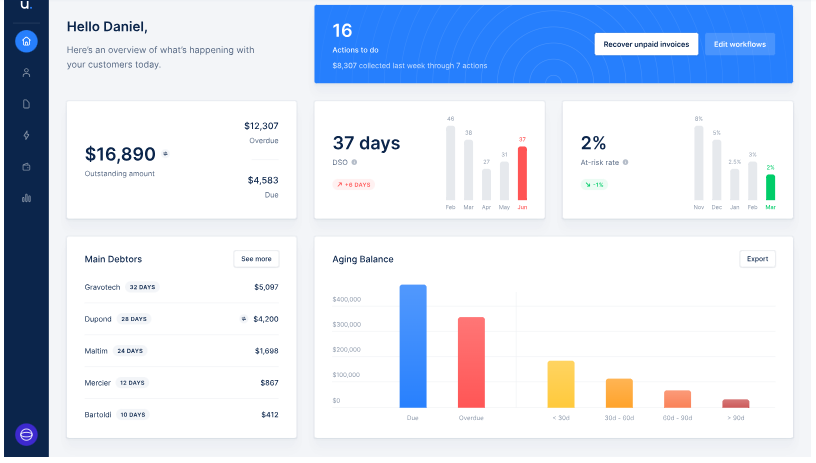
What I appreciated most was how Upflow treated collections as a relationship, not just a chase. Automated, personalized reminders went out without feeling like a form letter, and the branded client portal let customers pay through ACH, card, or direct debit without a back-and-forth email chain. Syncing with QuickBooks and NetSuite meant I was not reconciling numbers by hand at month-end anymore.
The AI-powered cash application matching was the feature that saved the most hours. Incoming payments got matched to open invoices automatically, cutting out a manual task that used to eat up half a day every week. For a finance team inside a financial services firm, this tool solves a very specific pain point that a general CRM does not touch.
Pros:
- Real-time dashboards tracking DSO, CEI, and overall AR performance
- Automated, personalized invoice reminder sequences
- Branded customer payment portal with multiple payment options
- AI-powered cash application to reduce manual reconciliation
Cons:
- Built primarily for B2B accounts receivable, not general client relationship management
- Custom pricing makes upfront budgeting harder for smaller teams
Pricing:
Custom pricing based on team size and invoice volume.
3. Creatio – Best for No-Code Workflow Automation
I picked up Creatio for a financial services client who wanted heavy process automation without hiring a development team, and the no-code builder delivered on that promise faster than I expected. Credit decisioning workflows that used to involve three separate approvals got mapped into a single automated flow within the first few weeks.
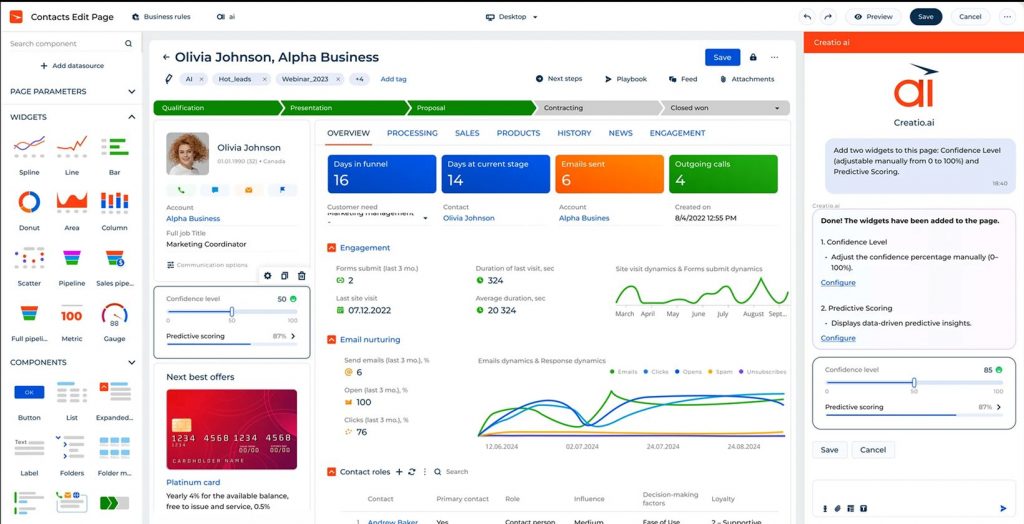
The multichannel marketing campaign builder was another strong point in my experience. I could launch a segmented outreach campaign, track open and click behavior, and adjust the sales pipeline stages based on real engagement data, all inside the same platform. Real-time KPI dashboards gave leadership visibility into deal flow without a separate reporting tool.
Where Creatio slowed me down was with larger datasets. Once the contact database grew past a certain size, some screens took noticeably longer to load, and building custom online forms required at least basic HTML knowledge from someone on the team. Still, for a financial firm ready to automate credit and underwriting workflows without a full IT build-out, it held up well.
Pros:
- No-code, low-code platform customizable without deep technical skill
- Predictive scoring tools to support credit decision-making
- Real-time KPI monitoring, reporting, and analytics dashboards
- Document management tools built into the sales process
Cons:
- Performance slows with larger client databases
- Building custom online forms requires HTML knowledge
Pricing:
Starts at $25/user/month.
4. Wealthbox – Best for Financial Advisors and Wealth Managers
Wealthbox was the CRM I recommended most often when an advisor asked me for something that felt modern without a steep learning curve. Every contact record laid out calls, emails, files, and transactions in a single scrollable timeline, which made client prep before a meeting genuinely fast.
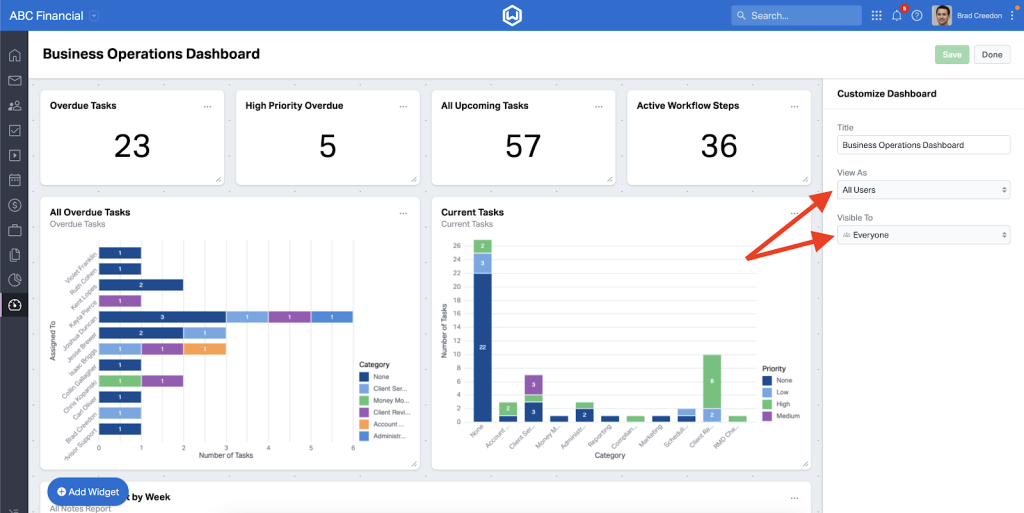
The client segmentation and tagging system stood out as one of its strongest features in practice. I could filter contacts by household, AUM tier, or life event, and the real-time streaming updates on client activity meant nothing important slipped by unnoticed. Integration with financial planning tools like eMoney and RightCapital also meant data moved cleanly between planning and CRM without duplicate entry.
The one gap I ran into was billing. Wealthbox does not include native invoicing, so firms still need a separate tool for that piece. Email templates were also more limited than I expected from a platform this polished. For advisors specifically, though, it remains one of the cleanest, most advisor-first tools on this list.
Pros:
- Detailed contact timelines showing calls, emails, files, and transactions
- Custom fields, tags, and groups for advanced client segmentation
- Integrations with major financial planning and portfolio tools
- Strong task and event tracking across the full client lifecycle
Cons:
- No built-in billing or invoicing tools
- Email template and design options are limited
Pricing:
Starts at $59/user/month.
5. AdvisorEngine – Best for Data Visualization
AdvisorEngine came onto my radar through a wealth management client who wanted better visibility into portfolio performance without switching their entire tech stack. The dashboards were the first thing that impressed me. Onboarding status, portfolio allocation, and compliance workflow all sat on one visual screen instead of three separate exports.
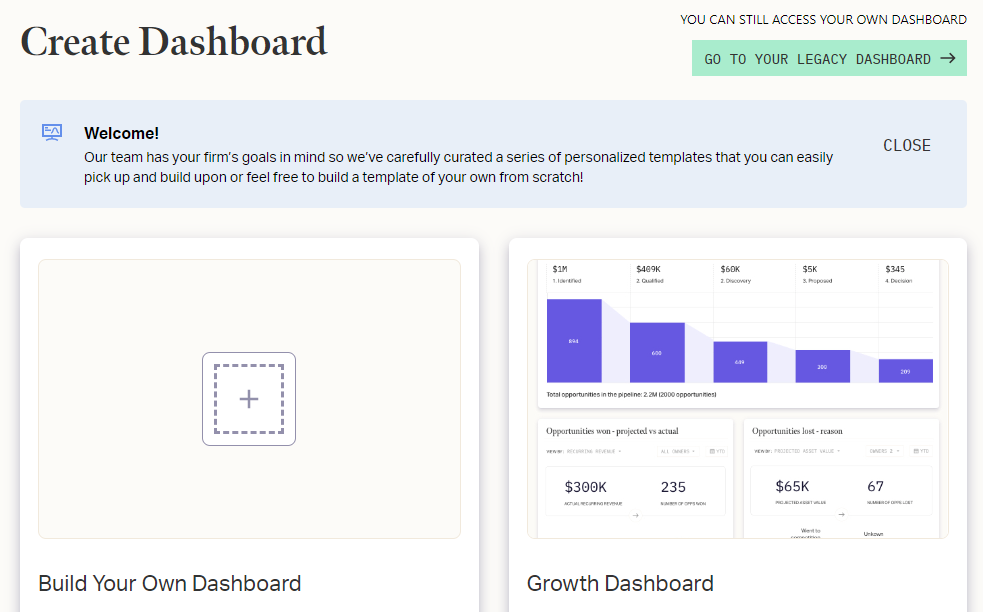
User and permission management across the organization was another area where AdvisorEngine held up well. I could segment access by team or role without much friction, and custom web forms captured prospect data directly from the firm’s website into the pipeline. Scheduled and automated reports meant leadership stopped asking for manual updates every Friday.
Cost was the tradeoff I ran into most. AdvisorEngine sits on the pricier end of this list, and the interface took my team a few sessions to get comfortable with. For firms that specifically need strong data visualization tied to portfolio management, the investment made sense. For a smaller team that just needs contact tracking, it was more platform than necessary.
Pros:
- Strong dashboard and data visualization capabilities
- Workflow engine automating routine onboarding and compliance tasks
- Custom web forms to capture website leads directly
- Scheduled and automated custom reports
Cons:
- Interface requires an adjustment period for new users
- Fewer standalone contact management features compared to advisor-first CRMs
Pricing:
Starts at $65/user/month.
6. LeadSquared – Best for Lending, Banking, and Insurance Teams
LeadSquared earned its spot on this list when I worked with a lending team that needed to manage document collection, verification, and onboarding without five disconnected tools. What impressed me was how tightly it mapped to regulated financial workflows specifically, rather than acting as a generic sales CRM with a finance label attached.
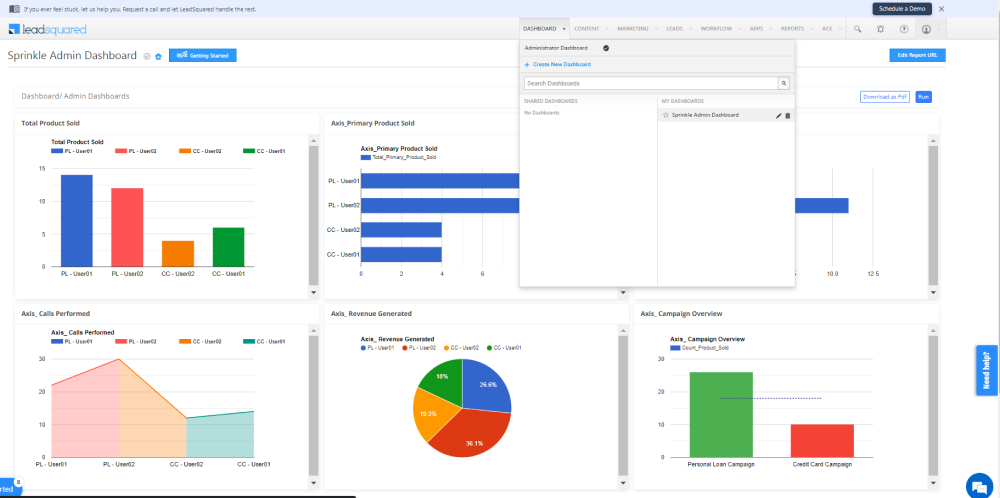
Digital onboarding with KYC document collection ran through the same workflow engine handling approvals, renewals, and collections. That meant leadership finally got a full 360-degree view of the customer lifecycle instead of piecing it together from separate systems. Real-time dashboards by branch and product also made performance reviews far less manual.
Security was a genuine strength here too, with MFA, SSO, audit logs, and RBI-compliant consent management built in. My one hesitation was around configuration. Smaller teams found the setup more extensive than they needed, and a few users on G2 mentioned wanting deeper native reporting rather than relying on exports.
Pros:
- Workflow automation built specifically for regulated BFSI processes
- Digital onboarding with KYC and document verification
- Real-time performance dashboards by team, branch, and product
- Integrations with loan origination and core banking systems
Cons:
- Configuration can feel extensive for very small teams
- Custom pricing requires a sales conversation to estimate cost
Pricing:
Custom pricing.
7. Redtail CRM – Best for Collaborative Advisory Teams
Redtail was the CRM I saw most often already in place when I started working with advisory firms, and it earned that reputation through sheer depth of integration. Custodian connections, portfolio reporting tools, and financial planning software all plugged in without much friction, which made it function as a real hub for the advisor tech stack.
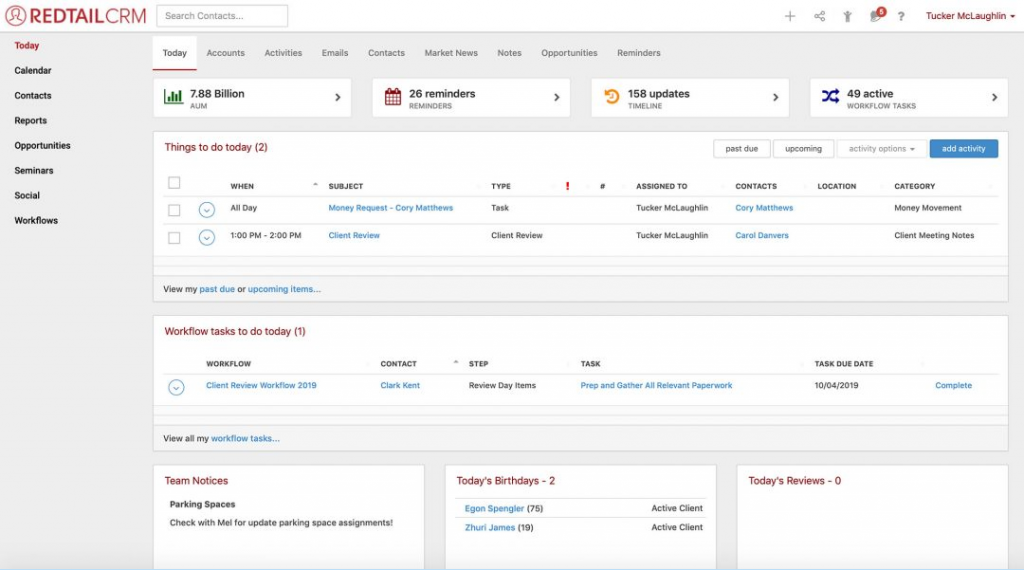
Team collaboration was where Redtail consistently performed well in my experience. Task assignment, team broadcasts, and shared notes meant nothing depended on one advisor’s memory. Two-way sync with Office 365 and Google kept email and calendar data current across the team without manual entry.
Where I noticed friction was the interface. It functions well but looks and feels dated next to newer platforms, and the contact search could be more intuitive. A few advisors I spoke with also mentioned slower support turnaround and pricing increases since Redtail’s acquisition by Orion. Even so, its integration depth keeps it a serious contender for firms already deep into that ecosystem.
Pros:
- Deep integrations with 150+ custodians and planning tools
- Strong team collaboration with task assignment and broadcasts
- Two-way sync with Office 365 and Google Calendar
- Built-in compliant archiving for email and text communication
Cons:
- Interface feels dated compared to newer competitors
- Contact search function could be more intuitive
Pricing:
Starts at $39/user/month for up to 5 users.
8. Salesforce Financial Services Cloud – Best for Large, Complex Organizations
Salesforce Financial Services Cloud was the platform I brought in when a client’s firm had genuinely outgrown every mid-market CRM on this list. The 360-degree client view went beyond basic contact storage, mapping full household relationships, linked accounts, and every prior interaction into one enriched profile.
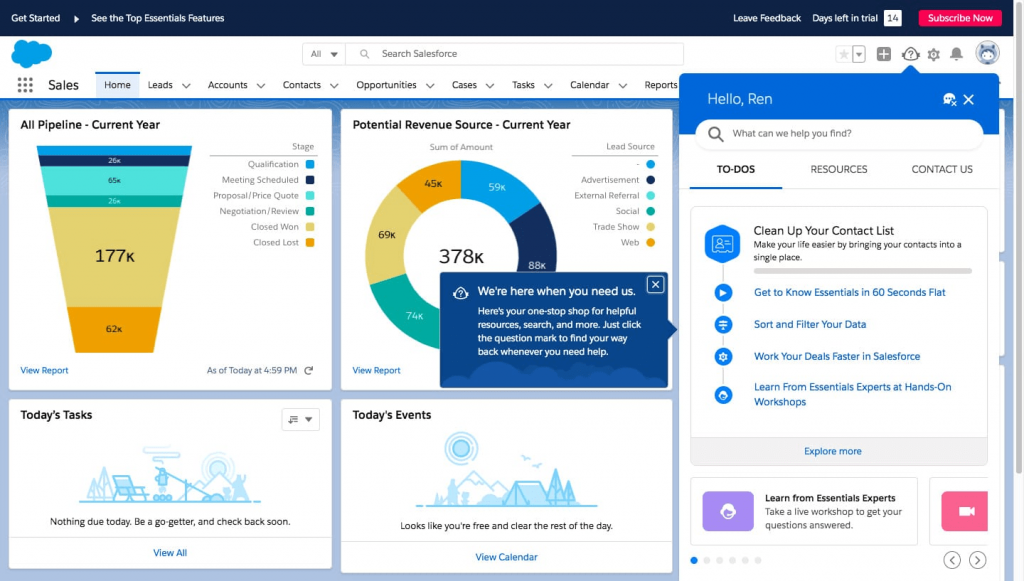
Customization was the clear strength here. Through the AppExchange marketplace, I built out workflows specific to underwriting, onboarding, and portfolio review that a smaller CRM simply could not support out of the box. Einstein’s AI-powered insights also flagged upsell and retention opportunities that would have taken a data analyst hours to surface manually.
The tradeoff was cost and complexity, and it was significant. Implementation took real time and often a dedicated admin, and the learning curve for non-technical staff was steep. This is a platform built for scale, not for a five-person advisory team looking for something simple. For enterprise firms with the budget and technical support to match, it remains the most powerful option on this list.
Pros:
- Highly customizable with a large AppExchange ecosystem
- Advanced AI-powered insights through Einstein
- Extensive integration capabilities across email, data, and social platforms
- Handles high data volumes across large, multi-branch organizations
Cons:
- High cost, especially for small and mid-sized firms
- Implementation typically requires dedicated admin support
Pricing:
Starts at $325/user/month.
Evaluation Criteria
I built this list using an unbiased, systematic approach that ensures a fair and well-rounded review of every tool. My evaluation rests on six factors.
- User Reviews and Ratings: I pulled direct feedback and star ratings from G2 and community forums like Reddit to understand real satisfaction levels and recurring complaints.
- Essential Features and Functionality: I looked at each platform’s core capabilities, from contact management to compliance-specific tools like KYC workflows and audit logs.
- Ease of Use: I evaluated how quickly a non-technical advisor or agent could get comfortable navigating the interface without extensive training.
- Customer Support: I considered how responsive and helpful each vendor’s support team was during setup, troubleshooting, and ongoing use.
- Value for Money: I compared pricing against the depth of features to judge whether a firm actually gets its money’s worth.
- Personal Experience and Expert Opinion: I weighed my own hands-on time with each tool alongside insights shared by advisors and industry peers in forums and reviews.
My Top 3 Picks for the Best Financial Services CRM Software
After testing and researching all 9 platforms, three stood out as the strongest overall fits depending on what a firm actually needs.
1. BIGContacts
BIGContacts is my top overall pick for most financial services teams. It combines contact management, Outlook sync, compliance-ready security, and email marketing automation into one affordable system, and the forever-free plan means a small insurance agency or advisory practice can start today without a budget conversation first.
2. Wealthbox
Wealthbox is the right call if your team is specifically financial advisors who want a modern, advisor-first interface. Its client timelines and planning software integrations make daily prep noticeably faster, even though billing tools live outside the platform.
3. Redtail CRM
Redtail CRM fits firms already deep into the advisor tech stack, particularly those relying on custodian and portfolio integrations. Its collaboration tools and compliant archiving make it a dependable choice for teams that prioritize integration depth over interface polish.
How Do You Choose the Right Financial Services CRM for Your Firm?
Choosing the right financial crm software comes down to matching the platform to your team size, budget, and compliance requirements rather than picking the tool with the longest feature list. This general guide on how to choose a CRM for small business walks through the same tradeoffs in more depth if you want a broader checklist beyond financial services specifics.
- Start with your must-have integration. If your team lives in Outlook, prioritize two-way sync above every other feature.
- Check the security baseline. Two-factor authentication, role-based permissions, and GDPR alignment should be non-negotiable for client financial data.
- Match pricing to team size. A five-person agency rarely needs a $325/user/month platform built for enterprise scale.
- Test the learning curve. A tool your team avoids using does not help you, no matter how powerful it is on paper.
- Confirm data portability. Ask how easily you can export your client data if you ever switch platforms.
Your Client Relationships Deserve Better Than Spreadsheets
Find a Financial Services CRM Software That Actually Retains Clients
Every financial services firm eventually hits the same wall: spreadsheets stop scaling, and Outlook was never built to run a sales pipeline. The right CRM does not just organize contacts. It protects the relationships your business is actually built on.
Whether your team needs enterprise-grade customization or a lean, affordable system that gets you running by this afternoon, the 9 tools in this guide cover that full range. Pick based on your team size, your compliance needs, and honestly, how quickly your staff will actually adopt it.
For financial services teams that want to start simple and scale as they grow, a tool like BIGContacts makes it easy to centralize client data, automate renewal reminders, and stay compliant without months of setup or a six-figure budget. If budget is the deciding factor for your team, this roundup of free CRM software options is worth a look before you commit to a paid plan.
A financial services CRM is software that stores client account details, tracks communication history, and automates compliance workflows like renewals and onboarding for banks, insurers, and advisory firms. Pricing ranges from free plans for small teams up to $325 or more per user per month for enterprise platforms like Salesforce Financial Services Cloud, depending on features and scale. Yes. BIGContacts offers Outlook sync, role-based permissions, and custom fields for policy or account data, making it a strong fit for insurance agencies, lending teams, and small advisory practices. Most financial services CRMs, including BIGContacts, Redtail, and Wealthbox, offer two-way Outlook sync that automatically logs emails and calendar events against the right client record. Yes. Most platforms include GDPR-aligned permissions, audit trails, encrypted storage, and two-factor authentication to help firms meet regulatory recordkeeping standards. A CRM manages client relationships, communication, and pipeline tracking, while financial planning software like eMoney or RightCapital handles portfolio modeling and tax analysis. Many firms use both together. BIGContacts works well for small insurance agencies because of its custom fields for policy data, forever-free plan, and built-in email automation for renewal reminders. Yes, most modern CRMs support bulk import from Excel or a previous system. Always confirm export options with your current vendor before committing to a new platform. Community feedback on Reddit and G2 consistently points to high per-user cost and long implementation timelines as the main reasons smaller advisory teams avoid enterprise platforms. Yes. A CRM automates the reminders, reporting, and access controls that spreadsheets require manual effort to maintain, while keeping client data centralized and firm-owned. Lending teams should prioritize KYC document collection, workflow automation for approvals, and integrations with loan origination systems, all of which LeadSquared covers specifically. BIGContacts offers a forever-free plan with core contact management and email features, making it one of the few genuinely free options built for small financial services teams.Frequently Asked Questions
What is a financial services CRM?
How much does financial services CRM software cost?
Is BIGContacts good for financial services teams?
Can a financial services CRM integrate with Outlook?
Do financial services CRMs support compliance requirements?
What is the difference between a CRM and financial planning software?
Which CRM is best for small insurance agencies?
Can I switch CRMs without losing my client data?
Why do advisors complain about enterprise CRMs like Salesforce?
Does a financial services CRM replace excel spreadsheets?
What features should a lending team look for in a CRM?
Is there a free financial services CRM option?
FREE. All Features. FOREVER!
Try our Forever FREE account with all premium features!