
Did a promising lead go cold last month? You followed up, they seemed ready, and then nothing but silence.
I’ve seen it happen far too often, especially in small businesses where every lead counts and every missed follow-up feels personal. But trust me, it’s not your fault. All you need is a simple CRM that keeps your contacts, conversations, and next steps in one place.
After testing dozens of tools and working closely with growing sales teams, I’ve pulled together the 8 best simple CRM software options built to help you stay organized, close faster, and never lose a lead to chaos again.
Quick heads-up: “Simple” doesn’t mean “basic.” A good simple CRM system feels easy on day one, and still scales when your team and contact list grow.
Why Your Business Needs a Simple CRM
Running a small business in 2026 means managing multiple leads, customer queries, follow-ups, and sales goals simultaneously.
And you’re not alone in looking for help. CRM software is projected to cross $80B in annual revenue by 2026, which tells you one thing: businesses are leaning on CRMs to stay organized and competitive.
Here’s what it brings to your table:
- Everything in one place: No more messy spreadsheets or scattered notes. Your contacts, emails, tasks, and deals, neatly organized and accessible to your whole team.
- Zero missed follow-ups: Know who to call, when to email, and what was said last, without digging.
- Clarity on what’s working: Track leads, deals, and pipelines. See where your sales are coming from and where things stall.
- Quick to set up: A basic CRM doesn’t need hours of training or IT help. You’ll be up and running in minutes.
- Everyone’s on the same page: Sales, support, marketing, everyone shares one source of truth.
New to CRM? Learn how it actually works with these 5 simple steps of the CRM process to start building better customer relationships today.
List of Top 8 Simple CRM Solutions
The simple CRM software tools listed below are primarily sourced from market leaders who consider them essential for daily operations. Additionally, I’ve extracted information from software review platforms and peer suggestions to provide a comprehensive view from various perspectives.
Finally, I’ve infused my own experiences, aiming to help you make well-informed decisions. So, let’s begin.
| CRM Software | Best For | Pricing (Starting) |
|---|---|---|
| BIGContacts | Contact Management & Email Marketing | Free for growing teams. Paid plan starts at $9.99/month |
| Zoho CRM | Analytics & Forecast | Starts at $14/user/month |
| Pipedrive | Customizable Sales Pipeline | Starts at $14/user/month |
| Freshsales | Sales Intelligence | Starts at $9/user/month |
| Bitrix24 | Sales Funnel Automation | Starts at $49/month (includes 5 users) |
| Zendesk Sell | Pipeline Visibility | Starts at $19/user/month |
| EngageBay | Deal Management | Starts at $14.99/user/month |
| Insightly | Project Management & Marketing Automation | Starts at $29/user/month |
1. BIGContacts – Best for Contact Management & Email Marketing for Growing Businesses
I started using BIGContacts based on a recommendation from an industry peer. It’s one of the low-cost CRM solutions perfect for first-time users. The UI is quite simple, and anyone can get started without any extensive training.
For contact management, adding new contacts is quite simple, and searching for existing ones is lightning-fast. Plus, the automatic contact enrichment feature pulls in valuable details from social media and other sources, saving me tons of time.
Email marketing is equally effortless. BIGContacts offers a drag-and-drop email builder with pre-designed templates. So, creating professional campaigns is possible without any coding. The built-in email tracking shows who opens emails and clicks on links – great for visualizing what’s working and what’s not.
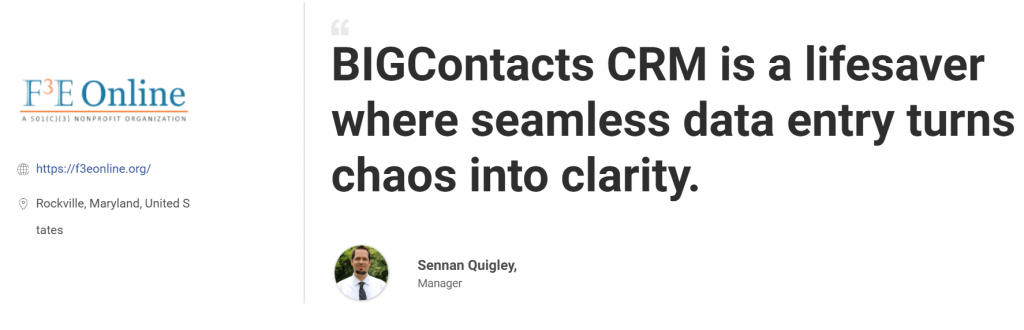
Here’s what Sennan Quigley from the Foundation for Financial Education (F3E), a nonprofit dedicated to promoting financial literacy, had to say about using BIGContacts:
Pros:
- Easy capture and storage of all communications with contacts
- Reports on sales activities, pipeline, and performance for the whole team
- Captures leads from web forms, landing pages, and social media
- Assigns and tracks tasks for team members and sets reminders and alerts
- Drip email campaigns to nurture customer relationships
Cons:
- No downloadable or on-premise version
- No dedicated account manager for the free plan, unlike the paid vesion
Pricing:
Free for growing teams. Paid plan starts at $9.99/month.
2. Zoho CRM – Best for Analytics & Forecast
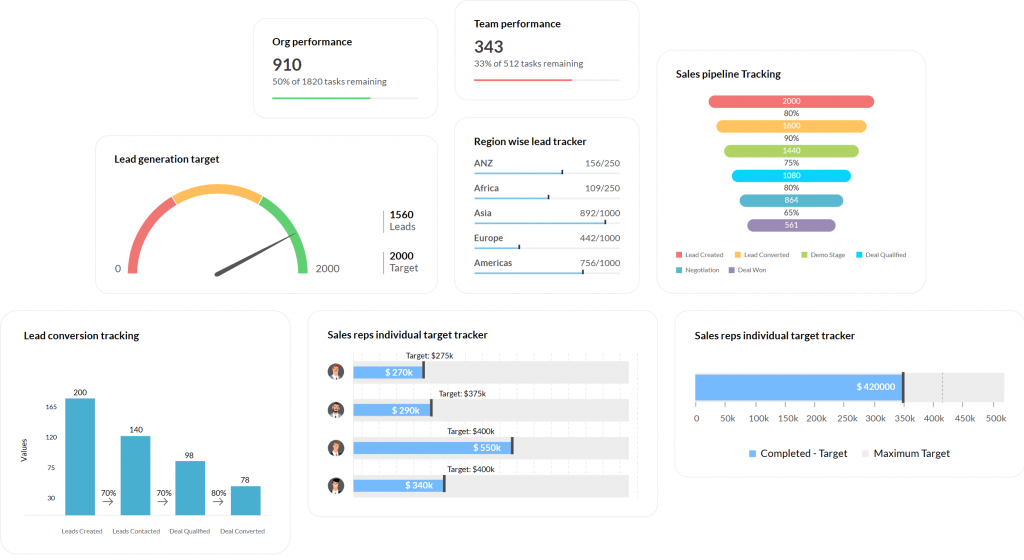
Image Source: Zoho
I could easily crown Zoho as the easiest CRM to use. It does have a simple interface and useful features, including lead management, sales forecasting, and analytics.
The CRM’s analytics and forecasting tools are designed to help you make data-driven decisions. With its advanced analytics features, you can track and analyze every part of the sales process, including lead data, details about deals, activity statistics, and email information.
I used the tool for a few weeks and could create customized dashboards with analytical widgets for sales – charts, target meters, KPIs, and funnels. The platform also offers customizable reports, which provide actionable data intelligence to boost sales success.
Pros:
- Insights into customer behavior and preferences with advanced analytics
- Automates lead scoring by identifying leads that will convert
- Personalizes customer interactions with a 360-degree view of every customer
- Deal management to track what stage your deals are currently in
- Workflows that reduce manual data entry and eliminate redundancies
Cons:
- The setup can take time if you want dashboards, modules, and workflows to match your process
- Some features you may expect in day-to-day use are gated behind higher plans
Pricing:
Starts at $14/user/month.
3. Pipedrive – Best for Customizable Sales Pipeline
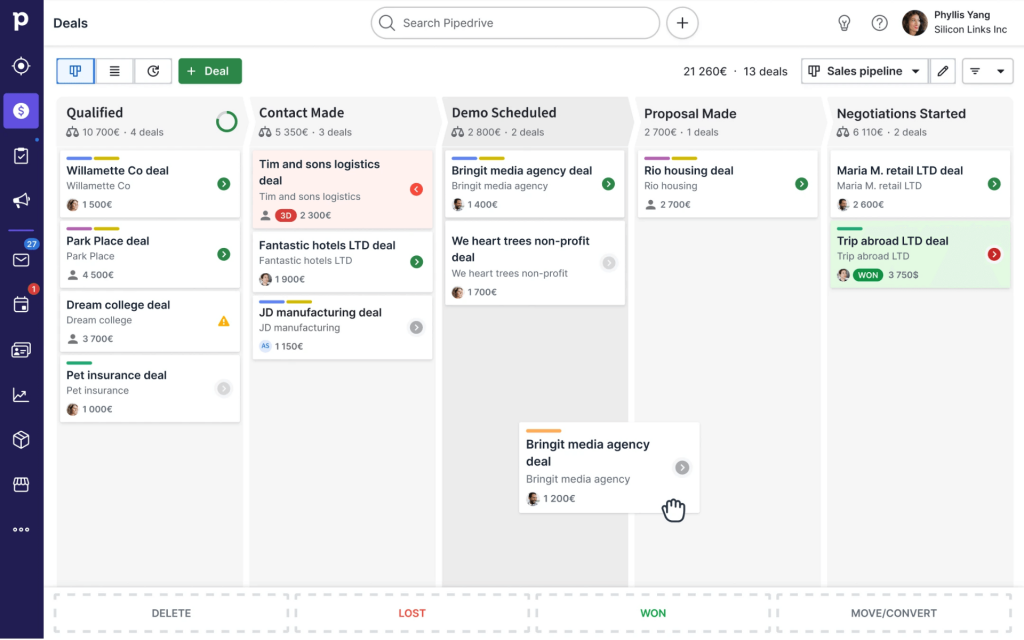
Image Source: Pipedrive
In my experience, Pipedrive is a simple CRM for individuals and small teams. I found the tool’s customizable sales pipeline particularly impressive.
It helped me create and customize the sales pipeline according to my business needs. It also helps you track the sales process more efficiently and identify areas for improvement.
Plus, the built-in sales assistant, powered by machine learning, gave me helpful tips and insights that actually made a difference in how I approached follow-ups.
But the magic lies in the customization. You can build your pipeline to perfectly match your sales process, adding, removing, or renaming stages as needed.
Pros:
- Sales pipeline and deal management with customizable stages
- Reporting capabilities for tracking sales performance
- Recurring revenue tracking for managing subscriptions and repeat customers
- Task management for organizing sales-related activities
- Invoice and billing features for seamless financial transactions
Cons:
- Email marketing is limited compared to tools built for campaigns and newsletters
- Costs can rise as you add users and paid add-ons
Pricing:
Starts at $14/user/month.
4. Freshsales – Best for Sales Intelligence
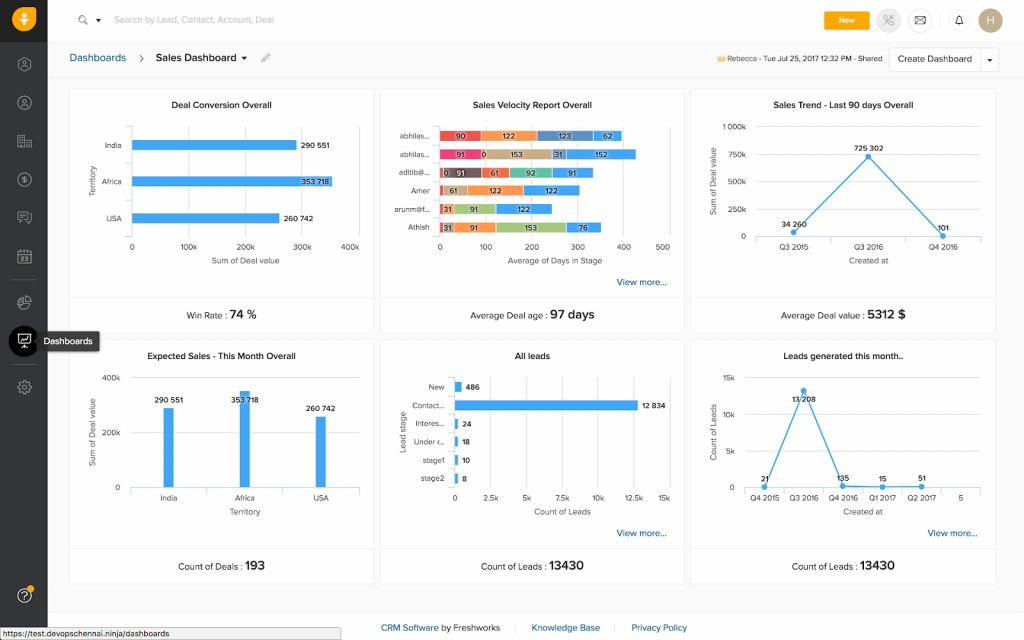
Image Source: Freshsales
Freshsales is one of the simplest CRM platforms I’ve tested. In my experience, it’s ideal for ambitious sales teams in SMBs looking to reach their prospects more strategically. The software’s intuitive and customizable UI makes it a good choice for those new to CRM tools.
What impressed me most was the sales intelligence. It identified patterns in customer behavior that I wouldn’t have spotted on my own. I could clearly see who was most likely to convert and what they were actually interested in. That kind of insight helped me focus my energy where it mattered most.
It also brings smart automation, lead scoring, and forecasting to the table—all at a price point that doesn’t scare small teams. My only real concern? The app integrations could be better. But overall, it’s a powerful, no-fuss CRM that delivers where it counts.
Pros:
- Unified platform housing contacts, deals, activities, and communication history
- Custom pipelines and stages to visualize and track deal progress
- AI-powered segmentation and lead nurturing for higher conversion rates
- Advanced reporting and analytics to optimize sales performance
- Customization of fields, layouts, views, and dashboards to suit business needs
Cons:
- Some of the best automation and reporting features are tied to higher-tier plans
- Integrations can be hit-or-miss depending on the tools you already use
Pricing:
Starts at $9/user/month.
5. Bitrix24 – Best for Sales Funnel Automation
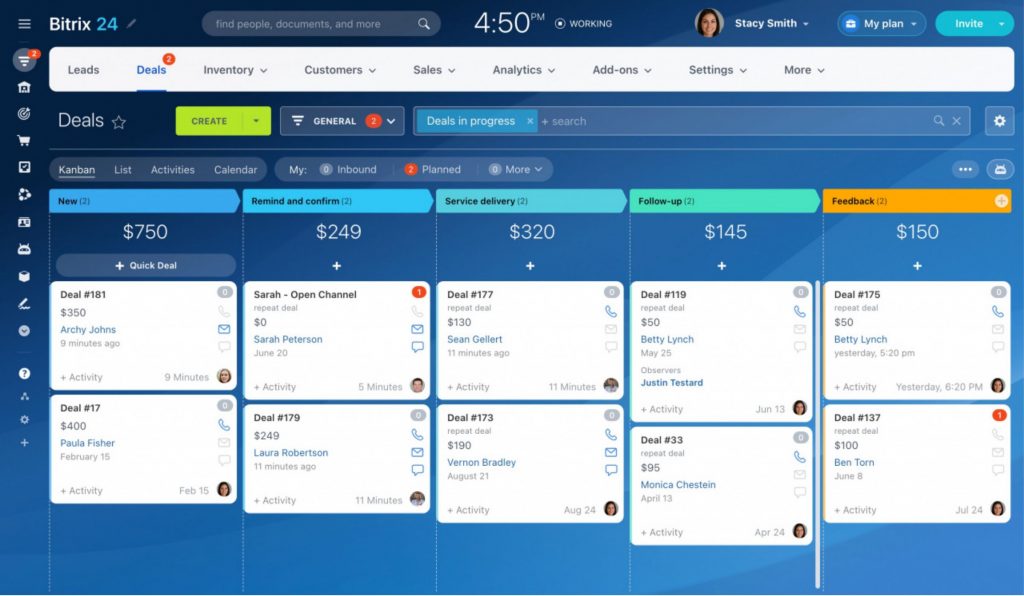
Image Source: Bitrix24
Bitrix24 is a simple CRM packed with lead management tools and smart automation, which makes it a strong choice for SMBs. But what really caught my attention was its sales automation.
I liked how the custom sales funnels gave me a quick snapshot of where leads were dropping off and which stages needed work. It was easy to set up automated emails based on what leads were doing, trigger workflows as deals moved along, and even tailor website content to different customer segments. That kind of control felt powerful without being overwhelming.
And the best part? If you’ve got a team of five or more, Bitrix24 is one of the most affordable CRM tools out there, especially for what it offers.
Pros:
- Visual sales pipeline to track deals at every stage and close them faster
- Converts website visitors, social media followers, and email leads into customers
- Marketing automation to launch targeted email campaigns and score leads automatically
- Customizable dashboards & reports for real-time insights into sales performance
- Social media integration to manage interactions and convert followers into leads
Cons:
- It comes with a lot of modules, so it can feel overwhelming if you only want a basic CRM
- The interface can feel “busy” and takes time to get comfortable with
Pricing:
Starts at $49/month (includes 5 users).
6. Zendesk Sell – Best for Pipeline Visibility
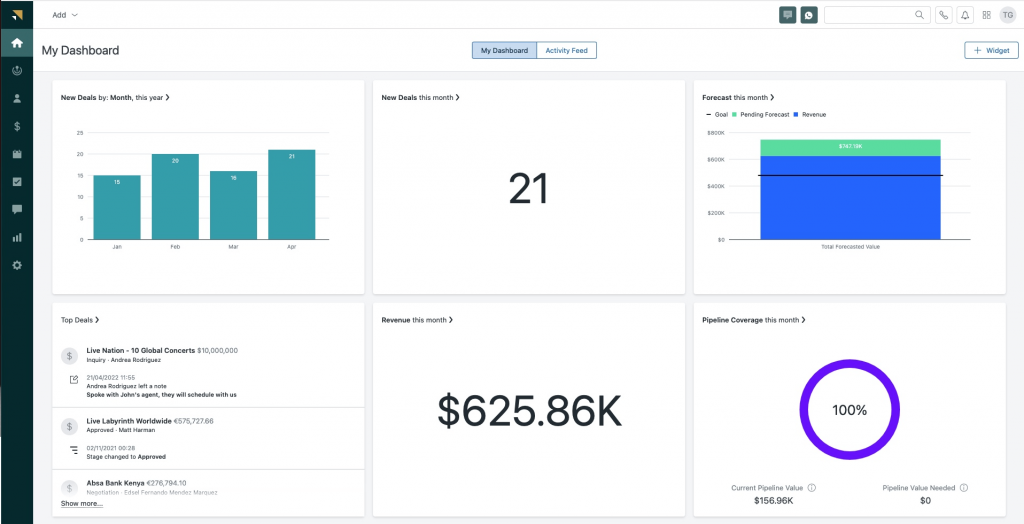
Image Source: Zendesk
If you are looking for a basic CRM system, you may want to consider Zendesk Sell. I had the opportunity to use the software and was decently impressed with its pipeline visibility feature.
The tool allowed me to track deals throughout each stage of the pipeline, providing full visibility to plan, track, and analyze the sales process without heavy lifting. I find this feature especially useful for sales managers who must keep track of leads and ensure that deals don’t fall through the cracks.
The software is one of those easy CRM tools with a conversational interface built around everyday sales activities. It offers everything you need in one simple platform, including prospecting, engagement, lead generation, and communication capabilities.
Pros:
- Prioritize leads based on predicted conversion potential with AI-powered lead scoring
- Email and task sequences to automatically engage leads
- Customized email sequences to follow up with leads automatically
- Integrates with other Zendesk products and Support to exchange key data and insights
- Trigger-based actions to eliminate admin work, automate workflow, and ensure customers get full attention
Cons:
- It’s best when used with the Zendesk ecosystem, so it may be less attractive if you are not using Zendesk already
- Customization is solid, but not as flexible as some CRM platforms built for heavy tailoring
Pricing:
Starts at $19/user/month.
7. EngageBay – Best for Deal Management
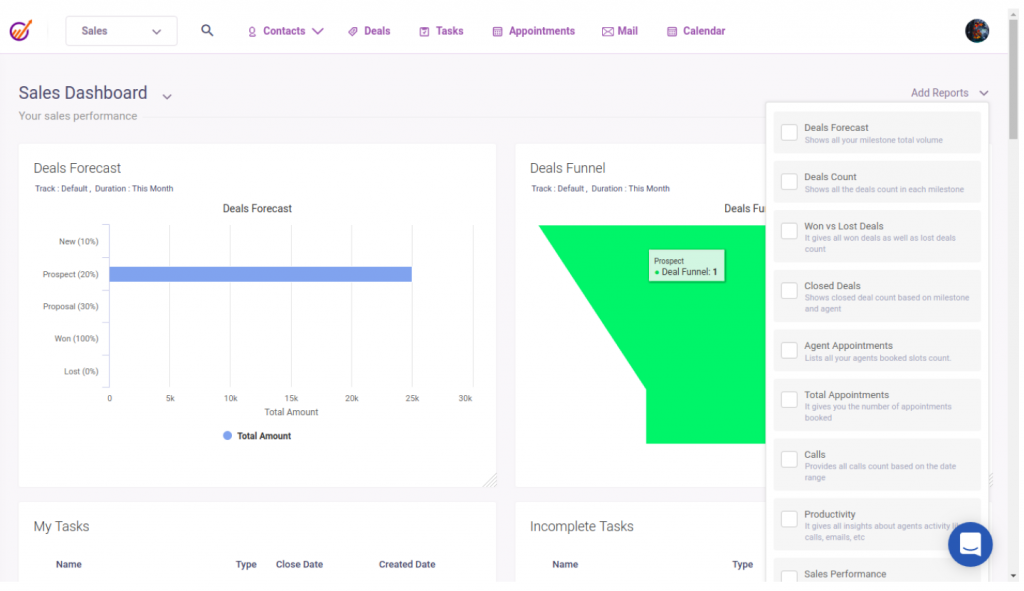
EngageBay is a simple CRM app with an easy-to-use automation platform for emails, landing pages, and forms. I found the tool to be user-friendly and easy to set up.
The software’s deal management feature is a special mention. It lets you track the progress of sales deals and manage them. Adding deals, managing pipelines, and tracking progress is pretty simple.
EngageBay offers an exhaustive view of deals at every stage. You can track the number of deals in each stage, organize and filter them based on their expected close date, and make informed decisions. It gives you complete control to prioritize, track, monitor, and close deals like never before.
Pros:
- Automated email sequences for lead nurturing
- Proposal analytics to track and optimize sales proposals
- Lead scoring and prioritization based on behavior and profile
- Multiple deal pipelines with a drag-and-drop interface and custom stages
- Email sequences and templates to create personalized and engaging emails
Cons:
- The interface and editor can feel less polished than premium CRMs
- Reporting is fine for basics, but advanced analytics can feel limited
Pricing:
Starts at $14.99/user/month.
8. Insightly – Best for Blending CRM + Project Management
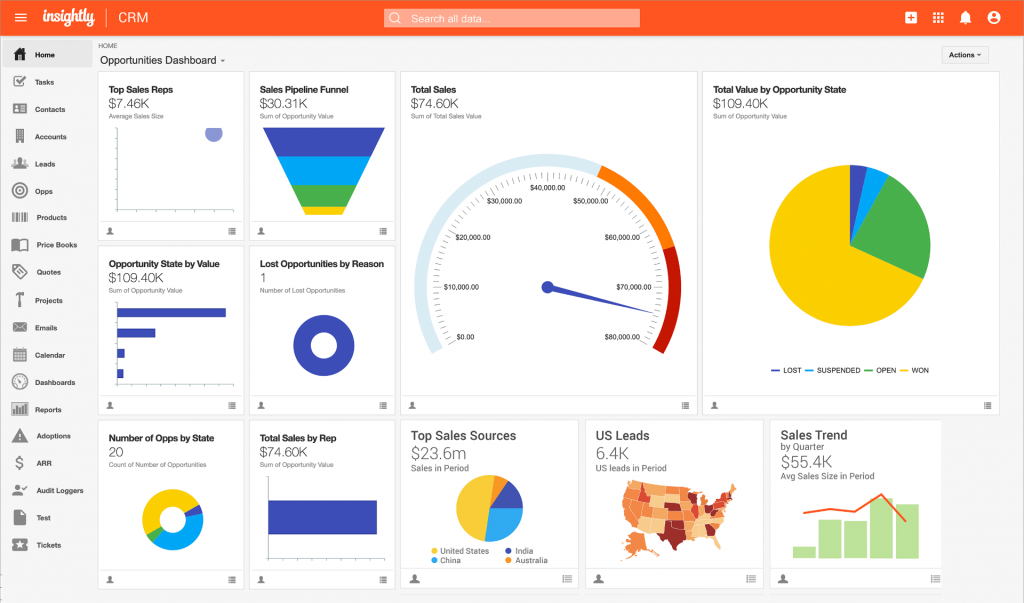
If you want a CRM that’s easy to use and helps you keep post-sale work organized, Insightly is one of the strongest options on the market. Unlike many lightweight CRMs that focus only on contacts and pipelines, Insightly stands out by pairing sales tools with built-in project management—making it ideal for teams that handle both selling and service delivery.
The interface is clean and approachable, giving you a centralized place to manage leads, track deals, automate tasks, and oversee project milestones once a sale closes. I found its visual pipelines and project boards especially helpful for understanding what’s happening across the customer journey without having to switch tools.
Its automation features also make everyday workflows easier—things like updating fields, triggering emails, or assigning tasks can run in the background, helping teams save time and maintain consistency. Add integrations with Google Workspace, Unbounce, QuickBooks, and Shopify, plus AI tools for summaries and data cleanup, and Insightly becomes a smart all-in-one hub for growing businesses.
Pros:
- Combines CRM, project management, and workflow automation in one simple platform
- Clean, intuitive interface that’s easy for beginners to adopt
- Visual deal and project pipelines to manage pre- and post-sale work
- AI enhancements features include Copilot chat, automated email summaries, and data clean-up.
- No-code automations to remove repetitive tasks
Cons:
- The learning curve is a bit steeper because it blends CRM + project management
- Some automations and integrations are strongest on higher plans, which can raise the total cost
Pricing:
Starts at $29/user/month.
What Are the Top 5 Must-Have Features in a Simple CRM?
Choosing the right simple CRM can make a real difference for businesses. It’s not just about storing contact details; it’s about streamlining your workflow, improving customer relationships, and helping your team close more deals with less effort.
Here are the key features you should look for:
1. Contact & Lead Management
A strong CRM should make it easy to organize contact details, track interactions, and move leads through the sales funnel. You shouldn’t need a manual to figure it out—simple drag-and-drop tools and a clean layout go a long way in keeping things efficient.
2. Sales Pipeline Visualization
Knowing where each deal stands is crucial. Look for a CRM that gives you a visual sales pipeline, so you can quickly spot bottlenecks, forecast revenue, and prioritize your follow-ups without digging through spreadsheets.
Want to see how it’s done? Watch this quick video:
3. Reporting & Analytics
To grow, you need to know what’s working. Built-in reporting and analytics help you track customer behavior, team performance, and deal trends. Clear insights mean better decisions and smarter strategies.
4. Integration with Key Business Tools
Your CRM should work well with tools you already use—like email platforms, accounting software, or help desk systems. Seamless integration reduces manual work and keeps your data synced across departments.
5. Mobile Access & Remote Usability
Your team won’t always be tied to a desk. A simple CRM should have a mobile app or responsive design so you can access customer info, update deals, or follow up with leads even on the go.
6. Easy Adoption
If your team does not use the CRM daily, it fails. Look for clean UI, minimal clutter, and quick workflows like “add note + set next step” in under 10 seconds.
7. Security, Permissions, and Compliance Basics
Every business needs to think about who can view/export contacts, and how customer data is protected. If you deal with regulated industries or handle sensitive information, prioritize role-based access and clear audit trails.
Once you’ve mastered the basics, you might want to explore what’s next. Check out this guide to AI CRMs that can take your customer management to the next level with predictive insights, intelligent automation, and smarter workflows.
What Makes a Simple CRM System Powerful for SMBs
For small and medium-sized businesses, a simple CRM is most effective when it strikes the right balance between features and usability.
1. Essential Features vs. Enterprise Bloat
Simple CRM software shines by focusing on core features important to SMBs. Unlike big CRM systems, simple ones concentrate on contact and lead management, sales pipeline visualization, and basic reporting tools. This approach makes it easy for users to navigate and use the system without feeling overwhelmed.
CRM expert Jill Rowley says,
“A CRM system should be as simple as possible, allowing users to focus on building relationships rather than navigating complex software.”
This highlights the importance of simplicity in CRM design.
2. The Balance Between Usability and Functionality
Designing simple CRM systems requires balancing usability and functionality. It’s key for the system to be easy to use but also provide the tools needed for effective customer relationship management. Easy CRM solutions achieve this with intuitive interfaces and customizable features tailored to SMBs’ needs.
3. Cost-Effectiveness for Growing Businesses
Simple CRM systems are also cost-effective. They offer free or low-cost customer service management software. This allows SMBs to manage their customer relationships without breaking the bank. It’s great for growing businesses, as it lets them scale their CRM capabilities with their customer base.
4. Works in the “Real World” (Not Just in a Demo)
A simple CRM system should match how your team already works, especially around email and calendar. If your world runs on Outlook or Gmail, pick a CRM that fits into that workflow instead of forcing a new one.
| CRM Feature | Simple CRM | Enterprise CRM |
|---|---|---|
| Contact Management | Basic, intuitive | Advanced, customizable |
| Sales Pipeline | Visual, straightforward | Complex, multi-layered |
| Reporting Tools | Simple, essential metrics | Advanced, customizable reports |
A simple CRM system’s power comes from balancing essential features with ease of use and cost-effectiveness. By focusing on what matters most to SMBs, these systems offer a valuable tool for improving customer relationship management.
How to Implement a Simple CRM Without Breaking Your Team’s Routine
This is where most small businesses struggle. Not because the CRM is hard, but because switching feels like extra work. The good news is you can roll out a simple CRM without turning it into a big project.
Here’s a rollout I’ve seen work really well for small teams.
Step 1: Clean Your Data Quickly (Not Perfectly)
Before you import anything, spend a short time cleaning up your list. You do not need it to be flawless. You just want it usable.
Do this first:
- Merge obvious duplicates (same person saved twice)
- Fix basic formatting (phone numbers, emails, company names)
- Remove dead entries if you can spot them fast (wrong emails, no name, junk rows)
- Decide 5 to 10 tags or fields you will actually use, like: Lead source (website, referral, ads), industry, location, status (new, contacted, proposal sent)
Why this matters: if you import messy data, you will end up hating the CRM because everything feels harder than your spreadsheet.
Step 2: Import a Starter Batch First
A lot of teams make the same mistake: they import the full list and then realize the fields are wrong, tags are messy, or notes got lost.
Instead:
- Import your top 50 to 200 active contacts first (people you are actually working with)
- Check if names, emails, tags, and notes look right
- Confirm your team can find contacts quickly and add notes easily
- Only then import the remaining contacts
This keeps the CRM clean from day one and saves you from doing the same work twice.
Step 3: Set One Simple Rule Everyone Follows
You do not need 10 rules. You need one rule everyone sticks to.
I recommend this:
- Every contact must have a next step
- Every next step must have a date
- If you use a pipeline, every deal stage must have an owner
That’s it.
This single habit solves the biggest small-business problem: missed follow-ups.
Step 4: Make Adoption Easy
Some teammates will resist at first. It’s normal. Most people hate changing a routine.
Here’s what usually works:
- Make the CRM the only place for follow-up reminders and next-step tracking
- Keep the first 2 weeks simple: Add contacts, notes, set follow-ups, and move deals (if you use pipelines)
- Do not push dashboards, reports, and automation on day one. That comes later
- Pick one person as the CRM owner for the first month
This prevents the CRM from becoming messy and ignored.
Step 5: Check Language and Regional Needs (If It Applies)
If your team works in more than one region or language, test this early:
- Can people type names and notes in their language without issues?
- Are date formats clear (DD/MM vs MM/DD)?
- Can you store addresses, currencies, and region-specific info properly?
It sounds small, but it can cause daily confusion if the tool does not handle it well.
A Simple Onboarding Plan That Keeps Things Moving
If you want something super easy:
- Day 1: Import starter batch and create tags/fields
- Week 1: Team uses CRM only for notes and next steps
- Week 2: Add pipeline stages (only if needed)
- Week 3: Add one automation (like a reminder after “proposal sent”)
- Week 4: Review what’s working and remove what’s not
Training matters even for simple tools. A short, practical rollout like this is often the difference between “we love it” and “we stopped using it.”
How to Choose the Right Simple CRM for Your Specific Needs
Choosing the right simple CRM isn’t just a tech decision—it directly impacts how you manage relationships, close deals, and grow your business. Here’s how to find a CRM that actually works for you:
1. Identify What Your Business Really Needs
Are you mostly B2B (longer relationships, fewer high-value contacts) or B2C (more volume, faster follow-up)? That one answer usually decides whether you need a clean contact hub, a light pipeline, or a CRM with built-in email campaigns.
Before you even look at tools, take a moment to reflect on how you currently handle leads and customers.
- Are you using spreadsheets or juggling between tools?
- What parts of your sales process feel clunky or disorganized?
- How big is your team, and who will use the CRM daily?
By answering these questions, you’ll be able to prioritize the features you need—like contact management, email tracking, or pipeline visualization.
2. Set a Budget That Works (and Sticks)
CRMs come in all shapes and sizes, and so do their pricing plans.
Look for something that fits your budget without cutting corners on must-have features. Don’t forget to factor in:
- Set up and onboarding costs
- Ongoing subscription or per-user fees
- Any add-ons or integration costs
Choose a CRM that feels affordable now but can still grow with you later.
3. Make Sure It Can Grow With You
Your business won’t stay the same forever, and your CRM shouldn’t either.
Pick a platform that scales easily. Look for:
- Flexible pricing plans
- Add-on modules or integrations
- Features that support growing teams and complex workflows
Also, check whether the tool stays simple as you scale. Some CRMs start easy, but get cluttered fast once you add users, pipelines, or automations. A CRM that grows with you means fewer headaches (and fewer migrations) down the road.
Find the Right Simple CRM to Drive Lasting Business Growth
A simple CRM can make a real difference when you are juggling leads, follow-ups, and customer conversations with a small team. The right tool pulls everything into one place, helps you stay consistent with follow-ups, and gives you a clear view of what is moving and what is stuck.
As you narrow down your options, keep it simple:
- If you mainly need contacts, notes, and reminders, choose a tool that makes contact organization effortless.
- If you run a sales process with stages, pick a simple sales CRM with a pipeline your team will actually use.
- If email outreach is a big part of your workflow, look for a CRM that supports segmentation, campaigns, and tracking without getting complicated.
My biggest advice is this: choose a CRM that fits how you already work today, especially your email and calendar. When your team can use it daily without thinking, adoption becomes easy.
If you want a starting point that is easy to learn and affordable, BIGContacts is worth considering. It keeps contact management simple while giving you email marketing and follow-up structure in the same place, which is often exactly what small businesses need to stay organized and grow steadily.
Frequently Asked Questions
Who should use a simple CRM?
If you are managing leads or customers in spreadsheets, notes apps, or your inbox, a simple CRM is a good fit. It is especially useful for small teams that want clarity without a complex setup.
How much does simple CRM software cost?
Most simple CRM software starts with a low monthly fee per user or per contact tier, depending on the vendor. The real cost depends on how many users you add and whether you need email campaigns, automation, or reporting.
Is there a free simple CRM for small businesses?
Yes, some CRMs offer free plans, but they usually come with limits like fewer users, fewer contacts, or fewer automation and reporting features. Free is great for testing your workflow before paying.
Is a simple CRM better than using Excel or Google Sheets?
For storing data, sheets work. But a CRM wins when you need follow-up reminders, contact history, and a shared system your team can use without losing context. That is usually where spreadsheets break down.
How long does it take to set up a simple CRM system?
If your contact list is clean, many small teams can get started quickly with import, tags, and a basic pipeline. The longer part is usually agreeing on simple rules like how you label stages and how you track next steps.
Does a simple CRM work with Gmail or Outlook?
Many do, but the experience varies. Before you commit, test whether emails log correctly into contact history and whether calendar sync feels smooth for your daily routine.
What Is the difference between a simple CRM and a simple sales CRM?
A simple CRM can be mainly contact management, notes, and follow-ups. A simple sales CRM adds a pipeline and deal tracking so you can manage stages like contacted, proposal sent, and won.
Can a simple CRM replace email marketing tools?
Sometimes, yes, if you only need basic newsletters, segmented lists, and simple drip follow-ups. If you run heavy campaigns with advanced design, landing pages, and complex automation, you may still want a dedicated email platform.
What security basics should I look for in a simple CRM?
Look for role-based access so the right people see the right data, export controls, and clear backup options. If you handle sensitive info, also check how the vendor protects data and what compliance standards they follow.
Why do teams stop using a CRM, even if it is simple?
Usually it is not the tool, it is the habit. If the CRM adds extra steps, people slip back to their inbox or spreadsheet, so you want quick workflows like adding notes and setting the next step in seconds.
What should I ask in a simple CRM demo?
Ask the vendor to show your real daily workflow: import a small contact list, add notes, set a follow-up, log an email, and run one report. If those basics feel clunky, the CRM will not feel simple after the demo.
FREE. All Features. FOREVER!
Try our Forever FREE account with all premium features!