
I’ve seen sales teams lose winnable deals for one simple reason: nobody noticed the lead had gone hot. Hot sales leads are the prospects who are ready to buy right now, and missing that narrow window costs real revenue every single week.
A study by Forrester in 2023 shows the average sales rep burns nearly two full days a week on admin work alone. That’s not a small gap. It means the businesses that spot a hot lead first, and act on it first, win the deal more often than the businesses with the better product.
That’s exactly why I lean on a simple CRM like BIGContacts by ProProfs to catch these signals automatically instead of relying on memory, gut feel, or a sticky note on a monitor. This guide walks through what makes a lead hot, how to spot one, how to score it, and how to make sure it doesn’t slip away.
What Are Hot Sales Leads?
A hot sales lead is a prospect who matches your ideal customer profile and has shown clear, recent buying intent, such as requesting a demo, asking about pricing, or replying with specific questions about your product. Hot leads are closer to a purchase decision than warm or cold leads.
What Does “Hot Lead” Mean in Sales?
In plain terms, a hot lead is someone who has moved past curiosity and into evaluation. They already understand the problem your product solves, they’ve engaged with your business more than once, and they’re comparing options instead of just learning about the category. This is what most people mean when they search for “hot leads meaning” or “what is a hot lead in sales.”
If you want the fuller picture of how a lead differs from a prospect or an opportunity, this breakdown of lead vs. prospect vs. opportunity is worth a look.
BIGContacts by ProProfs is a simple, affordable CRM with contact management, email marketing, task automation, and sales pipeline tracking all in one place. It’s built specifically to help small teams catch these moments without extra software or a data analyst on staff.
What Is the Difference Between Hot, Warm, and Cold Leads?
Cold, warm, and hot leads differ in intent and readiness to buy. Cold leads have little to no awareness of your product, warm leads know who you are and show mild interest, and hot leads are actively evaluating your product as a solution right now.
| Lead Type | What They Know | What They’re Doing | Right Next Step |
| Cold Lead | Little to nothing about your product | No engagement or a single cold outreach touch | Educational content, low-pressure introduction |
| Warm Lead | Aware of your brand and the problem you solve | Opened emails, visited your website more than once | Nurture sequence, helpful case studies |
| Hot Lead | Understands your product and is comparing solutions | Requested a demo, asked about pricing, replied directly | Immediate personal follow-up |
People searching “what are warm leads” are usually trying to figure out if a prospect is worth a phone call yet. The honest answer: warm leads are worth a helpful nudge, but hot leads are worth dropping what you’re doing.
For a deeper look at how these categories show up in a real pipeline, see this guide on the different types of leads.
What Signals Show That a Lead Is Hot?
Hot leads reveal themselves through specific, trackable actions rather than vague interest. Watch for these signals instead of guessing based on how a conversation “feels.”
- Visits your pricing or plans page more than once in a week
- Requests a demo, free trial, or consultation call
- Replies directly to a sales email with a specific question
- Opens the same email multiple times or forwards it internally
- Downloads a comparison guide or case study late in their research
- Asks about implementation timelines, contracts, or onboarding
- Mentions a budget or a decision deadline
These are entity-level facts, not opinions. Email tracking that logs opens and link clicks against each contact turns this list from a guessing game into a simple checklist.
Try This Now: Open your inbox and find the last email a prospect opened three or more times. That’s very likely your hottest lead sitting untouched right now. Reply to them before you keep reading.
How Do You Identify Hot Sales Leads?
Identifying hot sales leads is a repeatable process, not a hunch. Follow these steps to separate hot leads from everyone else sitting in your pipeline.
- Track Engagement Automatically. Connect your website forms, email tool, and CRM so every click, open, and form fill lands on the contact’s record.
- Set Clear Intent Triggers. Decide which actions count as “hot,” such as a pricing page visit plus a reply within 48 hours.
- Score The Lead. Assign points to each action so leads with the highest scores rise to the top of your list (more on this below).
- Alert The Right Rep Instantly. Route the lead to a person the moment it crosses the hot threshold, not at the next team meeting.
- Follow Up Within The Hour. Speed matters more at this stage than a polished pitch.
- Log The Outcome. Record what happened so your scoring model gets more accurate over time.
Why Do Hot Sales Leads Go Cold?
Hot sales leads go cold when follow-up is delayed, inconsistent, or missing entirely, not because the prospect lost interest in the product itself. The lead didn’t change; your response time did.
Problem: Leads sit in a shared inbox or spreadsheet with no owner. Solution: Assign every new lead to a specific rep the moment it comes in.
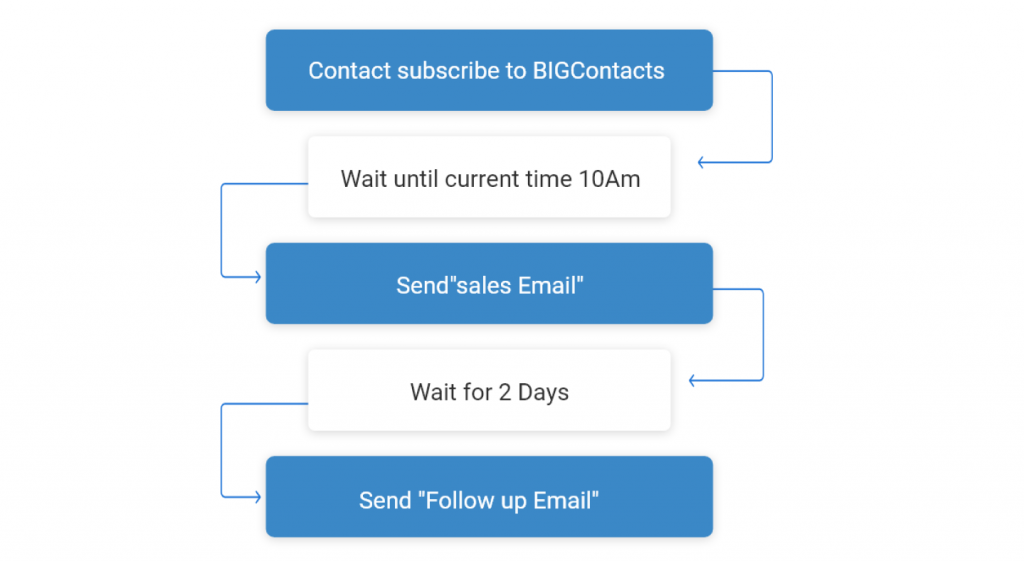
Problem: Reps forget to follow up because there’s no reminder system. Solution: Use automated task reminders tied to each contact’s activity.
Problem: No one can tell which leads are actually hot versus just browsing. Solution: Use lead scoring so reps know exactly who to call first, and lean on lead nurturing for everyone else.
Problem: Follow-up happens days later because the signal wasn’t visible in real time. Solution: Set up instant alerts for high-intent actions like demo requests or pricing page visits.
A study by Forrester in 2023 shows the average sales rep loses nearly two days a week to admin work, and a study by Gartner in 2024 shows 42% of sales reps feel overwhelmed by the number of tools they use daily.
Put those two together and it’s easy to see exactly why a hot lead can sit untouched for hours: there’s simply too much manual noise between the signal and the reply.
See Exactly Which Leads Are Hot With Real-Time Reporting
Track every open, click, and reply in one report, automatically
How Can a CRM Help You Track Hot Sales Leads?
A CRM helps you track hot sales leads by logging every interaction in one place and flagging the moments that matter, instead of leaving that information scattered across inboxes, spreadsheets, and someone’s memory.
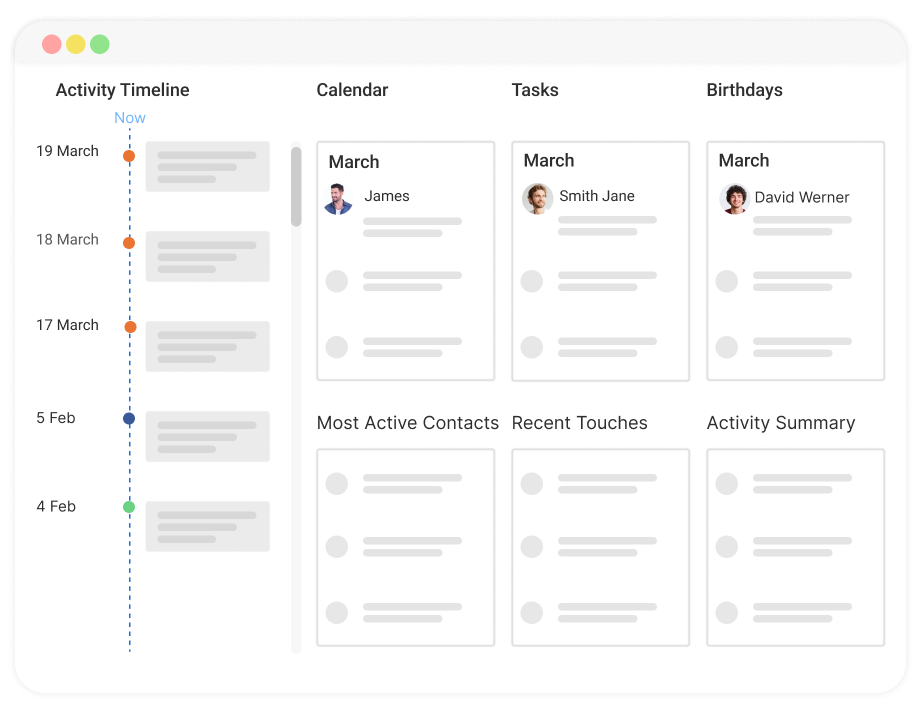
Here’s what this looks like in practice with a tool built for small and growing teams:
- Stores every email, call, and website interaction against a single contact record
- Sends automatic reminders when a lead hasn’t been followed up with in a set window
- Tracks which emails a contact opened and which links they clicked
- Shows the full history of a contact’s activity on one screen, without digging through folders
- Segments contacts by engagement level so hot leads don’t get buried under cold ones
- Rolls all of this into a live report so you can see hot leads by rep, source, or stage without building a spreadsheet by hand
This is where good lead management software earns its keep, and where CRM reporting turns raw activity into a list you can act on the same day.
BIGContacts by ProProfs is a simple, affordable CRM built for growing small businesses, and it includes a forever-free plan for teams that want to try this kind of tracking without committing a budget upfront.
How Does a CRM Compare to a Spreadsheet for Tracking Hot Leads?
A CRM tracks hot leads automatically and in real time, while a spreadsheet only shows what someone remembered to type in manually, usually after the moment to act has already passed.
| Task | Spreadsheet | CRM |
| Logging email opens and clicks | Manual, often skipped | Automatic |
| Alerting a rep to a hot lead | Requires someone to notice | Instant notification |
| Tracking follow-up history | Scattered across tabs or notes | One record per contact |
| Reminding reps to follow up | No built-in reminders | Automated task reminders |
| Working across a team | Version conflicts, overwritten data | Shared, real-time updates |
Several small business owners we’ve worked with described the exact same problem before switching off spreadsheets: leads getting buried in a tab nobody opened that week, and follow-ups happening too late to matter.
If you’re still comparing options, this free CRM comparison spreadsheet is a useful starting point before you commit to a tool.
Stop Guessing. Start Reporting on Every Hot Lead
See open rates, click activity, and follow-up status in one dashboard
How Should Teams Prioritize Hot Leads?
Small business teams should prioritize hot leads by assigning ownership immediately and reserving personal outreach, like a call or a tailored email, for leads showing the clearest buying signals.
- Solo Founders And Small Teams: Set a rule that any demo request or pricing inquiry gets a personal reply within one hour, even if it’s a short one.
- Growing Sales Teams: Use lead scoring to route hot leads to whichever rep is free next, instead of always going to the same person. This is a simple form of lead distribution, and it works even without enterprise software.
- Agencies And Consultants: Flag hot leads by service line so the right specialist responds, not just the first available rep.
- Field Sales And Local Businesses: Pair CRM alerts with mobile notifications so a hot lead doesn’t wait until someone is back at a desk.
How Do You Score a Lead to Know if It Is Hot?
Lead scoring assigns point values to specific actions and attributes, then totals them so you can rank leads by how close they are to buying, rather than guessing based on conversation tone alone. A score removes the guesswork of “does this feel like a good lead” and replaces it with a number everyone on the team agrees on.
Most business scoring models are built from three pillars:
- Fit Score: How closely the contact matches your ideal customer profile, based on things like industry, company size, or budget range.
- Engagement Score: How much the contact has interacted with you, based on email opens, website visits, and content downloads.
- Intent Score: How close the contact is to a buying decision, based on high-value actions like demo requests, pricing page visits, or a direct reply asking about next steps.
Here’s a simple point structure you can copy directly:
| Action or Attribute | Points |
| Matches ideal customer profile (industry, size, budget) | +20 |
| Opens an email | +5 |
| Clicks a link inside an email | +10 |
| Visits the pricing page | +15 |
| Visits the pricing page a second time within 7 days | +15 |
| Downloads a case study or comparison guide | +10 |
| Replies directly with a specific question | +20 |
| Requests a demo, call, or quote | +25 |
| No activity for 14 days | -20 |
Worked example: A contact matches your ideal customer profile (+20), opens two emails (+10), clicks a pricing link (+10), then visits the pricing page again three days later (+15) and replies asking about onboarding time (+20). That’s 75 points. If your threshold for “hot” is 70, this lead gets an instant alert and a same-day call, not a spot in next week’s follow-up list.
Set a threshold (commonly 65 to 75 out of 100) that automatically tags a lead as hot the moment it’s crossed, and build in recency decay, meaning points drop off after a set number of days of silence, so a lead that went hot three weeks ago and then went quiet doesn’t stay marked as hot forever.
This kind of scoring matters more than ever because buyers do most of their research on their own before ever talking to a rep. A study by Gartner in 2025 shows 61% of B2B buyers prefer a rep-free buying experience, which means a lead’s browsing behavior often tells you more about their intent than a phone call would.
You don’t need enterprise software to run this. Most small business CRMs, including BIGContacts, let you tag contacts by engagement level and set reminders based on specific triggers, which covers the same ground the table above without a data science team.
For a longer list of scoring models to test, this lead scoring best practices guide is a good next stop, and CRM metrics worth tracking alongside your score.
Turn Lead Activity Into a Report You Can Act On
Get a live view of every hot, warm, and cold lead in your pipeline
How Do You Choose the Right Tool to Manage Hot Sales Leads?
Choosing the right tool to manage hot sales leads comes down to three questions: does it track engagement automatically, does it alert your team fast enough to matter, and can your team actually use it without weeks of training.
Look for:
- Automatic activity tracking (email opens, clicks, page visits) tied to each contact
- Built-in reminders and task automation, not just contact storage
- A pipeline view that shows where every lead sits, including which ones are hot right now
- Reporting that breaks down leads by score, source, and rep without manual spreadsheet work
- A plan that fits your team size and budget, including a free tier to start
- Simple onboarding that doesn’t require a dedicated CRM administrator
A clean lead qualification process paired with a simple CRM covers this without adding complexity to your stack.
BIGContacts by ProProfs is a simple, affordable CRM built for growing small businesses, with contact management, email marketing, task automation, and sales pipeline tracking in one place, and it’s built specifically so small teams can set this up in a day, not a quarter.
Convert More Hot Sales Leads Before They Go Cold
Hot sales leads aren’t rare. They show up in your inbox and on your website every single week. The real difference between businesses that close them and businesses that lose them isn’t the product, it’s how fast and how consistently someone notices and responds.
Start small. Pick two or three signals from this guide, like pricing page visits and demo requests, apply the scoring table above to your current pipeline, and set up a simple rule to flag and follow up within the hour. That one change alone will catch deals that used to slip through.
For teams looking for something simple to set this up without hours of training or a big budget, a tool like BIGContacts makes it easy to track engagement, score leads automatically, and see it all in one report instead of piecing it together by hand.
Frequently Asked Questions
How long does a hot lead stay hot?
Most hot leads stay hot for a few hours to a couple of days before their urgency fades. If you don't respond within that window, the lead often cools back down to warm or moves to a competitor.
What is a good example of a hot sales lead?
A prospect who visits your pricing page twice, then emails asking about your onboarding timeline, is a strong example. They've shown interest, done research, and are asking a buying-stage question.
Is every website visitor a hot lead?
No. Most website visitors are still browsing or comparing options. A visitor becomes a hot lead only after showing specific, repeated buying signals like pricing checks or a direct inquiry.
Can a cold lead become a hot lead?
Yes. Cold leads warm up through consistent, helpful nurturing like emails, content, and check-ins, and they can become hot once they start showing direct buying intent, such as requesting a call.
What is the difference between a hot lead and a qualified lead?
A qualified lead fits your ideal customer profile but may not be ready to buy yet. A hot lead fits that profile and is actively showing intent to purchase right now.
How fast should you follow up with a hot lead?
Aim to respond within one hour, and ideally within minutes. The longer a hot lead sits untouched, the more likely they are to move on to a competitor who replied first.
What tools help track hot leads automatically?
A CRM with built-in email tracking, website activity logging, and automated alerts does this without manual effort. BIGContacts, for example, flags engagement changes and reports on them so reps don't have to check manually.
Do small businesses need lead scoring software?
Small businesses benefit from basic lead scoring even with a small pipeline, since it removes guesswork about who to call first. Simple CRMs offer this without the complexity of enterprise tools.
What happens if you ignore a hot lead?
Ignoring a hot lead usually means losing it to whichever competitor responds first. Manual, spreadsheet-based tracking makes this easy to miss, since nobody is watching for the signal in real time.
How many hot leads should a sales rep handle at once?
There's no fixed number, but reps should never have more hot leads than they can personally follow up with inside a few hours. Beyond that, leads sit too long and start cooling off.
Is BIGContacts good for managing hot leads?
BIGContacts tracks email opens, website activity, and follow-up reminders in one contact record, and rolls it all into a report, which makes it a solid, budget-friendly option for small teams that need to spot hot leads without extra software.
Does BIGContacts have a free plan for small teams?
Yes, BIGContacts offers a forever-free plan, which makes it easy for small teams to start tracking, scoring, and reporting on hot leads without any upfront cost.
FREE. All Features. FOREVER!
Try our Forever FREE account with all premium features!