
I’ve seen this happen countless times.
A lead fills out a form. Marketing celebrates. Sales never calls. Not because they don’t care, but because the lead is stuck in a spreadsheet, the alert went to the wrong inbox, or someone forgot to move the data into the CRM.
That’s the real issue most teams face. It’s not a lack of tools. It’s too many tools that don’t talk to each other. From my experience, CRM integration is the fastest way to fix this without rebuilding your entire stack.
When your CRM connects with the tools you already use, customer data stays updated, handoffs work smoothly, and nothing gets missed. In this guide, I’ll break down what CRM integration actually means, which integrations deliver the most value, and common mistakes to avoid.
What Is CRM Integration?
CRM integration is the process of connecting your Customer Relationship Management (CRM) system with other business tools so they can share data in real time. This allows your CRM to act as a central hub, syncing information across apps like email, marketing platforms, customer support software, e-commerce systems, and accounting tools.
For example, when a customer fills out a form or makes a purchase, their details automatically flow into your CRM and connected systems. Any update made in one place is reflected everywhere, ensuring all teams work with the same accurate, up-to-date data.
Without CRM integration, teams often re-enter data across multiple tools, leading to errors, inconsistencies, and wasted time. Integration eliminates these issues by creating a single, reliable source of customer information.
Behind the scenes, CRM integration typically works through APIs, but most modern CRMs make this easy with built-in integrations or app marketplaces that require little to no technical setup.
Why CRM Integration Is Important for Your Business
Investing in CRM integration directly improves efficiency, collaboration, and customer experience. As customer expectations rise, having connected systems helps teams respond faster, personalize interactions, and work from a single source of truth. Here’s why CRM integration is so important:
1. A Unified 360° Customer View
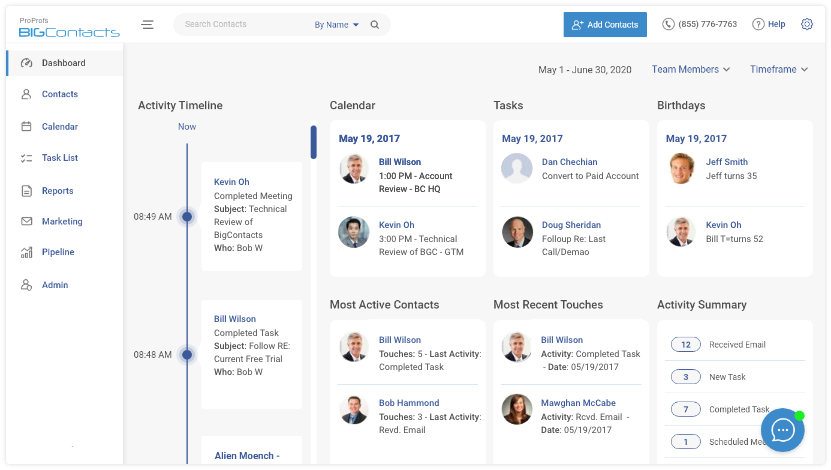
CRM integration brings all customer interactions into one place — marketing activity, sales conversations, purchases, and support history. This gives every team a shared, complete view of the customer, eliminating blind spots and repeated questions. Leaders can also spot trends across the entire customer journey and make better, data-backed decisions.
2. Real-Time Data Sync and Less Manual Work
Integrated systems automatically update data across tools, removing duplicate entries and reducing errors. When a lead submits a form or a customer updates their details, that information syncs everywhere instantly. Teams work faster and trust that the data they see is accurate and current.
3. Faster Sales Cycles and Higher Productivity
With tools connected, teams spend less time switching between apps and more time taking action. Sales reps can follow up faster, marketing can pass qualified leads instantly, and support can coordinate with sales in real time. Small workflow improvements add up to major productivity gains.
4. More Personalized & Consistent Customer Experiences
CRM integration makes personalization possible by connecting data from marketing, sales, and support. Teams can reference past interactions, purchases, or issues during every conversation. Customers feel recognized, not repeated to, which builds trust and long-term loyalty.
5. Smoother Workflows and Better Collaboration
Integrated workflows remove silos between departments. Actions in one system can trigger tasks in others automatically, ensuring smooth handoffs and nothing falling through the cracks. Team collaboration also improves when conversations and updates happen directly around CRM data.
6. Better Insights and Smarter Decisions
When data from multiple systems flows into the CRM, reporting becomes more meaningful. Businesses gain a clearer picture of what drives conversions, retention, and revenue. This turns raw data into actionable insights that guide strategy and improvement.
7. Fewer Errors and Cleaner Data
Keeping data synced across systems reduces inconsistencies and manual mistakes. Everyone works from the same updated records, improving accuracy and helping maintain compliance where required.
8. Cost Savings and Higher ROI
CRM integration reduces wasted time, avoids costly errors, and can eliminate redundant tools. At the same time, faster responses and better experiences increase customer retention and revenue. Over time, the efficiency gains often outweigh the initial integration effort.
10 Essential CRM Integration Examples (What Should Your CRM Integrate With?)
A CRM can integrate with almost any tool that handles customer or business data. While the right setup depends on your tech stack, these integrations are valuable for most businesses.
1. Email and Calendar Integration
Connecting Gmail or Outlook with your CRM automatically logs emails to contact records and keeps all conversations in one place. Calendar sync ensures meetings, reminders, and follow-ups stay aligned across tools, helping sales and account teams stay organized and responsive.
2. Marketing Automation and Lead Generation Tools
Integrating marketing platforms like Mailchimp or HubSpot allows leads, engagement data, and campaign activity to flow directly into the CRM. Sales can see what content a lead is engaged with, while marketing can trigger campaigns based on CRM updates, improving alignment and follow-through.
3. Phone & Calling Software
CRM integrations with calling tools enable click-to-call, automatic call logging, and contact pop-ups during incoming calls. Call notes, recordings, and follow-up tasks are tracked automatically, saving time and improving visibility for managers.
4. Social Media Platforms
Social integrations enrich CRM records with profile data and social interactions from platforms like LinkedIn or Facebook. Teams can track mentions, capture social leads, and gain valuable context before reaching out, creating more timely and relevant conversations.
5. Document Management and E-Signatures
Integrating tools like Google Drive, DocuSign, or proposal software lets teams create, send, track, and store documents directly from the CRM. Contracts and quotes can auto-fill with CRM data, update deal stages when signed, and stay easily accessible.
6. Customer Support and Service Desk Software
When help desk tools integrate with CRM, support agents see customer history instantly, while sales and success teams stay aware of open tickets and past issues. This shared visibility helps teams deliver faster, more informed, and more consistent service.
7. Team Communication and Collaboration Tools
CRM integrations with Slack or Microsoft Teams keep teams informed through real-time alerts for leads, deals, or updates. CRM records can be shared directly in chats, helping teams collaborate quickly without switching tools.
8. Online Forms, Surveys, and Data Collection
Integrating forms and survey tools with your CRM ensures that customer data flows directly into one system, keeping records complete and up to date. Website forms can automatically create or update leads in the CRM and notify sales instantly, helping teams respond faster to inquiries.
9. Analytics and Business Intelligence Tools
CRM integration with analytics or BI tools allows you to turn customer data into meaningful insights. By combining CRM data with marketing, finance, or website analytics, teams can build end-to-end dashboards that show the full customer journey.
10. Accounting and Billing Systems
Connecting accounting or payment platforms with your CRM links financial data directly to customer and deal records. Payments, invoices, and revenue updates sync automatically, giving sales and account teams visibility into billing status without switching systems.
How to Implement CRM Integration (Methods and Services)
Once you know what to integrate, the next step is choosing how to connect your systems. CRM integrations generally fall into a few common approaches, ranging from simple plug-and-play options to fully custom solutions.
1. Native Integrations (Out-of-the-Box)
Most CRMs offer built-in integrations with popular tools like email platforms, accounting software, and marketing apps. These are easy to set up, require no coding, and are maintained by the vendor. They are reliable and supported, though limited to the apps your CRM officially supports. Always check your CRM’s integration marketplace first, as it often covers more tools than expected.
2. Integration Platforms (iPaaS)
When a native integration is not available, Integration Platform as a Service tools like Zapier, Make, or Workato act as a bridge between systems. They let you create automated workflows using triggers and actions, without writing code. iPaaS tools offer flexibility and support thousands of apps, making them ideal for connecting less common tools or building multi-step workflows.
3. Custom API Integrations
For unique workflows or proprietary systems, custom API integrations offer full control. Developers use APIs provided by the CRM and other apps to build tailored connections. This approach is powerful but requires technical expertise, ongoing maintenance, and monitoring. It’s typically used by larger teams or businesses with specific integration needs.
4. Connector Apps and Integration Services
Some tools specialize in syncing specific types of data, such as contacts or deals, across systems. Others offer consulting or managed integration services, handling setup and maintenance for you. This option works well if your setup is complex or you lack in-house technical resources.
5. No-Code and Low-Code Automation Tools
Many CRMs and third-party platforms now offer no-code or low-code automation features. These allow non-technical users to build basic integrations using visual builders. They’re great for quick wins and department-level workflows but should be managed carefully to avoid duplicate or uncoordinated processes.
Best Practices for Seamless CRM Integration
CRM integration isn’t just a technical task. It impacts how teams work and how data flows across the business. To get real value from it, you need a thoughtful, phased approach. Here are some proven best practices to follow.
1. Define Clear Objectives and Use Cases
Start by identifying what you want to achieve. This could be reducing manual data entry, improving lead response time, or creating better visibility across teams. Clearly defining pain points and goals helps you prioritize integrations and measure success later. Document these objectives so every integration ties back to a real business need.
2. Start Small and Focus on High-Impact Integrations
Avoid integrating everything at once. Begin with one or two integrations that deliver immediate value, such as email, calendar, or lead capture. Rolling out integrations in phases makes the process easier to manage and helps teams adapt without feeling overwhelmed.
3. Clean and Prepare Your Data
Before integrating systems, ensure your data is accurate and consistent. Remove duplicates, standardize formats, and map fields correctly between tools. Poor data quality can quickly spread across systems once integrations are live, so fixing issues early saves time and frustration later.
4. Prioritize Security and Privacy
Use secure authentication methods and official integrations whenever possible. Control who can access sensitive data and ensure privacy preferences sync across systems. If your business operates under regulations like GDPR or HIPAA, confirm that integrations comply with those requirements from day one.
5. Plan for Scalability and Change
Choose integration methods that can grow with your business. As data volume and tools increase, your integrations should handle higher loads without breaking. Design workflows flexibly so tools can be swapped or updated without rebuilding everything.
6. Test Before Full Rollout
Always test integrations with sample data or a small group before rolling them out company-wide. Check for sync errors, incorrect field mapping, and unintended data overwrites. Involving end users during testing helps catch practical issues early.
7. Train Teams and Update Processes
Integration only works if people use it properly. Train teams on what’s changed and how integrations make their work easier. Update workflows so teams rely on integrated systems instead of old manual processes, and gather feedback to fine-tune setups.
8. Monitor, Document, and Prepare for Issues
After launch, monitor integrations regularly for errors or failures. Set up alerts, keep documentation updated, and define fallback plans for critical integrations. This ensures issues are caught early and knowledge isn’t lost if team members change.
Common CRM Integration Challenges (and How to Overcome Them)
CRM integration delivers strong benefits, but it’s rarely flawless out of the box. Below are some common challenges businesses face and how to handle them effectively.
1. Finding the Right Integration Tool
Not every CRM has native integrations for every app. Start by checking your CRM’s marketplace, then look for iPaaS tools like Zapier or Make. When multiple options exist, choose officially supported or well-reviewed integrations. If no connector exists, APIs or an integration partner may be necessary.
2. Data Compatibility and Mapping Issues
Different systems often structure data differently, which can cause sync errors or misplaced fields. The solution is careful data mapping and testing. Align fields correctly, use unique identifiers where possible, and clean up inconsistencies before going live.
3. Sync Frequency and Performance Limits
Deciding between real-time and scheduled syncs can be tricky. Real-time sync offers freshness but can strain systems, while batch syncs reduce load but introduce delays. Choose based on business needs and watch for API rate limits. For large datasets, migrate data in stages.
4. Security and Compliance Concerns
Data flowing between systems raises security and privacy risks. Use secure authentication methods, limit data access by role, and ensure compliance with regulations like GDPR. Involve IT or security teams early and vet third-party integration tools carefully.
5. Downtime and Integration Failures
Integrations can break due to updates, expired credentials, or outages. Set up monitoring and alerts to catch issues early. Having a manual fallback process for critical data ensures business continuity if automation fails temporarily.
6. User Adoption and Change Management
Even well-built integrations can fail if teams don’t trust or use them. Provide training, communicate benefits clearly, and address issues quickly. Having an internal champion helps encourage adoption and builds confidence in the system.
7. Complexity and Scope Creep
As more systems connect, integrations can become hard to manage. Avoid syncing unnecessary data, document workflows, and regularly review whether each integration is delivering real value. Simpler setups are easier to maintain and scale.
Streamline Cross-Departmental Collaboration with CRM Integration
CRM integration works best when it simplifies everyday work instead of adding more layers. Connecting the right tools helps teams avoid duplicate effort, keep data clean, and respond faster to customers. Over time, this creates smoother workflows and more consistent customer experiences.
The most effective approach is to start with real problems. Focus on integrations that reduce manual updates, prevent missed follow-ups, and give teams shared visibility into customer interactions. Small, well-planned integrations usually deliver more value than trying to connect everything at once.
To make this easier, it helps to use a CRM that fits naturally into your existing tech stack. Tools like BIGContacts are often chosen because they support practical integrations and simple workflows, making it easier for teams to stay aligned without overcomplicating their systems.
Frequently Asked Questions

Does CRM integration require technical expertise?
Most modern CRMs offer no-code or low-code integrations that non-technical users can manage. Technical help is usually only needed for custom API-based integrations or highly specific workflows.
How do I measure the success of CRM integration?
Success is measured through reduced manual work, faster response times, fewer errors, improved data accuracy, and better team visibility into customer interactions.
Can CRM integration help with scaling the business?
Yes. CRM integration creates a flexible foundation that supports growth by keeping systems connected, workflows consistent, and data accessible as teams and customer volumes increase.
FREE. All Features. FOREVER!
Try our Forever FREE account with all premium features!