

I still remember the early days of running my small business: juggling spreadsheets, sticky notes, and late-night follow-ups that somehow still slipped through the cracks. I thought I was organized… until I realized leads were going cold, customers weren’t getting replies, and deals were getting lost somewhere between my inbox and my memory.
That’s when I discovered the power of the best CRM software for small businesses. Not the flashy enterprise systems with a thousand features I’d never use, but tools designed for teams like mine — fast-moving, small, and focused on building real relationships.
Over the years, I’ve tested more CRMs than I can count. Some that looked great but overpromised, and others that quietly transformed how I worked.
In this blog, I’m sharing the 13 best ones that actually deliver. Whether you’re just starting out or managing a growing client list, you’ll find tools here that can simplify your day, strengthen customer connections, and free up time for what truly matters — growing your business.
Why Do Small Businesses Need CRM Software?
A good CRM helps you get organized, stay efficient, and grow faster. Here’s how it makes a difference:
- Stay Organized: No more messy spreadsheets or scattered emails. Everything about your customers—contacts, notes, tasks—is stored in one place for easy access. (Imagine having every email and call logged under a contact’s profile instead of digging through inboxes.)
- Build Better Relationships: With a 360° view of every customer interaction, you can personalize communication and boost loyalty. Knowing a client’s history means you can tailor your approach and make them feel valued.
- Boost Sales & Marketing: Track deals, automate follow-ups, and nurture leads with ease. A CRM makes sure no opportunity slips through the cracks by reminding you of tasks and helping you send timely emails.
- Make Smarter Decisions: Built-in analytics let you spot sales trends, identify bottlenecks, and measure performance. Data-driven insights show what’s working and what isn’t, so you can focus your efforts effectively.
- Collaborate as a Team: Everyone sees the same up-to-date customer info, so your team stays in sync and delivers a better experience. Sales, marketing, and support can all be on the same page with each client’s status and history.
Before I walk you through all 13, here’s a quick video comparing five CRM options worth a look.
Top 13 Best CRMs for Small Businesses
To compile this list, I evaluated each tool based on its ease of use, features, and scalability, ensuring they cater to various small business needs. My assessments are based on personal experience, insights from trusted reviews, and feedback from industry peers.
| CRM Software | Best For | Pricing |
|---|---|---|
| BIGContacts | Contact management & email marketing | Free for growing teams. Paid plan starts at $9.99/month |
| Monday CRM | Visual task and project tracking | Starts at $12/user/month |
| Zendesk Sell | Lead & deal management | Starts at $19/user/month |
| HubSpot CRM | Centralizing sales, marketing & support operations | Starts at $9/user/month |
| Agile CRM | Integrated sales, marketing & support | Free for up to 10 users; paid plans from $8.99/user/month |
| Pipedrive | Sales-focused teams | Starts at $14/user/month |
| Salesforce | Complex sales organizations | Starts at $25/user/month |
| Zoho CRM | Omnichannel engagement | Starts at $9/user/month |
| Salesmate | Sales pipeline management | Starts at $23/user/month |
| Freshsales | Lead scoring and AI-driven insights | Starts at $9/user/month |
| Keap | Marketing automation and CRM combined | Starts at $249/month |
| Less Annoying CRM | Simple, budget-friendly CRM for very small teams | Starts at $15/user/month |
| Capsule CRM | User-friendly CRM with useful customization | Starts at $18/user/month |
1. BIGContacts – Best for Contact Management & Email Marketing
In my experience, the contact management of BIGContacts is particularly strong: you get 360-degree contact profiles where every email, note, task, file, and interaction is logged in one place. This provides an all-in-one view of each customer, similar to what higher-end CRMs offer, but in a more approachable manner for small businesses.
The built-in sales pipeline management is visual and simple – you can drag-and-drop deals through stages and see your whole funnel at a glance. I also like the ability to segment contacts into static and dynamic lists (think of dynamic lists as saved filters that update automatically).
Also, team collaboration with BIGContacts is quite seamless. The shared calendar and task management features let my team coordinate follow-ups and meetings all in one place. Additionally, BIGContacts provides 24/7 human support via phone, chat, and a comprehensive knowledge base.
Pros:
- Segmentation of contacts into static and dynamic lists for more targeted communication and marketing
- 360° contact profiles with every email, note, task, file, and transaction stored in one place
- Automated drip email campaigns that adapt to a contact’s stage in the sales cycle (great for hands-off lead nurturing)
- Calendar and task management features for tracking appointments and follow-ups, improving team collaboration
Cons:
- No downloadable or on-premise version
- Dark user interface option not available
Pricing:
Free for small teams. Paid plan starts at $9.99/month.
2. Monday CRM – Best for Visual Task Tracking
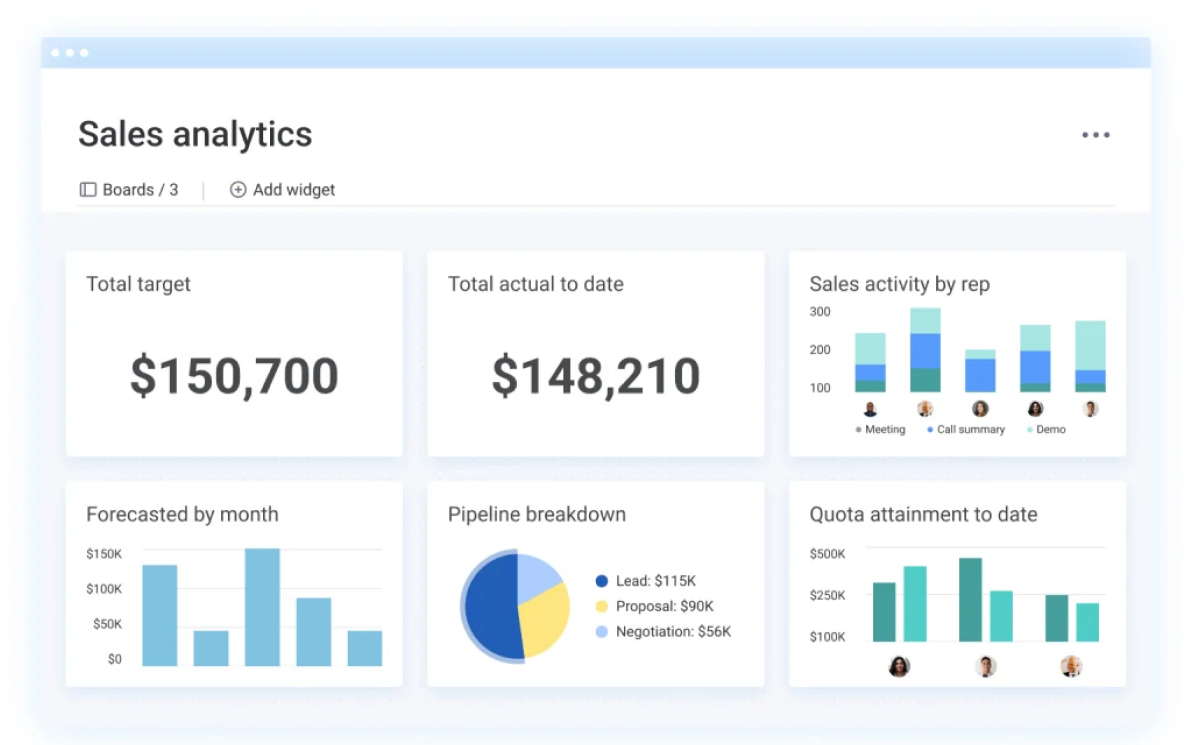
I found Monday CRM incredibly helpful for managing customer relationships and tasks in one place. If you’re a visual thinker, its customizable boards make tracking deals and workflows easy — you can literally drag and drop leads through each stage of your pipeline and instantly see where everything stands.
Built on Monday.com’s flexible work platform, this tool combines CRM features with project management. This was perfect for my team when handling not just sales follow-ups, but also delivery of services and internal task assignments.
Monday CRM offers solid contact management, deal tracking, and basic automation. It also integrates smoothly with tools like Gmail, Outlook, and Google Calendar, so meetings and emails sync without fuss.
Pros:
- Customizable boards for visual task and deal management, allowing you to easily track progress and stay organized at a glance
- Lead management tools to capture, assign, and track leads from initial contact to conversion, helping you improve and standardize your sales process
- Centralized communication logs, so all customer emails, call notes, and updates are kept in one place for easy reference
- Time tracking capabilities to monitor how long tasks and projects take, which helps in assessing productivity and allocating team resources efficiently
Cons:
- Can feel overwhelming at first due to many customization options.
- Reporting features are somewhat limited in the lower-tier plans.
Pricing:
Starts at $12/user/month.
3. Zendesk Sell – Best for Lead & Deal Management
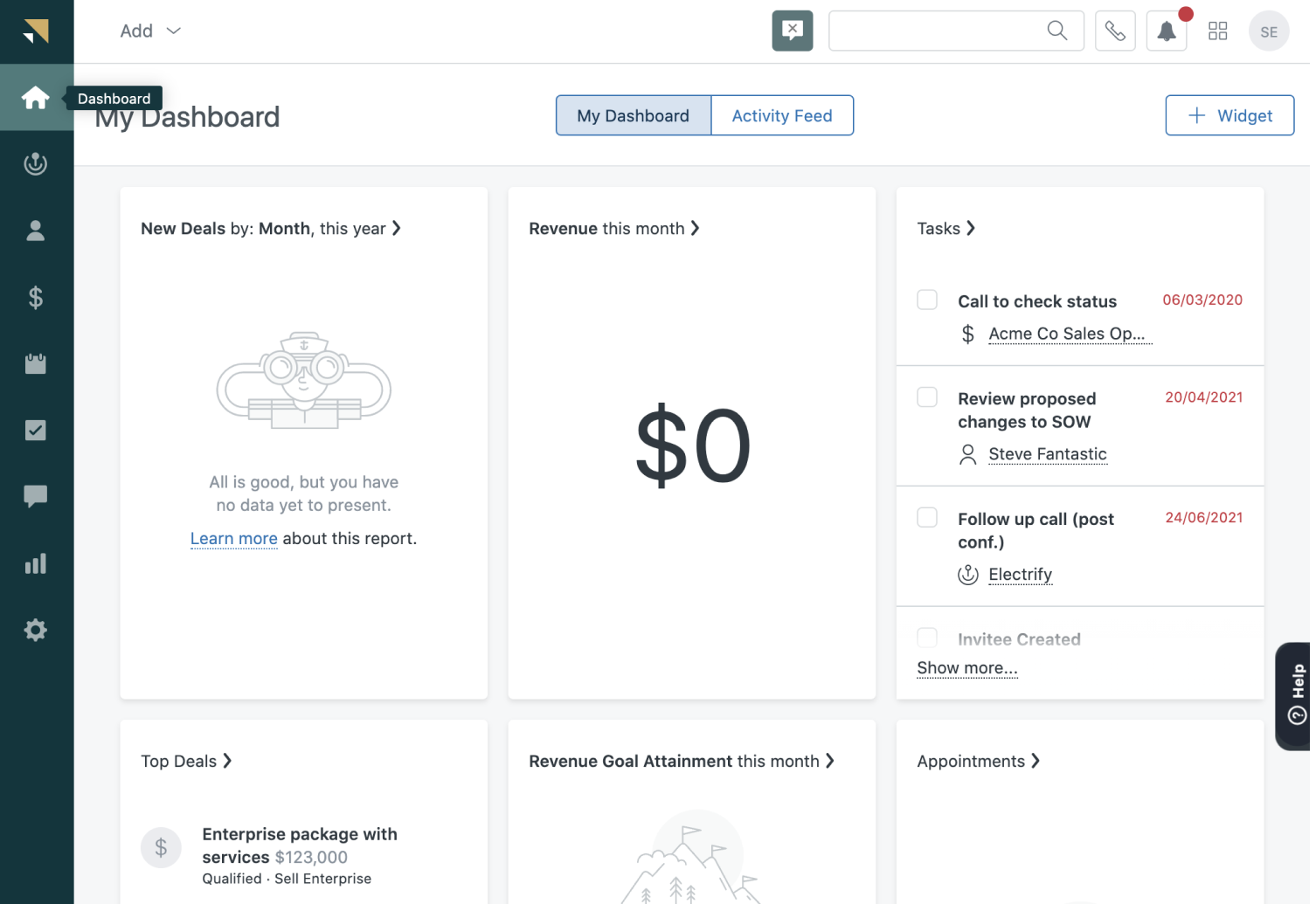
Zendesk Sell is one of the most intuitive sales-focused CRMs I’ve used for managing leads and deals. Its clean interface, built-in telephony (a handy integrated dialer), and excellent mobile app made it easy to track interactions, update deal statuses, and stay productive on the go.
I was impressed with how quickly I could import a list of contacts and start working on a streamlined pipeline with Zendesk Sell. The real-time reporting and simple UI helped me focus on closing deals rather than fiddling with settings.
Zendesk Sell also plays well with others – it integrates with popular tools like Mailchimp for email campaigns, Google Drive for file sharing, and, of course, Zendesk Support for customer tickets. Keep in mind, Zendesk Sell is strictly sales-focused. If you need built-in marketing automation or customer service modules, you would have to connect additional tools.
Pros:
- Easy integrations with apps like Mailchimp, PandaDoc (for proposals/signatures), Google Workspace, Microsoft 365, and more.
- Drag-and-drop customizable dashboards for analytics, so you can create personalized sales reports and track the metrics that matter to you.
- An integrated phone dialer and texting feature for seamless calling and SMS, which lets you log communications and record call notes directly in the CRM.
- Quick onboarding and data import tools – you can get up and running in very little time, importing contacts from a spreadsheet or another CRM without hassle
Cons:
- Lacks built-in marketing or customer support tools; requires external integrations.
- Some users find the mobile app missing deeper reporting functionality.
Pricing:
Starts at $19/user/month.
4. HubSpot CRM – Best for Centralizing Sales, Marketing & Support Operations
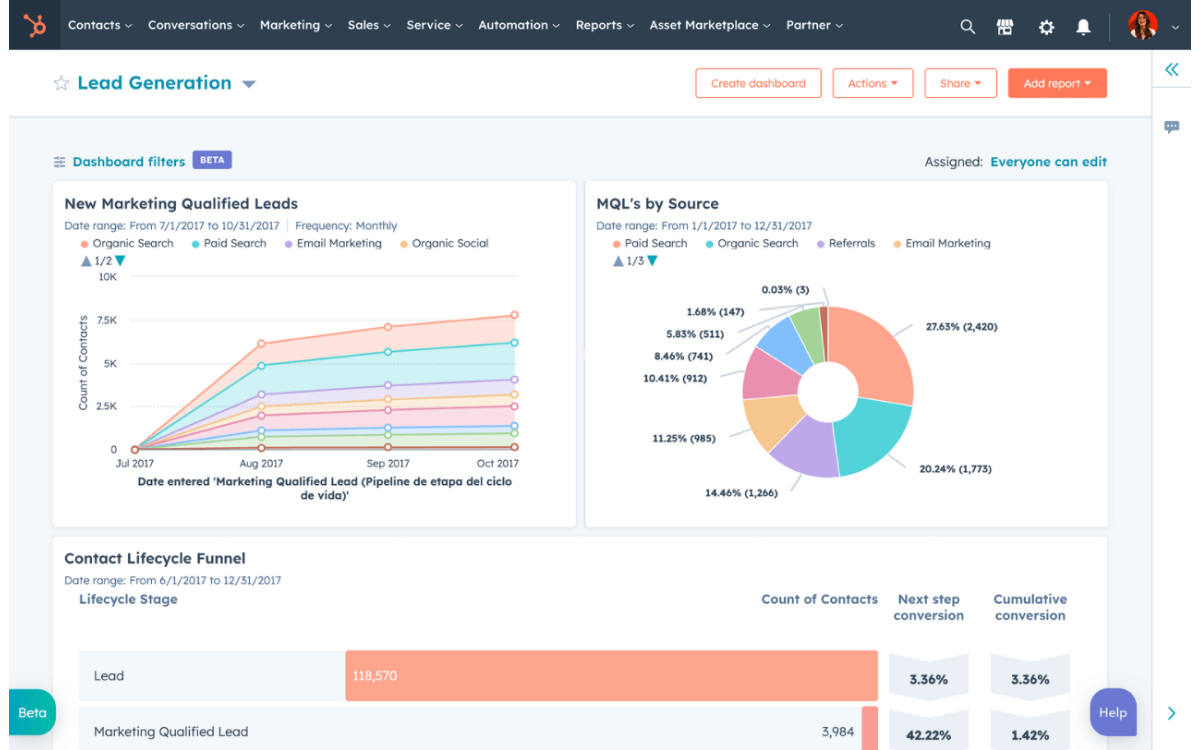
HubSpot CRM quickly became my go-to for managing all aspects of my business in one system. It brings together sales, marketing, and customer service tools in a unified, easy-to-use platform. I could track leads, automate follow-ups, manage a content calendar, and even handle support tickets without needing separate systems for each department.
The interface is clean, and features like the shared inbox and team @mentions kept our communications in sync. It gave me a clear view of every customer interaction across email, phone calls, website form fills, and more. That 360-degree view enabled me to personalize my approach and make more informed decisions on where to focus our efforts.
HubSpot’s automation features saved me a ton of time on routine tasks. For example, you can set up workflows so that when a new lead comes in, they automatically get a series of welcome emails, and the system reminds a salesperson to call them after a few days. The built-in email templates and sequences were great for follow-ups.
Pros:
- Sales pipeline, email marketing, live chat, ad tracking, and support ticketing are all available in one place, ensuring different teams work off the same data.
- Easily create engaging emails or landing pages for campaigns without any coding, using built-in templates and a visual editor.
- HubSpot offers SEO suggestions, content strategy tools, and social media integration to help drive more organic traffic and leads to your business.
- You can set up chatbots on your website to handle common questions or routing, and automatically score leads based on their activity.
Cons:
- Advanced automation and analytics require paid upgrades, which can get pricey.
- Customization for reporting and dashboards can be limited in the free version.
Pricing:
Starts at $9/user/month.
5. Agile CRM – Best for Integrated Sales, Marketing & Support
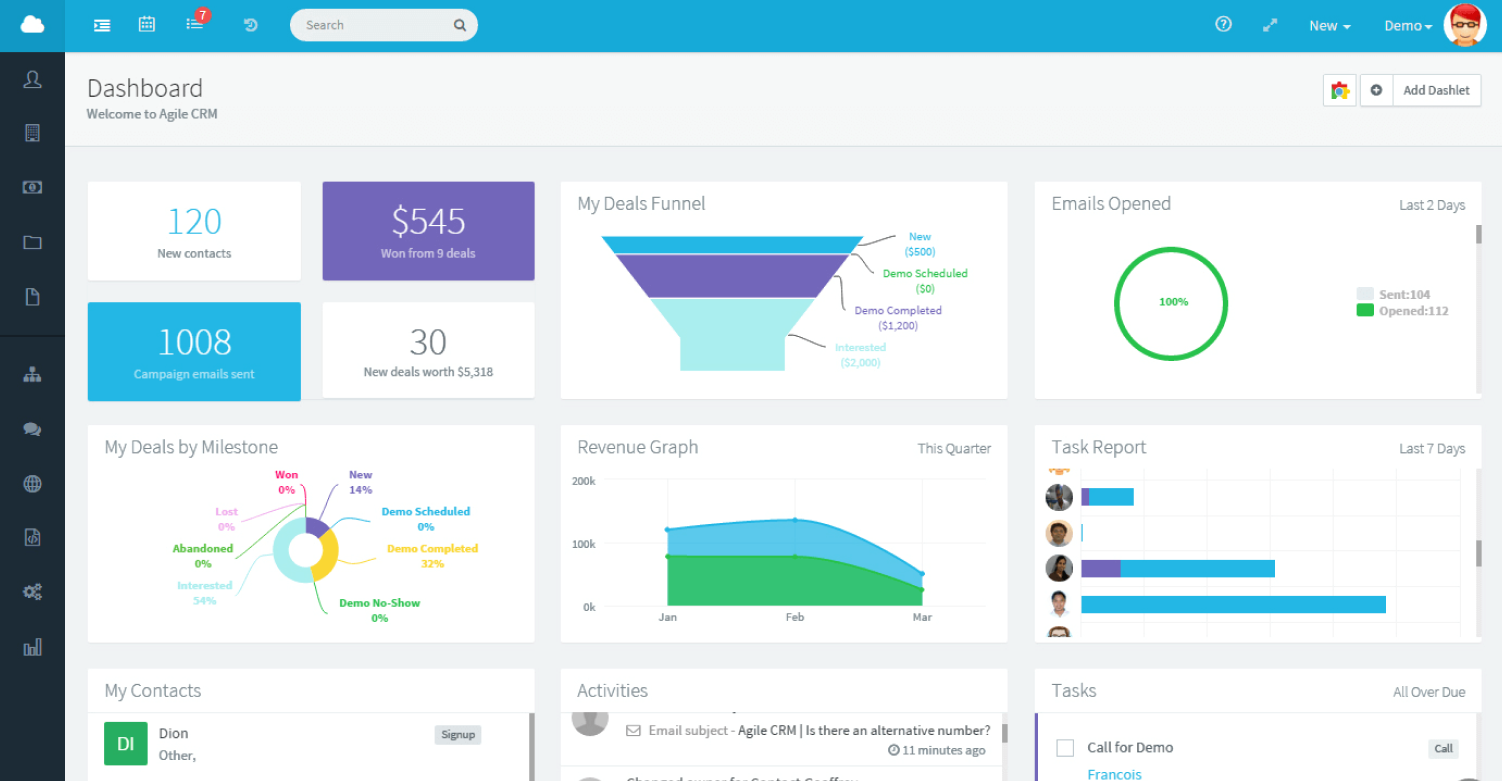
Agile CRM is a solid all-in-one platform that combines sales, marketing, and support features on a single dashboard — perfect if you want to manage everything without juggling multiple apps. I especially enjoyed using its visual marketing automation builder: it lets you design email campaigns and drip sequences with a simple drag-and-drop workflow.
On the sales side, Agile CRM provides a kanban-style deal pipeline, which kept our deals organized in stages. Moving a deal to the next stage could trigger automated actions, like sending a follow-up email or creating a task for a team member, which helped ensure a consistent process without manual effort.
Agile CRM also has a built-in phone dialer and voice recording, plus email tracking, which made sales outreach more efficient — I could call a lead and have the call logged and recorded automatically, or see when someone opened my email.
Pros:
- A friendly drag-and-drop builder for creating automated workflows (for emails, web engagement, social posts).
- Agile CRM includes basic project management features with tasks, milestones, and team collaboration.
- Fun gamification features (like leaderboards and achievements for sales reps) can help motivate your team by turning sales activities into a friendly competition.
- It can track web engagement (who’s visiting your site, what they click) and social media interactions, feeding that info into contact histories for richer context when you reach out.
Cons:
- The interface can feel cluttered with so many features packed in one dashboard.
- Occasional syncing delays when connecting with external tools like Gmail.
Pricing:
Free for up to 10 users; paid plans from $8.99/user/month.
6. Pipedrive – Best for Sales-Focused Teams
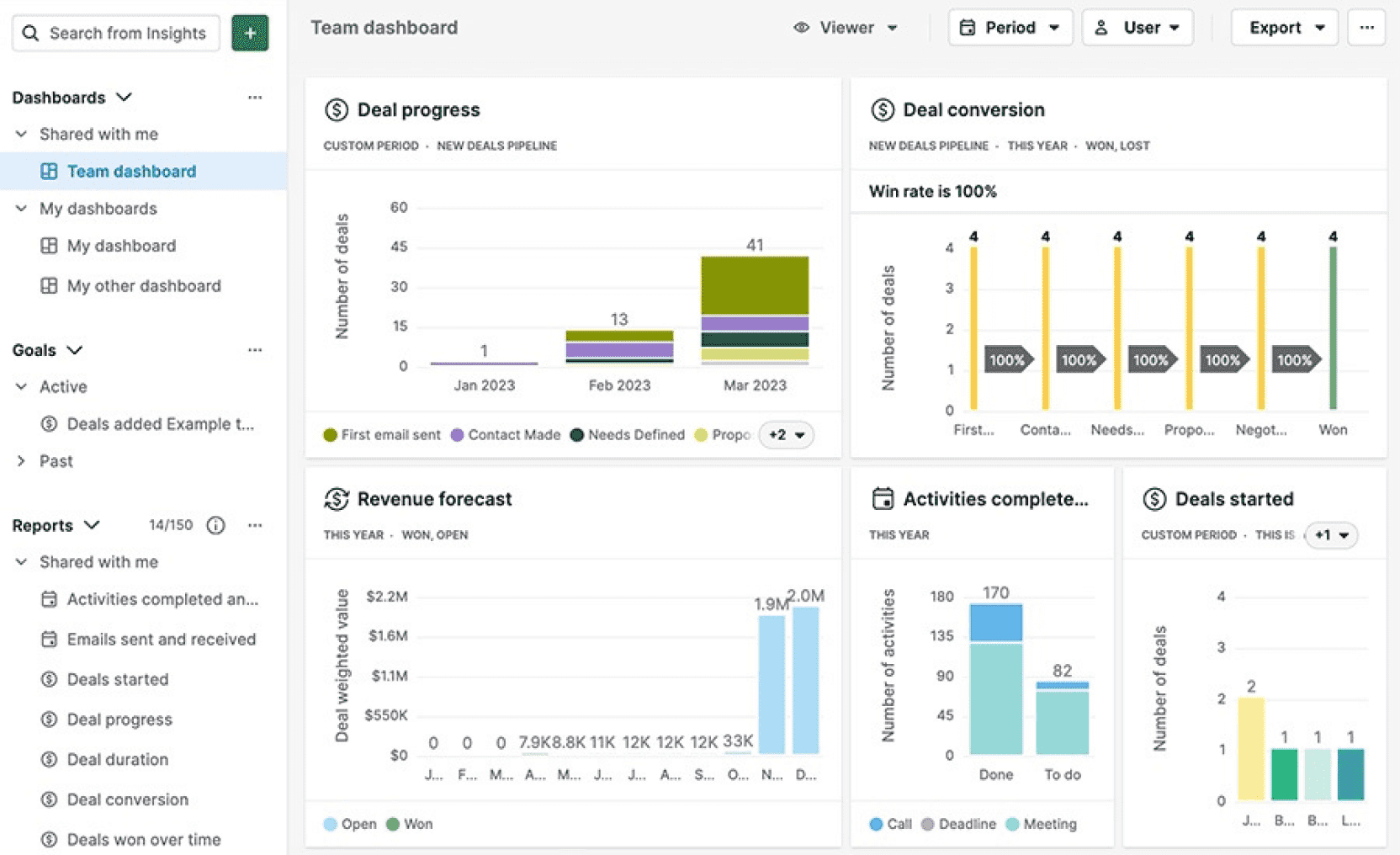
Pipedrive is a CRM that’s laser-focused on helping sales teams stay organized and close more deals. When my sales team first tried Pipedrive, it was exactly what we needed to boost productivity without any fluff. The heart of Pipedrive is its highly visual sales pipeline: an intuitive drag-and-drop interface where you track deals through different stages.
We could tailor pipeline stages to match our sales process and add custom fields for the info we care about. The CRM also offers AI-powered sales tips and automations. For example, it can automatically remind you to follow up if a deal has been sitting idle, or suggest activities based on what’s worked in past deals.
Pipedrive integrates with a lot of other tools we used, like Gmail (so you can track emails to contacts), Google Calendar, and even Slack for notifications. It also has a growing marketplace of add-ons and integrations (including things like QuickBooks for invoicing or Zoom for meeting scheduling).
Pros:
- You can set up multiple pipelines and define stages that fit your unique sales process.
- The clear visual layout helps you quickly identify which deals are stalling and which stage has the most value tied up, so you can focus your energy where it counts.
- Pipedrive’s workflow automation can auto-create follow-up tasks or send emails when a deal moves stages, or trigger alerts if a deal sits too long with no action.
- Real-time sales metrics and customizable reports give you actionable insights.
Cons:
- Lacks built-in marketing or customer service tools; you’ll need integrations.
- Custom reports and dashboards are available only in higher plans.
Pricing:
Starts at $14/user/month.
7. Salesforce – Best for Complex Sales Organizations
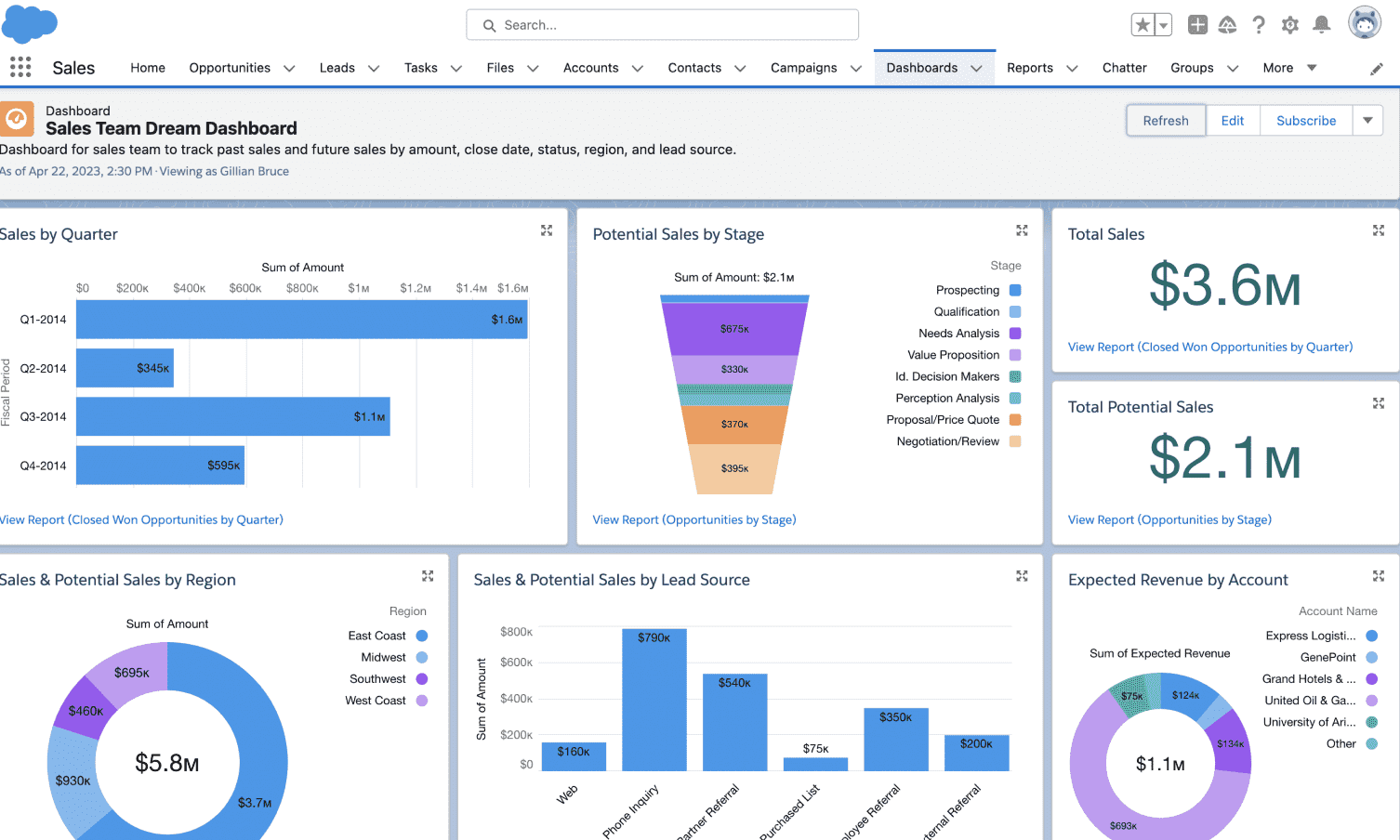
Salesforce is a powerhouse in the CRM world, known for its deep customizability and scalability. Even the small-business-focused edition (Salesforce Essentials) offered advanced capabilities like lead scoring, workflow automation, and AI-driven insights through Salesforce Einstein.
What I loved about Salesforce was how integrated it became with everything. We easily connected it with our phone system, our email marketing platform, and even our accounting software. Salesforce’s AppExchange marketplace provides thousands of third-party apps and integrations, so chances are, if you have any tool in your stack, there’s an integration available.
Salesforce excels at automation and customization. We created custom workflows that would, say, automatically assign a new lead to the appropriate sales rep based on region and send an email introduction.
Pros:
- You can customize nearly anything – page layouts, fields, workflows, even create your own apps within Salesforce.
- Salesforce’s AI (Einstein) can automatically score leads by likelihood to convert, and surface insights like which deals might be at risk.
- Engage with customers through email, phone, social media, and even WhatsApp or SMS using various Salesforce add-ons.
- Salesforce can grow with you indefinitely. It’s used by companies with just 5 employees all the way up to Fortune 500 enterprises.
Cons:
- Setup can be complex, often requiring admin help or training.
- Pricing quickly increases as you add features or integrations.
Pricing:
Starts at $25/user/month.
8. Zoho CRM – Best for Omnichannel Engagement
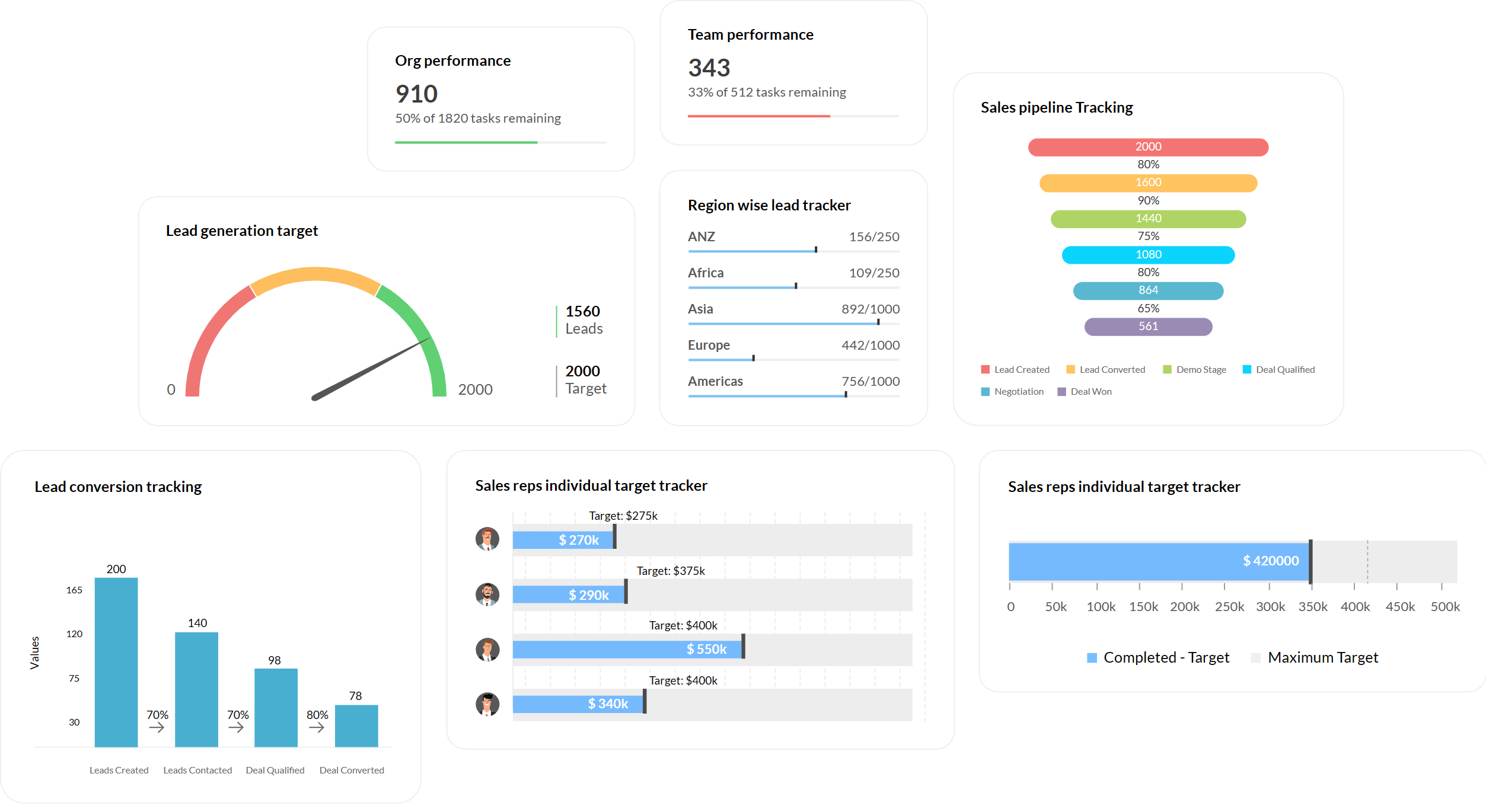
Zoho CRM is a feature-rich yet budget-friendly option that’s ideal for small and midsize businesses wanting a broad range of capabilities. One thing that immediately stands out about Zoho CRM is how many channels it ties together. In one system, you can manage customer interactions across email, phone, live chat, social media, and even in-person meetings.
A big advantage of Zoho CRM is its ecosystem. It integrates tightly with other Zoho products (like Zoho Campaigns for email marketing, Zoho Desk for customer support tickets, Zoho Books for accounting, etc.). If you’re using or open to using Zoho’s suite, you can run almost your entire business on their platform with the CRM at the center.
Customization in Zoho CRM is excellent for the price point. We easily added custom fields, created custom modules (to track something like project bids separately from standard deals), and set up Blueprints. Blueprints in Zoho are a visual process flow tool – we used it to enforce our sales process steps.
Pros:
- Engage with customers via email, social media (Twitter, Facebook integration), live chat on your site, telephony integration for calls, and even SMS. Zoho brings all these channels into one timeline for each contact, so you never lose context.
- Highly customizable modules, fields, and layouts. If something doesn’t fit, you can likely tweak Zoho to accommodate.
- Set up automation rules for lead assignment, task creation, email alerts, etc. Zia (the AI) can auto-fill missing data, identify the sentiment in emails, and even automate simple tasks via command.
- Zoho CRM includes effective reporting tools and even a module called Zoho Analytics for deeper BI reporting if needed.
Cons:
- The user interface can feel dated compared to newer CRMs.
- Some advanced automation features are hidden behind higher-tier plans.
Pricing:
Starts at about $9/user/month.
9. Salesmate – Best for Sales Pipeline Management
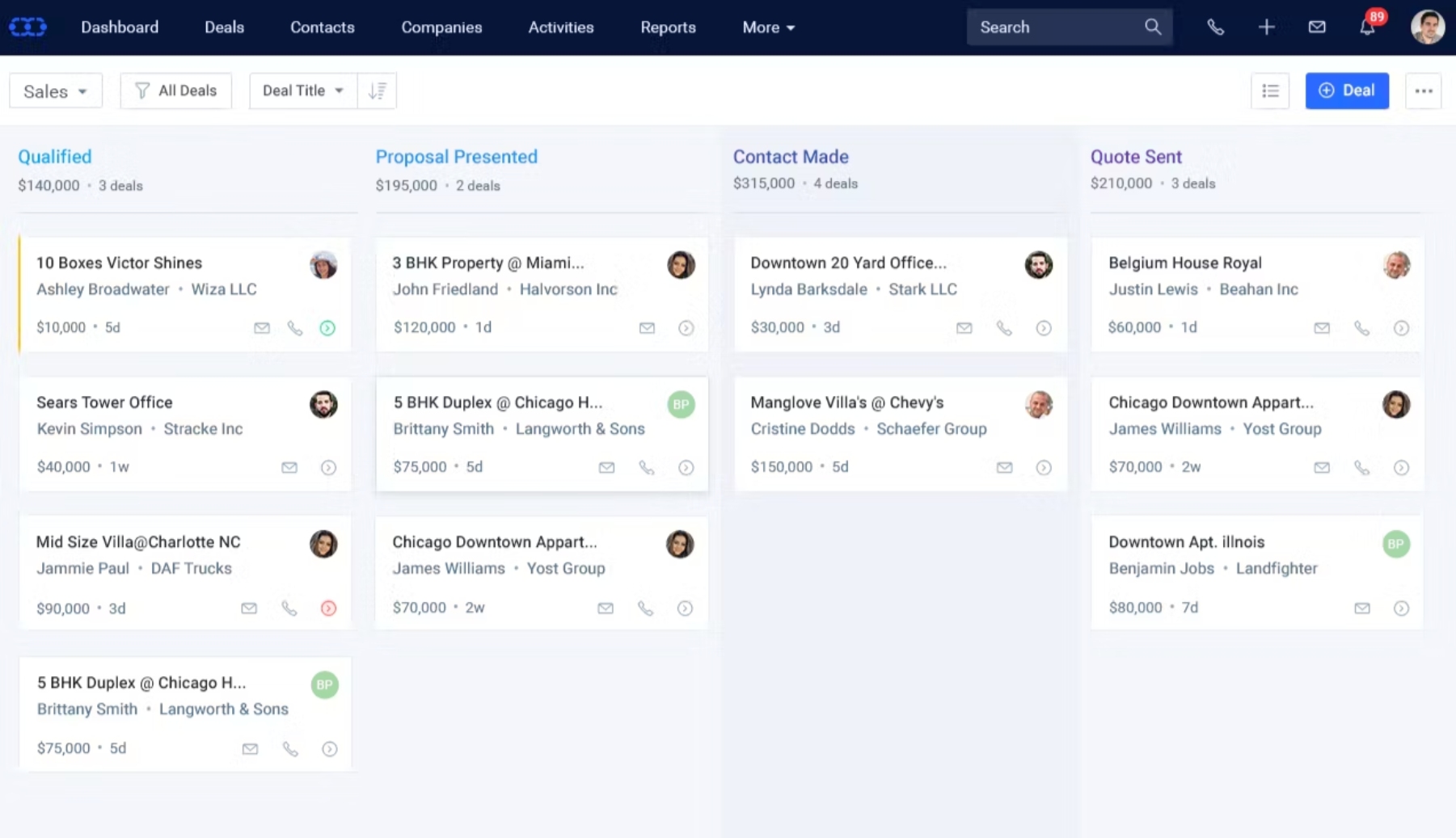
Salesmate is a CRM that offers a clean, modern interface with a strong focus on visual pipeline management and built-in communication tools. When I tried Salesmate, what struck me was how it marries the pipeline-centric approach of tools like Pipedrive with multi-channel communication similar to some larger CRMs. It has a kanban-style sales pipeline where you can customize stages and drag deals as they progress.
One standout feature of Salesmate is the built-in calling and texting. You can get a virtual phone number through Salesmate and make calls or send SMS to contacts right from the CRM. My team got a lot of use out of the text messaging – for many of our clients, a quick text got faster responses than an email.
Salesmate also offers sequences, which are like mini automation workflows for sales outreach. We set up a sequence for cold leads that would send an introductory email, then wait 3 days and send a follow-up email, then create a task for us to call them, etc. This mix of automated emails and manual task reminders helped ensure every lead was touched multiple times without things falling through the cracks.
Pros:
- Manage all activities from one place. You can even segment contacts into lists or tags for targeted campaigns or filtering.
- Salesmate not only tracks every interaction but also allows you to set daily/weekly goals for activities (like 20 calls per rep per day) and then track progress.
- You can create dashboards with widgets that show your key sales metrics like deals won this month, conversion rate, and activities completed.
- Each deal has its own timeline, and you can set automated reminders so you never forget to follow up.
Cons:
- Reporting tools are useful but not as in-depth as larger CRMs.
- Email templates and design options are somewhat basic.
Pricing:
Starts at $23/user/month.
10. Freshsales – Best for Lead Scoring
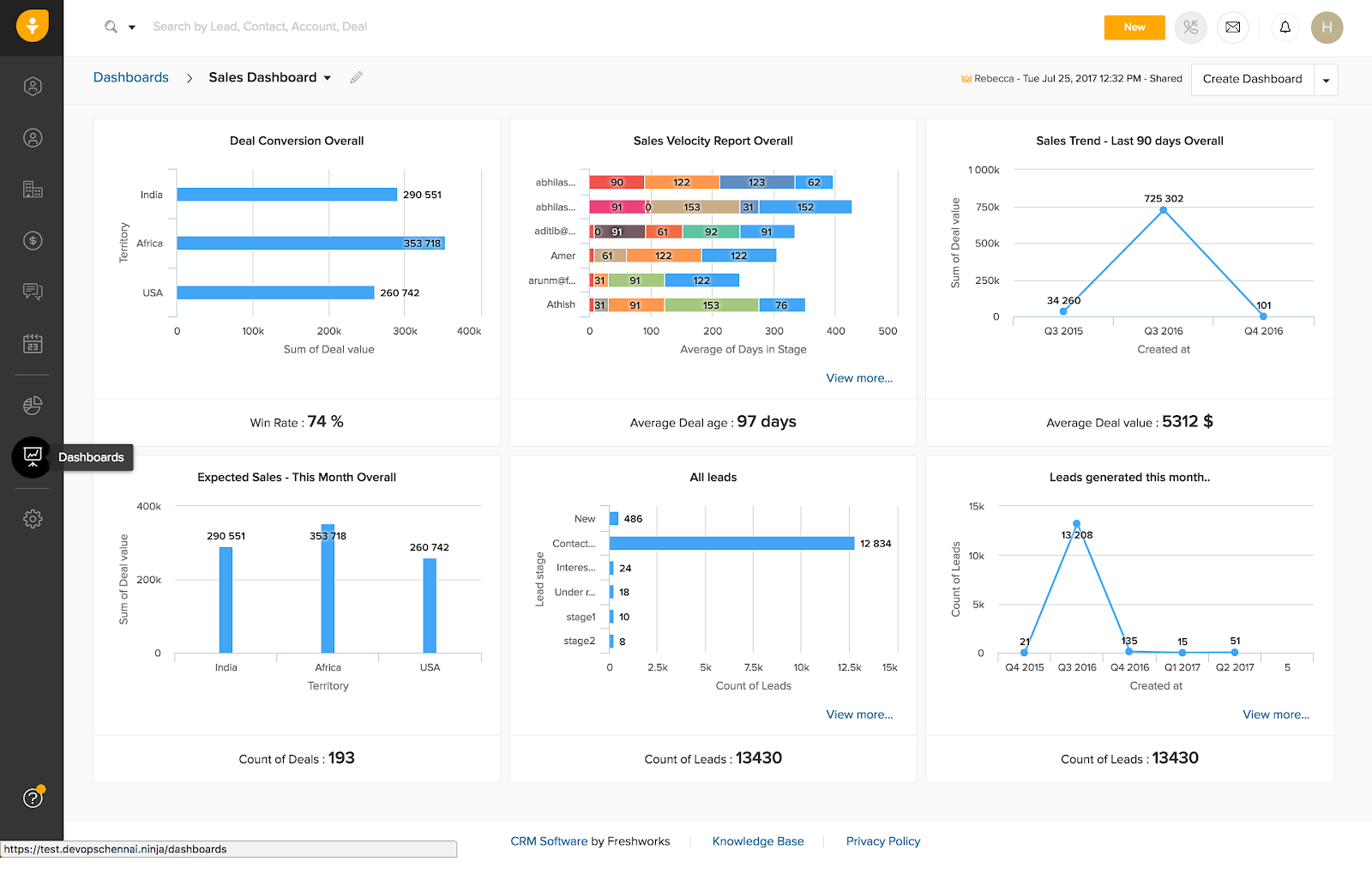
Freshsales (part of the Freshworks suite, formerly known as Freshworks CRM) stood out to me for its smart use of AI and automation to help prioritize leads. One of its headline features is Freddy AI, which automatically scores leads based on their engagement and behaviors. In practice, this meant our leads in Freshsales would get a score.
The interface of Freshsales is modern and clean, and it provides a visual deal pipeline similar to others where you can track opportunities through stages. Customizing deal stages and fields was straightforward. I also appreciated the integrated multichannel communication: Freshsales has built-in email (with open/click tracking), phone dialing, WhatsApp integration, and live chat.
Freshsales offers powerful workflow automation as well. We set up rules like: if a new lead comes in from our pricing page, automatically assign it to the sales manager and send a personalized email. Or if a deal moves to “Won”, create a task for the account manager to follow up in 30 days.
Pros:
- The CRM analyzes interactions and uses AI to rank leads so you can prioritize follow-ups.
- You can manage multiple sales pipelines if needed (for different products or services, or perhaps one for new sales and one for renewals).
- Email, phone, WhatsApp, SMS, and chat are all available. Freshsales can auto-log emails (via connecting to your email account), record calls, and save chat transcripts.
- Freshsales tracks website visits and email interactions, allowing you to segment contacts or trigger actions.
Cons:
- AI-based features like Freddy may not always produce accurate scores.
- Integration setup with external tools can occasionally be glitchy.
Pricing:
Starts at $9/user/month.
11. Keap – Best for Marketing Automation
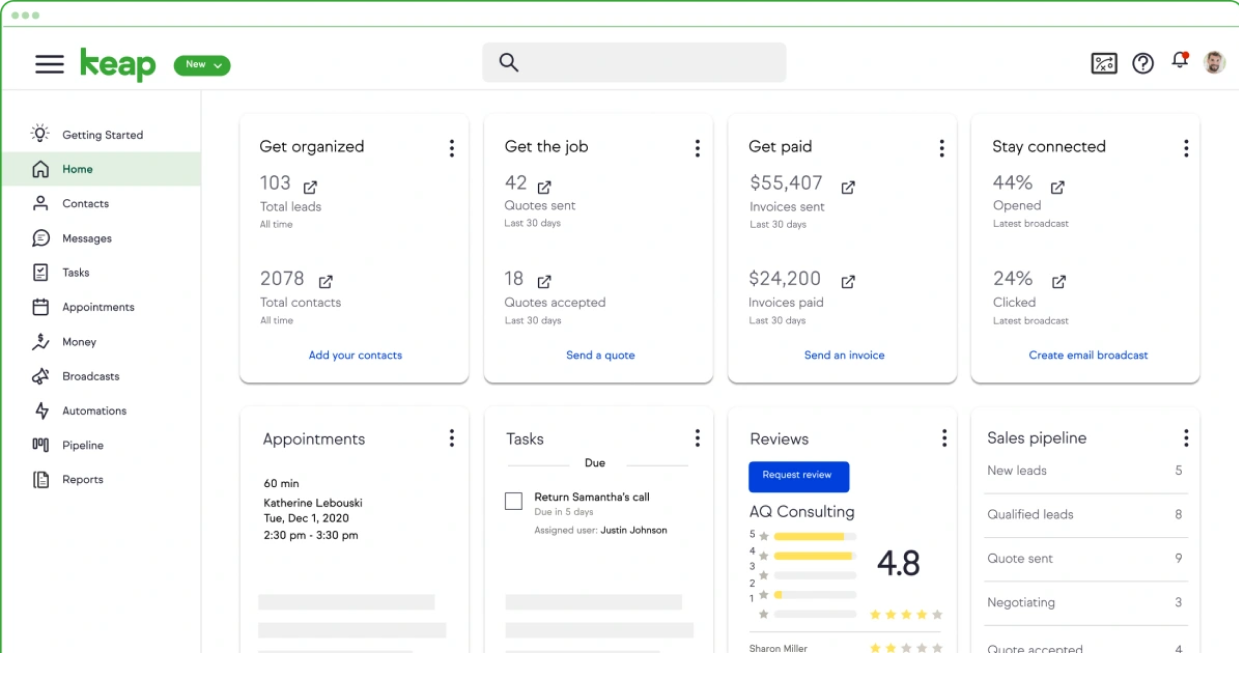
Keap is a CRM that’s particularly strong in marrying sales and marketing automation, which can be a game-changer for small businesses that need to do more with less. I used Keap in a past role specifically to streamline client follow-ups and email marketing, and it definitely helped us automate a lot of busywork.
One of Keap’s core strengths is its automation builder, which uses a visual flowchart interface. We created workflows for things like new lead nurturing: when a lead fills out a form on our site, Keap would automatically add them to the CRM, tag them, send a custom welcome email, wait a few days, then send a follow-up offer email, and create a task for a sales rep to call them.
Keap also has a built-in email marketing tool. Designing emails is drag-and-drop, and you can personalize them with any field (name, company, etc.). It also tracks when people open or click, which in turn can trigger additional actions in the automation (like if someone clicked the pricing link, alerting a salesperson).
Pros:
- Keap really shines in automating follow-ups. You can create if/then logic (for example: If customer doesn’t open Email #1 then resend it 2 days later; if they do open and click then create a task to call them).
- Keap allows you to score leads based on their interactions and also segment contacts with tags.
- If you sell products or services, Keap can handle shopping cart integration, recurring subscriptions, and one-click upsells.
- The built-in scheduling tool is like having Calendly inside your CRM. Share a link with prospects to let them book meetings on your calendar at times you preset.
Cons:
- Steeper learning curve for beginners due to extensive automation options.
- Pricing is high for smaller businesses compared to other CRMs.
Pricing:
Starts at $249/month.
12. Less Annoying CRM – Best for Simplicity & Solo Entrepreneurs
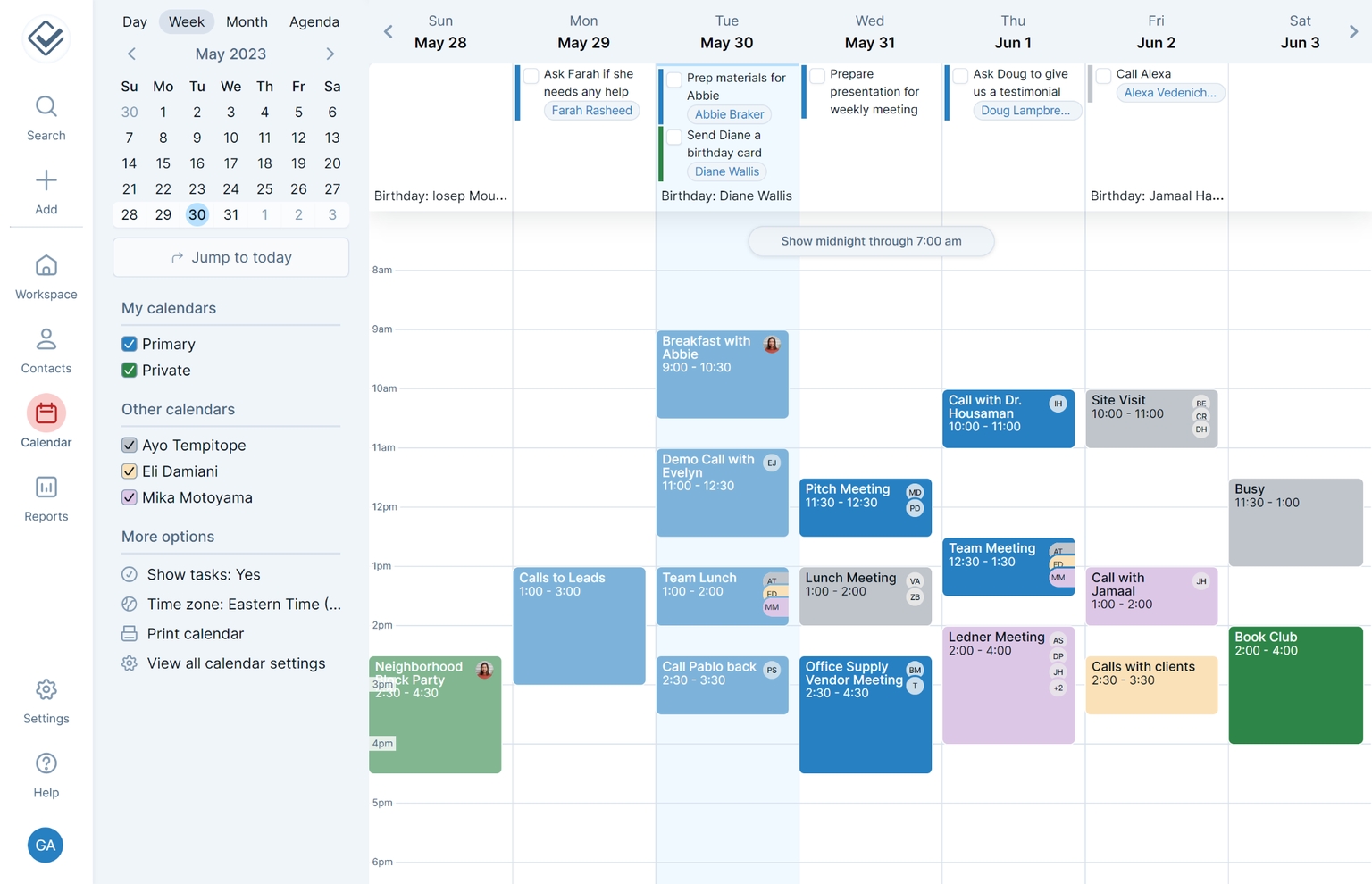
As its name suggests, Less Annoying CRM is one of the simplest, most straightforward CRMs I’ve used. It’s refreshingly clean and easy, making it perfect for solo entrepreneurs or very small teams who need the basics without any extra hassle.
The philosophy of Less Annoying CRM (often abbreviated LACRM) seems to be “do a few things really well.” It focuses on contact management, pipeline tracking, and task management. The contact records are straightforward but allow for custom fields and ample note-taking space. You can log interactions and set follow-up tasks on each contact easily.
Another nice aspect is that it’s web-based and cloud-hosted, but very lightweight. I could run it on any device via a browser. Even with a spotty internet connection on the go, it loaded fast, and I could access my customer info. And because it’s so straightforward, I rarely ran into issues where I needed support.
Pros:
- The interface feels immediately familiar. Navigation is straightforward (Contacts, Companies, Calendar, Pipeline, Tasks).
- You can keep detailed notes on each contact and even pin the most important info to the top.
- The sales pipeline feature is basic but effective. It lists your leads/deals in stages.
- No need for a separate task app – you have an events calendar for meetings and a task list that can be linked to contacts or deals.
Cons:
- Lacks advanced automation or marketing features.
- No mobile app (browser access only), limiting convenience for on-the-go use.
Pricing:
Starts at $15/user/month.
13. Capsule CRM – Best for a User-Friendly CRM with Customization
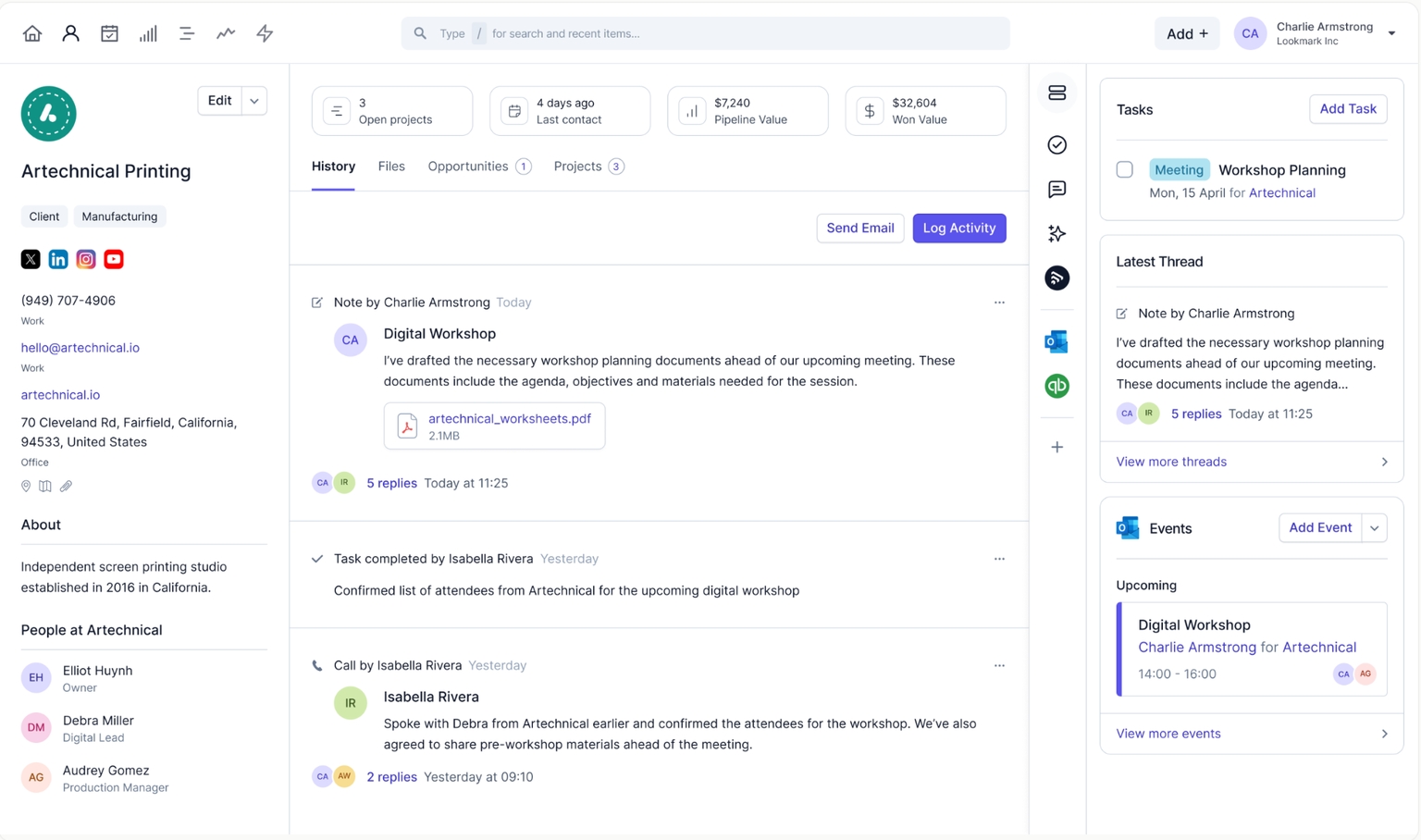
Capsule CRM hits a sweet spot between simplicity and flexibility. It’s user-friendly and clean, but it also allows a good degree of customization so you can adapt it to your workflow.
Getting started with Capsule was quick. The interface organizes information into a few key areas: Contacts, Sales Pipeline, and Cases. We liked the visual pipeline for sales opportunities – it’s a list view, not cards, but with clear stages and progress indicators. We could see all open deals, their values, and what stage they were in, all on one screen.
One of Capsule’s strong points is customization with tags and custom fields. Instead of having dozens of modules, Capsule uses tags to categorize contacts and deals. We created tags for things like lead source and used that to filter and report later.
Pros:
- Capsule gives you a full view of a contact or organization, including conversation history, associated sales opportunities, cases, and tasks.
- You can create tasks (to-dos) and attach them to contacts, deals, or cases. Capsule can sync with Google or Outlook calendars, so deadlines show up on your regular calendar if you want.
- The sales pipeline tracks the potential value of deals and expected close dates. Capsule can generate a basic sales forecast based on the probability of closing.
- Capsule’s mobile app was solid, giving access to contacts and deals on the go. You can quickly add notes after a meeting or scan a business card to create a new contact.
Cons:
- Doesn’t include built-in marketing or advanced automation features.
- Limited native integrations; requires Zapier for many third-party apps.
Pricing:
Starts at $18/user/month.
My Top 3 Picks for the Best Small Business CRM
If you’re short on time, here’s a quick snapshot of my top three picks and why I like them:
1. BIGContacts
An easy-to-use and affordable CRM that enhances contact management, email marketing, workflow automation, and pipeline tracking. (Offers robust features without a steep learning curve or price tag.)
2. Agile CRM
Ideal for small businesses needing a single tool that integrates sales, marketing, and customer service in one platform. However, some users note that its reporting features can be a bit limited compared to other solutions.
3. Nimble
Perfect for small teams seeking a social CRM that combines contact management with rich social media insights. Keep in mind, its social media features can be overwhelming for businesses with a larger social presence or those needing advanced analytics.
Key Features of a Small Business CRM
With so many options out there, it’s easy to feel lost. But the best CRM software for small business should make your life easier, not more complicated. Here are the features that matter most:
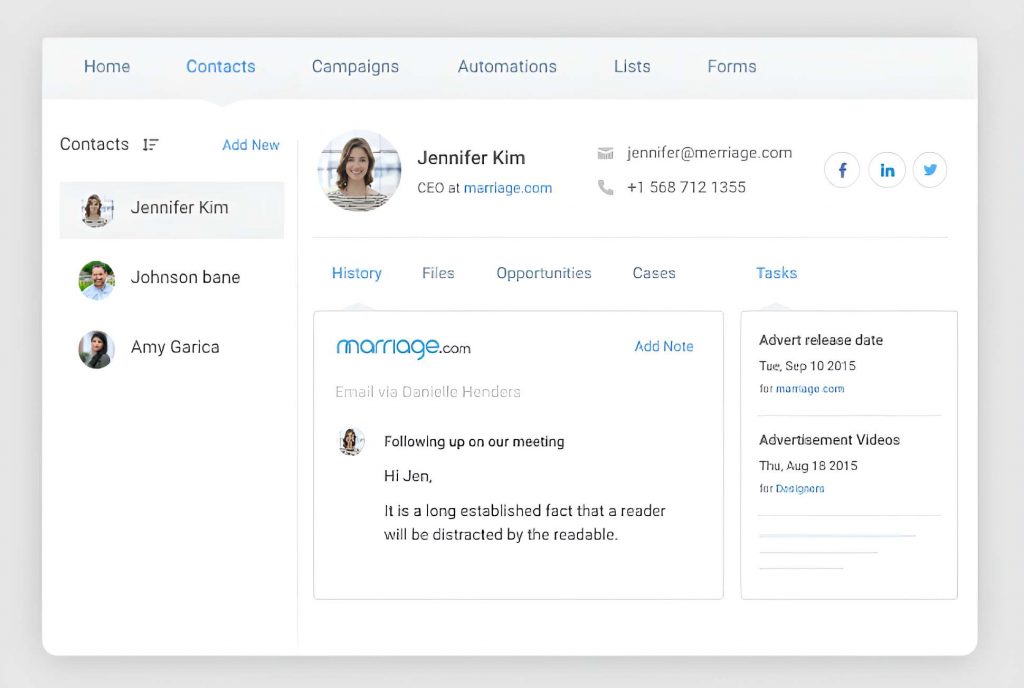
1. Contact Management
This is the heart of any CRM. It keeps all your customer details — names, emails, notes, and past conversations — in one place. No more digging through emails or spreadsheets. When you talk to a customer, you’ll instantly see their history and preferences, helping you personalize every interaction.
2. Sales Pipeline Tracking
A visual sales pipeline lets you track every opportunity from the first call to a closed deal. You can easily see where each prospect stands and where to focus next. It’s perfect for spotting bottlenecks and making sure no deal slips through the cracks.
3. Task & Workflow Automation
Let your CRM handle the busywork. You can automate things like follow-up reminders, thank-you emails, or assigning new leads. These small automations save time, reduce errors, and keep your process consistent — even on your busiest days.
4. Integration with Other Tools
Your CRM should work seamlessly with the tools you already use — like Gmail, Outlook, QuickBooks, or Mailchimp. This means new leads from your website go straight into your CRM, and customer data stays synced everywhere. It saves you from entering the same info twice and keeps your systems connected.
5. Customer Support Tracking
A good CRM doesn’t just help you sell — it helps you care for customers after the sale. Features like case or ticket management let you track issues and follow up until they’re resolved. Everyone on your team can see what’s happening, so customers always get a consistent, informed response.
6. Reports & Insights
Finally, your CRM should show you what’s working. Reports and dashboards turn your data into clear insights — like which sources bring the best leads or which stage most deals get stuck in. This helps you make smarter decisions, spot opportunities, and plan ahead with confidence.
7 Steps to Choose the Best CRM for Your Small Business
Finding the right CRM software for small business doesn’t have to be stressful. Here’s a simple way to make a smart choice:
1. Identify Your Needs
Start by asking what you really want a CRM to do. Do you need help organizing contacts, automating follow-ups, or tracking customer service requests? List your top goals — like “respond faster to leads” or “track deals more easily.” This helps you focus only on CRMs that actually solve your problems.
2. Keep It Simple
Choose a CRM that’s easy for your team to use every day. A clean interface and quick setup are far more valuable than a long list of complicated features you’ll never touch. Test a few demos — if it feels confusing, skip it. The best CRM should make work easier, not harder.
3. Stay Within Budget
There are plenty of affordable CRM software for small business options, even free ones. Check the total cost, including per-user pricing and upgrades as you grow. Use free trials to see if the paid features are worth it. Remember, a good CRM should pay for itself by helping you close just one extra deal.
4. Check Integrations
Your CRM should connect smoothly with tools you already use — like Gmail, Outlook, QuickBooks, or Mailchimp. Integrations save time and reduce manual data entry. Make sure it supports your existing systems (and has room to grow with new ones).
5. Prioritize Security
Your CRM holds valuable customer data, so security matters. Look for encryption, regular backups, and access controls. Choose a provider that’s reliable, transparent, and compliant with privacy laws like GDPR if you deal with international clients.
6. Think About Growth
Pick a CRM you won’t outgrow in a year. It should easily handle more contacts, users, and features as your business expands. Flexibility, mobile access, and upgrade options are key — you want something that scales with you, not something you’ll need to replace later.
7. Look for Good Support
Great customer support can save you tons of time. Check if they offer live chat, phone support, or tutorials. Look for a provider with strong onboarding help and quick responses. The easier it is to learn and get help, the faster your team will see real results.
Overcoming CRM Integration and Data Security Challenges
Implementing a new CRM can be exciting — but small businesses often face two common hurdles: integration and data security. Here’s how to handle both smoothly.
1. Tackling Integration Issues
Small businesses usually use multiple tools — email, billing, marketing, etc. The challenge? Getting them to work together. Without proper integration, you end up entering the same data twice or dealing with inconsistencies.
How to fix it:
- Choose a CRM that easily connects with tools you already use, like Gmail, QuickBooks, or Mailchimp.
- Check for native integrations or API/Zapier connections before you buy.
- Set up integrations gradually — start with email and calendar, then add marketing or accounting tools.
- Watch for duplicate records and enable de-duplication features (like using email as a unique ID).
- If you’re stuck, use your CRM’s support team — they’ve seen these issues before and can save you hours.
The goal is to make your CRM the single source of truth — where sales, marketing, and support all see the same up-to-date customer data.
2. Ensuring Data Security and Privacy
As you centralize customer information, keeping it safe becomes critical. Even small businesses can face data breaches or compliance issues.
How to stay secure:
- Pick a CRM with strong encryption (both in transit and at rest) and regular data backups.
- Use user roles or permissions so only the right people can access sensitive data.
- Enable two-factor authentication for an added layer of protection.
- Stay compliant with privacy laws (like GDPR or CCPA) using built-in consent tracking.
- Regularly back up your data, and remove access when employees leave.
- Train your team on security basics — weak passwords are still the top risk.
Treat your CRM data like a business asset. A secure, well-integrated CRM not only builds trust with customers but also helps your business run more efficiently and confidently.
Smart Choice, Big Impact: Pick the Best CRM Today
Choosing the right CRM takes some thought, but the payoff is worth it. The right tool will fit your daily workflow, help your team stay organized, and make managing customer relationships easier. Start small with what you truly need, and you can always expand later as your business grows.
The goal isn’t just to have a CRM but to create better experiences for your customers. When your system helps you follow up faster, remember details, and personalize communication, your relationships naturally get stronger. A customer-first CRM approach not only boosts sales but also builds loyalty and trust.
If you’re ready to simplify how you manage contacts, deals, and communication, start exploring CRMs designed for small teams. Tools like BIGContacts make it easy to organize your data, automate follow-ups, and stay connected with customers without any complexity. Once you take that first step, you’ll wonder how you ever managed without one.
Frequently Asked Questions

What’s the difference between small business and enterprise CRMs?
Small business CRMs are simpler, more affordable, and designed for managing a smaller volume of customer data with basic features. Enterprise CRMs, on the other hand, are more complex and scalable and offer advanced features for handling large teams, high data volumes, and customized processes, often requiring more resources and a higher budget.
How much does it cost to implement a CRM?
The cost to implement a CRM can vary depending on the provider, features, and the size of your business. Some CRMs offer free plans, while others charge between $12 to $200 per user per month. Additional costs may include customization, training, and integration, so it's important to assess your specific needs before committing.
How do you measure the ROI of a CRM for a small business?
To measure the ROI of a CRM for a small business, track key metrics like increased sales, improved customer retention, and time saved on manual tasks. Compare the cost of the CRM to the revenue growth and efficiency gains it brings. A positive ROI shows the CRM’s value to your business.
Is a CRM useful for small businesses?
Yes, a CRM is very useful for small businesses. It helps you organize customer information, track sales, and manage communication all in one place. With a CRM, small businesses can improve customer relationships, automate tasks, and make informed decisions. It saves time and helps you stay focused on growing your business.
How does BIGContacts CRM support small businesses?
BIGContacts CRM supports small businesses by offering an easy-to-use platform to manage contacts, track deals, and automate follow-ups. It helps organize tasks, set reminders, and streamline communication with leads and customers. The CRM also includes customizable fields, visual pipelines, and reporting tools to improve productivity and sales efficiency.
FREE. All Features. FOREVER!
Try our Forever FREE account with all premium features!