

If you’re managing contacts across Excel sheets, Outlook folders, and sticky notes, you don’t have a system, you have a liability. A customizable CRM fixes that by letting you build around the way your business actually works, instead of forcing you into someone else’s process.
The mistake most teams make is picking a CRM based on a feature list rather than fit. A platform with a hundred capabilities you’ll never use isn’t powerful, it’s just another thing to manage. That’s how people end up back in Excel after three months of paying for something they couldn’t figure out.
I’ve put together an honest breakdown of the 8 best customizable CRM options for 2026. Whether you’re migrating from spreadsheets, switching from something that got too expensive, or setting up a CRM for the first time, there’s something on this list that will fit.
What Is a Customizable CRM?
A customizable CRM lets you track the contacts, stages, and follow-ups that matter to your business without being locked into someone else’s idea of how sales works. You set the pipeline stages, the fields, the automations, and the reports.
Simply put: customizable CRM software works according to your needs, not the other way around.
8 Best Customizable CRM Software to Try This Year
Not sure where to start? This table gives you a quick side-by-side snapshot of all 8 tools so you can spot your shortlist in under a minute before diving into the full reviews below.
| CRM | Best For | Pricing |
|---|---|---|
| BIGContacts | Contact management & email marketing for growing businesses | Free for growing teams. Paid plans starts at $9.99/month. |
| Zoho CRM | All-in-one CRM with AI assistance | Starts at $15/user/month |
| Apptivo | Budget-friendly CRM with project management | Starts at $8/user/month |
| Nutshell | Sales + marketing teams in one platform | Starts at $16/user/month |
| Bitrix24 | Teams needing CRM + collaboration tools | Starts at $46/month |
| Close | High-volume inside sales teams | Starts at $25/user/month |
| Pipedrive | Visual pipeline management | Starts at $9.90/user/month |
| Zendesk Sell | CRM + customer support combined | Starts $19/user/month |
Now, let’s take a look at the 8 most customizable CRM options and the functionality they offer.
1. BIGContacts – Best for Contact Management & Email Marketing for Growing Businesses
When I’m managing follow-ups, contacts, and campaigns without a dedicated sales team, I need a CRM that runs quietly in the background, not one that needs babysitting. BIGContacts is what I currently use to keep my contacts organized, my follow-ups on track, and my pipeline moving.
What I appreciate most about this customizable CRM is how straightforward the customization actually is. I built my own pipeline stages, added custom fields that match how my business tracks clients, and set up automated follow-up emails all without touching a single line of code.
The Outlook sync and bulk contact import were the two features that sealed it for me. I moved about 1,200 contacts from a spreadsheet in one go, and the two-way calendar sync means I never have to manually update two places at once. For any team sitting on a pile of Excel sheets wondering where to start this is a genuinely helpful custom CRM software.
Pros:
- Fully customizable sales pipeline with drag-and-drop stage management
- Custom fields, tags, and contact types for granular segmentation
- Automated workflows with custom triggers and follow-up sequences
- Two-way Outlook and Gmail integration with calendar sync
Cons:
- No downloadable or on-premise version
- No dedicated account manager for the free plan, unlike the paid
Pricing:
A free plan is available for growing teams. Paid plan starts at $9.99/month.
2. Zoho CRM – Best All-in-One CRM With AI Assistance
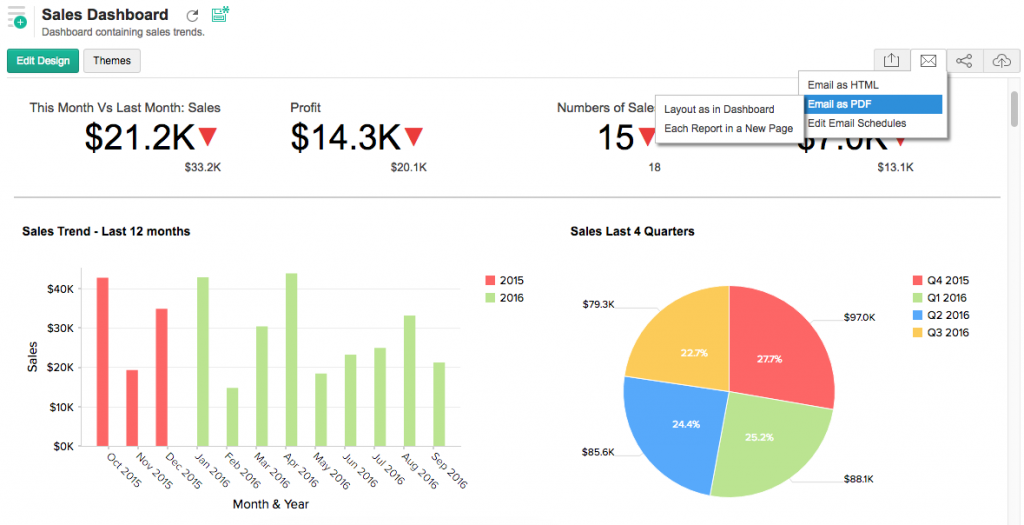
A colleague of mine who runs a mid-sized marketing agency switched to Zoho CRM about two years ago, and the thing she kept coming back to was the depth of customization it offered across different teams. Her sales team had one page layout, her client success team had another all inside the same platform, no overlap, no confusion.
She told me that Zoho’s ability to duplicate custom settings from one account to another saved her team weeks of setup time. The AI assistant, Zia, became something her sales manager actually relied on for lead scoring and anomaly detection.
The one thing she flagged was that the initial learning curve was steeper than expected, especially when customizing email templates. Customer support also wasn’t the fastest when they ran into configuration issues. But once the setup was done right, it worked smoothly.
Pros:
- Unique page layouts per team or business process
- Zia AI assistant provides lead scoring, predictions, and anomaly alerts
- Custom data validation rules for cleaner, more consistent data entry
- Duplicate custom settings across accounts which is a major time saver for scaling teams
Cons:
- Email template customization has a noticeable learning curve
- Interface can feel overwhelming for very small or first-time CRM teams
Pricing:
Starts at $15/user/month.
3. Apptivo – Best for Project Management
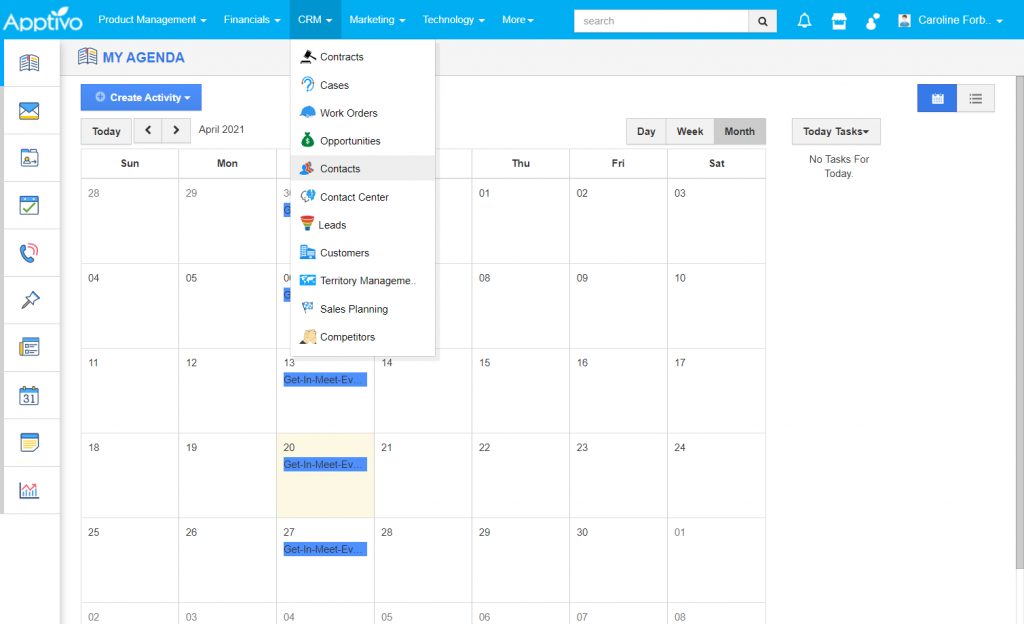
Before I landed on my current setup, I spent about three weeks testing Apptivo for a small consulting project I was managing. The drag-and-drop interface made rearranging layouts and adding custom fields genuinely simple, even for someone who isn’t naturally comfortable with software setup.
The G Suite and Office 365 integrations worked smoothly from day one, which mattered because my team was split between Google and Microsoft environments. I could create automated email sequences to follow up with leads, and the visual pipeline made it easy to see where every deal stood at any given moment.
Where it fell short for me was the initial setup time. Getting everything configured the way I wanted took longer than expected, and the navigation wasn’t always intuitive. But once things were in place, day-to-day use was smooth.
Pros:
- Drag-and-drop interface for customizing layouts and views without coding
- Custom fields on contacts, leads, and opportunity records
- Automated email sequences for lead nurturing
- Strong integrations with both G Suite and Office 365
Cons:
- Initial setup and configuration can be slow and time-intensive
- Navigation is not immediately intuitive for new users
Pricing:
Starts at $8/user/month.
4. Nutshell – Best for Combined Sales and Marketing Teams
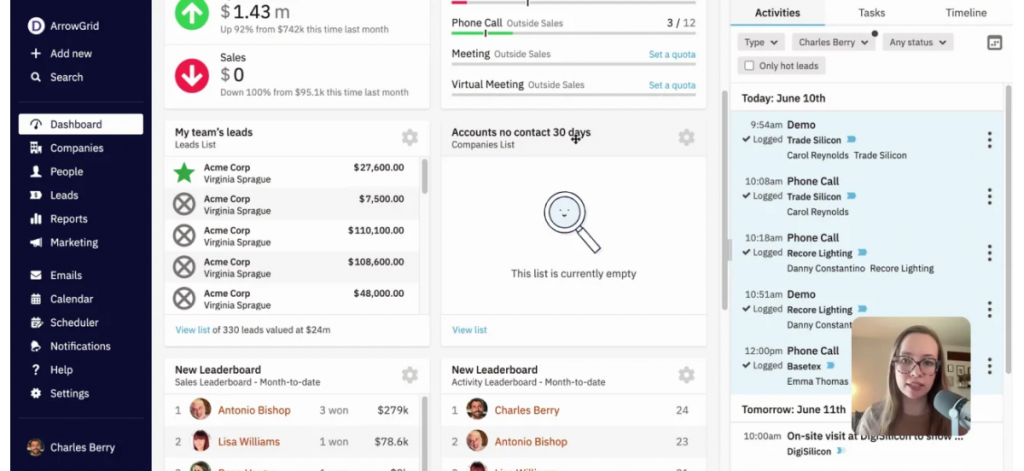
A friend who manages a small B2B sales team switched to Nutshell from a larger platform after getting frustrated with how much she was paying for features her team never used. The first thing she noticed was that the pipeline views were genuinely different from anything else she’d tried. She could switch between list, map, chart, and board views depending on the situation.
She used Nutshell’s custom web forms to embed a lead capture form on her website, and the leads flowed directly into her pipeline without any manual entry. The email personalization and segmented list tools meant her team could run targeted campaigns without needing a separate email marketing platform.
The one persistent frustration she mentioned was the mobile app. It worked fine for checking on deals, but felt less polished than the desktop experience. Deduplication was also something she had to manage manually more than she’d have liked.
Pros:
- Multiple customizable pipeline views: list, map, chart, and board
- Custom web forms for website lead capture that feed directly into the pipeline
- Automated sales workflows to reduce repetitive manual tasks
- Segmented lead lists with personalized email marketing built in
Cons:
- Mobile app experience is less polished than the desktop version
- Deduplication features are limited and often require manual cleanup
Pricing:
Starts at $16/user/month.
5. Bitrix24 – Best for Collaboration Tools
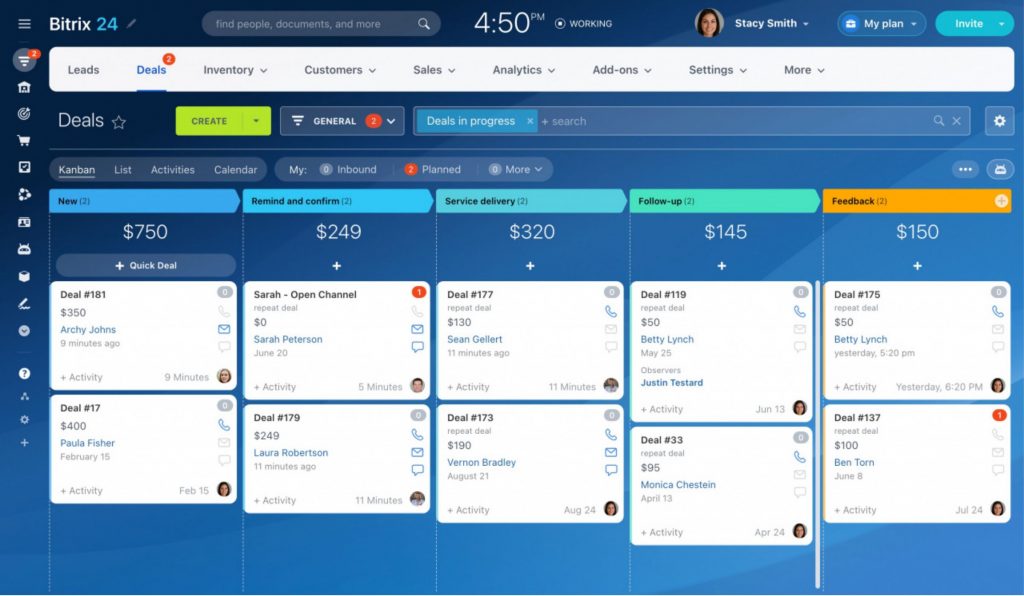
I set up Bitrix24 over the course of a week, and what stood out immediately was how much ground it covered. This isn’t just a customizable CRM, it’s effectively a business operating system.
The custom workflow rules and triggers were flexible enough to handle a fairly complex sales process. Running targeted email campaigns to segmented contact lists, tracking deals with a drag-and-drop board, and managing project tasks all happened inside the same interface.
That said, if you just want a clean, simple CRM, Bitrix24 can feel like a lot to navigate at first. Scheduling automated notifications also turned out to be more complex than it should be. But for any team that’s been stitching together three or four tools and paying for them all separately, the consolidation alone is worth the learning curve.
Pros:
- Custom workflow rules and triggers for complex, multi-step business processes
- Unique sales pipeline stages configurable to any sales cycle
- Contact segmentation with targeted email campaign tools built in
- Per-workspace pricing is cost-effective for larger teams vs. per-user billing
Cons:
- Interface can feel overwhelming for teams that only need basic CRM features
- Scheduling automated notifications is more complex than it should be
Pricing:
Starts at $46/month
6. Close – Best for High-Volume Inside Sales Teams
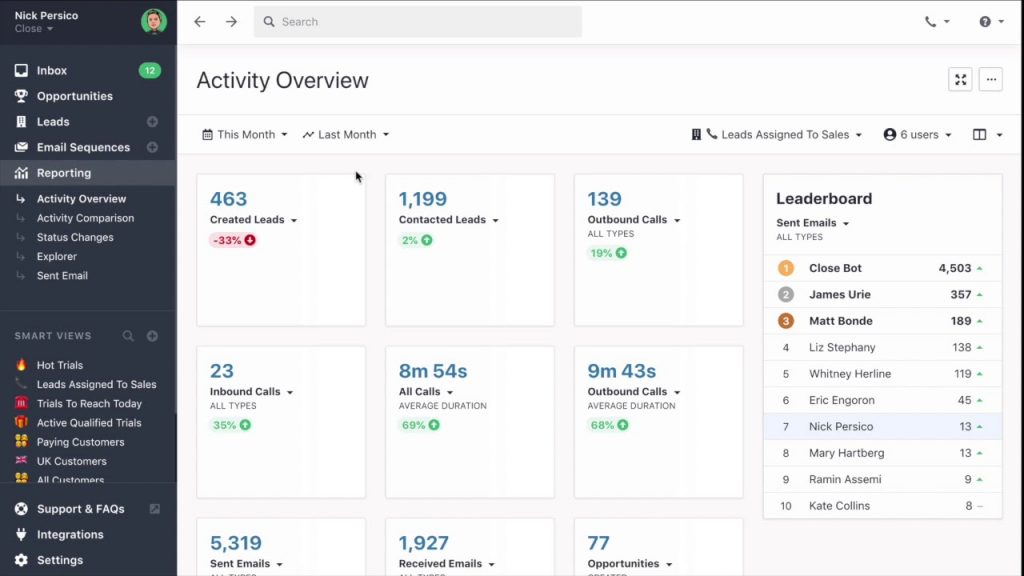
The moment I logged in to Close, it was clear this wasn’t a general-purpose custom CRM solution — it was purpose-built for sales reps who live in their inbox and on the phone all day.
The Smart Views feature was genuinely useful: I could filter my contacts any way I needed, save those views, and act on them immediately without rebuilding the same search over and over. Setting up automated call and email sequences took about 20 minutes, and having them run in the background while I focused on live conversations made a noticeable difference in how many prospects I was actually keeping warm.
Where Close frustrated me was the navigation. It took a few days before I stopped hunting for things. And the reporting on the base plan was thinner than I’d have liked for tracking team-level performance.
Pros:
- Built-in calling, SMS, and email — no third-party integrations needed for outreach
- Smart Views allow instant custom filtering and saved contact segments
- Automated call and email sequences integrated directly into workflows
- Custom user roles and permissions for team-level access control
Cons:
- Navigation has a learning curve not immediately intuitive for new users
- Reporting depth is limited on lower-tier plans
Pricing:
Starts at $25/user/month.
7. Pipedrive – Best for Visual Pipeline Management
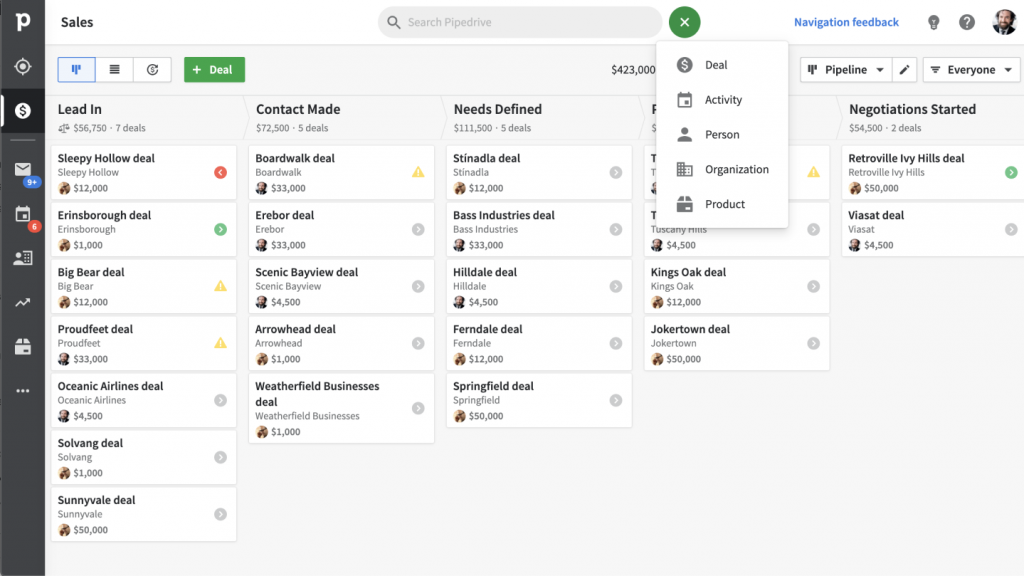
A sales manager I worked with for a few years swore by Pipedrive as the cleanest visual pipeline CRM he’d ever used. The drag-and-drop pipeline was intuitive enough that new reps were using it confidently within their first week.
He built out multiple custom pipelines for different product lines, added custom fields to each deal card, and used the automated reminders to make sure no follow-up ever slipped. The ability to auto-populate contact records from LinkedIn was something his team used heavily, especially for outbound prospecting where they were frequently adding new contacts.
The main frustrations he flagged over time were around reporting. The advanced analytics were only unlocked on higher-tier plans, which felt limiting. Training resources were also thinner than expected for a platform of this size. And as the team grew, the per-user pricing added up faster than anticipated.
Pros:
- Highly visual drag-and-drop pipeline
- Custom fields on pipelines and deal cards for granular deal tracking
- Auto-populates contact records from LinkedIn and other online sources
- Automated reminders for tasks and upcoming events
Cons:
- Advanced reporting is only available on higher-tier plans
- Training and help resources are limited relative to platform complexity
Pricing:
Starts at $9.90/user/month.
8. Zendesk Sell – Best for CRM & Customer Support Management
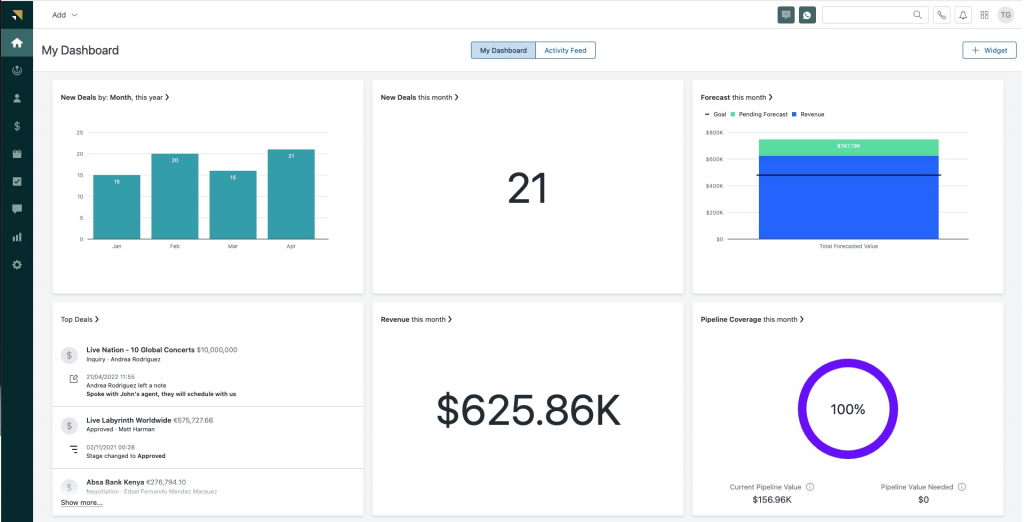
I looked at Zendesk Sell closely when a client of mine was trying to figure out why their sales and support teams were constantly working with outdated information about the same customers. The problem was two separate tools that never spoke to each other like support tickets on one side, deal history on the other, and no easy way to see both at once.
Zendesk Sell solved that neatly by sitting inside the same ecosystem as Zendesk Support. Once it was configured, the sales team could see open support tickets next to deal history, and support agents had context on where a customer was in the sales cycle. The drag-and-drop dashboard builder made it easy to customize what each team saw.
The frustrations were real though. The custom views and settings couldn’t be duplicated across users, which meant repetitive manual setup every time someone new joined. And customer support from Zendesk itself was inconsistent; sometimes fast, sometimes not.
Pros:
- Deep native integration with Zendesk Support for a unified customer view
- Custom objects and relationships for complex or non-standard data structures
- Drag-and-drop dashboard builder for personalized reporting views
- Highly extensible via Zendesk’s app marketplace
Cons:
- Custom views and settings cannot be duplicated across users and requires manual recreation
- Customer support quality from Zendesk is inconsistent
Pricing:
Starts at $19/user/month.
Which Customizable CRM Is Right for Your Business?
There’s no single “best” CRM. It depends on your team size, your current tools, and what you actually need day-to-day. Here’s a quick decision guide:
| Use Case | Best Pick |
|---|---|
| Moving from spreadsheets or a CRM that got too expensive | BIGContacts |
| Small team, need simplicity + Outlook integration | BIGContacts or Nutshell |
| Want an all-in-one platform (CRM + marketing + support) | Zoho CRM or Bitrix24 |
| High-volume inside sales team (calls + emails) | Close CRM |
| Visual, pipeline-first sales team | Pipedrive |
| Need CRM + customer support in one place | Zendesk Sell |
| Growing startup on a tight budget | Apptivo or BIGContacts |
| Enterprises and small teams managing members, supporters, or event contacts | BIGContacts or Nutshell |
My Top 3 Picks for the Best Customizable CRM
After testing and researching dozens of options, these three stood out the most, not just for their features, but for how well they actually work for real businesses of different sizes and needs.
1. BIGContacts
BIGContacts is my top pick for any growing business looking for a customizable CRM that doesn’t require a learning curve. What makes it stand out is how quickly you can make it your own. Custom pipelines, custom fields, automated follow-ups, and Outlook or Gmail integration are all set up in hours, not weeks.
2. Zoho CRM
If your business is growing fast and you need a CRM that can scale with you, Zoho CRM is the one I’d point you to. The depth of customization, from unique page layouts per team to AI-powered lead scoring, goes well beyond what most tools in this price range offer. It takes a little more time to configure than some others, but once it’s set up the way you need it, it runs like a well-oiled machine.
3. Pipedrive
For sales-first teams that think visually, Pipedrive is the clearest and most intuitive pipeline CRM I’ve come across. Dragging deals through custom stages, setting up automated reminders, and keeping every contact record current feels effortless. If closing deals faster is the primary goal, Pipedrive is built for exactly that.
Stop Adjusting to Your CRM, Customize It Instead!
The right CRM is the one that removes the excuse for not following up because the contact is right there, the task is already set, and your team doesn’t need a manual to use it.
Whether you’re a solo operator tracking cold calls across 50 spreadsheets, a growing startup building out a sales team, or a non-profit managing members and volunteers, the tools on this list give you the flexibility to build a CRM that works for you.
Here’s the short version of my recommendation: if you want simplicity, affordability, and genuine flexibility without a steep learning curve, BIGContacts is the place to start. It’s designed for exactly the kind of business that doesn’t want to spend weeks setting up a CRM before they can actually use it.
Frequently Asked Questions
Is a customizable CRM worth it for small businesses?
Yes, especially for small businesses. A CRM that you can shape to your specific process means less friction, higher adoption by your team, and fewer workarounds. You don't have to use features you don't need, and you can add complexity as you grow. Many of the options on this list start at under $10/user/month, making them very accessible.
What's the difference between a customizable CRM and a custom-built CRM?
A customizable CRM is an off-the-shelf product that you can configure without code. A custom-built CRM is built from scratch by developers, which is far more expensive and time-consuming. For most small and mid-sized businesses, a customizable off-the-shelf CRM delivers 90% of the value at a fraction of the cost.
Which CRM is easiest to customize for a non-technical user?
BIGContacts and Pipedrive consistently rank highest for ease of customization without technical skills. Both use drag-and-drop interfaces and don't require any coding to set up pipelines, custom fields, or automated workflows. Apptivo is also strong in this area.
Can I migrate my Excel contacts to a customizable CRM?
Yes. Most CRMs on this list support bulk import via CSV or Excel. BIGContacts specifically has an import template that maps your columns during upload, useful if your spreadsheets aren't all formatted the same way, which is usually the case when you're consolidating 10 or 50 sheets into one place.
Do customizable CRMs integrate with Outlook?
Most of them do. BIGContacts, Zoho CRM, Pipedrive, Nutshell, and Zendesk Sell all offer Outlook integration for email sync and calendar. BIGContacts specifically supports two-way Outlook sync via Zapier, which automatically keeps contacts in sync between both platforms.
What is the most affordable fully customizable CRM?
BIGContacts offers the lowest entry point on this list with a forever free plan for up to 100 contacts and paid plans starting at $9.99/month. Apptivo is the next most affordable at $8/user/month. Both offer strong customization at their price points.
FREE. All Features. FOREVER!
Try our Forever FREE account with all premium features!