
I have looked at more CRM dashboard screenshot examples than I can count, and the pattern is always the same. The businesses that struggle with sales are the ones staring at spreadsheets instead of a dashboard. The ones that grow steadily almost always have one screen that tells them exactly where every deal, lead and customer stands.
That is the entire point of a CRM dashboard. It takes the pile of contact records, emails, calls and deal stages sitting inside your CRM and turns it into a picture you can actually read in ten seconds. You stop hunting through tabs and start making decisions.
In this guide, I will walk you through what a CRM dashboard is, show you real examples and screenshots, and share dashboard ideas you can copy for your own team. Along the way, I will point out where a simple, no-code approach makes this easier for small businesses that do not have an analyst on staff.
What Is a CRM Dashboard?
A CRM dashboard is a visual screen inside your customer relationship management software that displays your most important sales, marketing and customer data using charts, graphs and lists. It is also called a customer relationship management dashboard, and some tool menus label it simply as a “CRM dash.”
Instead of opening ten different reports, you open one dashboard and see your pipeline value, open deals, recent activity and lead sources at a glance. Most CRM dashboards are customizable, so a sales manager, a marketing lead and a business owner can each see the numbers that matter to their role, pulled from the same underlying data.
A study by Grand View Research in 2026 values the global customer relationship management market at $79.6 billion in 2025, projected to grow to $161.3 billion by 2033. Dashboards are a major reason that growth keeps climbing. Businesses are not just buying a database anymore. They want a live view of the business built into it.
What Does “Dashboard in CRM” Actually Mean?
A dashboard in CRM is not a separate product. It is a feature layered on top of your existing CRM data. Every contact, deal, task and email you already log gets pulled into charts and widgets automatically, so you are not entering data twice.
How Does a CRM Dashboard Work?
A CRM dashboard works by pulling live data from your CRM records and displaying it through pre-built or custom widgets, updating automatically as your team logs calls, emails, deals and tasks. You never touch a spreadsheet formula.
Here is the basic process behind every CRM dashboard, step by step:
- Data Collection: The CRM captures contact details, deal stages, emails, calls and tasks as your team works.
- Data Organization: The system groups this data by fields you choose, such as deal stage, rep, region or lead source.
- Visualization: The dashboard renders that grouped data as bar charts, pie charts, funnels or simple number widgets.
- Refresh: As new activity gets logged, the dashboard updates in real time or on a set schedule, so the view never goes stale.
- Action: Team members and managers use the dashboard to spot stalled deals, missed follow-ups or dips in performance, then act on them immediately.
This is why a dashboard beats a static report. A report tells you what happened last month. A dashboard tells you what is happening right now.
What Features Does a CRM Dashboard Include?
Every solid CRM dashboard is built around a handful of core features that keep the data useful, current and easy to act on. A dashboard missing any of these usually turns into another tab people stop checking within a month. Here is what each feature actually does for you day to day.
1. Real-Time Data Syncing
The dashboard pulls in new activity the moment a rep logs a call, sends an email or moves a deal to a new stage. You are never looking at numbers from yesterday’s stand-up, which matters most when a manager asks “where do we stand right now” in the middle of the week.
2. Customizable Widgets
Every role cares about different numbers. A rep wants to see their own open deals. A manager wants the whole team’s pipeline. Customizable widgets let both build a screen around what they personally check, instead of scrolling past sections meant for someone else.
3. Drag-And-Drop Layout Tools
You should be able to add, remove or resize a widget yourself in a few clicks. If changing your dashboard requires a support ticket or a developer, the tool was not built with small teams in mind.
4. Role-Based Views
Sales reps get their own pipeline and tasks. Managers get a rolled-up view across the whole team. Marketing gets campaign and lead-source data. One dataset, several different lenses, so nobody has to filter through information meant for another department.
5. Filters And Date Ranges
Being able to switch between this week, this quarter, last year or a custom range turns one dashboard into dozens of useful views. This is also what makes a dashboard usable for both a quick daily check-in and a monthly board update.
6. Mobile Access
Reps spend a good chunk of their day out of the office, in client meetings or on the road. A dashboard that only works on a desktop browser gets checked once a week at best. One built for mobile gets checked constantly.
7. Export And Sharing Options
Sometimes you need to hand a screenshot or a PDF to an investor, a board member or a client. Good dashboards let you export a clean version of the data without rebuilding it in a spreadsheet first.
A study by Salesforce in 2023 found that sales reps spend just 28% of their week actually selling, with the rest consumed by administrative work like manual data tracking. A well-built dashboard claws some of that time back by replacing manual report pulling with a screen that is already up to date.
What are Some CRM Dashboard Examples?
Different teams need different CRM dashboard examples, since a sales manager and a support agent are not tracking the same numbers. Below are the four dashboard types you will see most often, along with what each one typically shows.
Sales CRM Dashboard
A sales CRM dashboard tracks the health of your pipeline and the performance of your sales team in one screen. This is usually the first dashboard any growing business sets up.
- Total pipeline value and forecasted revenue
- Deals by stage (new, qualified, proposal sent, closed)
- Win rate and average deal size
- Sales rep leaderboard by revenue or activity
- Deals stalled beyond a set number of days
Marketing Dashboard
A marketing dashboard shows how campaigns are performing and where new leads are coming from. Marketing teams use this to decide which channels deserve more budget. Channel-level numbers only tell part of the story, though; pairing them with marketing measurement methods like multi-touch attribution or holdout tests shows which campaigns actually created new leads rather than just getting credit for them.
- Leads generated by campaign or channel
- Email open rates, click-through rates and unsubscribes
- Cost per lead and cost per acquisition
- Marketing qualified leads (MQLs) handed to sales
Customer Service Dashboard
A customer service dashboard includes ticket volume, response times and satisfaction scores, giving support leaders a real-time view of how the team is coping.
- Open, pending and resolved ticket counts
- Average first response and resolution time
- Customer satisfaction (CSAT) scores by agent
- Ticket volume by issue type
Activity Dashboard
An activity dashboard measures the day-to-day actions your team takes, such as calls made, emails sent and meetings booked, rather than end results.
- Calls, emails and meetings logged per rep, per day
- Tasks completed versus tasks overdue
- Follow-up reminders due today
- Time spent per activity type
What Does a CRM Dashboard Screenshot Look Like?
A typical CRM dashboard screenshot shows a grid of small widgets across the top of the screen (usually five to seven number cards for KPIs like open deals, pipeline value and tasks due) with larger charts underneath, such as a pipeline funnel or a bar chart of deals by rep.
Most dashboards keep the highest-priority numbers at the top left, since that is where the eye naturally lands first. Below that, you will typically see:
- A visual sales pipeline (drag-and-drop deal cards by stage)
- An activity feed showing recent calls, emails and notes
- A calendar strip with upcoming tasks and follow-ups
- A small leaderboard or team performance chart
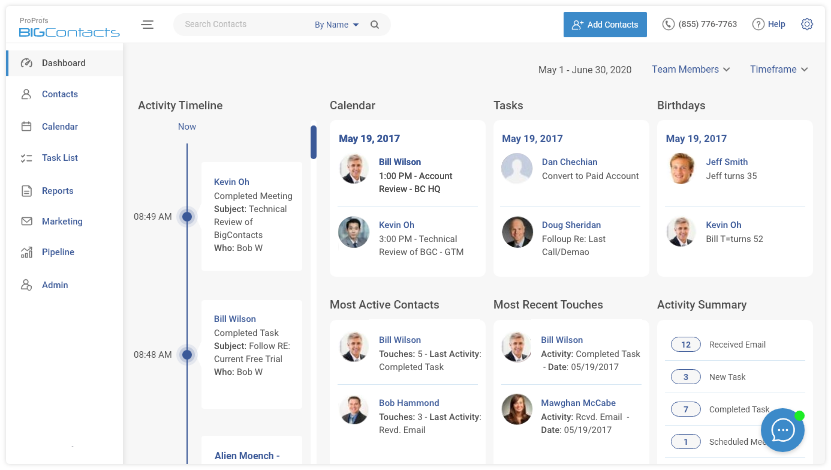
If you want to see this in action rather than read about it, BIGContacts’ sales pipeline dashboard shows exactly this layout, with deal stages, conversion rates and rep performance on one screen.
What CRM Dashboard Ideas Work Best for Growing Teams?
The best CRM dashboard ideas are the ones built around what a specific role checks every single day, not a generic template pulled from a vendor’s demo account. Below are dashboard ideas broken out by who is using them.
CRM Dashboard Ideas for Sales Reps
A sales CRM dashboard for an individual rep works best when it stays narrow and personal. Good widgets include:
- My open deals, sorted by close date
- My tasks due today and overdue
- My quota progress this month
- My last five customer interactions
CRM Dashboard Ideas for Managers and Owners
Managers and small business owners need a wider view that rolls up the whole team. Good widgets include:
- Team pipeline value by stage
- Deals won versus deals lost this quarter
- Rep-by-rep activity and conversion comparison
- Revenue forecast against monthly goal
BIGContacts by ProProfs is a simple, affordable CRM built for growing small businesses, with contact management, email marketing, task automation and sales pipeline tracking in one place. Its dashboards are prebuilt for exactly these two views, so you are not starting from a blank canvas.
What Problems Does a CRM Dashboard Solve?
A CRM dashboard solves the core problem of scattered, hard-to-read business data by giving every team member one place to see what matters, without digging through spreadsheets, inboxes or separate tools. Here is how it maps directly to common pain points:
| Problem | How a CRM Dashboard Solves It |
| Contacts and deals scattered across Excel, Outlook and email | Centralizes everything into one searchable, filterable view |
| No visibility into which deals are stalling | Flags deals that have not moved in a set number of days |
| Managers cannot tell who on the team is behind | Rep-by-rep activity and performance widgets show gaps instantly |
| Reports take hours to compile manually | Dashboards update automatically as reps log activity |
| Leadership asks for a quick update and no one has current numbers | One shared dashboard gives everyone the same live figures |
How Does a CRM Dashboard Compare to a Spreadsheet?
A CRM dashboard updates automatically and shows real-time trends, while a spreadsheet is a static snapshot that goes out of date the moment someone forgets to update it. This is the biggest practical difference between the two.
| Feature | Spreadsheet | CRM Dashboard |
| Updates | Manual, prone to human error | Automatic, in real time |
| Access | Usually one file, one editor at a time | Multiple team members view live simultaneously |
| Visuals | Requires manual chart building | Built-in charts, graphs and widgets |
| History | Easy to overwrite past data by accident | Keeps a running activity history per contact |
| Mobile use | Difficult to check on a phone | Built for mobile access |
Small teams often start with a spreadsheet because it feels free. The real cost shows up later, in lost deals nobody was tracking and hours spent reconciling three different versions of the same file.
A study by Nucleus Research in 2024 found that a well-adopted CRM still returns $3.10 for every dollar spent, even as the market matures, which is a return most spreadsheets simply cannot deliver.
Which CRM Dashboard Software Should You Choose?
Choosing the right CRM dashboard software comes down to matching the tool’s complexity to your team’s actual size and skill level, not picking whichever platform has the most features on paper. Use this checklist:
- Check for no-code customization. You should be able to rearrange widgets yourself, without a developer.
- Confirm real-time updates. If the dashboard only refreshes overnight, it is a report, not a dashboard.
- Look for role-based views. Reps, managers and owners should each get a relevant screen, not one generic layout.
- Test it on mobile. If your team is out meeting clients, a desktop-only dashboard will not get used.
- Ask about the free plan. Many small businesses do not need enterprise analytics on day one.
BIGContacts by ProProfs offers exactly this kind of setup, with customizable dashboards, mobile access and a forever-free plan for small teams that want to try it before committing to a paid tier. You can see the full pricing breakdown here or check out more free CRM options if you are still comparing tools.
Build a CRM Dashboard and Stop Guessing at Your Pipeline
A CRM dashboard is not a luxury feature reserved for large sales teams with dedicated analysts. It is the difference between guessing how your pipeline looks and knowing exactly where every deal, lead and customer stands the moment you open your laptop.
If you take one thing from this guide, let it be this: pick two or three dashboard widgets that map directly to a decision you make every week, whether that is which deals to chase or which rep needs coaching, and build your dashboard around those first. You can always add more once the basics are working.
For teams that want to start simple, BIGContacts‘ sales pipeline tools make it easy to set up a working dashboard without hours of training or a big budget, and the forever-free plan means you can test it with your real data before spending a cent.
A CRM report is a static summary of past data, usually exported as a file. A CRM dashboard is a live, visual screen that updates automatically as new activity gets logged, so it always reflects the current state of your business. Yes, most modern CRM dashboards update in real time or near real time as reps log calls, emails and deal changes. Some older or basic tools only refresh on a set schedule, so it is worth confirming before you buy. No, a CRM dashboard focuses specifically on customer, sales and marketing data already stored in your CRM. Business intelligence software is broader and often pulls data from many systems across an entire company. Yes, even a team of two or three benefits from a dashboard, since it prevents leads from slipping through the cracks and removes the need to manually compile updates before a weekly check-in. Most modern CRM tools, including BIGContacts, use drag-and-drop dashboard builders, so you can rearrange widgets, change date ranges and pick metrics without any coding or developer help. A sales rep should track open deals, tasks due today, quota progress and recent customer interactions daily. Keeping the list short helps reps actually check the dashboard instead of ignoring it. Yes, most CRM dashboards, including BIGContacts, are built to work on mobile browsers or apps, so reps can check pipeline status and tasks between meetings without opening a laptop. For most day-to-day tracking, yes. Some teams still export dashboard data into a spreadsheet occasionally for board meetings or investor updates, but the core tracking work no longer needs one. Pricing ranges widely, from free plans for small teams to $175 per user per month for enterprise platforms with advanced forecasting. Most small businesses find everything they need in the $0 to $20 per user range. BIGContacts offers a forever-free plan with prebuilt, customizable dashboards for contact management, email marketing and sales pipeline tracking, making it a strong starting point for small teams on a tight budget. Yes, cloud-based CRM dashboards are designed for simultaneous access, so a manager and a rep can both view the same live numbers at the same time without emailing files back and forth. Tools built specifically for small businesses, like BIGContacts, tend to be the easiest to set up, since they come with prebuilt dashboard templates instead of requiring you to design widgets from scratch.Frequently Asked Questions
What is the difference between a CRM report and a CRM dashboard?
Can a CRM dashboard update in real time?
Is a CRM dashboard the same as business intelligence software?
Do small businesses need a CRM dashboard?
Can I customize a crm dashboard myself?
Which CRM dashboard KPIs should a sales rep track daily?
Can a CRM dashboard work on mobile?
Does a CRM dashboard replace spreadsheets completely?
How much does crm dashboard software cost?
Which CRM has the best free dashboard for small teams?
Can multiple people view the same CRM dashboard at once?
What is the easiest CRM dashboard software to set up?
FREE. All Features. FOREVER!
Try our Forever FREE account with all premium features!