


Running a law firm, I’ve seen how quickly things can slip through the cracks. Client emails spread across inboxes, intake details buried in spreadsheets, follow-ups noted on sticky notes, and that constant worry of missing something important.
That’s where a CRM for law firms starts to make a real difference. The right CRM doesn’t just store data—it brings structure to the chaos and helps you stay in control as your firm grows.
When I first started exploring CRMs, my goal was straightforward: to spend less time managing information and more time practicing law. During this journey, I came across multiple tools that I’ll share with you, so you can run your law firm with more clarity and confidence.
7 Best Law Firm CRM Software to Consider
Below are my top picks for law firm CRM systems, each with a unique strength to address common challenges in legal practice. For each tool, I’ll share a bit of my experience, list key pros/cons, user ratings, and pricing details.
1. BIGContacts – Best for Contact Management & Email Marketing for Growing Businesses
For me and my team at our law firm, BIGContacts really simplified how we manage client relationships. Once we started handling multiple cases, deadlines, and client conversations daily, things could get messy fast. Within a few months of adoption, BIGContacts became our central hub for all client information. I could easily organize clients by case type, track every interaction, and see all emails or notes related to a client in one place. That 360° view made a big difference. No more digging through inboxes or spreadsheets. Everything we needed was right on the client’s profile.
One standout feature was its email marketing integration. I was able to create targeted email campaigns and automated newsletters right from the CRM. For example, after a case is closed, I’d put the client on a drip email sequence for follow-up and referrals. BIGContacts took care of sending those emails and even tracked who opened them, which saved me a lot of manual effort and ensured consistent communication.
Another thing I appreciate is the built-in task and calendar system. I can set up automated reminders for important deadlines (like court dates or filing deadlines), and BIGContacts pops up notifications so I never miss a crucial meeting. Overall, it’s an easy-to-use
Pros:
- A complete 360° view of customers that centralizes tasks, events, files, notes, and emails in one place
- Improved data management with lists, tags, comments, and groups for more efficient organization
- Detailed reporting tools that offer insights into activities, supporting informed business decisions
- Workflow automation and recurring task management to enhance the efficiency of sales and marketing processes
Cons:
- No downloadable or on-premise version
- No dedicated account manager for the free plan, unlike the paid
Pricing:
A free plan is available for growing teams. Paid plan starts at $9.99/month
2. Lawmatics – Best for Client Intake Automation
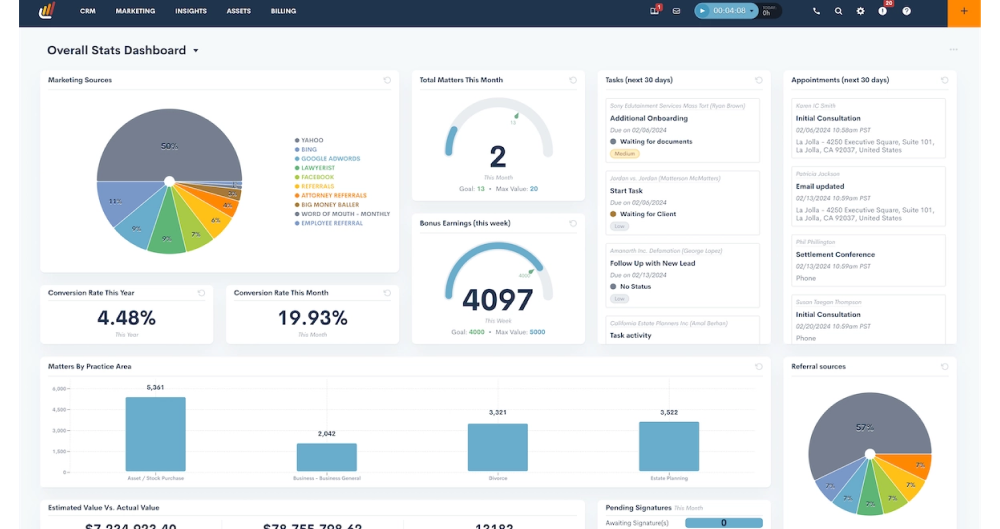
Image Source: Lawmatics
When a colleague’s law firm implemented Lawmatics, I helped them get set up and saw first-hand how it transformed their client intake process. We created custom client intake forms that prospective clients could fill out online. Once a form was submitted, Lawmatics automatically pulled the data into the CRM, created a new contact, and even kicked off an email drip campaign to nurture that lead.
Document management was another area where Lawmatics shined. I was impressed by its document automation and e-signature integration. For instance, sending out fee agreements or engagement letters became a few-click task, and clients could sign electronically.
I also liked the workflow tools in Lawmatics. We set up a workflow for when a new lead comes in: Day 1 send a welcome email, Day 3 follow-up call task if they haven’t scheduled a consultation, etc. Lawmatics handled this timeline automatically. From a user perspective, the interface was modern and fairly intuitive, though it has a lot of features.
Pros:
- Automated workflows that streamline document handling, saving you time and reducing manual errors
- Integrated email campaigns to keep clients informed, helping you maintain strong communication
- Customizable client intake forms for efficient onboarding, ensuring a smooth start for every client relationship
- Task management tools that keep the legal team organized, ensuring no deadlines are missed
Cons:
- Mobile app features are somewhat limited for on-the-go document access
- Limited integration options with non-legal software
Pricing:
Starts at ~$67/user/month.
3. Clio Grow – Best for Streamlined Client Intake
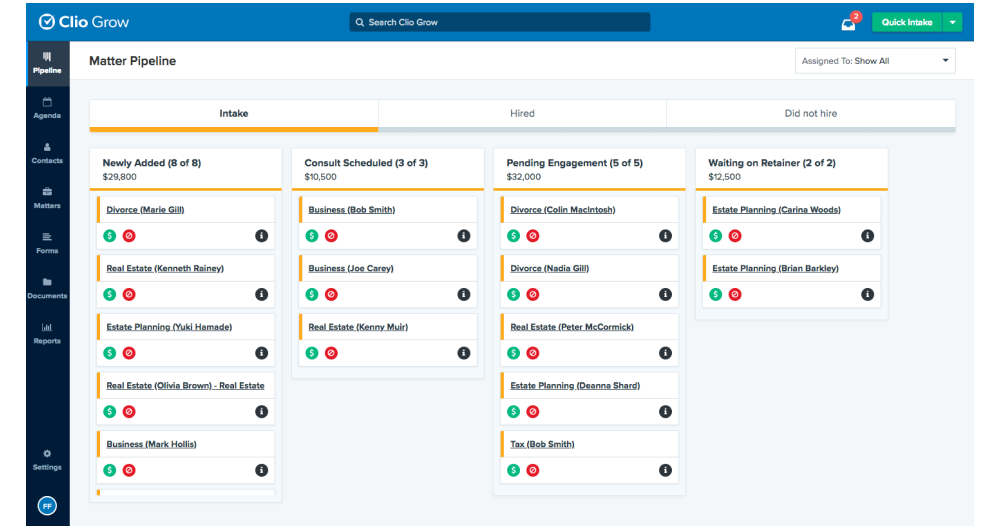
Image Source: Brightline
Pros:
- Customizable intake forms that cater specifically to legal needs
- A centralized dashboard that offers a clear overview of your client pipeline
- The ability to schedule appointments directly from the platform
- Seamless integration with Clio Manage for end-to-end client management
Cons:
- Limited customization options for branding intake forms
- Occasional issues with email tracking and deliverability
Pricing:
Starts at $39/user/month.
4. Law Ruler – Legal Marketing & Follow-up Automation
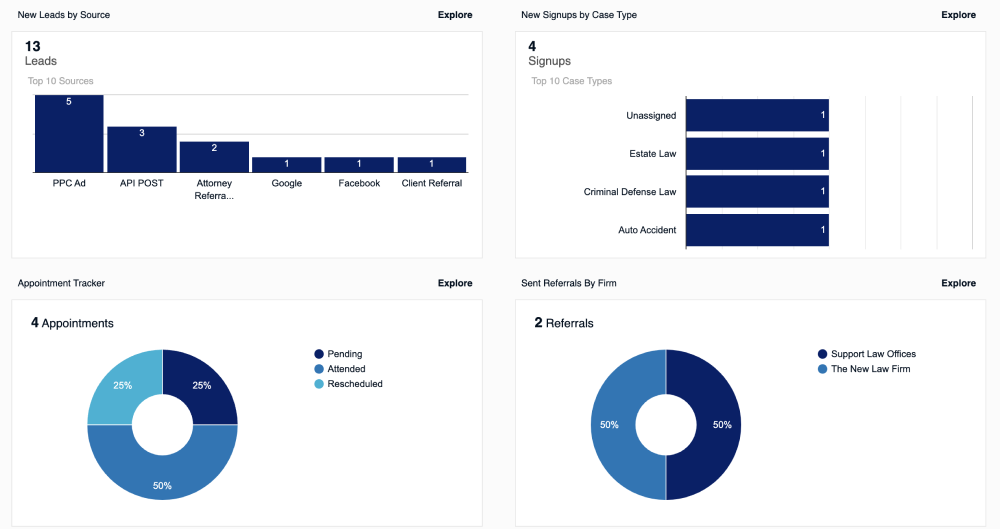
Image Source: Law Ruler
I had the opportunity to use Law Ruler at a mid-sized personal injury firm that was very focused on marketing and lead conversion. Right away, Law Ruler impressed me with its marketing automation features. We set up a series of text message and email campaigns that would automatically go out to new leads.
Another standout feature is the built-in softphone and call tracking. We used Law Ruler to make and record calls to leads directly from the computer. It would automatically log call details under the contact’s history. If a new lead called our firm, Law Ruler could even automatically route the call or prompt us to create a new contact.
Law Ruler also offered effective intake forms and e-signature tools. Much like some other CRMs, it helped collect client info and get fee agreements signed electronically. One unique feature geared toward law firms: Law Ruler helped with conflict checking by allowing us to easily search our contacts/database to ensure a new lead didn’t present a conflict of interest with existing or past clients.
Pros:
- Calendar integration makes it easier to schedule appointments and court dates directly from the platform
- The lead tracking feature ensures that no potential client slips through the cracks
- Allows for easy document storage and retrieval, keeping all your legal documents organized in one place
- Built-in payment processing makes it easy for clients to pay invoices directly through the CRM
Cons:
- Limited LPMS integrations, which may restrict how it connects with other legal practice management systems
- Not a turn-key solution, meaning it may require additional setup or customization to fit your firm’s needs
Pricing:
Starts at ~$65/user/month.
5. Pipedrive – Best for Visual Sales Pipeline Management
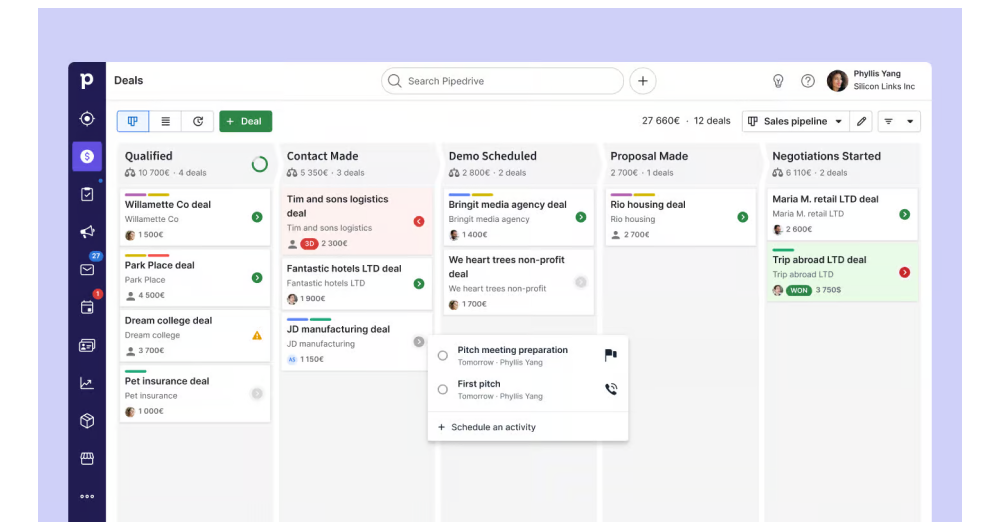
Image Source – Pipedrive
Pipedrive isn’t a legal-specific CRM, but I’ve seen small law firms use it effectively to manage their client intake as a “sales pipeline” (especially firms that treat new client acquisition in a structured way). I personally used Pipedrive in a non-legal context first, and later helped a lawyer friend set it up for his growing practice. The big attraction of Pipedrive is its simplicity and visual pipeline.
Automation is another area where Pipedrive has helped us, even though it’s lightweight compared to the legal CRMs mentioned above. We set up some automated tasks and reminders – for example, when we moved a deal to “Consultation Scheduled,” Pipedrive would automatically create a task for 24 hours before the meeting to “Review client info” and another task a day after the meeting to “Follow up with prospect”.
While using Pipedrive, we integrated it with Google Workspace (Gmail/Calendar). This was seamless – emails to a client would sync into Pipedrive’s timeline for that contact, and meetings on the calendar showed up as well. So even though Pipedrive doesn’t know what a legal case is, it did a fine job keeping client communications and schedule in check.
Pros:
- Visual sales pipeline made to easily track and move deals quickly
- Lead segmentation for precise targeting
- Smart contact data enrichment to pull in useful client details automatically, saving manual input time
- Machine learning-powered sales assistant to help you prioritize leads and suggest the best actions
Cons:
- The mobile app lacks full functionality, which could slow you down when working remotely
- The email sync sometimes experiences delays, affecting timely communication with clients
Pricing:
Starts at $12/user/month.
6. InterAction – Best for Enterprise Relationship Management
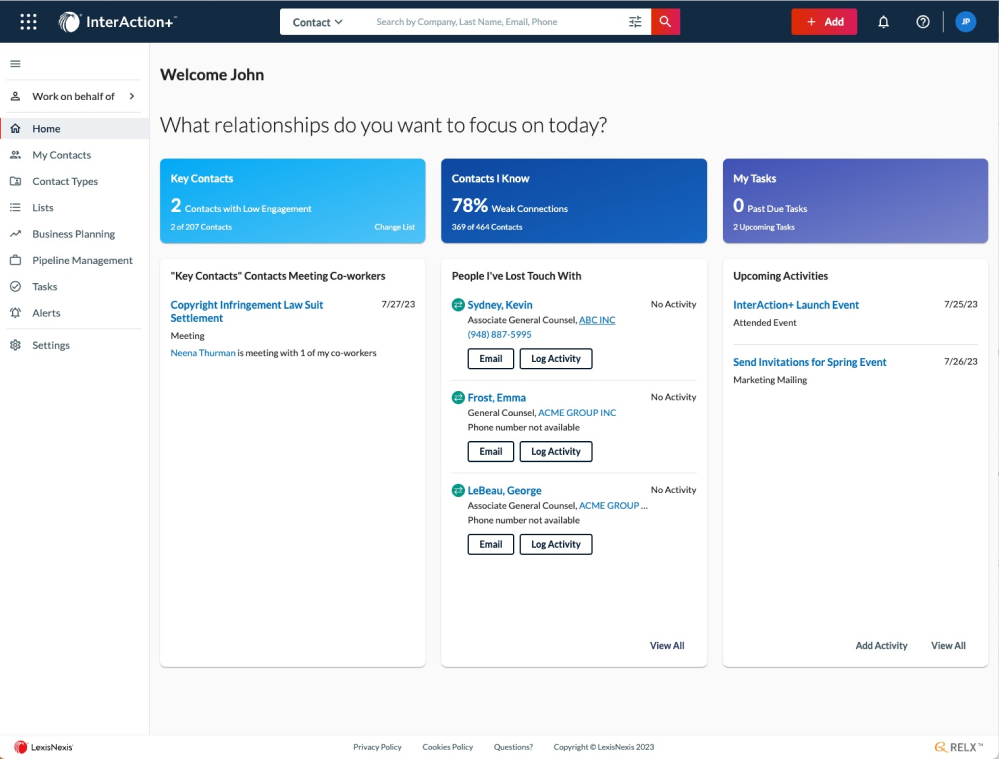
Image Source: InterAction
InterAction by LexisNexis is a veteran in the legal CRM space, mainly used by mid-to-large law firms. I interacted with InterAction while consulting for a large firm’s business development team. This tool is geared towards extensive contact management and relationship intelligence. One scenario where InterAction proved invaluable was in managing the firm’s many relationships.
We also leveraged workflow automation in InterAction, but in a different way than a small firm might. For instance, the marketing team set up workflows to automatically prompt attorneys to reach out to their top clients every quarter. If an attorney hadn’t had any interaction logged with a key client in, say, 90 days, InterAction would notify them to check in.
Using InterAction does come with a trade-off: it’s a complex system. The interface felt a bit dated, and it’s not as intuitive as modern SaaS CRMs. In my experience, attorneys weren’t the ones directly fiddling with InterAction much; it was often the marketing or IT staff managing the data, while attorneys would consume the output (like relationship reports before a meeting). The firm had training sessions and even a dedicated specialist to get the most out of it.
Pros:
- Effective opportunity management that helps track and close deals faster
- Custom fields to customize data to your firm’s specific needs, making it easier to manage and organize information
- Event management for easy check-ins and seamless network tracking
- Seamless integration with Outlook for email management
Cons:
- Less user-friendly for contact and activity management, which can slow down your workflow
- The outdated Windows client and lackluster UI make it less visually appealing and harder to navigate
Pricing:
Custom pricing.
7. CosmoLex – Best for All-in-One Practice Management
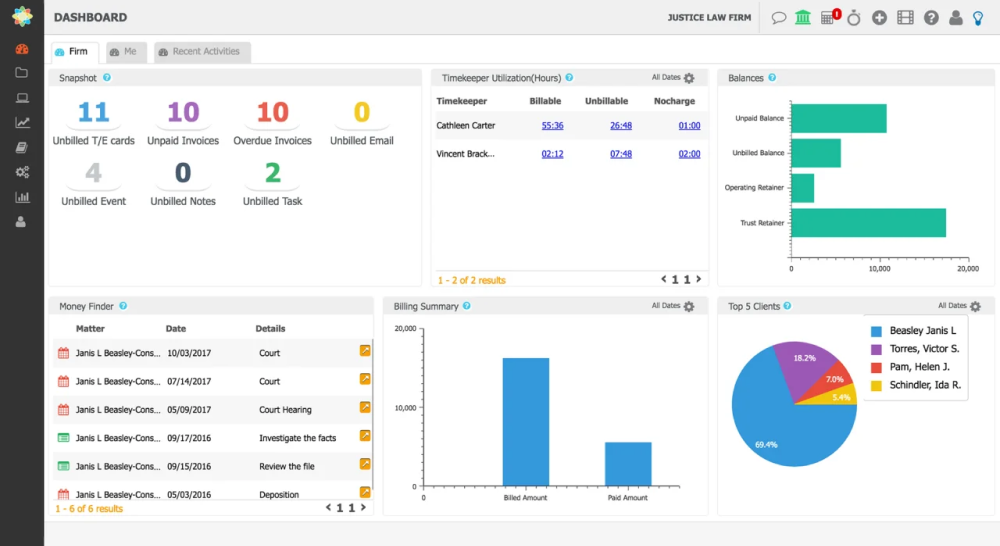
Image Source: CosmoLex
CosmoLex is a bit different from the others on this list – it’s actually a full practice management software that includes CRM capabilities. I helped implement CosmoLex at a boutique law firm (about 5 attorneys) because they wanted to consolidate multiple tools into one. With CosmoLex, we managed to bring together contact management, case/matter management, time tracking, billing, and even accounting all under one roof.
As a CRM, CosmoLex covers the basics: you can store all your client contacts, track communications (it can save emails into the system), and keep notes and documents attached to matters. But where CosmoLex really shines for law firms is its legal accounting integration, especially for trust accounts. In our old setup, the firm used QuickBooks for accounting, and it was always a headache making sure client trust funds were handled correctly and in compliance.
Working in CosmoLex day-to-day, I took advantage of its task and calendar features to manage deadlines. It integrates court rules and can calculate deadlines (for example, if you set a task for “File motion,” it can automatically set a due date X days before a hearing, etc., depending on settings). The document management was solid – not as fancy as a dedicated DMS like iManage, but we could template documents and store all files by matter.
Pros:
- Secure client portal for streamlined communication and document sharing
- Integrated trust accounting for seamless legal compliance
- A built-in document management system that keeps all your legal files and emails organized within each case
- Compliance management tools help you stay ahead of legal regulations, reducing the risk of errors
Cons:
- Entering multiple expenses manually can be slow, as you have to wait for the software to load after each entry, which affects efficiency
- Loading can be slow, causing delays when generating reports or moving between tasks
Pricing:
Starts at $49/user/month.
My Top 3 Picks for the Best CRM for Law Firms
After testing and comparing several tools, these three stood out for different types of law firms:
1. BIGContacts
If you want an easy-to-use, affordable CRM that keeps client details, emails, and follow-ups organized, BIGContacts is my top choice. It covers the essentials without feeling complex and even offers email automation at a price that works well for small and mid-sized firms.
2. Pipedrive
Pipedrive is ideal for lawyers who want a clean, visual way to track client intake and opportunities. It’s not built specifically for law firms, but its simplicity makes it easy to manage leads and stay on top of follow-ups without much setup.
3. CosmoLex
For firms that want CRM, billing, accounting, and trust compliance in one system, CosmoLex is a strong option. It’s best suited for established firms looking to replace multiple tools with a single, compliant platform.
How to Choose the Best CRM for Your Law Firm
Choosing the right CRM for lawyers comes down to finding a tool that fits your firm’s workflow, not the other way around. Focus on these key factors:
1. Legal-Specific Needs
Start by deciding whether you need law-specific features like conflict checks, matter management, or trust accounting. Tools like CosmoLex cover these areas, while general CRMs focus more on contacts and pipelines.
2. Client Intake & Lead Tracking
If new client acquisition is important to your firm, look for strong intake tools. Online forms, automated follow-ups, and a clear intake pipeline help ensure no inquiry gets missed. Platforms like Lawmatics and Clio Grow are built specifically for this.
3. Ease of Use & Team Adoption
A CRM only works if your team actually uses it. Simple, intuitive tools such as BIGContacts or Pipedrive are often easier to adopt, especially for small teams that don’t want heavy training.
4. Integrations With Existing Tools
Your CRM should work smoothly with your email, calendar, billing, and practice management software. Good integrations reduce duplicate work and keep client data consistent across systems.
4. Automation & Scalability
Look for automation that saves time, such as follow-up reminders, task creation, or email sequences. Also, think ahead. The CRM should scale as your firm grows and allow customization to match your intake and case workflows.

5. Security, Compliance & Support
Client data security is non-negotiable. Choose a CRM with strong encryption, access controls, and compliance support. Reliable onboarding and customer support can also make a big difference in long-term success.
Take Control of Client Relationships and Run Your Firm With Confidence
Managing client relationships effectively is essential for law firms that handle multiple cases, deadlines, and ongoing client communication. The CRM tools covered in this list are built to centralize client information, track every interaction, and simplify follow-ups, helping your team stay organized and focused on legal work.
When choosing a CRM, prioritize ease of adoption and how well it fits into your daily workflow. Centralized client records, automated reminders, and a clear history of emails and notes can reduce missed deadlines, improve response times, and create a more consistent client experience.
For law firms looking for a practical and easy-to-use solution, BIGContacts CRM fits naturally into this need. It helps organize client data, manage communication, automate follow-ups, and keep everything connected in one place, making it easier to run your firm with confidence.
Frequently Asked Questions

Why do law firms need a CRM?
Law firms need a CRM to avoid missed follow-ups, scattered client data, and inconsistent communication. A CRM centralizes client information, tracks interactions, and supports intake and follow-up workflows. This improves efficiency, reduces administrative stress, and helps firms deliver a more reliable and professional client experience.
Do lawyers need an industry-specific CRM?
Not always. Industry-specific CRMs are helpful for features like conflict checks or trust accounting. However, many small and mid-sized firms do well with general CRMs focused on contact management and follow-ups. The right choice depends on your workflow, firm size, and how complex your legal operations are.
How do I choose the best CRM for my law firm?
Start by identifying your biggest pain points, such as missed leads, poor organization, or slow follow-ups. Look for a CRM that fits your workflow, integrates with your existing tools, and is easy for your team to use. The best CRM should simplify daily work, not add friction.
FREE. All Features. FOREVER!
Try our Forever FREE account with all premium features!