

Over the years, I’ve seen many businesses start with a CRM tool like Zoho because it has every feature imaginable. But over time, they realize they are only using a small part of the system while the rest just adds clutter and slows them down.
If you have ever felt frustrated because it takes too many clicks to log a simple call or find a client’s email, you aren’t alone. Searching for Zoho CRM alternatives is usually a sign that you need a tool that matches how your team actually works.
I have spent time looking at the top options to see which ones actually make life easier for sales teams today. Whether you want to fix a messy database, get better mobile access, or just want a system that is easier to learn, this guide will help you pick a partner that helps your business grow.
Why Businesses Look for Zoho CRM Alternatives
The story behind why people switch from Zoho is remarkably consistent. Whether it’s a small team of spreadsheet migrants or a marketing-first business, the “why” usually boils down to the fact that Zoho feels a bit too heavy for everyday use.
While the idea of an all-in-one suite sounds perfect on paper, the reality of managing it can often lead to more frustration than growth. Here is what users frequently experience:
1. Complexity That Slows Down Your Team
Many businesses find that Zoho feels like an enterprise machine designed for massive corporations, rather than a streamlined tool for relationship selling.
For teams used to Outlook/Gmail-heavy workflows, the interface can feel cluttered and the learning curve unnecessarily steep.
2. Performance Glitches That Waste Selling Time
In the middle of a busy day, you need your CRM to be invisible and reliable. However, many users report mobile app lags during critical client calls and email threads that occasionally drop.
When basic reporting glitches or custom-field issues pop up, it leads to hours wasted on troubleshooting instead of actually selling.
3. Waiting for Fixes While New Features Pile Up
There is a common frustration regarding support and long-standing product requests. Users often find themselves waiting years for fixes to essential tools like the quoting and templates module while the platform continues to ship new, unrelated features.
This disconnect makes it difficult for businesses that need a reliable, integrated experience for their daily pipeline and follow-ups.
4. Pricing That Scales Faster Than Your Growth
What starts as an affordable solution can quickly become a financial burden as you scale. Between the cost of higher tiers and the time investment required to manage the “heavy” nature of the software, many find that the ROI starts to dip.
Now let’s look at the best Zoho CRM alternatives in 2026.
Top 10 Zoho CRM Alternatives
If you’re looking for a tool that prioritizes automation without complexity, this list covers everything from budget-friendly options to specialized platforms for sales-heavy teams.
| Tool | Best For | Pricing |
|---|---|---|
| BIGContacts | Contact management & email marketing for growing businesses | Free for growing businesses. Paid plan starts at $9.99/month. |
| HubSpot | Marketing automation & inbound teams | Starts at $18/user/month |
| Pipedrive | Visual sales pipelines | Starts at $14/user/month |
| Freshsales | Built-in calling & automation | Starts at $15/user/month |
| Bitrix24 | Free CRM with collaboration tools | Free plan available |
| Insightly | Project-driven B2B teams | Starts at $29/user/month |
| Nimble | Social selling & Gmail users | Starts at $24.90/user/month |
| Monday CRM | Custom workflows & task-heavy teams | Starts at $10/user/month |
| Close CRM | Inside sales & calling teams | Starts at $49/user/month |
| Agile CRM | Budget-friendly all-in-one | Starts at $14.99/user/month |
1. BIGContacts – Best for Contact Management & Email Marketing for Growing Businesses
The thing I like most about BIGContacts is that it stays focused on the workflows most simple CRM buyers actually need: a clean contact record with activity history, tasks/reminders, pipeline tracking, and built-in drip email campaigns. That approach is exactly what many Zoho switchers are looking for when they’re tired of spending time maintaining the tool instead of using it.
I also like that BIGContacts is designed to run campaigns and track engagement (opens/clicks) alongside CRM work, which is a big deal for marketing-first CRM users. It aligns well with the CRM as a database + segmentation + outreach mindset that shows up frequently in switching conversations.
Pros:
- Strong contact management with custom fields, activity history, and a 360° view of interactions
- Built-in drip email campaigns and email tracking for opens/clicks
- Pipeline tracking and automation features oriented toward follow-ups
- Integrations via Zapier and common marketing tools (e.g., Mailchimp, ActiveCampaign)
How BIGContacts Compares to Zoho
While Zoho offers a broad suite of features, it can feel complex and overwhelming. BIGContacts, on the other hand, keeps things simple by focusing on core CRM workflows, such as clean contact records and built-in drip email campaigns. This means you spend less time managing software and more time selling. Plus, its seamless integration with tools like Mailchimp and Zapier makes it an ideal choice for marketing-first teams looking for an easy-to-use CRM solution.
Pricing:
A free plan is available for growing teams. Paid plan starts at $9.99/month.
2. HubSpot CRM – Best for Marketing Automation & Inbound Teams
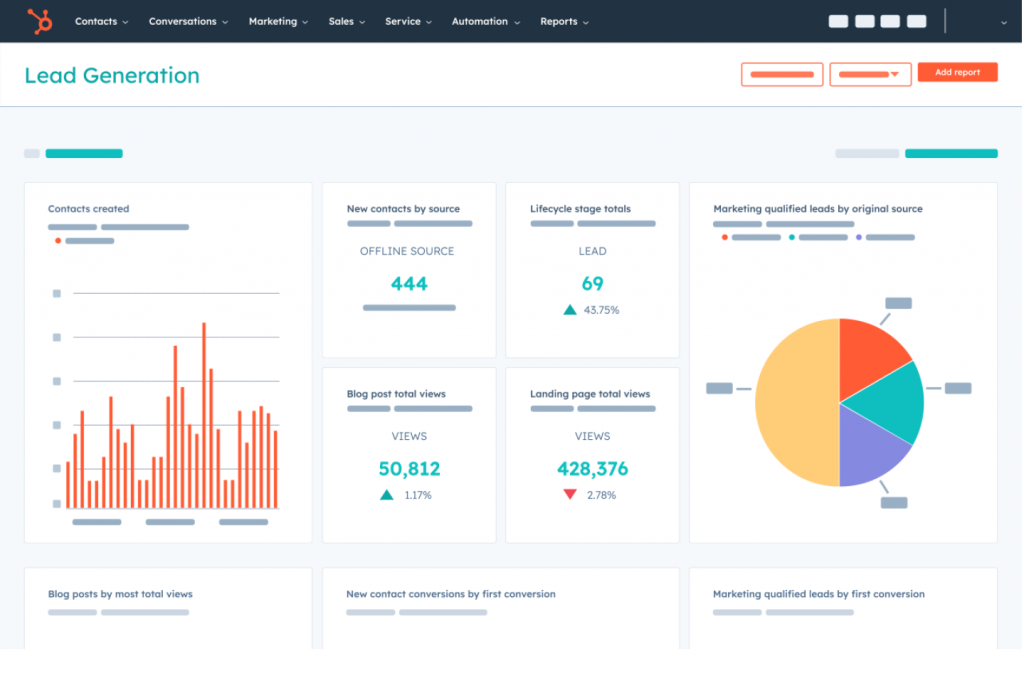
When I tested HubSpot with a small team, the biggest difference vs. heavy CRMs was adoption: the UI is clean, the basics are fast, and you can get value without a giant admin project.
A friend of mine who migrated from Zoho described the switch in very practical terms: export CSV, import, remap fields, and the biggest relief was simply getting reliable email tracking and a mobile experience that didn’t sabotage client calls. That kind of praise shows up repeatedly in community responses.
The key is knowing what you’ll pay for. HubSpot’s ecosystem is massive (integrations, hubs, add-ons), but the cost can climb quickly when you need advanced automation or higher-tier features.
Pros:
- Free CRM with no expiration, designed to provide a unified view of customer data
- Strong app ecosystem (HubSpot Marketplace is positioned as 1,900+ apps/integrations)
- Sales Sequences support automated outreach with email templates + task reminders
- Email integrations via HubSpot Sales extensions (Gmail/Outlook/Office 365)
- Scales into full RevOps suite (sales + marketing + service in one platform)
How HubSpot Compares to Zoho
Zoho offers a massive all-in-one suite, but HubSpot prioritizes ease of use and team adoption. While Zoho can feel like a complex admin project, HubSpot allows you to get started quickly with a clean interface and intuitive features. It’s the better choice if you want to avoid heavy software and need a mobile experience that won’t fail you during a sale. While Zoho is often cheaper at scale, HubSpot provides a more polished environment for growing teams.
Pricing:
Starts at $18/user/month.
3. Pipedrive – Best for Visual Sales Pipelines
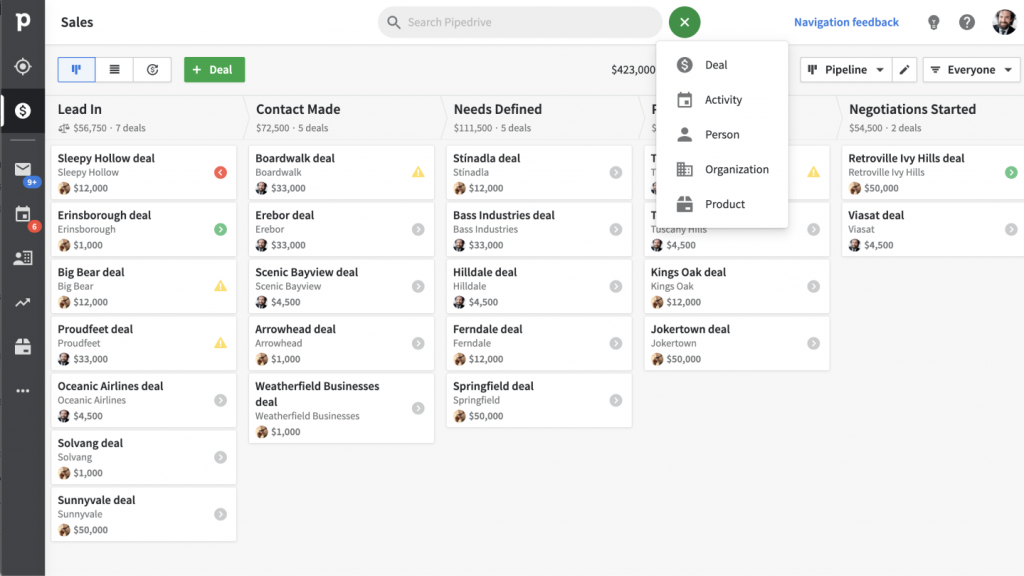
If your main complaint is that your current system feels heavy, Pipedrive is the fastest way to get back to selling. It is great for organizing sales activities. Everything is built around pipeline stages and ensuring you know exactly what the next action is.
What stands out is how Pipedrive pairs email sync with automated follow-up sequences. This is exactly the combination switchers look for: the power to automate nurturing without the technical complexity of an enterprise machine. It’s a tool built for sales execution, not just data entry.
Pros:
- Obsessive focus on visual pipelines and next-step sales discipline
- Growth plan includes full email sync with tracking and nurturing sequences
- Lightweight automation that handles follow-ups without complex setup
- Access to over 500 integrations to keep your sales stack connected
How Pipedrive Compares to Zoho
Zoho is a feature-rich powerhouse, but Pipedrive is designed for speed and deal execution. While Zoho users often feel buried in administrative tabs, Pipedrive keeps you focused on your visual pipeline. It’s the better fit if you want a tool that lives for the next action rather than one that feels like a heavy database. If you’re tired of software sprawl and just want to close deals, Pipedrive offers a much more streamlined experience.
Pricing:
Paid plans start at $14/user/month (billed annually).
4. Freshsales – Best for Built-in Calling & Automation
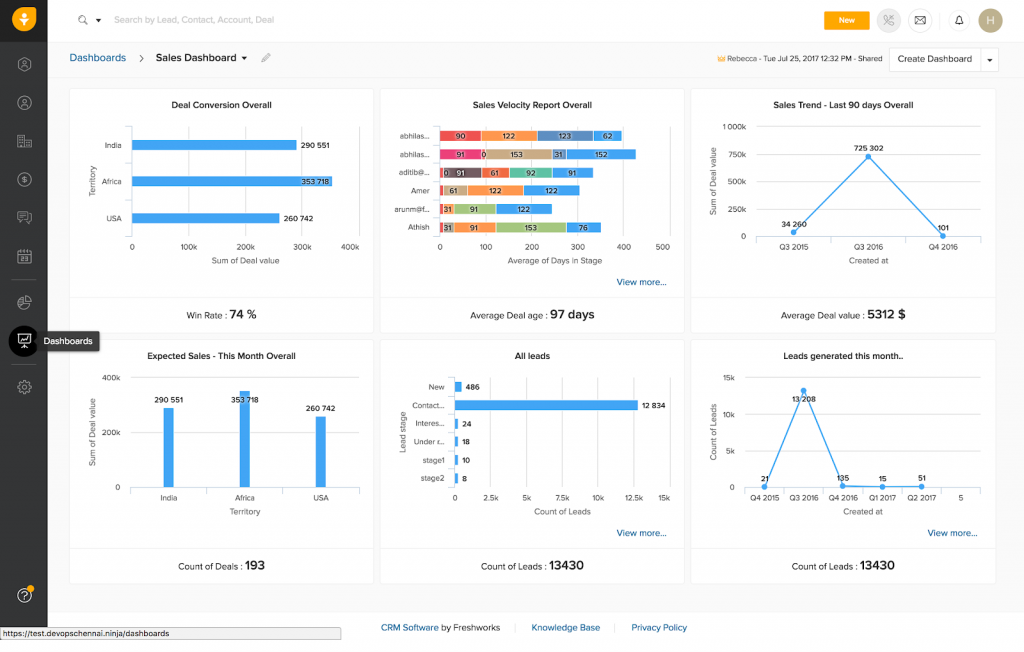
Freshsales stands out because it feels communication-native. It’s built for teams that don’t want a Frankenstein stack of different tools for calling, emailing, and chatting. Having your phone and email built directly into the CRM interface means you spend less time switching tabs and more time talking to leads.
I really like how it automatically associates conversations with contact records the moment you connect your mailbox. It’s a modern, SMB-friendly approach to automation that includes AI-powered contact scoring and sales sequences. It gives you the high-end features you need without the enterprise-level headache.
Pros:
- Built-in chat, email, and phone capabilities within the Growth plan
- Freddy AI features for contact scoring and automated sales emails
- Automatic conversation and calendar sync once your mailbox is connected
- Modern, clean UI that reduces the learning curve for new team members
How Freshsales Compares to Zoho
Zoho provides an extensive suite of separate modules, but Freshsales offers a more unified, communication-first experience. While Zoho can feel like a collection of tools stitched together, Freshsales feels modern and integrated from the start. It’s the better choice if you want built-in phone and AI features without the heavy feeling of a legacy CRM. If your team lives on the phone and in their inbox, Freshsales provides a smoother daily workflow.
Pricing:
A free plan is available for up to 3 users. Paid plans start at $9/user/month (billed annually).
5. Bitrix24 – Best for CRM & Collaboration Tools
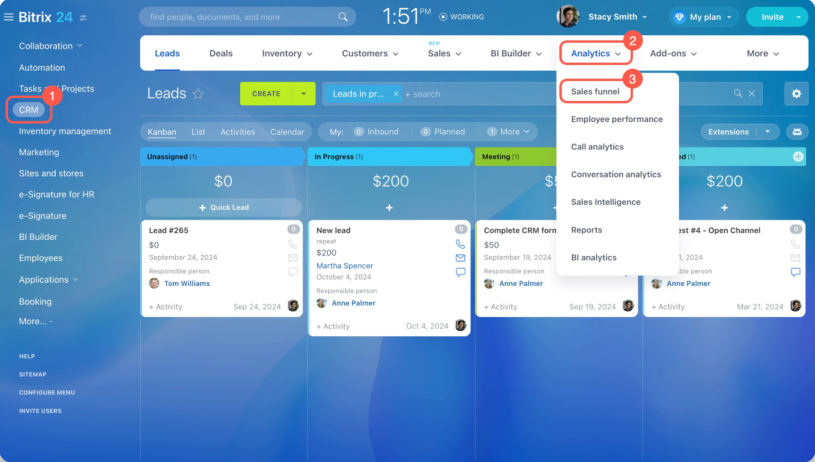
Bitrix24 is much more than a traditional CRM; it’s an entire digital workspace. What I like most is that it solves the scattered tool problem by combining your sales pipeline, project management, and internal communication (like chat and video calls) into one single dashboard.
I also appreciate how it handles the social side of work. It feels like a private social network for your business, complete with newsfeeds and instant messaging, which makes it a strong fit for remote-first companies.
Pros:
- Unlimited users on the free plan, making it ideal for large teams on a budget
- All-in-one toolkit including CRM, project management, and video conferencing
- Flat-rate pricing that provides predictable costs regardless of your team size
- Advanced automation rules for sales, tasks, and even HR workflows
How Bitrix24 Compares to Zoho
While Zoho is a modular suite where you often pay for separate apps, Bitrix24 gives you a massive unified toolkit for one flat fee. Zoho can feel fragmented as you jump between different products, but Bitrix24 keeps everything in one connected workspace. It’s the better choice if you want to replace multiple SaaS subscriptions (like Slack, Asana, and your CRM) with a single platform. However, be prepared for a bit more interface density as you learn to navigate its wide range of features.
Pricing:
A free plan is available with unlimited users. Paid plans start at $49/month for the whole team (billed annually).
6. Insightly – Best for Project-Driven B2B Teams
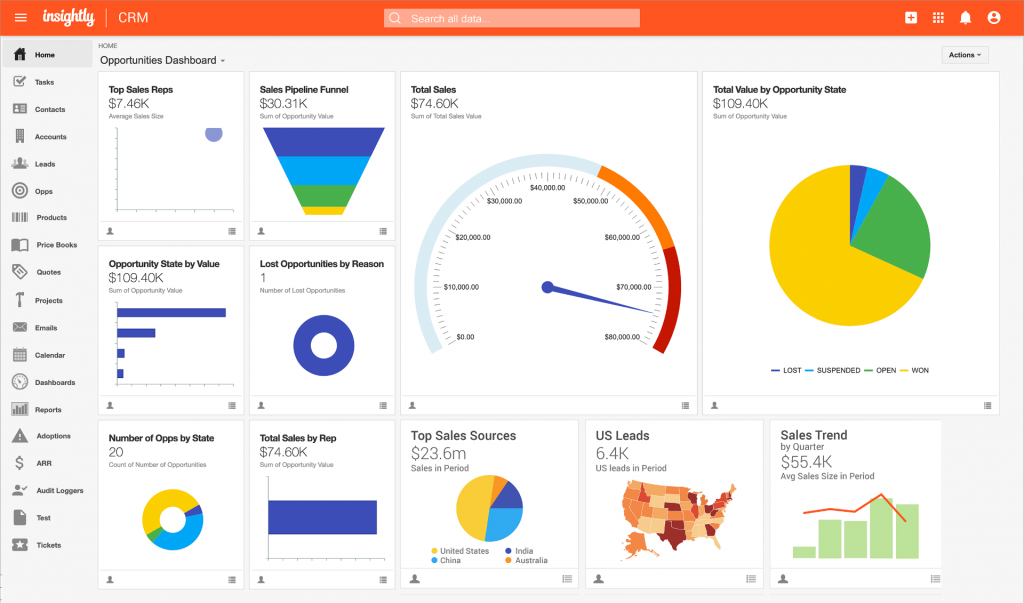
What makes Insightly unique is that it doesn’t stop once the deal is won. It’s built for businesses where the sale is just the beginning of a long project, such as consulting, construction, or manufacturing. By combining CRM features with native project management, you can convert a closed-won opportunity into a live project with milestones, task checklists, and resource tracking in a single click.
I also really liked the trigger-based workflow automation. It feels much more intuitive than the complex blueprint systems in larger CRMs. If you’re a small to mid-sized team that needs to automate the handoff from sales to the delivery team without losing any data in the process, Insightly provides a very logical, flowchart-style approach to the entire customer journey.
Pros:
- Native project management to track milestones and tasks directly within the CRM after a deal closes
- Easily map complex connections between contacts, organizations, and past projects
- Trigger-based actions to update fields, assign tasks, or send emails automatically
- 40+ chart types to visualize sales and project performance in real time
How Insightly Compares to Zoho
Zoho offers a vast suite of separate apps (Zoho CRM + Zoho Projects), but Insightly builds both into one unified interface. While Zoho can feel fragmented as you jump between different modules, Insightly keeps the sales-to-project transition seamless. It’s the better choice for B2B teams that prioritize project delivery and need a straightforward tool that handles the after-sale work just as well as the initial lead tracking.
Pricing:
Paid plans start at $29/user/month (billed annually).
7. Nimble – Best for Social Selling & Gmail Users
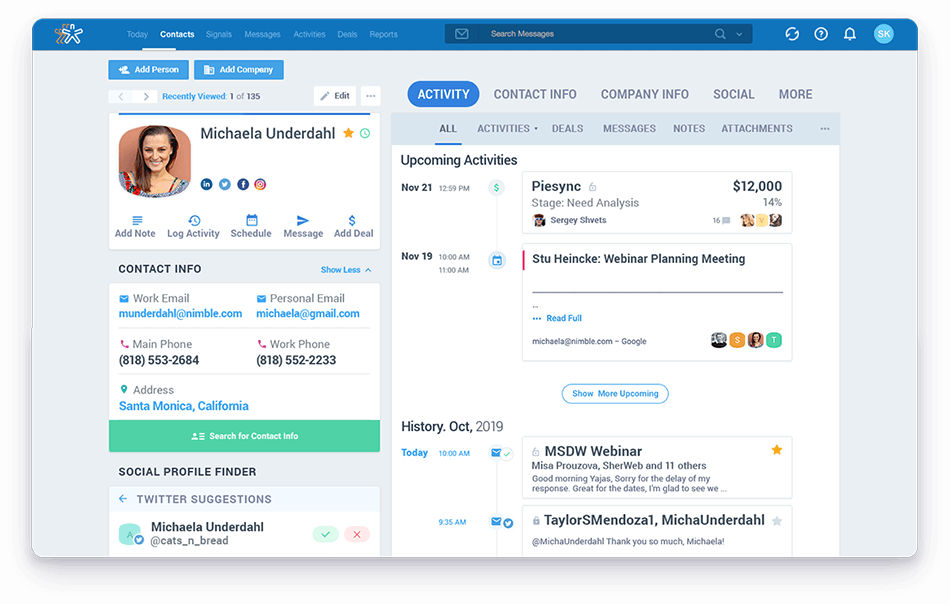
Nimble is the relationship engine of the CRM world. It’s designed for professionals who live in their inbox and social media rather than a rigid database. What I like most is the Prospector tool. It automatically scrapes social media profiles and email signatures to build a complete 360-degree view of a contact without you having to type a single word.
The interface is refreshingly simple because it centers everything around the contact record. Instead of digging through tabs, you see your email history, calendar appointments, and social updates in one tidy timeline. It’s a tool that works where you work, whether that’s inside Gmail, Outlook, or even LinkedIn making it one of the most adopted tools for teams that hate traditional data entry.
Pros:
- Automatically pulls social bios, job titles, and company info from the web
- Works as a sidebar inside Gmail and Outlook so you never have to switch tabs
- Syncs interactions from social platforms to give you a complete relationship history
- Visual Kanban-style boards for managing deals with minimal friction.
How Nimble Compares to Zoho
Zoho is an enterprise-style sales machine with deep automation, whereas Nimble is a relationship layer focused on human connection. While Zoho requires manual data entry and complex setup, Nimble does the heavy lifting for you by enriching contact data automatically. It’s the better fit for small teams and consultants who want a smart inbox assistant rather than a heavy, traditional CRM that feels like a chore to maintain.
Pricing:
Single-plan simplicity at $24.90/user/month (billed annually).
8. Monday CRM – Best for Custom Workflows & Task-Heavy Teams
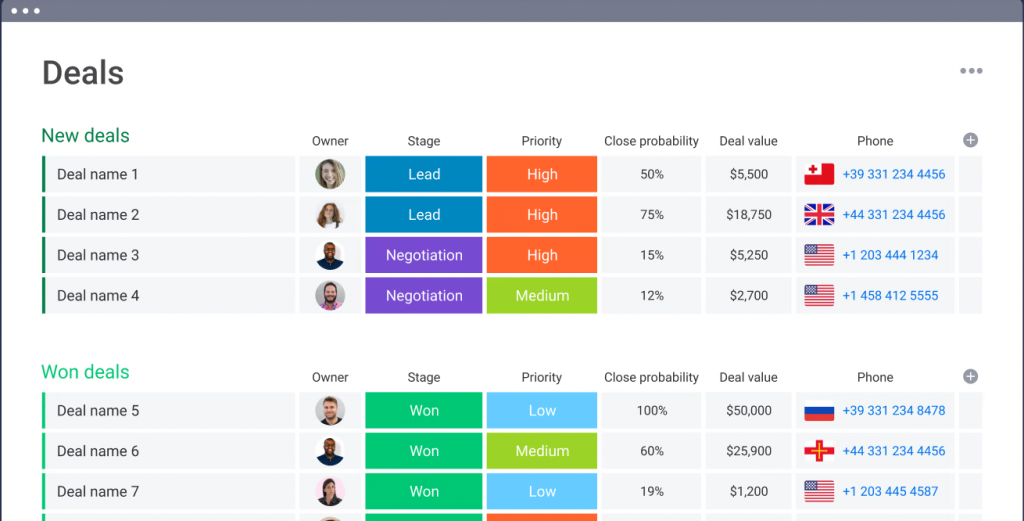
For agencies and service businesses, the sale is only the beginning. monday CRM is a top contender because it connects your sales pipeline directly to your delivery and operations. You aren’t just tracking a deal; you’re tracking the actual work that happens after the contract is signed, providing total visibility across your entire team.
The board-based workflow is incredibly flexible, which is great for teams that want to customize their own sales handoffs. It also integrates deeply with Outlook, allowing you to connect your email and calendar directly to your boards. It’s more than just a CRM; it’s a Work OS that makes your sales process feel like a natural part of your business operations.
Pros:
- Visual, board-based workflow that is highly customizable for any process
- Deep Outlook integration for syncing emails and calendars to your CRM boards
- Mass email tracking and engagement metrics are available on higher tiers
- Seamless connection between sales pipelines and project delivery boards
How Monday CRM Compares to Zoho
Zoho is a traditional CRM focused on sales objects, whereas monday CRM is a flexible platform that connects sales to operational work. While Zoho offers deep, rigid features, Monday CRM gives you a visual Work OS environment that is much easier to adapt to your specific agency needs. It’s the better fit if your sales process requires high visibility and collaboration across different departments beyond just the sales team.
Pricing:
Paid plans start around $12/user/month (billed annually; seat bundles apply).
9. Close CRM – Best for Inside Sales & Calling Teams
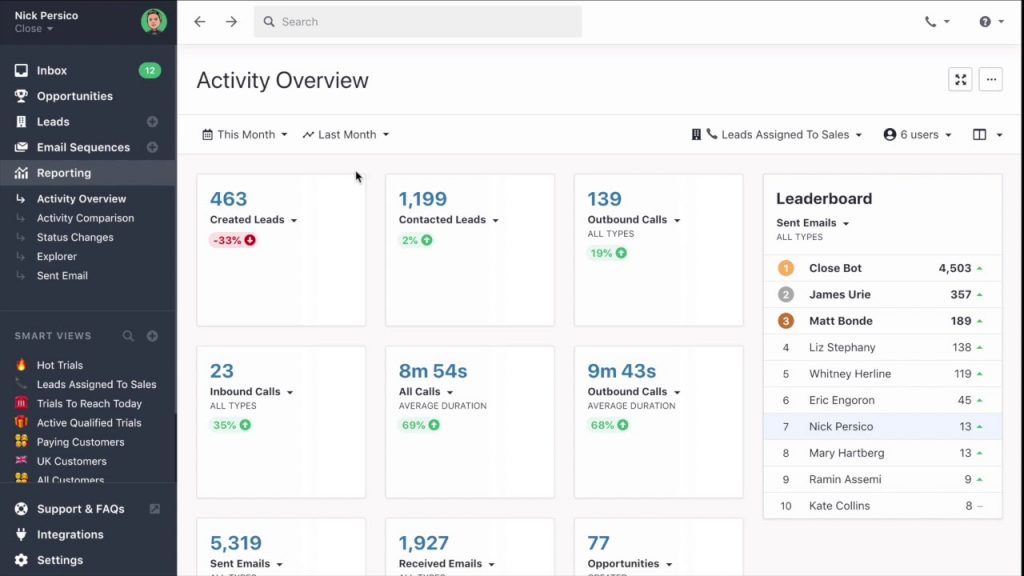
Close is built by and for people who spend their entire day closing deals. The thing I like most is how it eliminates the app-switching fatigue that usually comes with Zoho. Instead of toggling between a VoIP app, your email, and your database, Close builds calling, SMS, and two-way email sync directly into the workflow. It’s designed for speed; you can practically live in the lead view and move through a high volume of outreach without ever losing context.
I also love the focus on sales productivity through features like the Power Dialer and AI-powered call coaching. If your business depends on rapid deal progression and you want a CRM that feels like an extension of your phone and inbox, Close is hard to beat.
Pros:
- Integrated calling, SMS, and email with automatic activity logging
- Power and Predictive dialers that help reps reach more leads in less time
- Real-time filtering to help sales reps focus on the hottest leads at any moment
- AI sales assistant for automated call summaries and email drafting to reduce manual data entry
How Close Compares to Zoho
Zoho is a complex family of apps that often requires a dedicated admin to manage, while Close is a streamlined, all-in-one platform for inside sales. While Zoho requires third-party integrations for advanced calling, Close has global calling and SMS built in from the ground up. It’s the better choice if you want to avoid hidden implementation costs and need a tool that your sales team will actually enjoy using on day one.
Pricing:
Paid plans start at $35/user/month (billed annually).
10. Agile CRM – Best for All-in-One for Small Business Marketing & Sales
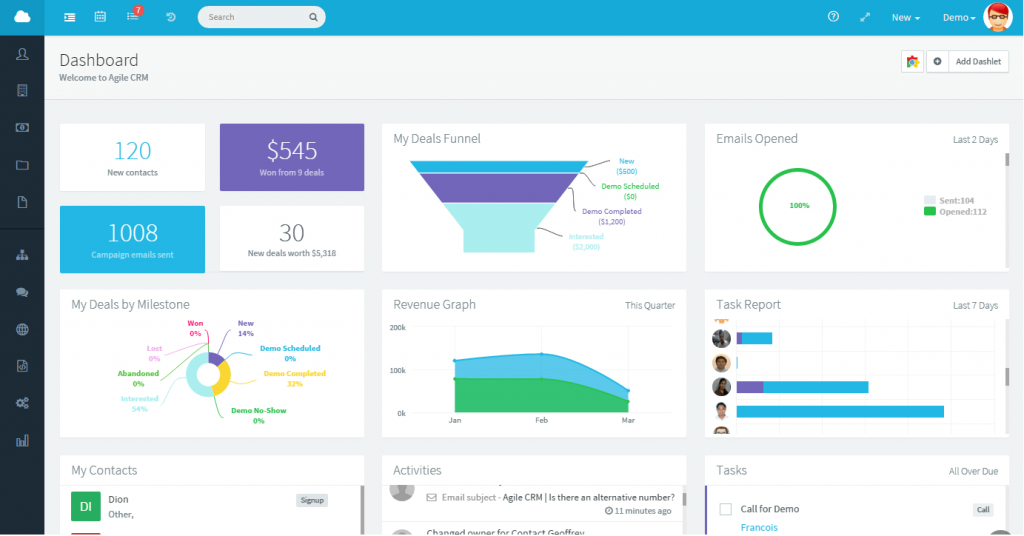
Agile CRM is a great choice if you love the all-in-one feature of Zoho but want something that feels more manageable for a small team. It combines sales, marketing, and service features into one dashboard, which is perfect for businesses that aren’t ready to pay for three different subscriptions. I like that it includes surprisingly advanced features like web engagement pop-ups and social media monitoring even at its lower price points.
What really stands out is its gamification feature, which lets you set up leaderboards to spark some friendly competition within your sales team. If you need lead scoring and automated marketing workflows but are working with a limited budget, Agile provides a lot of bang for your buck.
Pros:
- Integrated sales, marketing, and customer service modules in a single platform
- Drag-and-drop campaign builder for email sequences and web engagement
- One-click calling and voicemail automation (available on paid plans)
- Monitor social mentions and engage with prospects directly from the CRM
How Agile CRM Compares to Zoho
Zoho is a massive ecosystem that can grow quite expensive as you add modules, whereas Agile CRM offers a unified set of core features for a much lower entry price. While Zoho’s interface can be overwhelming for new users, Agile’s single-page contact management simplifies the daily workflow. It’s the better fit for startups and small businesses that need a little bit of everything like sales, marketing, and helpdesk without the enterprise-grade complexity or price tag.
Pricing:
A free plan is available for up to 10 users. Paid plans start at $8.99/user/month (billed annually).
My Top 3 Picks for Zoho CRM Alternatives
If you’re feeling overwhelmed by Zoho’s complexity, these three tools offer the best balance of power and usability for growing teams.
1. BIGContacts
This is my top recommendation for teams that want to stop managing their CRM and start using it. It excels by doing the basics like contact records, activity history, and task reminders extremely well without the clutter of unused features. What sets it apart as a Zoho alternative is the built-in drip email marketing and 360-degree contact view, allowing marketing-first users to run campaigns and track engagement (opens/clicks) alongside their sales pipeline.
2. Pipedrive
Pipedrive is the salesperson’s CRM, designed specifically to eliminate the administrative friction found in larger suites like Zoho. It centers everything on a highly visual Kanban-style pipeline that makes it obvious which deals need attention and what the next action should be. It’s built for speed and high-velocity deal tracking, making it ideal for teams focused solely on closing.
3. HubSpot CRM
HubSpot is the gold standard for teams looking for an all-in-one experience that actually feels unified rather than stitched together. While Zoho offers a massive ecosystem, HubSpot provides a much more intuitive user interface and a free forever core that is genuinely powerful for startups. It’s the best choice if you want your sales, marketing, and customer service teams to share a single source of truth without the steep learning curve.
How to Choose the Best Zoho CRM Alternative
Choosing a Zoho alternative isn’t just about finding a cheaper price tag. It’s about finding a tool that actually gets used. Based on common migration pitfalls and business needs in 2026, here is how to evaluate your next CRM:
- Total Cost of Ownership (TCO) Over Sticker Price: While Zoho is attractive for its low entry cost, the hidden costs of complex setup, specialized training, and weekly maintenance can quickly outweigh the license fee. Look for a tool where the time saved on administration pays for the software itself.
- Reliable Email and Calendar Sync: Your CRM is only as good as its data. A true alternative must offer consistent, searchable email logging (native integration with Gmail/Outlook is preferred over third-party connectors) to ensure your team has a trustworthy communication history without manual entry
- Low-Complexity Automation: Automation should be a set it and forget it time-saver, not a massive configuration project. Prioritize platforms that offer intuitive, stage-based guidance and reminders that prevent next step failures without requiring a dedicated admin to manage the blueprints.
- Segmentation and Inbox Deliverability: If you plan to use your CRM for outreach, ensure it supports robust tagging, dynamic lists, and modern authentication like DKIM. Authenticated emails are essential in 2026 to ensure your campaigns actually hit the inbox rather than the spam folder.
- A Clean Migration Path: Don’t replicate a messy data model. A strong alternative should allow for a straightforward CSV import and field remapping. The best time to clean your data (standardizing formats and removing duplicates) is during the migration, not after.
Simplify Your Workflow with These Reliable Zoho CRM Alternatives
If you remember just one thing from this comparison, make it this: the best zoho crm alternatives are the ones your team will actually use every day without losing email history, missing follow-ups, or spending hours rebuilding dashboards. Research makes it clear that people don’t leave Zoho because it lacks features; they leave because the workflow cost gets too high.
If you want the simplest, conversion-oriented path for most SMB and relationship-driven teams, start with BIGContacts as your baseline. It provides the essential tools you need to manage contacts and automate outreach without the technical overhead.
You can opt for Pipedrive if pipeline speed is your priority, or Freshsales if you want built-in communication and modern automation.
Frequently Asked Questions
Why do people switch from Zoho CRM?
The most common triggers are workflow friction (reporting slowness, email threading reliability, mobile performance), support frustration, and a growing feeling that the CRM takes time instead of saving it. You can see these complaints directly in community threads and in competitor write-ups that call out learning curves, tricky customization, and support planning as real costs.
Is Zoho CRM free?
Zoho CRM is marketed as free for up to 3 users, with paid tiers that add more advanced capabilities.
What Zoho CRM competitors are best for automation without complexity?
Community answers commonly point to BIGContacts, HubSpot, Pipedrive, and Freshsales when the requirement is pipeline + follow-ups + automation that’s practical for daily use.
Is there an open-source equivalent of Zoho CRM?
There isn’t a perfect one-to-one equivalent, but open-source CRM options exist. BIGContacts is a widely cited open-source CRM option in both its GitHub project and community recommendations.
Which Zoho CRM alternative is best for small teams on a tight budget?
If you have fewer than 10 users, Agile CRM and BIGContacts are the top contenders. While Zoho limits its free tier to 3 users, BIGContacts offers a "Free Forever" plan with unlimited users, and Agile CRM is free for up to 10 users, making them much more scalable for bootstrapped startups.
Which tool is the easiest to migrate to from Zoho?
BIGContacts and HubSpot are widely considered the easiest for migration. Both platforms have dedicated Zoho importers that allow you to map your exported Zoho CSV files directly into their systems, significantly reducing the messy data risk common in manual migrations.
Can I migrate my Zoho data to BIGContacts easily?
Yes. The migration process is a simple three-step journey: export your contacts as a CSV from Zoho, map your fields in BIGContacts, and upload. Most users find they can move their entire database in less than an hour, often discovering that the data is more organized in the new, cleaner interface.
Are there Zoho alternatives that include built-in marketing automation?
Yes, but many (like HubSpot or Salesforce) charge a significant premium for it. BIGContacts stands out because it includes native drip email marketing and lead nurturing as a core feature. This allows you to run automated campaigns and track opens or clicks directly from a contact’s profile without needing a separate integration or a higher-tier Marketing Hub subscription.
FREE. All Features. FOREVER!
Try our Forever FREE account with all premium features!