

After years in consulting, I’ve learned one truth — even the best consultant can lose a client if their systems are disorganized. I’ve been there myself, trying to manage projects, follow-ups, and client details across spreadsheets, emails, and scattered notes. It only took a few missed reminders and forgotten conversations to realize how quickly things can fall apart.
Consultants juggle a lot — client calls, proposals, timelines, invoices, and constant context switching. Without a solid CRM for consultants, the chaos creeps in, and opportunities slip away.
That’s why I put together this list of the 10 best CRM tools I’ve used or recommended to consulting teams over the years. Whether you’re working solo or running a growing consultancy firm, these CRMs can help you stay organized, strengthen client relationships, and work with more clarity and confidence.
Let’s find the one that fits the way you work.
Why Your Consulting Business Needs a CRM System
Keeping track of dozens of clients and projects with spreadsheets or sticky notes just doesn’t cut it. Studies show that without a CRM, businesses suffer from frequent contact management errors (affecting ~41% of cases) and fragmented workflows (32%), leading to missed opportunities. As a consultant, you simply can’t afford disorganization or missed follow-ups. A dedicated consulting CRM software helps you:
- Eliminate data chaos: Centralize all client info, communications, and documents in one place for a consistent single source of truth.
- Streamline your workflow: Automate repetitive tasks (like sending follow-up emails or scheduling meetings), saving you administrative time.
- Maximize opportunities: Track every lead and interaction so you never miss a chance to convert a prospect or upsell an existing client.
Now, let’s explore the 10 best CRM software for consulting firms and how each can support your consulting business.
Top 10 CRM for Consultants
To compile this list, I have assessed each tool’s ease of use and scalability, ensuring they meet the diverse needs of consultants. My evaluation includes my personal experiences, insights from reputable reviews, and feedback from industry peers.
| CRM Software | Best For | Pricing |
|---|---|---|
| BIGContacts | Easiest All in One CRM for Contact Management, Email Marketing & Deal Tracking | Free for growing teams. Paid plan starts at $9.99/month |
| Accelo | Client Management | Starts at $39/user/month |
| Mimiran | Lead management | Starts at $49/user/month |
| HoneyBook | Task Automation | Starts at $29/user/month |
| NetSuite CRM | Sales & marketing automation | Custom pricing |
| Capsule CRM | Email Marketing | Starts at $18/user/month |
| HubSpot CRM | All-in-one solution for marketing, sales, and customer service | Starts at $18/user/month |
| Zoho CRM | Omnichannel engagement | Starts at $20/user/month |
| Salesforce | Large and complex sales organizations | Starts at $25/user/month |
| Pipedrive | Visual sales pipeline | Starts at $19/user/month |
1. BIGContacts – Easiest All in One CRM for Contact Management, Email Marketing & Deal Tracking
In my experience, BIGContacts has been a huge help in keeping all my client information organized in one place. The interface is simple, and the custom fields make it easy to tailor data to my consulting needs. I loved how quickly I could get started without any learning curve.
The Activity Timeline has been my favorite feature. It shows every interaction in order, from calls and emails to notes and tasks, so I can easily revisit past conversations before meetings. Automated reminders and follow-ups also keep my workflow on track by ensuring I never miss important tasks.
I’ve also enjoyed using the built-in email marketing tools. I can segment contacts, send personalized drip campaigns, and track engagement right inside the CRM. The AI-powered dashboard is a nice addition on top of this, quietly flagging which clients have gone quiet or which accounts need a check-in before I even open their record, which matters a lot when you’re juggling several engagements at once. The integrations with QuickBooks, Gmail, and Outlook make it even more convenient to manage everything with a complete view of each client.
Pros:
- Capture and organize all your leads and clients with custom fields, tags, and list segmentation for targeted outreach.
- Get a detailed chronological view of every interaction with each contact, ensuring you’re always up-to-date before a call or meeting.
- Set up automated reminders and drip email campaigns to nurture prospects without manual effort. This helps you stay engaged with clients consistently.
- AI-powered dashboard flags inactive clients and accounts needing attention, useful for consultants managing multiple engagements
- Integrates easily with Gmail/Outlook for email, and QuickBooks for viewing invoices and transactions in one place – improving your productivity.
Cons:
- No downloadable or on-premise version
- Dark user interface option not available
Pricing: A free plan is available for growing teams. Paid plan starts at $9.99/month.
2. Accelo – Best for Client Management
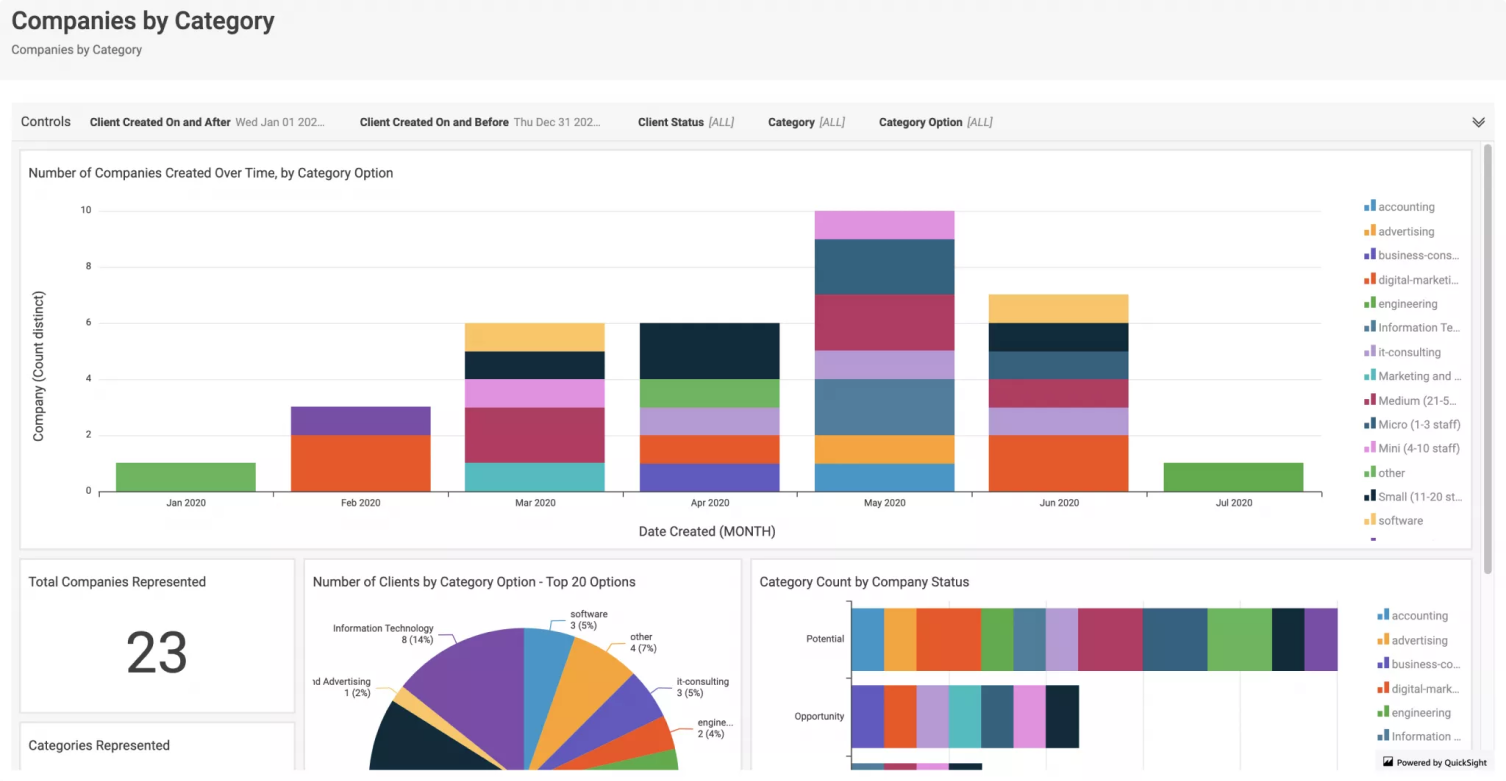
Image source: Productive.io
Accelo is more than a CRM. When I used it for a consulting project, what stood out was how it blended project management, time tracking, and client relationship management in one place. I could manage projects, log billable hours, and handle CRM tasks without jumping between different tools.
The CRM features make client communication effortless. Accelo automatically captures emails and appointments through its Gmail and Outlook integrations, so everything stays organized. I also found the real-time dashboards helpful for checking project status, sales pipeline updates, and budget health at a glance.
The Client Portal is another strong feature. Clients can review quotes, track project progress, and view invoices on their own. Plus, Accelo connects with tools like QuickBooks, Xero, G Suite, Office 365, and Slack. With so much automation, from follow-up emails to invoice creation, I had more time to focus on actual client work.
Pros:
- Easy integration with G-Suite for email and calendar sync
- Impressive client portal for collaboration, quote acceptance, and invoice viewing
- Automatic email and appointment imports
- Time management with hour logging and tracking features
Cons:
- Separate contact creation for multiple email addresses for one person
- Lack of features like reallocating tasks, meetings, or time entries
Pricing:
Starts at $39/user/month.
3. Mimiran – Best for Lead Management
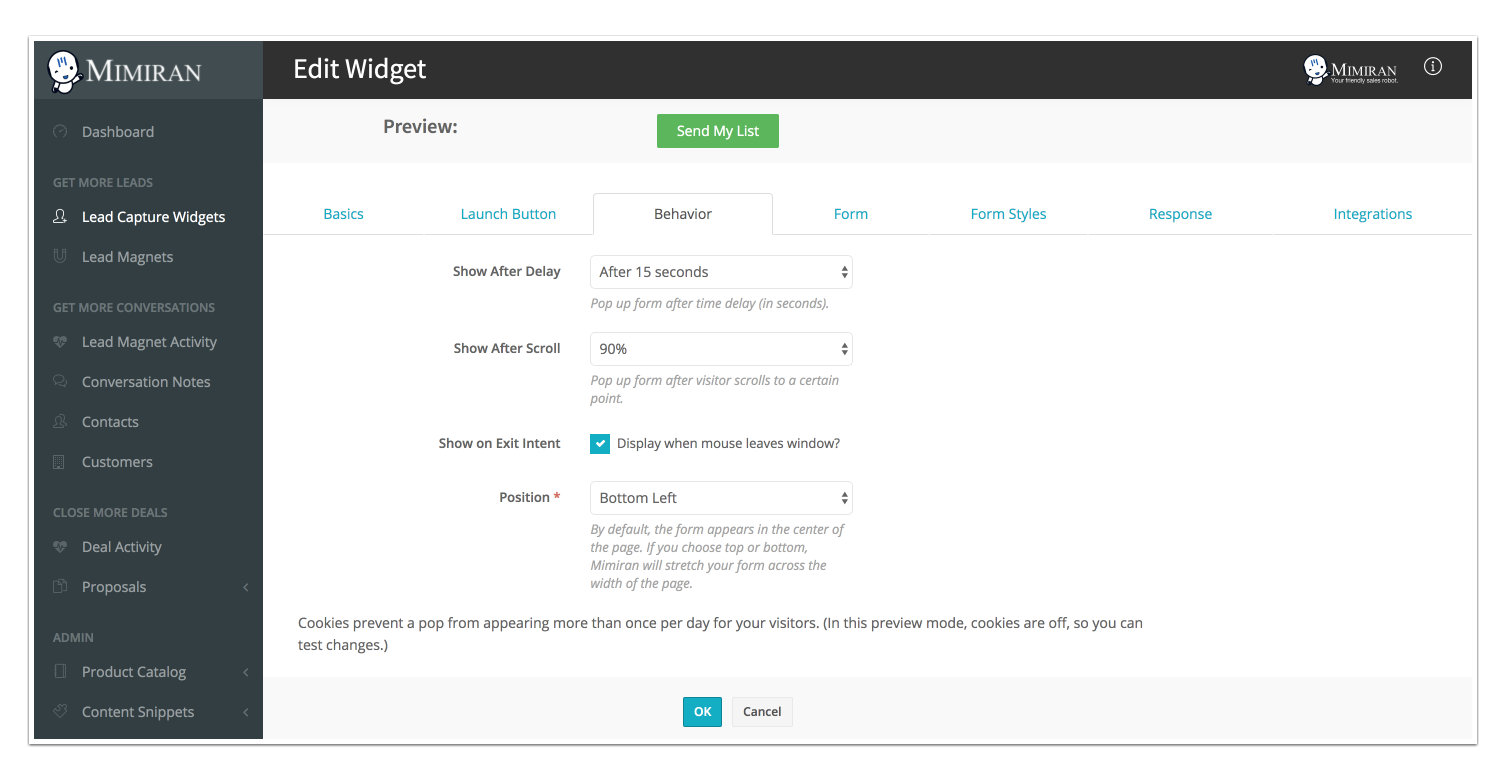
Image source: G2
When I used Mimiran, I could immediately tell it was designed by a consultant. Its proposal automation was the highlight for me. Instead of starting from scratch, I used templates and tracked when prospects opened or viewed specific parts of my proposal, which made follow-ups much more timely and effective.
Lead generation was also simple. The built-in lead magnets and web forms pulled inquiries straight into the CRM with an automatic follow-up sequence. My Gmail conversations synced smoothly, and the system even helped qualify leads based on website activity.
What I liked most was how streamlined everything felt. The interface is clean, the reminders kept me consistent with follow-ups, and contact tagging helped me stay organized. The lightweight client portal for proposal sharing and e-signatures added a professional touch without any extra complexity.
Pros:
- Integrated lead magnets to qualify leads on the website
- Customizable proposals and contracts
- Contact tagging and reminders for follow-ups
- A dedicated client portal to access information and communicate efficiently
Cons:
- Lacks in-depth analysis in the report’s section
- Limited integration with third-party apps
Pricing:
Starts at $49/user/month.
4. HoneyBook – Best for Task Automation
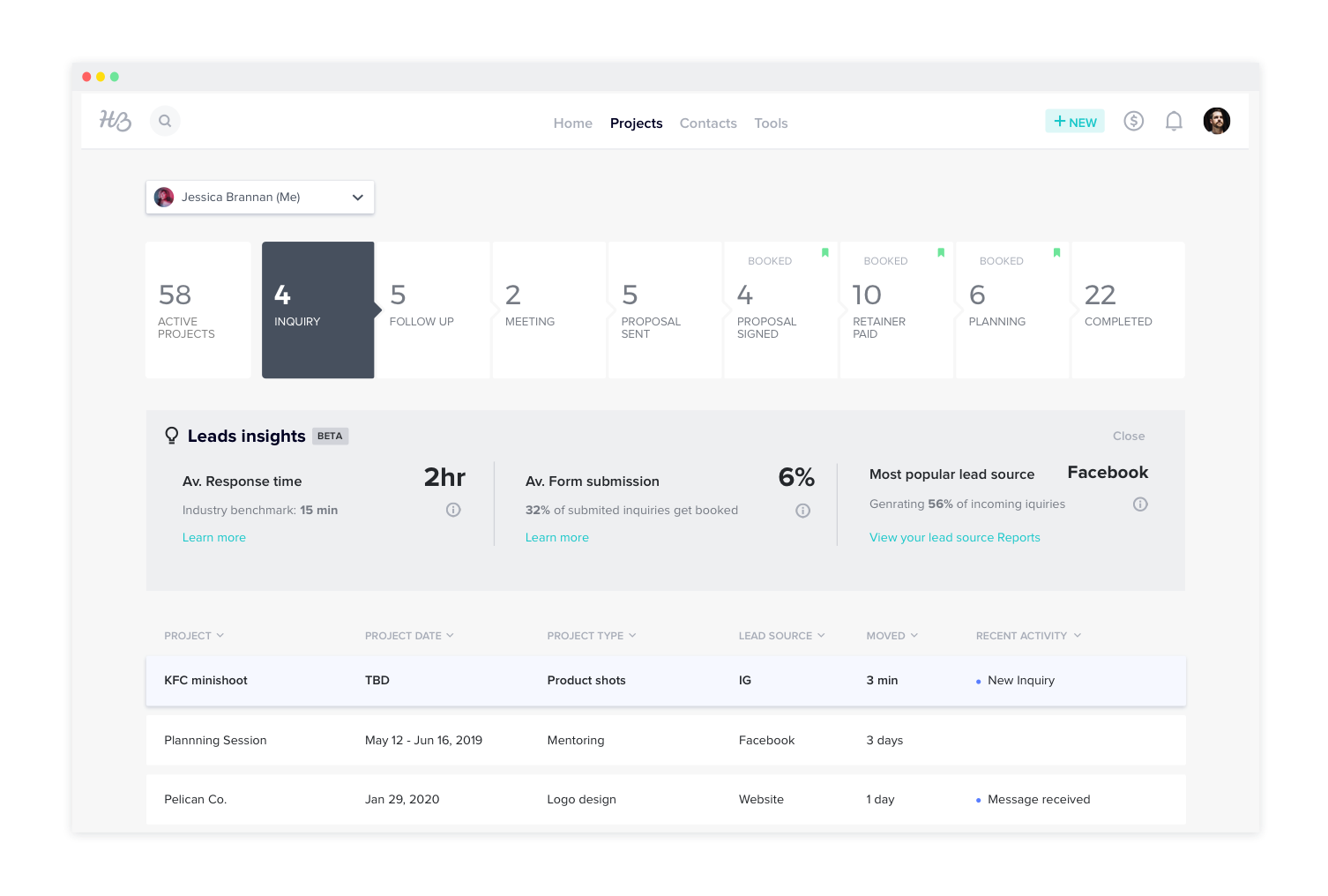
Image source: HoneyBook
HoneyBook turned out to be a great tool for managing my consulting work from inquiry to payment. I liked that everything was in one place. I could send proposals, contracts, and invoices without switching apps, and clients could review, sign, and pay in a smooth workflow.
The automation was a big help. I set up workflows that sent follow-up emails, next-step messages, and payment reminders automatically. With Gmail integration, all client emails appeared in the HoneyBook timeline, so nothing ever felt out of place.
I also found the client portal and payment features useful. Clients could log in to see communication, fill out forms, and make payments through credit card or bank transfer. The built-in templates and simple bookkeeping view made things feel polished and reduced a lot of admin work for my one-person setup.
Pros:
- Email integration with Gmail centralizes all business outreach
- Informative training resources make it easy to learn how to use the system effectively
- Integrated invoicing and payment processing for easy billing
- Automatic email reminders for client actions and follow-ups if emails aren’t opened
Cons:
- Inconsistent mobile app functionality as compared to the web-based application
- Lack of international time zone options in the online scheduling tool
Pricing:
Starts at $29/user/month.
5. NetSuite CRM – Best for Sales & Marketing Automation
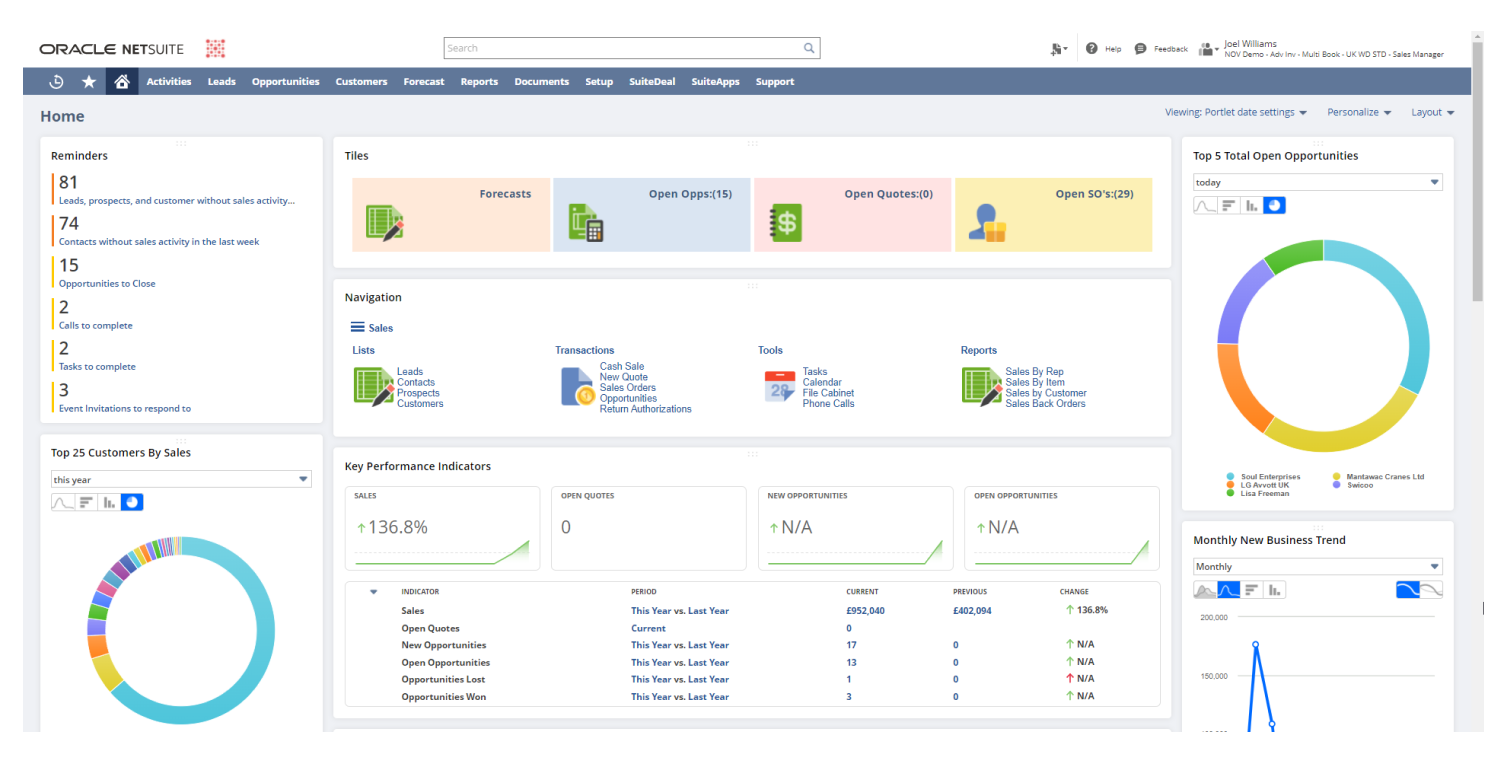
Image Source: Novutech
NetSuite CRM is a powerful option for fast-growing consulting firms that need advanced features and don’t mind a learning curve. I liked how it connects with NetSuite’s ERP and accounting tools, giving a full view of each client, from contacts to orders and invoices.
Its sales automation is strong, with forecasting, pipeline tracking, and quote management built in. You can also run email campaigns and nurture leads without leaving the system.
The CRM links smoothly with NetSuite’s project management module, which helps consultants move from sales to delivery in one place. It’s flexible and customizable, but it does require time and expertise to set up properly.
Pros:
- Add-on apps and NetSuite Connectors for tailored integrations with tools like Zendesk and Magento
- Bank Feeds that link bank accounts for up-to-date balances and Automated Clearing House (ACH) capabilities within NetSuite Enterprise Resource Planning (ERP)
- Search functions’ saving functionality for quick access
- Automated email reminders save you from missing out on any important client communications
Cons:
- Occasional slow performance when dealing with large data sets
- High technical expertise is needed to customize the system
Pricing:
Custom pricing.
6. Capsule CRM – Best for Email Marketing
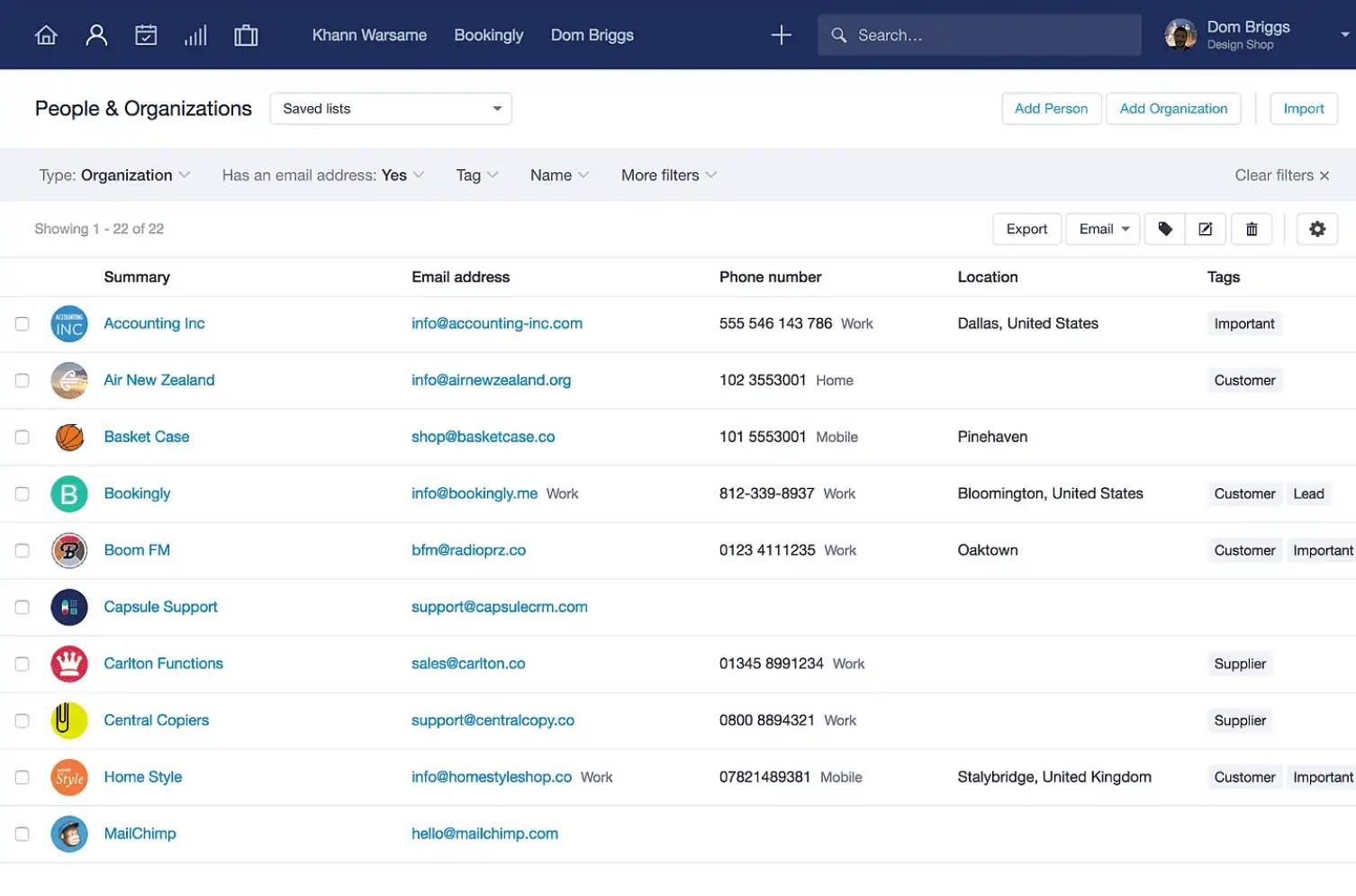
Image source: Capsule CRM
Capsule CRM is a simple, easy-to-use option if you want a clean interface without extra complexity. When I used it for a consulting side project, I liked how quickly I could import contacts, tag them, and start tracking deals. The layout focuses on contacts, opportunities, and tasks, so it’s very beginner-friendly.
Each contact record gives you a full history, including emails, notes, tasks, and files. The Gmail and Outlook integration was especially helpful since emails automatically appeared in the contact timeline through the BCC dropbox. Setting follow-up reminders kept me on track, like being prompted to call a client after sending a proposal.
Capsule also offers useful customization. I created custom fields, applied Tracks to automate task sequences for new leads, and used integrations like QuickBooks, Xero, and Mailchimp. I even connected Google Drive to attach proposals directly to contact records, which kept everything organized in one place.
Pros:
- QuickBooks, Mailchimp, Microsoft 365, Google Workspace, and Xero integration for email and accounting
- Document storage feature for contracts, proposals, invoices
- Creation of a standard selling process by the ‘tracks’ feature with predefined tasks for following up on business opportunities
- Organization of contacts using tags
Cons:
- Google Workspace integration incurs glitches, especially for calendars, tasks, and two-way syncing
- Limited integration options with third-party apps beyond popular email services
Pricing:
Starts at $18/user/month.
7. HubSpot CRM – Best All-in-One Solution for Marketing, Sales, and Customer Service
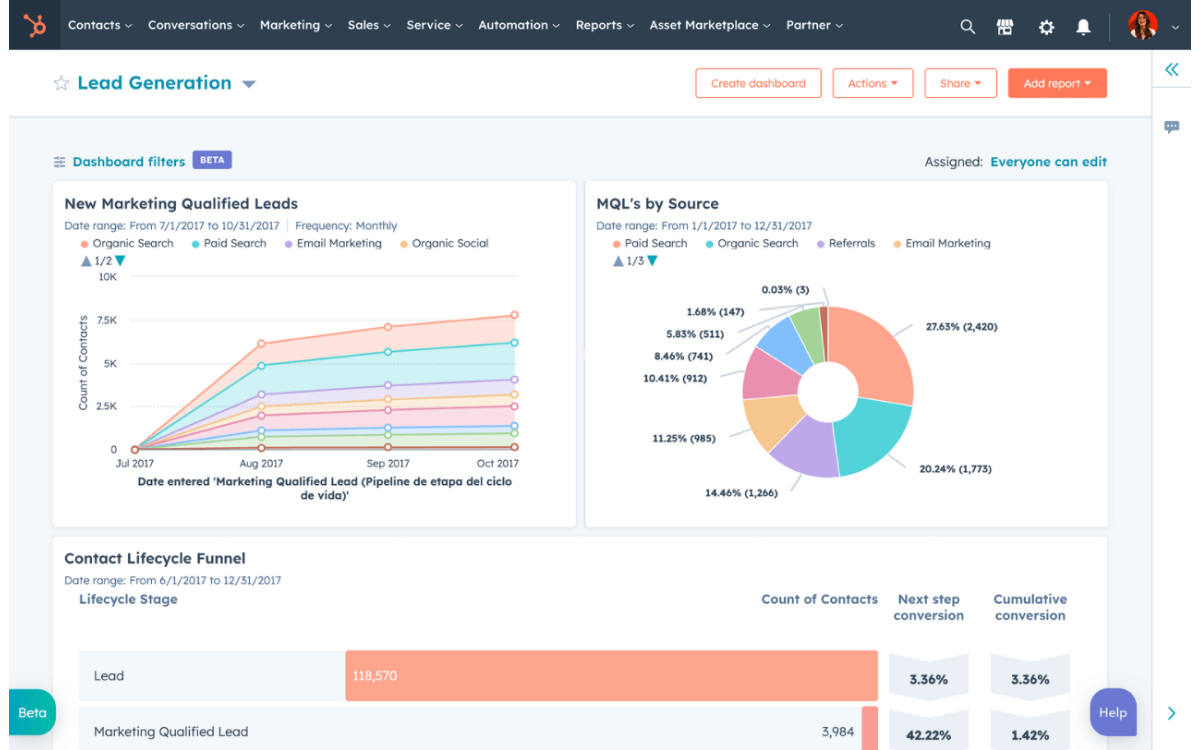
Image source: HubSpot
HubSpot CRM is one of the best free CRMs I’ve used. It let me manage contacts, track deals, and run basic email marketing without paying anything, which makes it perfect for small consulting businesses. The interface is modern and simple to navigate, and moving deals through the pipeline or logging notes felt very intuitive.
I liked how strong it is for lead capture and marketing. I embedded a HubSpot form on my site, and new inquiries flowed straight into the CRM with an automatic email reply. Features like live chat, meeting scheduling, and basic automation are included for free, and you can upgrade later to add more advanced tools like email sequences or workflow automation.
The integrations are a major plus, with over 1,000 options. I connected Gmail, Google Calendar, and even LinkedIn for quick lead info. HubSpot also offers helpful analytics and a great library of free training resources. Just keep in mind that while the free version is generous, advanced reporting and automation can get expensive on higher tiers.
Pros:
- Powerful free CRM with contact, deal, and email tools included
- Easy lead capture with forms, live chat, and meeting scheduler
- Huge integration library with Gmail, Outlook, Slack, Zoom, and more
- Modern, user-friendly interface that scales as your business grows
Cons:
- Advanced reporting and automation get expensive on higher tiers
- No built-in project or time tracking for post-sales work
Pricing:
Starts at $18/user/month.
8. Zoho CRM – Best for Omnichannel Engagement
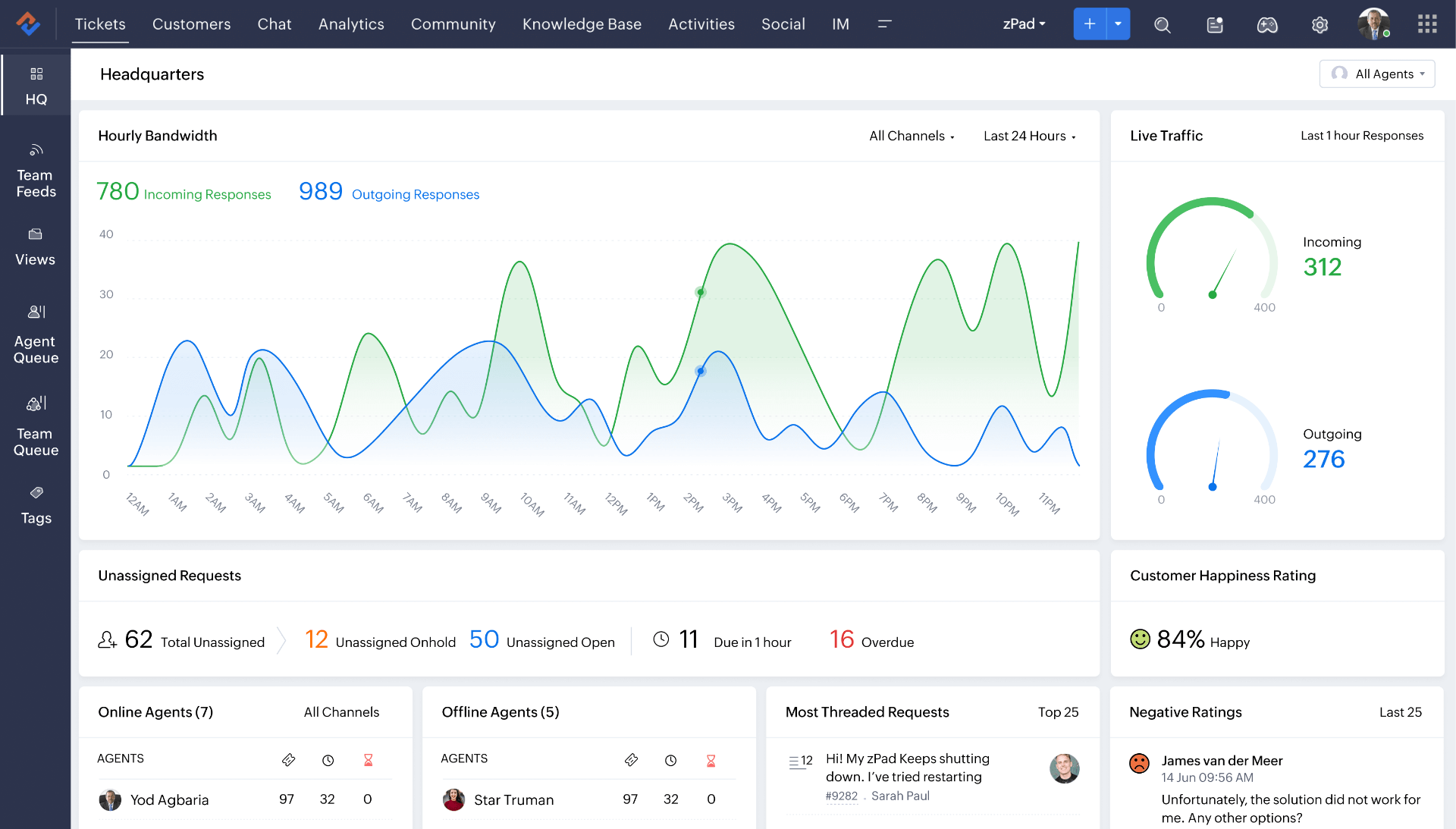
Image source: Zoho
Zoho CRM is a budget-friendly option that still delivers a lot of power. When I tried the Standard edition, I liked how it handled leads, contacts, deals, and tasks once I got used to the interface. It’s part of the larger Zoho ecosystem, so everything feels organized, even with many features included.
The customizability stood out to me. I could add custom fields, build simple automation, and even get helpful insights from Zoho’s AI assistant, Zia. Setting rules like automatic follow-ups for new website leads made the CRM feel far more capable than its price suggests.
Zoho also shines with integrations. It works smoothly with tools like Zoho Books, Zoho Projects, Google Workspace, Office 365, Mailchimp, and more. The mobile app, especially the business card scanner, was surprisingly handy for adding new contacts on the go.
Pros:
- Affordable pricing with strong features, even on lower plans
- Highly customizable fields, layouts, and automation
- Wide integration ecosystem with Zoho apps and popular third-party tools
- Useful AI insights and reporting through Zia
Cons:
- The interface can feel cluttered for new users
- Lower-tier plans have limits on automation and reporting
Pricing:
Starts at $20/user/month.
9. Salesforce CRM – Best for Large & Complex Sales Organizations
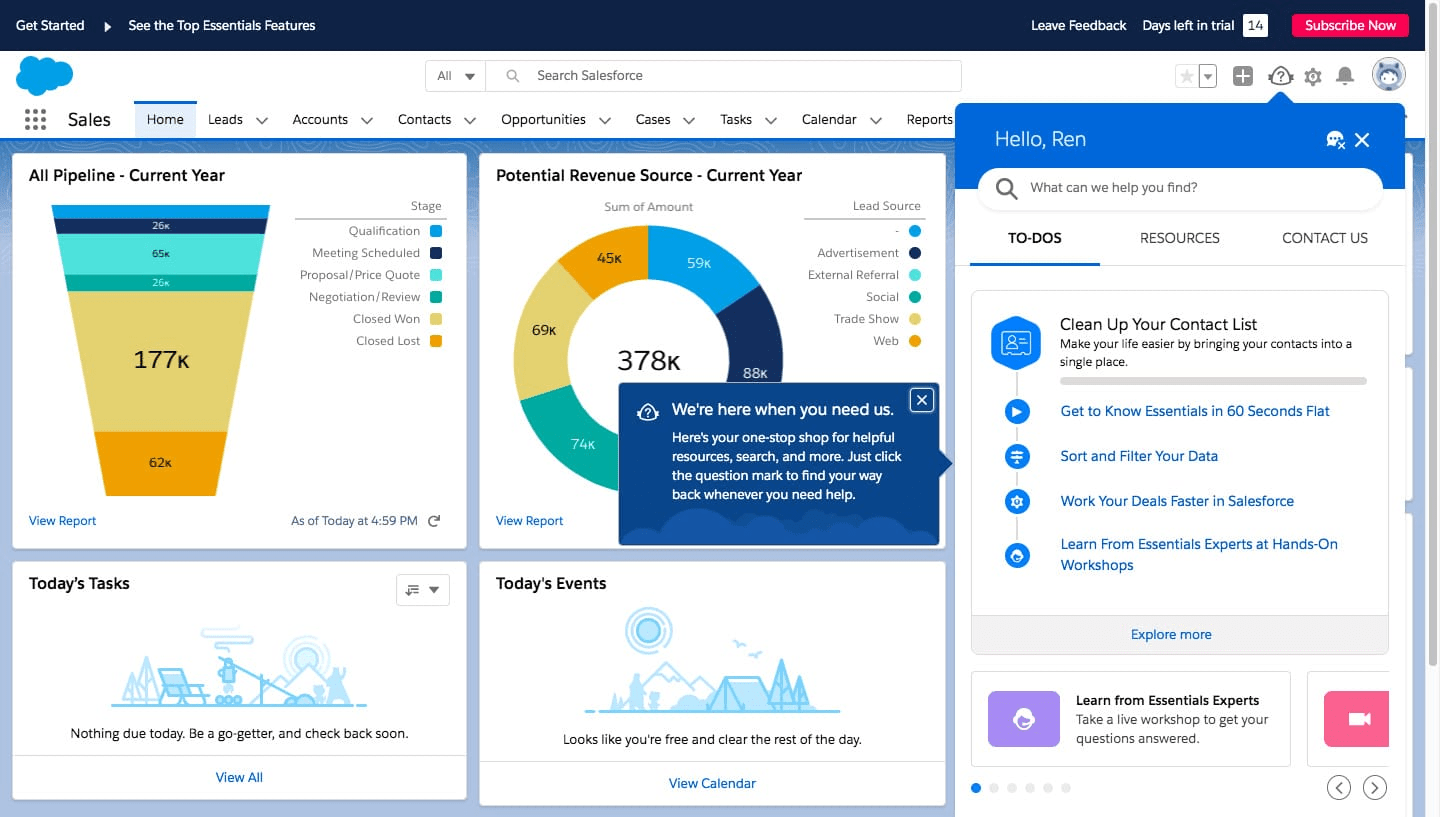
Image source: Salesforce
Salesforce is one of the most powerful CRMs you can use, especially if you plan to scale or have complex consulting workflows. I’ve worked at a company that implemented it, and the level of customization was impressive, though it came with a learning curve. Out of the box, you get strong contact management, deal tracking, email integration, and excellent dashboards.
What stood out most was the ecosystem and automation. The AppExchange had add-ons for everything from project management to e-signatures, and we used automation to trigger tasks, assign leads, and connect Salesforce to other tools. Einstein AI also provided helpful predictions on which deals were more likely to close.
The biggest trade-off is complexity. To really get the most out of Salesforce, you usually need someone who understands its admin tools. It’s powerful and scalable, but also expensive and can feel like overkill if your consulting needs are simple.
Pros:
- Highly customizable with support for custom objects, fields, and workflows
- Scales effortlessly for large teams and complex consulting processes
- Massive AppExchange marketplace for add-ons and extensions
- Powerful analytics and AI insights through Einstein and advanced dashboards
Cons:
- Can feel overwhelming or excessive for simple consulting workflows
- Requires ongoing maintenance to manage customizations and updates
Pricing:
Starts at $25/user/month.
10. Pipedrive – Best for Visual Pipeline Management
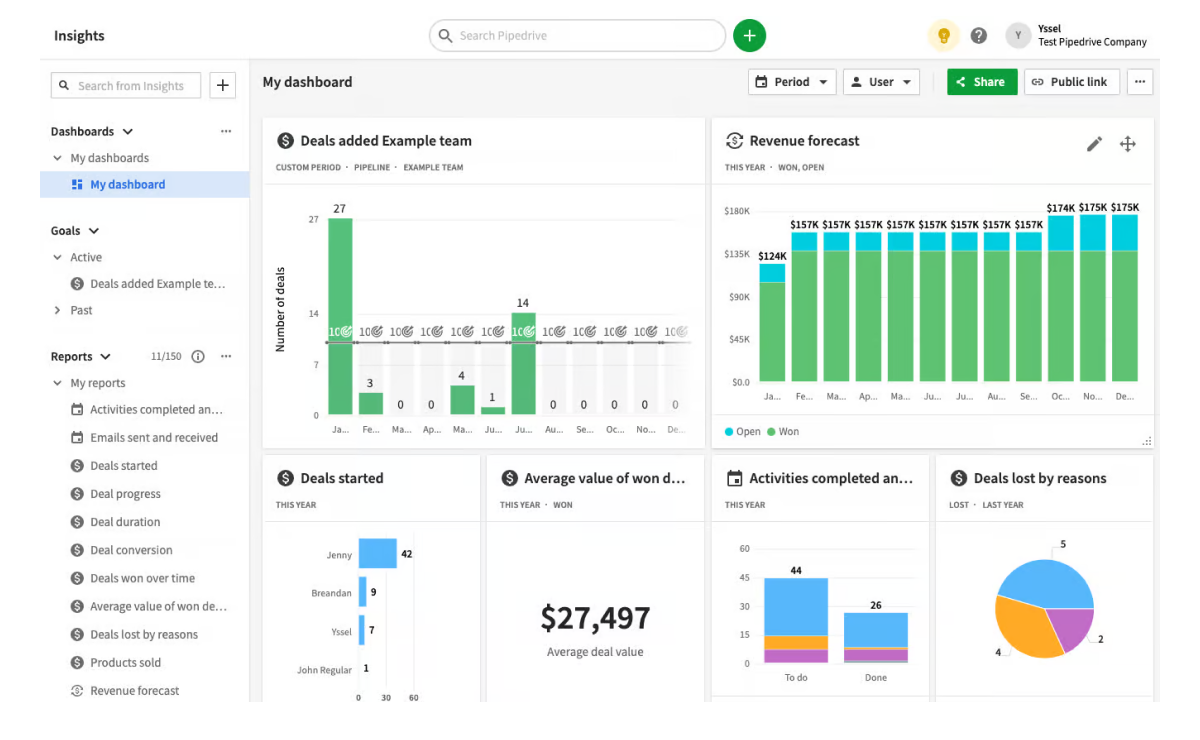
Image source: Pipedrive
Pipedrive is a simple, visual CRM built around a Kanban-style pipeline, which I found great for managing consulting leads. Dragging deals from stage to stage made it easy to see where everything stood, and setup was quick with smooth contact imports and customizable stages.
What I liked most was how action-focused it is. Pipedrive nudges you to schedule the next activity for every deal, so nothing goes cold. Email integration worked well too — I logged emails with smart BCC, tracked opens, and even used basic workflows like creating a follow-up task after winning a deal.
It also connects with tools like Google Contacts, Google Calendar, Slack, Trello, and more. The mobile app is handy for updating deals on the go. Reporting is basic but covers the essentials, and you may need extra tools for marketing campaigns or post-sale project work.
Pros:
- Clean visual pipeline that’s easy to manage with drag-and-drop
- Action-focused design that prompts you to schedule next steps
- Quick setup with simple terminology and smooth CSV imports
- Useful email sync with logging and open tracking
Cons:
- No built-in project management or delivery features
- No native marketing automation for drip campaigns
Pricing:
Starts at $19/user/month.
Decision-Making Checklist: Choosing the Right CRM for Your Consulting Business
Picking a CRM can feel overwhelming, so it helps to evaluate each option against the needs of your consulting workflow. Use this checklist to simplify your decision:
1. Define Your Requirements
List the features you truly need, whether it’s simple pipeline tracking or extras like project management, time tracking, reporting, or a mobile app. Your must-haves will immediately narrow the choices.
2. Ease of Use
Choose a CRM that fits your comfort level. Tools like BIGContacts, Pipedrive, or Capsule are easier to adopt, while platforms like Salesforce or NetSuite work better if you’re ready for more training or have an admin to manage them.
3. Integrations
Make sure it connects with your existing tools — email, calendar, accounting, and project management. QuickBooks users might prefer BIGContacts or Accelo, while Google Workspace users may lean toward HubSpot or Copper.
4. Customization & Scalability
Think long term. Pick a CRM that lets you add fields, create new pipelines, or upgrade as your services and team grow, without pricing becoming unreasonable.
5. Data Migration
Check how easy it is to import your current spreadsheets or CRM data. Always test a small sample during the trial to ensure everything maps correctly.
If you want a step-by-step walkthrough, you can check out this CRM Migration Guide for a smooth transition.
6. Training & Adoption
Look for good tutorials, support, and community resources. Simpler CRMs need minimal onboarding, while advanced ones may require dedicated training time.
7. Budget & ROI
Compare the full yearly cost, including add-ons, and weigh it against the value gained. The right CRM should save time, improve win rates, or make your client management smoother. Use free trials to test real scenarios before committing.
By running through this list, you can compare CRMs more confidently and choose the one that fits your consulting workflow — not just the one with the longest feature list.
Improve Client Relationships with the Best CRM for Consulting Firms
Choosing the right CRM can transform the way you manage clients, stay organized, and handle day-to-day work. The goal isn’t just to store information but to create a smoother workflow where follow-ups happen on time, communication stays consistent, and projects move forward without unnecessary friction.
As you explore your options, focus on what genuinely supports your consulting style. Look for a tool that feels intuitive, adapts to your processes, and makes your workload lighter instead of adding complexity. Give yourself time to experiment with trials, clean up your data, and build a setup that actually fits how you work.
And if you’re leaning toward something simple and easy to ease into, many consultants I’ve worked with appreciate tools that stay out of the way and quietly keep everything organized. BIGContacts tends to fit that mold well, especially for those who want a straightforward system without a steep learning curve.
Frequently Asked Questions

What features should you look for in the best CRM for consultants?
The best consulting CRM should include strong contact management, deal tracking, and email/calendar integration. Look for automation to streamline follow-ups, reporting to measure performance, and mobile access for working on the go. Integrations with tools like accounting software or project management platforms can also help. Most importantly, choose a CRM that you can customize to fit your consulting processes, rather than forcing you to adapt to it.
Why do you need a CRM for your consulting firm?
A CRM centralizes client information, keeps communication organized, and helps consultants manage leads and projects without losing track. It improves professionalism by ensuring timely follow-ups and consistent interactions. As your business grows, it becomes difficult to rely on memory or spreadsheets. A CRM also provides insights into your sales pipeline and client behavior, helping you refine strategies and deliver a better overall client experience.
How to choose the best consulting CRM
Start by identifying your workflow needs and listing must-have features like automation, integrations, or mobile access. Shortlist tools that match your requirements, then test them using free trials with real scenarios. Check customer support quality, ease of use, and long-term scalability. Choose the CRM that feels intuitive, fits your budget, and aligns with how your consulting business operates today and will evolve in the future.
FREE. All Features. FOREVER!
Try our Forever FREE account with all premium features!