
You remember that one customer who asked for pricing, the one who said “check back next week,” and another who is close to renewing. Until one busy day turns into five, a follow-up slips, and that “hot lead” quietly buys from someone else.
That kind of slip-up is common when you don’t track customer communications and leads in a centralized CRM. But tracking is only one of the benefits of CRM for small businesses. The right CRM could be the difference between running your sales and customer conversations with clarity or running them on memory, sticky notes, and half-sent drafts.
And here’s the part most people miss. CRM is not just for big companies with big teams. For small businesses, it often matters more because you have fewer hands, less time, and zero room for dropped balls.
In this guide, I’ll break down 12 practical benefits of using a CRM, what problem each one fixes, and how it helps you stay fast, organized, and consistent, even when your day is chaos.
What Is CRM Software?
A CRM (Customer Relationship Management) tool is a system that stores and manages your customer data in one place. But it’s more than just a contact list. It helps you track every interaction, stay on top of follow-ups, and make sure no lead or customer slips through the cracks.
Instead of having customer details scattered across spreadsheets, inboxes, sticky notes, and chat threads, a CRM keeps everything organized and easy to access. So if someone on your team talks to a lead today, anyone else can pick up the conversation tomorrow without guessing what happened.
This usually includes:
- Contact details (name, email, phone, company)
- Notes and conversation history (calls, emails, meetings, and what was discussed)
- Deals, pipeline stage, and next steps (so you know where each opportunity stands)
- Tasks, reminders, and follow-ups (so important leads don’t go cold)
- Customer tags and segments (like “hot lead,” “renewal due,” or “enterprise”)
- Reports on sales and activity (to see what’s working and what needs attention)
In simple terms, CRM is where your business goes to remember customers properly. It gives you a clear view of who your customers are, what they need, and what your team should do next, without relying on memory.
Why CRM Is Important to a Business
Customers do not wait.
If you miss a follow-up, they move on.
If your messages feel generic, they tune out.
If your team has no context, service becomes slow and frustrating.
A CRM fixes these gaps by keeping your customer details, conversations, and next steps in one place. So you are not scrambling through emails, asking teammates for updates, or guessing what to do next.
CRM gives you structure. It helps you build relationships at scale, even with a small team.
Here’s what that looks like in real life:
- You respond faster because you can instantly see past messages, notes, and activity.
- You follow up on time because tasks and reminders keep deals from going cold.
- You personalize outreach because you know what the customer asked for, what they care about, and where they are stuck.
- You stay organized as you grow because every lead has a stage, an owner, and a clear next step.
- You deliver smoother support because anyone on the team can pick up a conversation without making the customer repeat themselves.
- You make better decisions because reports show what is working, what is stuck, and where you are losing deals.
12 Benefits of CRM for Small Business
Right from centralized contact management to improved sales pipeline visibility, there are many benefits of adopting a CRM. Let me show you twelve areas where a CRM starts paying off right away:
1. Powerful Contact Management
Problem it fixes: “Customer info is everywhere.”
A CRM stores customer details, notes, and history in one record, so you stop jumping between spreadsheets, inboxes, and random docs just to answer one simple question.
It usually keeps things like:
- Contact and company info
- Past emails, calls, and meeting notes
- Files, proposals, and key links
- Last touchpoint and next planned action
The real win is speed and consistency. When everything sits in one timeline, you can respond with confidence even if you have not spoken to that customer in weeks.
2. Timely Follow-Ups That Stop Leads From Going Cold
Problem it fixes: “I forgot to follow up.”
Most small businesses do not lose leads because the product is bad. They lose leads because life gets busy, and the follow-up never happens.
CRMs help by letting you:
- Set tasks and reminders
- Create follow-up sequences
- Get alerts when a lead replies or goes quiet
- Schedule calls and meetings from the same place
A quick example:
Lead requests pricing on Monday
CRM sets a follow-up task for Wednesday
You follow up before they forget you
That kind of routine follow-up turns “maybe” leads into real conversations.
3. Better Internal Communication
Problem it fixes: “Sales and support are not aligned.”
When information lives in people’s heads, alignment breaks fast. A CRM creates a shared customer story so everyone can see what is happening.
Sales can see:
- Open support tickets
- Past issues and complaints
- Renewal dates or plan changes
Support can see:
- What was promised during the sale
- The customer’s goals and use case
- Who the key decision-maker is
This reduces awkward moments like:
“Can you repeat your issue?”
“Who did you speak to?”
“We do not have that information.”
And it makes the customer feel like they are dealing with one company, not five disconnected people.
4. Improved Productivity Through Automation
Problem it fixes: “Too much busywork.”
Small teams lose hours to tiny tasks. Not because those tasks are hard, but because they are constant.
Even simple CRM automations can remove a lot of that load, like:
- Auto-assigning new leads
- Sending follow-up emails or reminders
- Creating tasks after a call
- Logging emails automatically
- Moving deals when a milestone is reached
This is one of the biggest CRM benefits when your team feels stretched, because it protects their time for real selling and real support.
5. Better Sales Pipeline Visibility
Problem it fixes: “I don’t know what’s in my pipeline.”
Without a clear pipeline view, forecasting becomes guesswork. A CRM shows your deals by stage so you can see what is actually moving.
You can quickly tell:
- Who is close to buying
- Which deals are stuck and why
- What stage is leaking leads
- What needs attention this week
When you can see the pipeline clearly, you can manage it actively, not emotionally.
6. Stronger Reporting & Decision-Making
Problem it fixes: “I’m guessing what’s working.”
Small businesses often run on instincts. That works until you start growing, then it gets expensive.
CRM reports help you answer:
- Where do most leads come from?
- Which stage causes the most drop-off?
- Which rep, channel, or campaign performs best?
- How long does a deal usually take?
- What is our win rate?
That clarity helps you fix leaks faster and double down on what is already working, instead of constantly changing direction.
7. Better Segmentation & Targeting
Problem it fixes: “My campaigns are too broad.”
When you send the same message to everyone, it feels generic, and results drop.
With CRM segmentation, you can group customers by:
- Industry
- Deal stage
- Purchase history
- Location
- Engagement level
- Product interest
Then your outreach becomes relevant, not random.
Example: a “renewal coming up” segment gets a different email than a “new lead requested demo” segment.
This is one of those crm benefits that improve marketing results without increasing your budget.
8. Improved Customer Retention
Problem it fixes: “Customers disappear after they buy.”
Many small businesses focus hard on closing, then go quiet after the purchase. That is where churn starts.
A CRM helps you stay present by tracking:
- Onboarding progress
- Renewals and key dates
- Follow-ups after delivery
- Customer health signals (silence, reduced activity, missed check-ins)
It also helps with upsells that feel natural, because you have history and context, not assumptions.
Retention improves when you:
- Follow up after purchase
- Track renewals and milestones
- Spot silent customers early
- Offer timely upsells based on history
A CRM helps you do that without being pushy.
9. Better Customer Service With Context
Problem it fixes: “Support feels slow and repetitive.”
Customers get annoyed when they have to repeat themselves. Your team gets annoyed when they have to dig for details.
With CRM context, support can instantly see:
- What the customer bought
- Past issues and outcomes
- Priority or SLA notes
- Recent conversations with sales
So resolution gets faster, and customers feel understood.
If you also use a help desk, connecting it with your CRM is a big win because it links tickets to the full customer timeline.
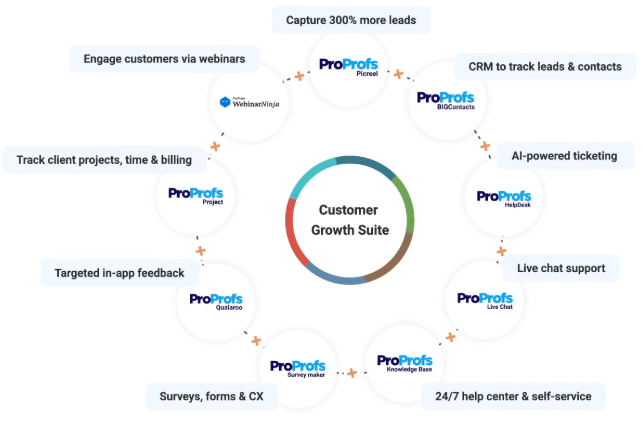
Win, Support & Convert More Customers With the Customer Growth Suite:
10. Cleaner Data & Fewer Costly Mistakes
Problem it fixes: “We have duplicates and outdated info.”
Bad data causes small mistakes that turn into big losses, like:
- Sending emails to the wrong person
- Calling a customer who already churned
- Mixing up deals across team members
- Quoting the wrong plan or price
A CRM encourages consistent data entry and ownership, which reduces duplicates and keeps records current. Even basic rules like required fields and duplicate alerts make a noticeable difference.
11. Easier Integrations and Smoother Workflows
Problem it fixes: “Tools don’t talk to each other.”
A CRM works best when it becomes the hub, not another isolated tool.
Most CRMs integrate with:
- Email and calendars
- Marketing platforms
- Accounting and invoicing tools
- Forms, chat widgets, and lead sources
- Support tools
That means fewer manual updates and more accurate records. When your tools sync, your team spends less time “updating systems” and more time serving customers.
12. Remote Access for Teams on the Move
Problem it fixes: “I need customer info outside the office.”
Small business teams are often moving. Meetings, calls, site visits, events, travel.
A mobile-friendly CRM helps you:
- Check notes before meetings
- Log updates right after a call
- Send follow-ups from anywhere
- Update deal stages in real time
That speed matters because the best time to update information is right after it happens, not three days later.
What Usually Goes Wrong With CRM (and How to Avoid It)
A lot of businesses want CRM, but then struggle with it. Usually, because of a few predictable issues. The good news is, they are fixable if you handle them early.
1. Failed Past CRM Attempt
Why it happens: The tool felt complex, the setup took forever, and nobody used it.
Fix: Start small. Track contacts, deals, and follow-ups first. Keep the pipeline simple. Add automations and advanced workflows only after your team is consistent.
2. Poor User Adoption
Why it happens: Reps feel it is extra work with no payoff.
Fix: Tie CRM usage to daily wins. Make it the place where tasks, reminders, and next steps live. If the CRM helps them close deals faster, adoption stops being a fight.
3. Messy Legacy Data
Why it happens: Duplicates, missing fields, outdated contacts, and inconsistent naming.
Fix: Do a cleanup before importing. Remove obvious junk, merge duplicates, and standardize key fields like company name, phone format, and deal stage. Even a basic cleanup makes the CRM feel twice as useful.
4. Change Fatigue
Why it happens: Too many process changes at once, and people resist.
Fix: Roll out CRM in phases. One team or one workflow first, then expand. Keep training short and practical. Focus on what people need this week, not everything the CRM can do.
How to Choose the Best CRM for Your Business
Use this simple filter. It keeps you focused on what you actually need, not what looks impressive on a pricing page.
1. Your Main Goal
Start with one clear outcome. Most CRM mistakes happen when you try to solve everything at once. Ask yourself: what do I want the CRM to improve first? More deals closed, faster follow-ups, better retention, cleaner customer organization, or better reporting. If you are stuck between two, pick the one that is costing you money right now.
2. Ease of Use
If your team avoids the tool, nothing else matters. A clean UI beats a long feature list. The CRM should feel effortless for daily actions like adding contacts, logging notes, updating deal stages, and checking what needs attention today. A good test is simple: can someone learn the basics quickly and start using it the same day?
3. Customization
Small businesses rarely follow a “standard” process, so your CRM needs to adapt to you. Look for the ability to add custom fields, create your own pipeline stages, use tags, and save views or filters. If the CRM forces you into a rigid workflow, your team will work around it, and adoption drops.
4. Automation That Feels Practical
Automation should remove repetitive steps, not create new complexity. Focus on simple wins, like reminders when a deal is sitting idle, tasks that get created automatically after calls, or basic follow-up sequences for common situations. The rule is: if it does not save time or prevent a missed step, it is probably not worth setting up.
5. Scalability
Your CRM should grow with you. Today you might need one pipeline and a small team. Soon you may need multiple pipelines, more users, deeper reporting, and clearer permissions. It also helps if the CRM connects easily with the tools you already use, like email, calendar, marketing, accounting, or support, so you are not doing double work later.
Deliver Customer-Centric Experiences Using CRM
“We see our customers as invited guests to a party, and we are the hosts. It’s our job every day to make every important aspect of the customer experience a little bit better.”– Jeff Bezos
Customer delight is undeniably the most crucial factor affecting a business’s survival. This is why you need to implement the right tools and techniques that contribute to an improvement in customer experiences. The most important benefits of CRM listed above can reinforce customer loyalty and faith in your business.
To derive these benefits, you must select the most effective CRM tool that can be easily adapted to your business needs. Any easy way to identify this is by accessing the features and carrying out a thorough analysis of them against your business needs.
Reliable CRM providers such as BIGContacts offer a free trial period, enabling you to get an overview of the tool’s features, so you can make an informed decision. You can choose such a dynamic CRM application to keep your customer relationships intact for a long time to come.
Frequently Asked Questions

What is the ROI of CRM for small businesses?
CRM ROI usually comes from faster follow-ups, higher conversion rates, fewer missed deals, and improved retention. Even small wins add up when your pipeline stays organized and customers feel cared for. Over time, CRM reduces admin work and helps you grow revenue with the same team.
How long does it take to set up a CRM for a small business?
Most small businesses can set up a CRM in a few days if they keep it simple. Start by importing contacts, creating deal stages, and setting basic fields. If your data is messy, add extra time for cleanup. A phased rollout helps you launch faster.
What data should you store in a CRM to get real value?
Store customer contact details, deal stage, last interaction, next step, notes, and key tags like industry or interest. Add purchase history and support context if relevant. The goal is to capture what helps you personalize follow-ups and move deals forward consistently.
FREE. All Features. FOREVER!
Try our Forever FREE account with all premium features!