
“If you put a key under the mat for the cops, a burglar can find it, too. Criminals are using every technology tool at their disposal to hack into people’s accounts. If they know there’s a key hidden somewhere, they won’t stop until they find it.” – Tim Cook
Platforms dealing in customer data can’t afford to have their keys in hackers’ hands. In fact, a study by Statista in 2023 shows the worldwide number of malware attacks reached 6.06 billion, a 10% increase over the year before.
Since businesses rely heavily on customer relationship management (CRM) systems to store and manage valuable data, CRM data security is of significant concern to them.
In this article, we’ll delve into the ins and outs of data security, uncovering the potential threats you need to avoid in order to keep critical CRM data secure. More importantly, we’ll provide you with practical best practices that you can implement to fortify your systems.
Let’s take it from the top.
Top CRM Data Security Concerns to Watch Out For
Customer data such as demographic details, purchase history, communication preferences, sales data, and communication logs stored in your CRM system face various threats and security challenges that can compromise its integrity, availability, and confidentiality.
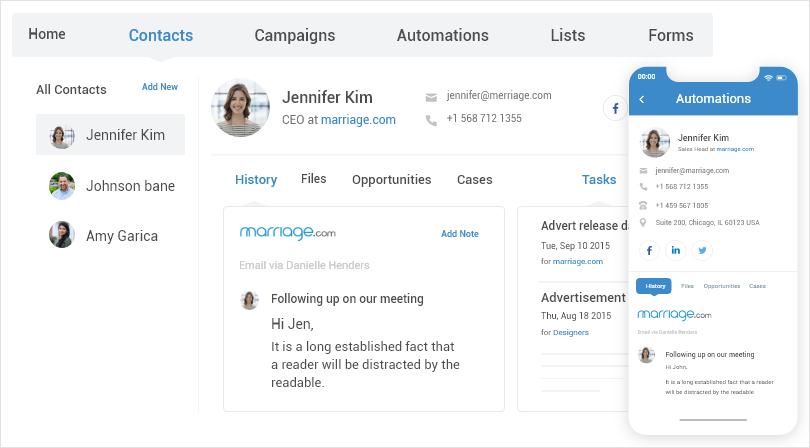
CRM privacy issues and threats can have severe consequences for your business.
It is crucial to identify and address these threats as well as data privacy concerns to protect your contact data and reduce potential risks. We’ve categorized these risks into two categories:
External Threats:
- Cyberattacks are deliberate attempts by hackers or cybercriminals to target CRM systems and exploit their vulnerabilities. They can use various methods such as brute force attacks, SQL injection, cross-site scripting, or denial-of-service attacks to gain unauthorized access, steal sensitive data, or disrupt operations.
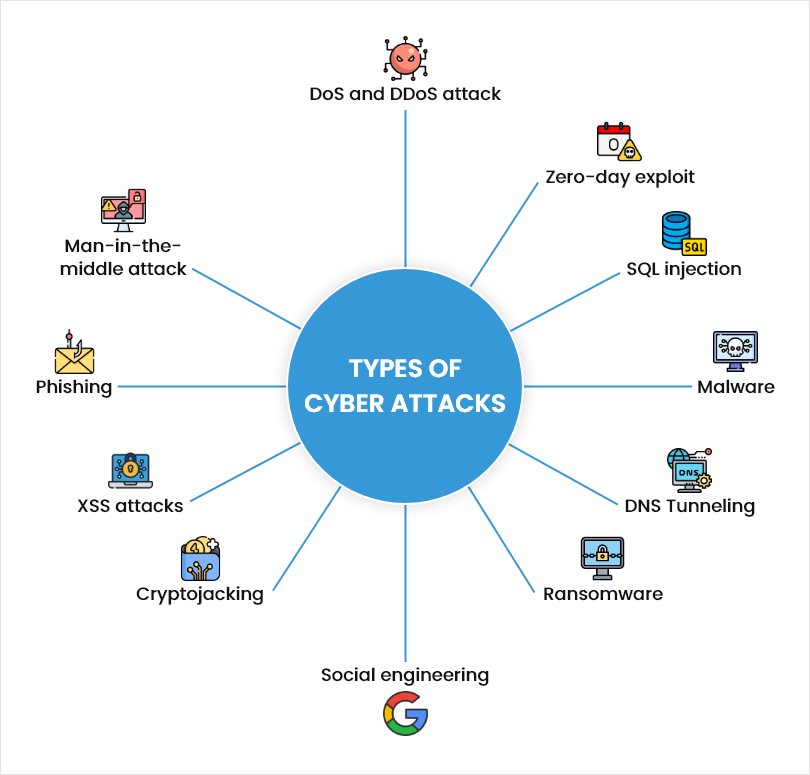
- Phishing is fraudulent emails or messages that impersonate legitimate entities or individuals and try to trick users into clicking on malicious links, opening infected attachments, or providing login credentials or personal information. Phishing can compromise CRM data by exposing it to hackers or malware. One way to reduce the risk of falling for spoofed emails is to verify the authenticity of sender domains using a bimi checker tool, which helps confirm whether the email is legitimately displaying brand identity.
- Malware is a harmful software program that infects CRM systems and causes damage or disruption. They can include viruses, worms, trojans, ransomware, spyware, or adware. It can compromise your data by corrupting, deleting, encrypting, or transmitting it to unauthorized parties.
- CRM Data breaches include unauthorized access or exposure of CRM data to malicious elements. It occurs due to a weak point in the CRM system’s security defenses, such as weak passwords.
In fact, a study by Verizon in 2026 shows the human element is still present in 62% of breaches – proof that weak passwords and careless clicks remain the easiest way in, even as attack methods get more sophisticated.
This can result in both short and long-term financial losses, such as investigating and mitigating the breach, potential lawsuits, regulatory fines, and more.
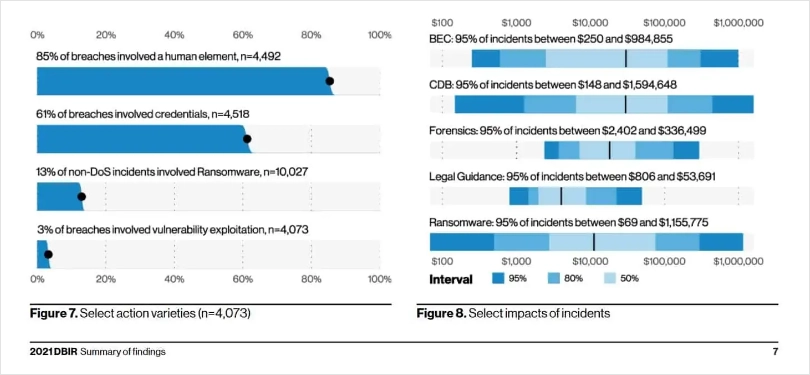
Image Source: Verizon
Internal Vulnerabilities:
- Employee negligence refers to unintentional errors by employees that can expose CRM data to unauthorized access or leakage.
For example, employees may use weak passwords, share login credentials with others, leave their devices unattended or unlocked, or use unsecured networks or devices to access the system. - Insider threats are malicious actions by employees or individuals with legitimate access to CRM systems and data. They can abuse their privileges to access, modify, delete, copy, or share data for personal gain or malicious intent.
Did You Know – a study by Ponemon Institute and DTEX in 2026 shows insider incidents now cost organizations an average of $19.5 million a year, up from $17.4 million the year before.
- Lack of employee data security training leads to a gap in knowledge and skills among employees regarding data safety. Employees may not be aware of the potential threats and data breaches and how to prevent or respond to them.
- Data mishandling is the improper management of contact data throughout its lifecycle. For example, employees may store data in unsecured locations or devices, transfer it using unencrypted channels, or dispose of data without due procedure.
Read More: Master Contact Management: 10 Best Practices
Understanding these threats is crucial for implementing robust security measures and avoiding CRM data breaches.
11 CRM Data Security Best Practices to Keep Your Data Safe
Implementing robust security practices is essential for safeguarding your CRM data from potential breaches and unauthorized access. Let’s explore the best practices that can help you secure your data.
Implement Strict Access Controls:
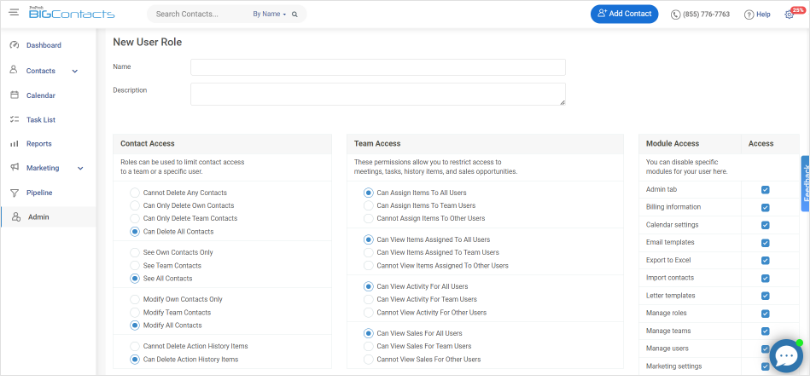
Regularly review and update user roles, revoking access for employees who no longer require it. This is the principle of least privilege in practice, most often enforced through role-based access control (RBAC) – giving each person only the permissions their job actually requires, nothing more.
Access permissions are like keys that grant entry to specific areas, preventing unauthorized access to sensitive information.
For example, your sales team should have access to customer information and sales data, while your marketing team may need access to leads’ information to create marketing strategies.
Optimize CRM Data Lifecycle:
Adopt a systematic approach to managing the entire lifecycle of your CRM data, including its collection, storage, usage, and disposal.
You should treat your CRM data like a living entity that requires constant care and attention throughout its lifecycle. You can implement privacy by design principles and GDPR compliance to embed data protection practices into your CRM processes.
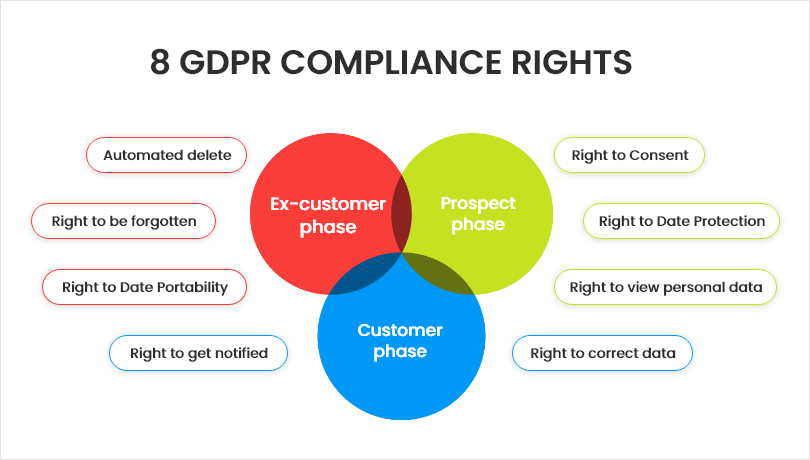
A CRM tool like BIGContacts offers server-side storage, so your customer data isn’t susceptible to risks that may come with third-party platforms. The tool also adheres to these eight GDPR compliance rights to ensure data protection and management –
Keep Every Contact Record Protected Automatically
Encrypt Sensitive CRM Data:
Another best practice to ensure data security is utilizing encryption protocols and protecting sensitive data at rest and in transit. Among these protocols, the importance of VPN use cannot be overstated.
You can leverage encryption protocols like SSL/TLS to secure data transmission between CRM systems and external entities. It acts like an unbreakable code, ensuring that even if unauthorized individuals gain access to your data, it remains indecipherable to them. Beyond these, the integration of VPN uses provides an extra layer of secure tunneling for data in transit.
Alongside a VPN, you can also use a free ad blocker to keep invasive ads away from your screen. It adds an extra layer of security and makes it more challenging for attackers to exploit your data. When sharing CRM data with external parties, use secure file transfer methods, such as encrypted email attachments, to protect data confidentiality.
It adds an extra layer of security and makes it more challenging for attackers to exploit your data. When sharing CRM data with external parties, use secure file transfer methods, such as encrypted email attachments, to protect data confidentiality.
Perform Regular Data Backups:
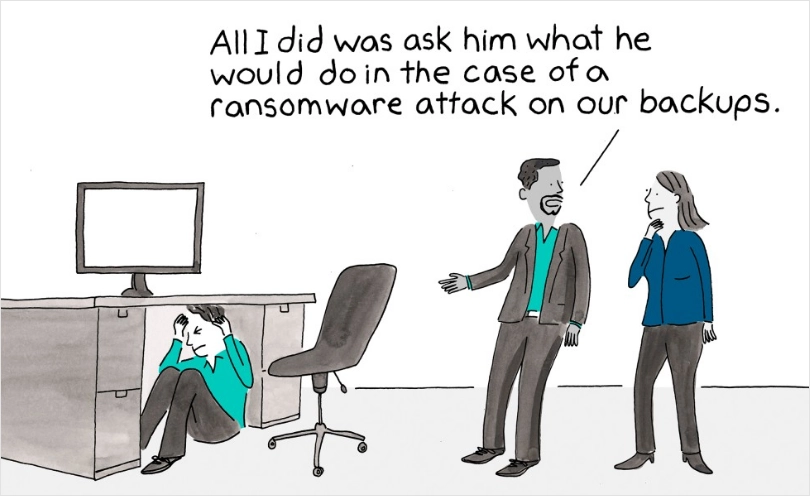
Create regular backups of your CRM data and store them in secure offsite locations. Think of backups as insurance for your data.
They act as a safety net in case of a breach, system failure, or accidental data loss. Also, test backup restoration processes periodically to ensure data integrity and availability when needed.
Leverage Regular Software & System Updates:
Keep your CRM software and underlying systems up to date with the latest security patches and updates. Think of software updates as your shield against known vulnerabilities.
It’s best to install updates regularly, address known weaknesses, and strengthen the overall security posture of your CRM environment. Opt for a tool that offers regular software updates so you get the best-in-class security and features.
Establish Data Retention Policies:
Not all data is worth keeping. So, define and implement data retention policy and CRM security policies for your business, outlining the retention duration for each data type.
Holding onto unnecessary data increases the risk of unauthorized access and breaches. Proper data retention practices ensure that outdated or excessive data is securely disposed of, reducing potential risks.
Secure Your IT Infrastructure:
Just as you secure the physical premises of your business with locks and alarms, securing your IT infrastructure is like fortifying the digital foundation of your CRM system.
You can implement robust network security measures, including firewalls, intrusion detection systems, and antivirus software, to protect your CRM infrastructure from external threats. If you’re hosting sensitive customer data yourself, choosing a secure VPS hosting provider with strong isolation and built-in security features is a critical first line of defense.
Choose a Trusted Vendor:
Select a reputable and trusted CRM vendor that prioritizes data security. Before you lock in on any tool, assess its security practices the way you would any other vendor contract. Look for certifications like SOC 2 or ISO 27001, and ask directly how the vendor handles GDPR and CCPA compliance – a vendor that can’t answer specifically isn’t one you want holding your customer data.
BIGContacts, for example, is built around a few specific, verifiable safeguards:
- GDPR-compliant data handling across all eight compliance rights
- Encrypted data storage and secure servers, not shared third-party infrastructure
- Admin-controlled user roles, so only designated admins can access sensitive tabs like Marketing or company-wide sales data
- Automatic account lockout for 15 minutes after three failed login attempts
- Regular security audits built into the platform
Your CRM vendor is your partner in securing your data, so choose one that can point to specifics, not just a badge list.
Choose a CRM Where Security Comes Built in, Not Bolted On
Ensure Strong Passwords:
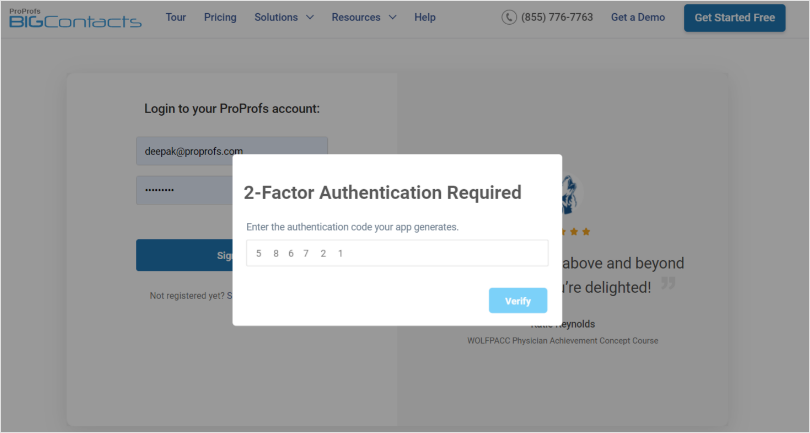
Establishing strong password and authentication policies adds an additional layer of security to your CRM system. Enable multi-factor authentication, requiring users to provide additional verification, such as a unique code sent to their mobile device, along with their password.
Multi-factor authentication is like having multiple locks on a door, making it exponentially more difficult for unauthorized individuals to gain access.
Besides this, you need to regularly review and update user permissions, ensuring that employees have access only to the data and functionality necessary for their roles. You can also follow a few best practices like setting complex passwords, changing passwords regularly, etc.
Host Cybersecurity Training Sessions for Employees:
You can educate your employees about the importance of data security, strong passwords, secure login practices, common cybersecurity threats, and best practices for secure data handling.
“How?” you may ask.
Encourage employees to report any suspicious activity or potential security incidents promptly. Just like fire drills prepare employees for emergencies, cybersecurity training prepares them to identify and respond to potential threats.
Keep a Vigilant Eye for Suspicious Activity:
Implement real-time monitoring and alert mechanisms to detect any suspicious or abnormal activity within your CRM system. This is usually done through audit logs, which record every login, data export, and permission change, giving you an audit trail to trace back to the source if something looks off.
Think of it as having security cameras installed in your CRM environment, continuously keeping an eye out for any potential CRM security incidents or breaches.
Why Is Customer Data Security a Big Deal?
Effective customer data protection is essential for various reasons, from safeguarding your business’s reputation to complying with government regulations. Let’s explore the key reasons why customer data protection should be a top priority for businesses:
The stakes keep climbing. A study by IBM in 2026 shows the global average cost of a data breach hit a record $4.99 million, up 12% year over year. For a small business, a single breach can be existential, not just expensive.
Protecting Your Reputation & Maintaining Customer Trust:
As a business, handling customer data with the utmost care and responsibility is crucial. By prioritizing data security, you can build trust, strengthen customer relationships, and safeguard your reputation from the negative consequences of data breaches.
Preventing Legal Issues and Lawsuits:
Many countries have implemented data protection laws to safeguard individuals’ privacy rights. Inadequate data protection can have severe CRM legal repercussions, including fines and lawsuits.
Ensuring compliance with these regulations is not only a legal requirement but also a demonstration of your commitment to ethical data-handling practices. You should comply with data protection regulations such as GDPR (General Data Protection Regulation) and CCPA (California Consumer Privacy Act) to avoid legal complications.
Gaining a Competitive Edge:
In today’s landscape, where data privacy concerns and breaches are rising, prioritizing customer data protection sets you apart from competitors. By showcasing your commitment to data security, you can attract customers who value their privacy and gain a competitive advantage.
Ethical Considerations & Responsible Data Handling:
Respecting the privacy and confidentiality of customer data is an ethical imperative. By prioritizing customer data protection, you demonstrate your dedication to responsible data handling practices, which promotes a culture of trust and transparency.
Remember, protecting customer data proactively is not just a legal obligation but an essential aspect of building and maintaining a successful business.
Fortify Your CRM Systems Against Cyber Threats
As a business that relies on CRM systems to store and manage your customer data, you can’t afford to take any chances with data security.
CRM data is vulnerable to various attacks and threats from both outside and inside your organization that can jeopardize its safety and quality.
Recognizing the importance of customer data protection is the first step toward data security. It helps businesses build trust, maintain their reputation, prevent legal issues, comply with regulations, gain a competitive edge, and demonstrate ethical data handling practices.
Make sure to invest in trusted CRM software like BIGContacts that prioritizes customer data security and follow the above-mentioned best practices diligently to keep your CRM data secure from any harm.
CRM data refers to the collection of customer-related information. It is a comprehensive repository of valuable insights that can help businesses understand their customers, make informed decisions, and drive revenue growth. CRM data includes Customer information such as demographic details, contact data, purchase history, and preferences. Communication preferences, i.e., preferred channels, opt-ins, opt-outs. Sales data including deals and opportunities, pipeline stages and forecasts, order history, and transaction details. Communication logs including customer interactions (phone calls, emails, live chats) and support tickets and issue resolutions. To secure your CRM data, follow best practices, such as implementing strict security controls, data encryption, robust password and authentication, routine data audits, hosting training sessions for employees, regular software updates, and more. Yes, reputable cloud CRMs protect data with encryption, access controls, and compliance with regulations like GDPR. Data is stored on secure servers with regular backups, though you should still verify a vendor's specific security practices before choosing one. At minimum, look for GDPR compliance if you handle EU customer data, plus SSL/TLS encryption and role-based access controls. Industry-specific businesses (finance, healthcare) may also need CCPA, HIPAA, or similar standards depending on their region and sector. Most businesses back up CRM data daily, with some critical systems backing up in real time. The right frequency depends on how often your data changes and how much data loss your business could tolerate before it becomes a real problem. Only employees who need specific data for their role should have access to it. Sales teams typically need customer and deal data, while marketing may only need lead information, not full financial or support history. BIGContacts stores data on secure servers, follows GDPR's eight compliance rules, and locks accounts after three failed login attempts. Admins control who can access sensitive data like company-wide sales pipelines, so teams only see what's relevant to their role.Frequently Asked Questions
What is CRM data?
How to secure data in CRM?
Is cloud CRM data safe?
What compliance standards should a CRM meet?
How often should you back up CRM data?
Who should have access to CRM data?
Is BIGContacts CRM secure?
FREE. All Features. FOREVER!
Try our Forever FREE account with all premium features!